소개
Thank you for choosing the ACS APG8201 PINhandy 1 OTP Generator. This device is designed to provide secure One-Time Passwords (OTPs) for enhanced authentication in various applications. This manual provides essential information for the proper setup, operation, and maintenance of your OTP generator. Please read this manual thoroughly before using the device to ensure optimal performance and safety.
안전 정보
- 기기를 물과 과도한 습기로부터 멀리하세요.
- 장치를 극한의 온도나 직사광선에 노출시키지 마십시오.
- 장치를 떨어뜨리거나 강한 충격을 가하지 마십시오.
- 직접 기기를 분해하거나 수리하지 마십시오. 자격을 갖춘 서비스 담당자에게 문의하십시오.
- 해당 지역 규정에 따라 장치와 배터리를 폐기하세요.
패키지 내용
개봉 후 구성품을 확인해 주십시오. 누락되거나 손상된 품목이 있을 경우 즉시 판매처에 연락하십시오.
- 1 x ACS APG8201 PINhandy 1 OTP Generator
- 1 x USB Cable (for power/connection)
- 1 x Quick Start Guide (this document serves as the full manual)
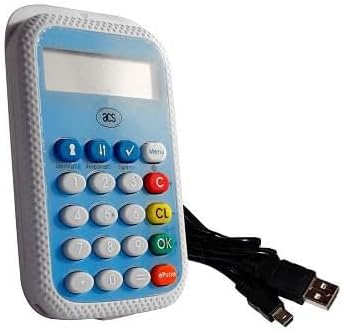
Image: The ACS APG8201 PINhandy 1 OTP Generator, a compact device featuring a display screen, a numeric keypad, and function buttons. A USB cable is shown connected to the device.
설정
초기 파워업
- Connect the provided USB cable to the micro-USB port on the OTP generator.
- Connect the other end of the USB cable to a powered USB port on a computer or a USB wall adapter.
- The device display should light up, indicating it is receiving power.
Driver Installation (if applicable)
For certain applications, a driver may be required for the device to communicate with your computer. Refer to the software documentation provided by your service provider for driver installation instructions. Typically, modern operating systems may automatically install necessary drivers.
작동 지침
Generating an OTP
- 장치의 전원이 켜져 있는지 확인합니다.
- Press the designated OTP generation button (often labeled "OK" or a specific function key, refer to your service provider's instructions for the exact button).
- If prompted, enter your PIN using the numeric keypad. Press "OK" to confirm.
- The display will show the generated One-Time Password.
- Enter this OTP into the required application or website within the specified time limit.
PIN 관리
PIN management functions (e.g., changing PIN) are typically initiated through the service provider's application or website, which then interacts with the device. Follow the on-screen prompts from your service provider.
유지
장치 청소
- 부드럽고, 건조하고, 보푸라기가 없는 천을 사용하여 기기 외부를 청소하세요.
- 연마성 세척제, 용제 또는 에어로졸 스프레이를 사용하지 마십시오.
- 어떠한 구멍에도 습기가 들어가지 않도록 주의하세요.
저장
사용하지 않을 때는 직사광선과 극한 온도 변화를 피해 서늘하고 건조한 곳에 보관하십시오.
문제 해결
| 문제 | 가능한 원인 | 해결책 |
|---|---|---|
| 장치의 전원이 켜지지 않습니다. | 전원 공급이 안 되거나 USB 케이블에 문제가 있습니다. | USB 케이블이 전원이 공급되는 USB 포트에 제대로 연결되어 있는지 확인하십시오. 다른 USB 포트나 케이블을 사용해 보십시오. |
| OTP not accepted. | Incorrect PIN, time synchronization issue, or expired OTP. | Verify the PIN entered. Ensure your system's time is synchronized. Generate a new OTP. Contact your service provider for time synchronization issues. |
| 디스플레이가 비어 있거나 읽을 수 없습니다. | Device malfunction or low power. | Ensure adequate power supply. If problem persists, contact support. |
명세서
| 특징 | 세부 사항 |
|---|---|
| 모델 | APG8201-CAC |
| 상표 | 자동판매기 |
| 연결성 | USB |
| 기능 | One-Time Password (OTP) Generation |
| 치수 | (Refer to product packaging or official ACS web(정확한 치수는 해당 사이트를 참조하세요.) |
| 작동 온도 | (Refer to product packaging or official ACS web대지) |
보증 및 지원
ACS products typically come with a standard manufacturer's warranty. For specific warranty terms and conditions, please refer to the warranty card included with your product or visit the official ACS website. For technical support, product inquiries, or warranty claims, please contact your point of purchase or visit the official ACS support portal.
ACS 공식 웹사이트 Web대지: www.acs.com.hk
Note: Support contact information may vary by region.


