📘 Studio manuals • Free online PDFs
Studio logo

스튜디오 매뉴얼 및 사용자 가이드

Studio encompasses a diverse range of professional equipment, including advanced Dante audio interfaces, DMX LED lighting panels, and modular studio furnishings.

팁: 정확한 모델 번호 확인을 위해 스튜디오 라벨에 인쇄된 전체 모델 번호를 포함해 주세요.

About Studio manuals on Manuals.plus

Studio is a versatile brand category representing a wide array of professional and consumer equipment. The product lineup features high-quality audio and media networking tools from manufacturers like Studio Technologies, which produces industry-leading Dante audio interfaces, intercom engines, and line outputs.

In addition to professional audio equipment, the Studio brand covers high-performance LED lighting panels equipped with advanced DMX controls, multi-platform wireless headsets, and modular wall unit systems tailored for functional workspace organization. Whether outfitting a broadcast facility, designing a creative workspace, or setting up a recording environment, you can find the essential installation and operating instructions here.

스튜디오 매뉴얼

최신 매뉴얼 manuals+ 이 브랜드를 위해 큐레이션되었습니다.

Studio PANEL300TW LED 패널 사용 설명서

1년 2024월 XNUMX일
Studio PANEL300TW LED Panel Product Information The PANEL300TW is a studio LED panel designed to provide powerful and versatile lighting for various applications. It comes with safety features and precautions…

Studio 543D IFB 인터페이스 사용자 가이드

20년 2024월 XNUMX일
Studio 543D IFB 인터페이스 제품 정보 사양: 모델: 543D IFB 인터페이스는 Dante audio-over-Ethernet 기술 S를 지원합니다.ample Rate: 48 kHz Bit Depth: 16, 24, or 32 Four 5-segment LED audio meters…

Studio 374A 인터콤 벨트팩 사용자 가이드

26년 2023월 XNUMX일
Studio 374A Intercom Beltpack Product Information Specifications Serial Numbers: M374A-04001 to 04500 Application Firmware: 2.1 and later Power Requirement: Power-over-Ethernet (PoE) Operating Parameters: Configurable using the STcontroller software application Audio…

STUDIO 라미네이트 바닥 사용 설명서

12년 2023월 XNUMX일
STUDIO Laminate Floors Care and Maintenance Quick-Step Studio laminate floors, like other fine furnishings in your home, require proper care to keep them looking their best. When you follow our…

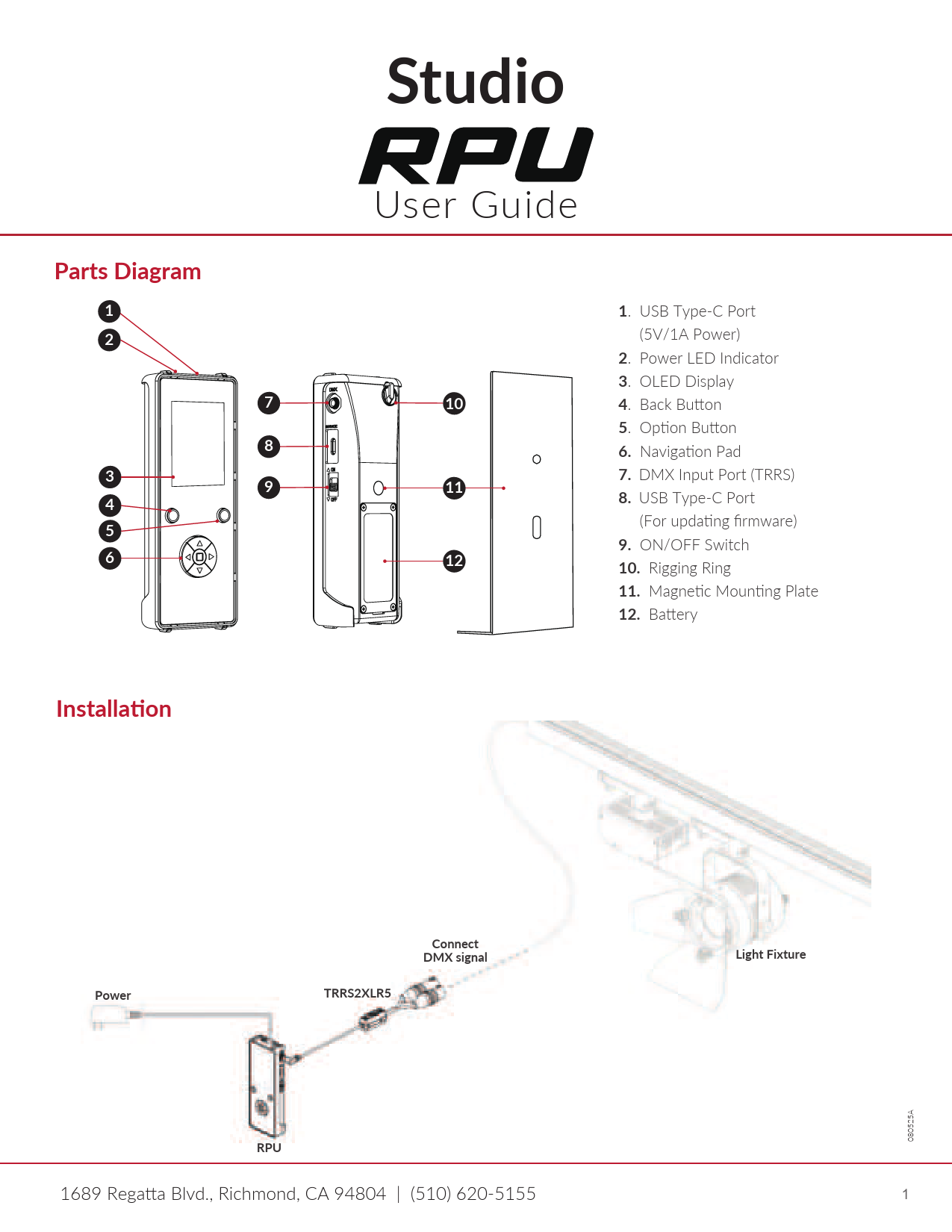
Studio RPU 사용자 가이드

사용자 가이드
Studio RPU 사용자 가이드로, 설치, 버튼 기능, DMX 제어(수동 모드 및 장면 모드), 펌웨어 업데이트, DMX 테스트, 조명기구 테스트, RPU 설정 및 문제 해결 방법을 다룹니다.

Studio manuals from online retailers

Mont Blanc to Everest Instruction Manual

B0000CJD1J • January 13, 2026
Instruction manual for the book Mont Blanc to Everest by Gaston REBUFFAT, covering its content, author, specifications, and care guidelines.

아시아: 2 사용 설명서

0670137960 • 2025년 7월 27일
마틴 H.의 저서 '아시아: 2'에 대한 사용 설명서url이만(imann), 스튜디오 출판. 이 가이드는 100년 이상에 걸쳐 내용을 다룹니다.view양장본의 사용법, 유지 관리, 문제 해결 및 사양에 대한 내용입니다.

Studio support FAQ

이 브랜드의 매뉴얼, 등록, 지원에 대한 일반적인 질문입니다.

  • Where can I find the DMX configuration for my Studio LED panel?

    The DMX channel modes and addressing instructions are detailed in the specific LED panel's user manual under the DMX control menu map.

  • How do I assign Dante channels on my Studio audio interface?

    Dante-compliant Studio devices use the Dante Controller software application to route audio signals, configure sample rates, and assign Dante flows.

  • Do Studio modular wall units require assembly?

    Many Studio modular wall units come pre-assembled and only require securing the keyhole mounts to wall screws according to the manual's installation guide.

  • How can I update the firmware on my Studio Dante equipment?

    Firmware updates for Studio Dante interfaces (like ones using the UltimoX integrated circuit) can be applied via your local network's Ethernet connection using the designated update utility.