1. 서론
구매해주셔서 감사합니다asing the Daakro SR-3800 5.1 Channel Home Audio Amp리퍼. 이것 amplifier is designed to provide a high-quality audio experience for your home theater, studio, or entertainment setup. It features a dynamic DSP display, multiple input options including Bluetooth 5.4, and robust power output for passive speakers. Please read this manual thoroughly before operating the device to ensure proper use and to maximize its performance and lifespan.

Image 1.1: Daakro SR-3800 5.1 Channel Home Audio Amplifier. This image shows the front view 의 amplifier with its illuminated DSP display and control knobs.
2. 중요한 안전 정보
- 기기를 작동하기 전에 모든 지침을 읽으십시오.
- 이 설명서를 향후 참고용으로 보관하세요.
- 이 제품을 비나 습기에 노출시키지 마십시오.
- 환기구를 막지 마십시오. 제조업체의 지침에 따라 설치하십시오.
- 라디에이터, 난방 조절기, 스토브 또는 기타 장치(다음을 포함)와 같은 열원 근처에 설치하지 마십시오. amp열을 생성하는 발전기.
- 전원 코드가 밟히거나 조이지 않도록 보호하십시오. 특히 플러그, 콘센트 및 기기에서 나오는 지점에서 전원 코드가 밟히거나 조이지 않도록주의하십시오.
- 제조사가 지정한 부속품/액세서리만 사용하세요.
- 번개 폭풍 시 또는 장기간 사용하지 않을 때는 기기의 플러그를 뽑아두세요.
- 모든 서비스는 자격을 갖춘 서비스 담당자에게 의뢰하십시오. 전원 코드나 플러그가 손상되었거나, 액체가 쏟아졌거나, 물체가 기기에 떨어졌거나, 기기가 비나 습기에 노출되었거나, 정상적으로 작동하지 않거나, 떨어졌을 때와 같이 기기가 어떤 식으로든 손상된 경우 서비스가 필요합니다.
- 경고: 화재나 감전의 위험을 줄이려면 이 제품을 비나 습기에 노출시키지 마십시오.
- 주의: 감전의 위험이 있습니다. 열지 마십시오.
3. 패키지 내용
상자 안에 모든 품목이 들어 있는지 확인하세요.
- Daakro SR-3800 5.1 Channel Home Audio Amp리퍼
- 리모컨
- 사용 설명서 (본 문서)
- 전원 케이블
4. 제품 오버view
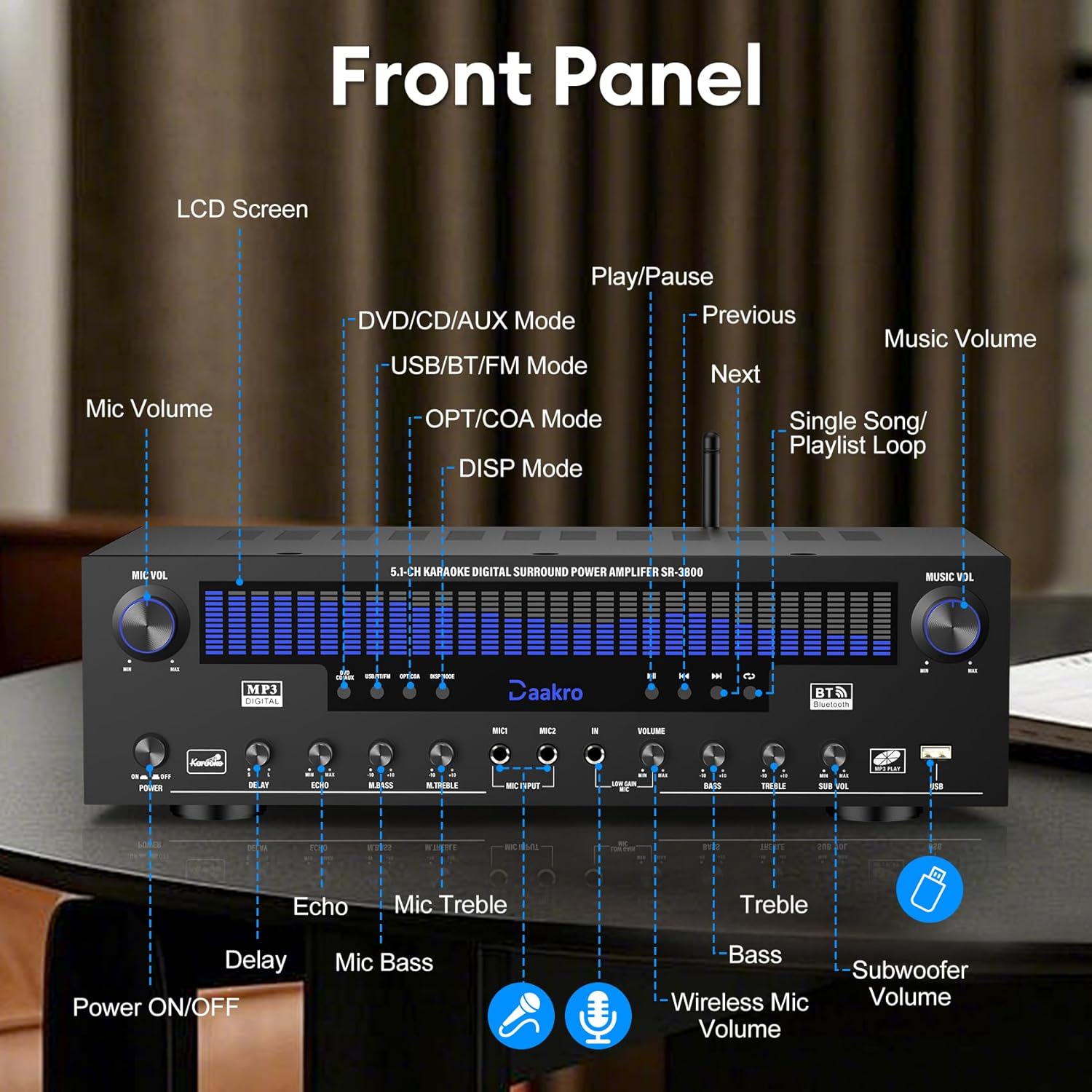
4.1 전면 패널 컨트롤

이미지 4.1: 상세 view of the Daakro SR-3800 front panel with labels for each control and display element.
- 마이크 볼륨: 마이크 볼륨을 조정합니다.
- 전원 켜기/끄기: 주 전원 스위치.
- LCD 화면: Displays current mode, DSP spectrum, and other information.
- 지연: Adjusts microphone echo delay.
- 에코: 마이크 에코 효과를 조정합니다.
- 엠베이스: Adjusts microphone bass level.
- M.트레블: Adjusts microphone treble level.
- 마이크 입력: 유선 마이크를 연결하세요.
- 음량: 전체 음악 볼륨을 조절합니다.
- 베이스: Adjusts music bass level.
- 고음부: Adjusts music treble level.
- 서브 볼륨: Adjusts passive subwoofer volume.
- USB: 미디어 재생용 USB 입력 단자.
- Input Mode Buttons: Select input source (DVD/CD/AUX, USB/BT/FM, OPT/COA).
- DSP Mode: Cycles through 13 DSP spectrum display effects.
- 재생 컨트롤: Play/Pause, Previous, Next, Single Song/Playlist Loop.
- 음악 볼륨: Main music volume control knob.
4.2 후면 패널 연결
이미지 4.2: 상세 view of the Daakro SR-3800 rear panel, showing all input and output ports with labels.
- FM 개미: FM antenna input.
- AUX 입력 : 3.5mm 보조 입력.
- 고르다: Optical audio input.
- 동축 케이블: Coaxial audio input.
- BT 개미: 블루투스 안테나.
- 오디오 입력(DVD, CD, 라인): RCA stereo audio inputs for DVD, CD, and Line sources.
- AUDIO OUT (LINE): RCA stereo audio output for connecting to active speakers or other audio devices.
- SPEAKER OUTPUT (FR, FL, SR, SL, C, SUB): Spring clip terminals for connecting passive speakers (Front Right, Front Left, Surround Right, Surround Left, Center, Subwoofer). Compatible with 4-16 ohm passive speakers.
- 전원 입력: AC power input (110V).
4.3 주요 특징
- Dynamic DSP Display: 19.8-inch LED screen with 13 spectrum effects, analyzing music rhythms in real-time (20 Hz to 20 kHz).
- True 300W Rated Power: Delivers 50W per channel across 5.1 channels, compatible with 4-16 ohm passive speakers.
- 다양한 입력 인터페이스: Bluetooth, USB, wireless microphone, two wired microphones, FM, AUX, OPT, COAX, DVD, CD, and LINE inputs.
- 무선 블루투스 스트리밍: Equipped with the latest Bluetooth 5.4 chip for stable connections up to 30 feet with smartphones, tablets, laptops, and computers.
- Intuitive Volume Equalizer Control: Independent rotary knobs for music volume, microphone volume, treble, bass, subwoofer, microphone delay, and reverb.
- Ultra-Quiet Cooling System: Built-in fans, heat sinks, and side ventilation ports improve cooling efficiency by 130% and reduce noise by 80%.
5. 설정
5.1 스피커 연결
The Daakro SR-3800 is compatible with 5-12 inch passive speakers and passive subwoofers. Ensure your speakers meet these requirements.
- Identify the speaker terminals on the rear panel: Front Right (FR), Front Left (FL), Surround Right (SR), Surround Left (SL), Center (C), and Subwoofer (SUB).
- Connect your passive speakers to the corresponding terminals. Ensure correct polarity (+ to + and - to -) for each speaker.
- If using a passive subwoofer, connect it to the SUB terminals.

Image 5.1: The Daakro SR-3800 amplifier positioned between two large passive speakers, illustrating a typical setup.
5.2 오디오 소스 연결
Connect your desired audio sources using the appropriate input ports on the rear panel.
- DVD/CD/LINE: Use RCA cables to connect DVD players, CD players, or other line-level audio devices.
- 광/동축: Use optical or coaxial cables for digital audio sources like TVs or game consoles.
- AUX 입력 : Use a 3.5mm audio cable for portable devices.
- FM 개미: Connect the FM antenna for radio reception.
5.3 전원 연결
- 확인하십시오 amp앰프의 전원 스위치가 꺼짐 위치에 있습니다.
- Connect the power cable to the POWER INPUT on the rear panel.
- 전원 케이블의 다른 쪽 끝을 표준 110V AC 전원 콘센트에 꽂으십시오.
6. 운영
6.1 전원 켜기/끄기
Press the POWER ON/OFF switch on the front panel to turn the ampliifier를 켜거나 끕니다.
6.2 입력 소스 선택
Use the input mode buttons on the front panel (DVD/CD/AUX, USB/BT/FM, OPT/COA) to select your desired audio source. The selected input will be displayed on the LCD screen.
6.3 볼륨 및 톤 조정
- 음악 볼륨: Rotate this knob to adjust the overall music volume.
- 저음/고음: Use these knobs to fine-tune the bass and treble levels of the music.
- 서브 볼륨: Adjusts the output volume of the passive subwoofer.
6.4 블루투스 스트리밍
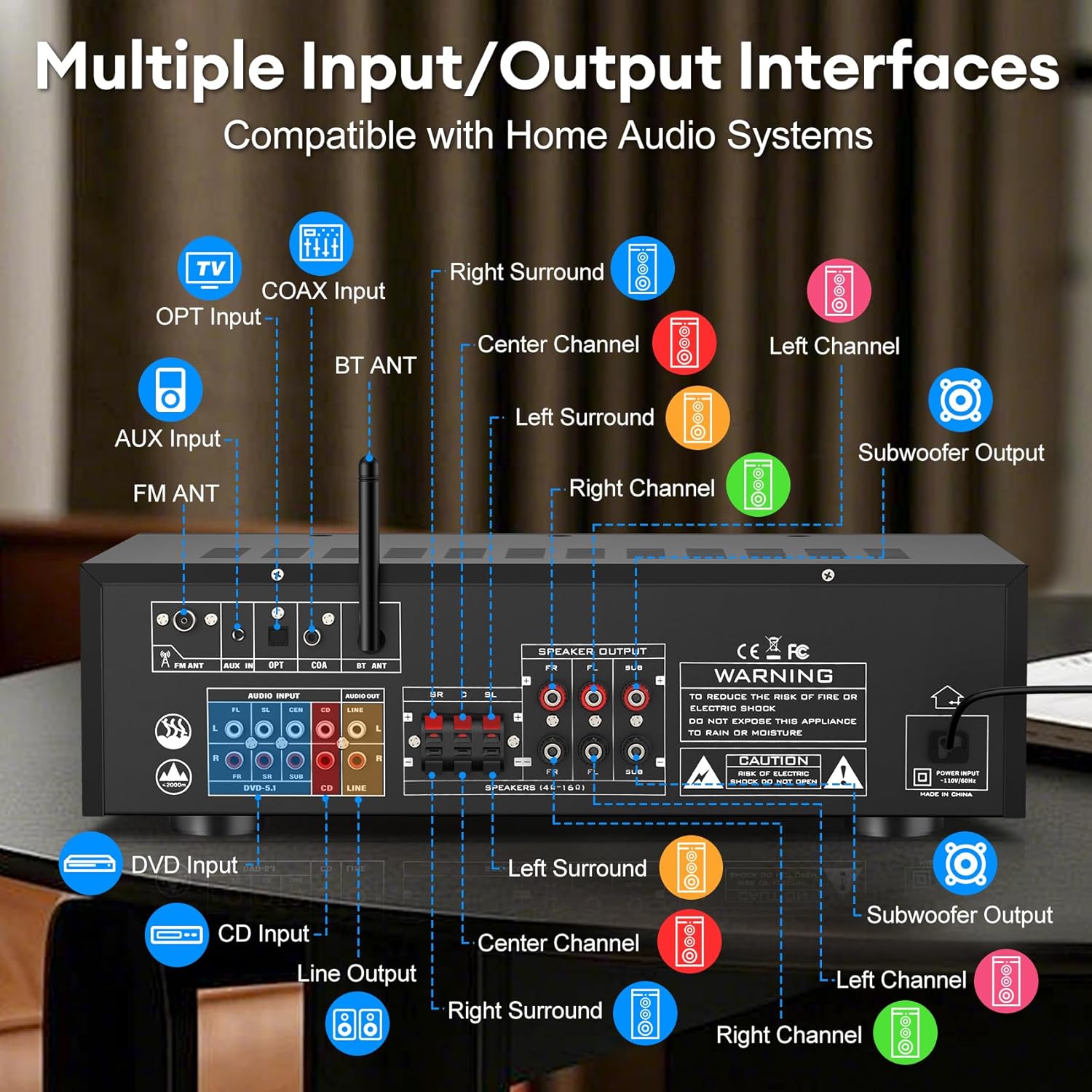
Image 6.1: The Daakro SR-3800 amplifier surrounded by various smart devices, illustrating its Bluetooth 5.4 connectivity and stable 30ft range.
- Select the 'USB/BT/FM' input mode.
- 블루투스 기능이 있는 기기(스마트폰, 태블릿 등)에서 사용 가능한 블루투스 기기를 검색하세요.
- Select 'Daakro SR-3800' from the list to pair.
- 페어링이 완료되면 무선으로 오디오를 스트리밍할 수 있습니다. amp리퍼.
6.5 마이크 및 노래방 기능
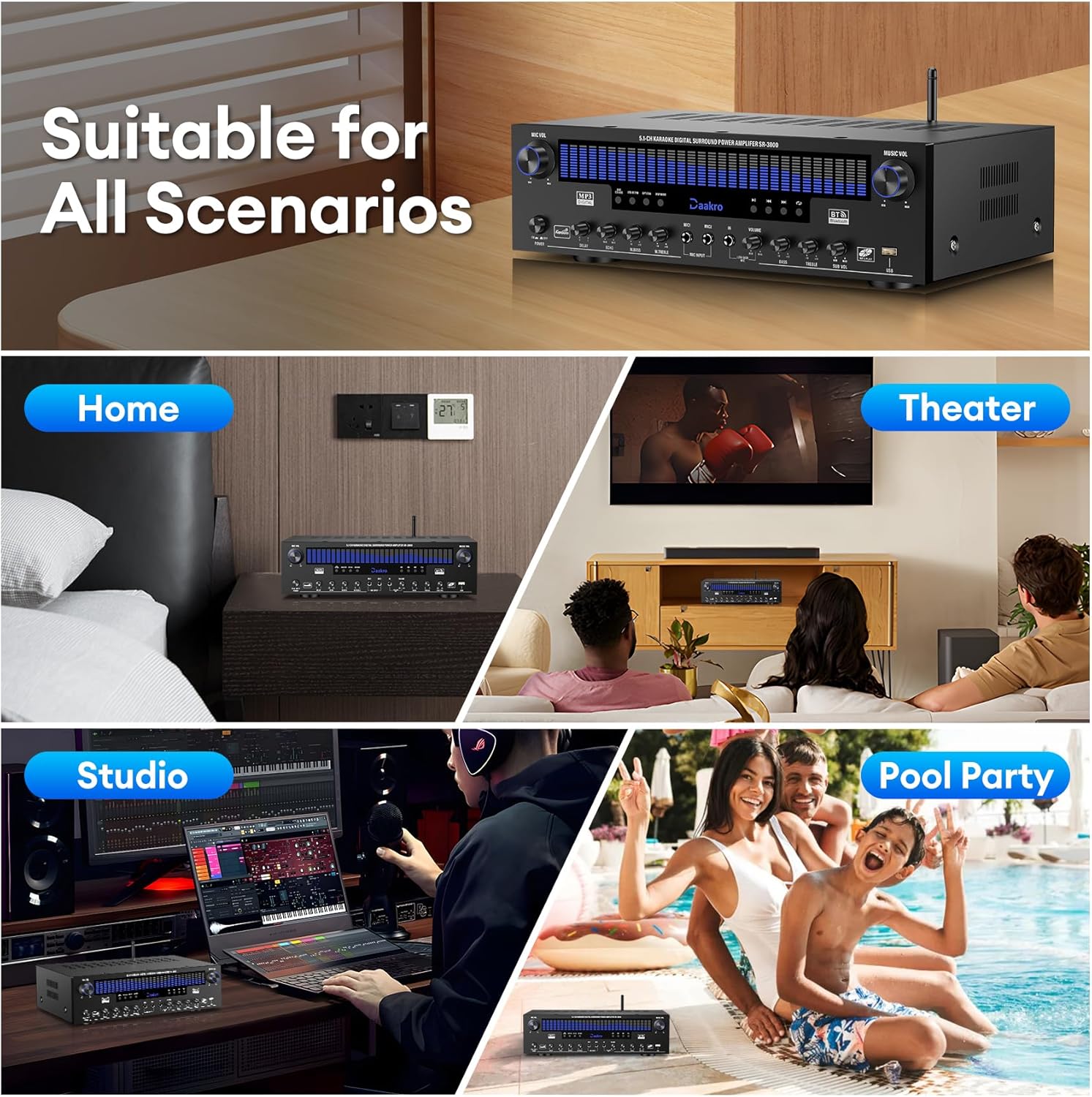
Image 6.2: Two individuals singing into microphones, demonstrating the karaoke feature of the Daakro SR-3800 amp리퍼.
- Connect wired microphones to the MIC INPUT jacks on the front panel.
- Adjust microphone volume using the MIC VOL knob.
- Use the DELAY, ECHO, M.BASS, and M.TREBLE knobs to customize microphone sound effects.
- 그만큼 amplifier also supports wireless microphones.
6.6 DSP Display Modes
Press the 'DISP Mode' button on the front panel to cycle through 13 different DSP spectrum display effects on the LCD screen.

Image 6.3: The Daakro SR-3800 amp증폭기 쇼크asing its 19.8-inch dynamic DSP display with active spectrum effects.
7. 유지관리
7.1 청소
- 플러그를 뽑다 amp청소하기 전에 앰프의 전원을 콘센트에서 뽑으세요.
- 부드럽고 마른 천으로 외부 표면을 닦으세요.
- 액체 세제나 에어로졸 세제를 사용하지 마십시오.
7.2 냉각 시스템
The SR-3800 features an ultra-quiet cooling fan. Ensure that the ventilation openings on the top and sides of the unit are not obstructed to allow for proper airflow.
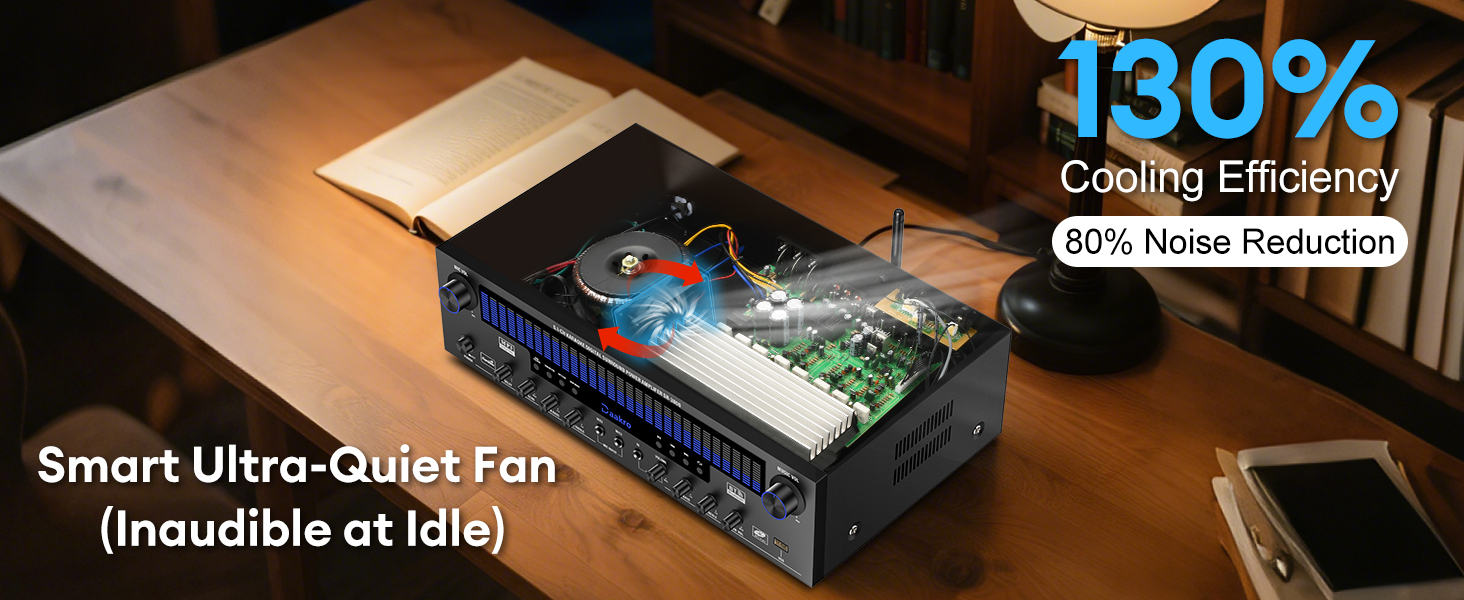
이미지 7.1: 내부 view of the Daakro SR-3800 amplifier highlighting its smart ultra-quiet fan and heat sinks for efficient cooling.
8. 문제 해결
| 문제 | 가능한 원인 | 해결책 |
|---|---|---|
| 전원이 없습니다 | 전원 케이블이 연결되지 않았습니다. 전원 스위치가 꺼져 있습니다. 전원 콘센트가 고장났습니다. | 전원 케이블이 제대로 연결되어 있는지 확인하십시오. 전원 스위치를 켜십시오. 다른 기기를 사용하여 전원 콘센트가 제대로 작동하는지 확인하십시오. |
| 소리가 나지 않습니다 | Incorrect input selected; Volume too low; Speakers not connected or faulty; Source device not playing. | Select the correct input source. Increase the MUSIC VOL. Check speaker connections and ensure they are passive speakers. Verify the audio source is playing. |
| 블루투스가 연결되지 않습니다 | Amp앰프가 블루투스 모드가 아닙니다. 기기가 너무 멀리 떨어져 있습니다. 기기가 이미 다른 기기와 페어링되어 있습니다. | Select 'USB/BT/FM' input mode. Ensure your device is within 30 feet. Disconnect your device from other Bluetooth devices and try pairing again. |
| Microphone feedback/noise | 마이크가 스피커에 너무 가깝거나 마이크 볼륨이 너무 높습니다. | Move microphones away from speakers. Reduce MIC VOL. Adjust M.BASS and M.TREBLE. |
| 왜곡된 소리 | Volume too high; Incorrect speaker impedance; Source audio quality is poor. | Reduce volume. Ensure speakers are 4-16 ohms. Check the quality of the audio source. |
9. 사양
| 특징 | 사양 |
|---|---|
| 모델 번호 | SR-3800 |
| 정격 출력 | 300W (채널당 50W) |
| 채널 수 | 5.1 |
| 스피커 임피던스 | 4-16 Ohms (Passive Speakers) |
| 블루투스 버전 | 5.4 |
| 블루투스 범위 | 최대 30피트(10미터) |
| DSP 디스플레이 | 19.8-inch LED with 13 spectrum effects |
| 주파수 응답 범위 | 20Hz ~ 20kHz |
| 입력 인터페이스 | Bluetooth, USB, Wireless Mic, 2x Wired Mic, FM, AUX, OPT, COAX, DVD, CD, LINE |
| 출력 인터페이스 | 5.1 Channel Passive Speaker Output, Line Out (RCA) |
| 권tage | 110볼트(AC) |
| 품목 무게 | 13.87파운드 |
| 패키지 크기 | 19.75 x 14 x 8 인치 |
| 인증 | 연방통신위원회(FCC) |
10. 제품 비디오 끝view
Video 10.1: An official product video from Daakro showcasing the features and connectivity of the SR-3800 5.1 Channel Home Audio Amplifier with DSP Display. This video provides a visual guide to the amplifier's design, input/output ports, and dynamic display in action.
11. 보증 및 지원
11.1 보증 정보
The Daakro SR-3800 amplifier comes with a 30-day warranty from the date of purchase. This warranty covers manufacturing defects and malfunctions under normal use. It does not cover damage caused by misuse, accidents, unauthorized modifications, or improper installation.
11.2 고객 지원
For technical assistance, troubleshooting, or warranty claims, please contact Daakro customer service. Our team is available to provide support and ensure your satisfaction.
- 온라인 고객 서비스: 24시간 이용 가능.
- 연락처 정보: Refer to the product packaging or the official Daakro web최신 연락처 정보는 사이트에서 확인하세요.


