소개
Thank you for choosing the FiiO EH11 Retro On-Ear Bluetooth Headphones. These headphones combine classic design with modern wireless technology, offering high-resolution audio and versatile connectivity. This manual provides essential information for the proper use, setup, and maintenance of your EH11 headphones.
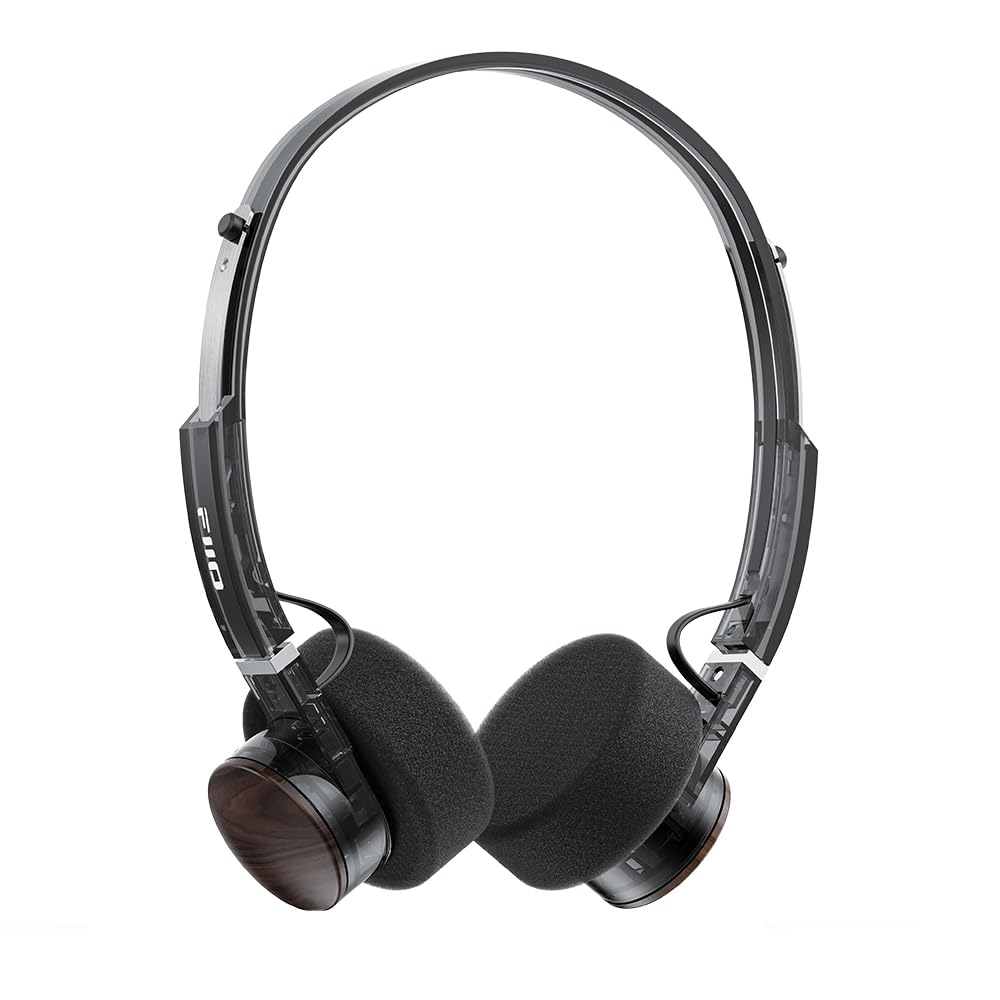
Image: FiiO EH11 Retro On-Ear Bluetooth Headphones, Transparent Black variant. This image displays the overall design of the headphones, highlighting the on-ear form factor and retro aesthetic.
안전 정보
- 헤드폰을 극한의 온도, 습도 또는 부식성 환경에 노출시키지 마세요.
- 청력 손상을 방지하려면 장시간 높은 볼륨으로 청취하지 마십시오.
- 기기를 직접 분해, 수리 또는 개조하지 마십시오. 공인 서비스 센터에 문의하여 도움을 받으십시오.
- 기기를 어린이와 애완동물의 손이 닿지 않는 곳에 보관하세요.
- 해당 지역 규정에 따라 제품과 배터리를 책임감 있게 폐기하세요.
패키지 내용
패키지에 모든 품목이 들어 있는지 확인하세요.
- FiiO EH11 Retro On-Ear Bluetooth Headphones
- Foam earpads (2 pairs)
- USB A to Type-C charging cable (1)
- Quick guide (1)
제품 끝view
Familiarize yourself with the main components and controls of your FiiO EH11 headphones.
컨트롤 및 포트
- 전원/다기능 버튼: 전원 켜기/끄기, 재생/일시정지, 전화 받기/끊기 등에 사용됩니다.
- 볼륨 노브: Rotatable knob for volume adjustment and track control.
- USB 타입-C 포트: 헤드폰을 충전합니다.
- 마이크로폰: 통화 및 음성 명령 기능이 내장되어 있습니다.
- LED 표시등: 전원, 충전, 블루투스 상태를 표시합니다.
Note: Specific button functions and LED indicator behaviors are detailed in the 'Operating' section.
설정
1. 헤드폰 충전
- USB Type-C 충전 케이블을 헤드폰의 충전 포트에 연결하세요.
- 케이블의 다른 쪽 끝을 USB 전원 어댑터(포함되지 않음)나 컴퓨터의 USB 포트에 연결합니다.
- LED 표시등은 충전 상태를 보여줍니다(예: 충전 중에는 빨간색, 충전이 완료되면 꺼짐).
- 완전 충전에는 약 1.5시간이 소요되며, 최대 30시간 동안 재생할 수 있습니다.
Description: Connect the provided USB-C cable to the headphone's charging port and a power source to charge the internal battery.
2. 전원 켜기 / 끄기
- 전원 켜기: Press and hold the Power/Multi-function button for approximately 3 seconds until the LED indicator lights up and you hear a power-on prompt.
- 전원 끄기 : Press and hold the Power/Multi-function button for approximately 5 seconds until the LED indicator turns off and you hear a power-off prompt.
3. 블루투스 페어링
- 헤드폰의 전원이 꺼져 있는지 확인하십시오.
- 전원/다기능 버튼을 약 5~7초 동안 길게 누르면 LED 표시등이 빨간색과 파란색으로 번갈아 깜빡이며 페어링 모드에 진입합니다.
- 기기(스마트폰, 태블릿, 컴퓨터)에서 Bluetooth를 활성화하고 사용 가능한 기기를 검색하세요.
- Select "FiiO EH11" from the list of found devices.
- Once connected, the LED indicator will flash blue periodically, and you will hear a connection prompt.
4. 듀얼 장치 연결
The EH11 supports simultaneous connection to two Bluetooth devices.
- 위에서 설명한 대로 헤드폰을 첫 번째 장치와 페어링합니다.
- 첫 번째 기기의 Bluetooth를 비활성화하세요. 헤드폰이 다시 페어링 모드로 전환됩니다.
- 헤드폰을 두 번째 장치와 페어링합니다.
- 첫 번째 기기에서 Bluetooth를 다시 활성화하세요. 헤드폰이 두 기기에 자동으로 연결될 것입니다.
- You can now seamlessly switch between audio sources from the two connected devices.
5. FiiO 컨트롤 앱
Download the FiiO Control App from your device's app store to unlock additional features and customization options, including EQ presets and gaming mode settings.
- 검색 "FiiO Control" in the App Store (iOS) or Google Play Store (Android).
- Install the app and ensure your EH11 headphones are connected via Bluetooth.
- Open the app to access settings such as EQ, gaming mode, and firmware updates.
작동 지침
음악 재생
- 재생/일시 중지: 전원/다기능 버튼을 짧게 누르세요.
- 볼륨 업: 볼륨 조절 손잡이를 시계 방향으로 돌리세요.
- 볼륨 작게 : 볼륨 조절 노브를 시계 반대 방향으로 돌리세요.
- 다음 트랙: Double-click the Volume knob.
- 이전 트랙 : Triple-click the Volume knob.
통화 관리
- 전화 받기/종료: 전원/다기능 버튼을 짧게 누르세요.
- 전화 거부: 전원/다기능 버튼을 2초 동안 길게 누르세요.
게임 모드
Activate Gaming Mode via the FiiO Control App to enhance in-game audio cues like footsteps and gunshots for a more immersive experience. This mode also optimizes latency.
LDAC High-Resolution Audio
The FiiO EH11 supports LDAC codec for high-resolution wireless audio. Ensure your source device also supports LDAC and that it is enabled in your device's Bluetooth settings for the best audio quality.
유지
청소
- 부드럽고 마른 보푸라기 없는 천으로 헤드폰을 닦으세요.
- 독한 화학 물질, 세척 용제 또는 강한 세제를 사용하지 마십시오.
- 어떠한 구멍에도 습기가 들어가지 않도록 주의하세요.
이어패드 교체
The foam ear pads are detachable for easy cleaning and replacement. Gently pull the ear pads off the earcups to remove them. Align the new ear pads with the earcups and press them firmly into place until they are securely attached.
Two pairs of different-colored official ear pads are included in the package for customization.
저장
When not in use, store the headphones in a cool, dry place, away from direct sunlight and extreme temperatures. Avoid placing heavy objects on the headphones.
문제 해결
- 전원 없음:
- 헤드폰이 완전히 충전되었는지 확인하세요.
- Try connecting to a different charging cable or power source.
- 기기와 페어링할 수 없습니다:
- 헤드폰이 페어링 모드(LED가 빨간색과 파란색으로 깜박임)인지 확인하세요.
- 기기에서 Bluetooth가 활성화되어 있는지 확인하세요.
- 헤드폰을 기기에 더 가까이 가져가세요.
- 헤드폰과 기기를 다시 시작해 보세요.
- 기기의 이전 Bluetooth 연결을 지웁니다.
- 소리가 나지 않거나 볼륨이 낮음:
- 헤드폰과 연결된 기기의 볼륨 레벨을 확인하세요.
- 헤드폰이 장치에 제대로 연결되어 있는지 확인하세요.
- 다른 애플리케이션이나 소스에서 오디오를 재생해보세요.
- 낮은 오디오 품질:
- 헤드폰과 기기 사이에 장애물이 없는지 확인하세요.
- 간섭원(예: Wi-Fi 라우터, 기타 Bluetooth 장치)에서 멀리 떨어지세요.
- If using LDAC, ensure your source device supports it and it is enabled.
명세서
| 특징 | 사양 |
|---|---|
| 모델명 | EH11 |
| 연결 기술 | 블루투스 |
| 무선 통신 기술 | 블루투스 |
| 오디오 드라이버 유형 | 다이내믹 드라이버(40mm) |
| 이어피스 모양 | 온이어 |
| 배터리 수명 | 최대 30시간 |
| 충전 시간 | 약 1.5시간 |
| 무게 | 약 92g(3.25온스) |
| 특징 | LDAC High-Resolution Bluetooth Audio, Dual Device Connection, FiiO Control App Support, Gaming Mode |
| 포함된 구성 요소 | Foam earpads*2, Quick guide*1, USB A to Type-C charging cable*1 |
보증 및 지원
FiiO products come with a limited warranty. For detailed warranty information, technical support, or service inquiries, please refer to the official FiiO web사이트를 방문하거나 현지 유통업체에 문의하세요.
자세한 정보와 연락처는 다음에서 확인할 수 있습니다. FiiO 공식 스토어.


