1. 서론
This manual provides essential information for the safe installation, operation, and maintenance of your DEWENWILS 15A GFCI Switch Outlet Combo. This device combines a Ground Fault Circuit Interrupter (GFCI) outlet with a single-pole switch, designed for enhanced electrical safety and convenience in various environments.
설치하기 전에 이 지침을 꼼꼼히 읽고 나중에 참조할 수 있도록 이 설명서를 보관하십시오.
2. 제품 특징
- High Efficiency & Safety: Supports 125VAC/60HZ and up to 15A current, with an integrated 10A switch. ETL certified for stable and safe operation.
- Integrated Panel Design: Combines a GFCI socket and a single-pole switch into one sleek white panel, optimizing space. The switch can be wired for regular operation.
- LED Indicator & Self-test: A continuous green LED indicates proper GFCI function. A red light indicates a potential fault, prompting replacement or repair. Automatic self-tests occur every 40 seconds, with a brief red flash.
- Child Safety & Weather Resistance: Features Tamper-Resistant (TR) receptacles to prevent foreign objects from being inserted, reducing electric shock risk. Weather-Resistant (WR) construction ensures performance in changing weather conditions.
- 다양한 용도: Suitable for bathrooms, kitchens, garages, and humid areas like pools and outdoor spaces (when used with a waterproof box).
3. 안전 정보
- GFCI 장치를 설치하거나 수리하기 전에 항상 회로 차단기 또는 퓨즈 박스에서 전원을 차단하십시오.
- 설치는 자격을 갖춘 전기 기술자 또는 전기 배선에 대한 지식이 있는 사람이 수행해야 합니다.
- 모든 배선 연결이 안전하고 현지 전기 규정을 준수하는지 확인하세요.
- Do not use in wet locations unless protected by a waterproof enclosure.
- Test the GFCI monthly to ensure proper function.
4. 패키지 내용
- GFCI Switch Outlet Combo × 1
5. 사양
| 사양 | 값 |
|---|---|
| 제품 치수 | 길이 4.4인치 x 너비 2.5인치 x 두께 0.04인치 |
| 품목 무게 | 4.5 온스 |
| 상표 | 데웬윌스 |
| 색상 | 하얀색 |
| 호환 장치 | Any device requiring a 125VAC 15A electrical connection |
| 재료 | 폴리카보네이트(PC) |
| 제조업체 | 데웬윌스 |
6. 설치
경고: To avoid fire, shock, or death, turn off power at the circuit breaker or fuse box and test that power is off before wiring. Improper installation can lead to serious injury or death. If you are unsure about any part of these instructions, consult a qualified electrician.
6.1. 일반적인 배선 고려 사항
The DEWENWILS GFCI Switch Outlet Combo requires an electrical box with at least three wires: Line/Hot (usually black), Neutral (usually white), and Ground (bare or green insulated wire).

Image: Electrical Box Wiring Requirements
Familiarize yourself with the components of the GFCI Switch Outlet Combo:

Image: GFCI Switch Outlet Combo Labeled Parts
The dimensions of the device are:

Image: GFCI Switch Outlet Combo Dimensions
6.2. 설치 비디오 가이드
For a visual guide on installation, please refer to the official video below:
Video: How to Install the DEWENWILS GFCI Outlet Easily. This video demonstrates the step-by-step process for wiring and installing the GFCI switch outlet combo.
6.3. 배선 방법
There are different wiring methods depending on your specific circuit configuration. Always ensure power is off before proceeding.
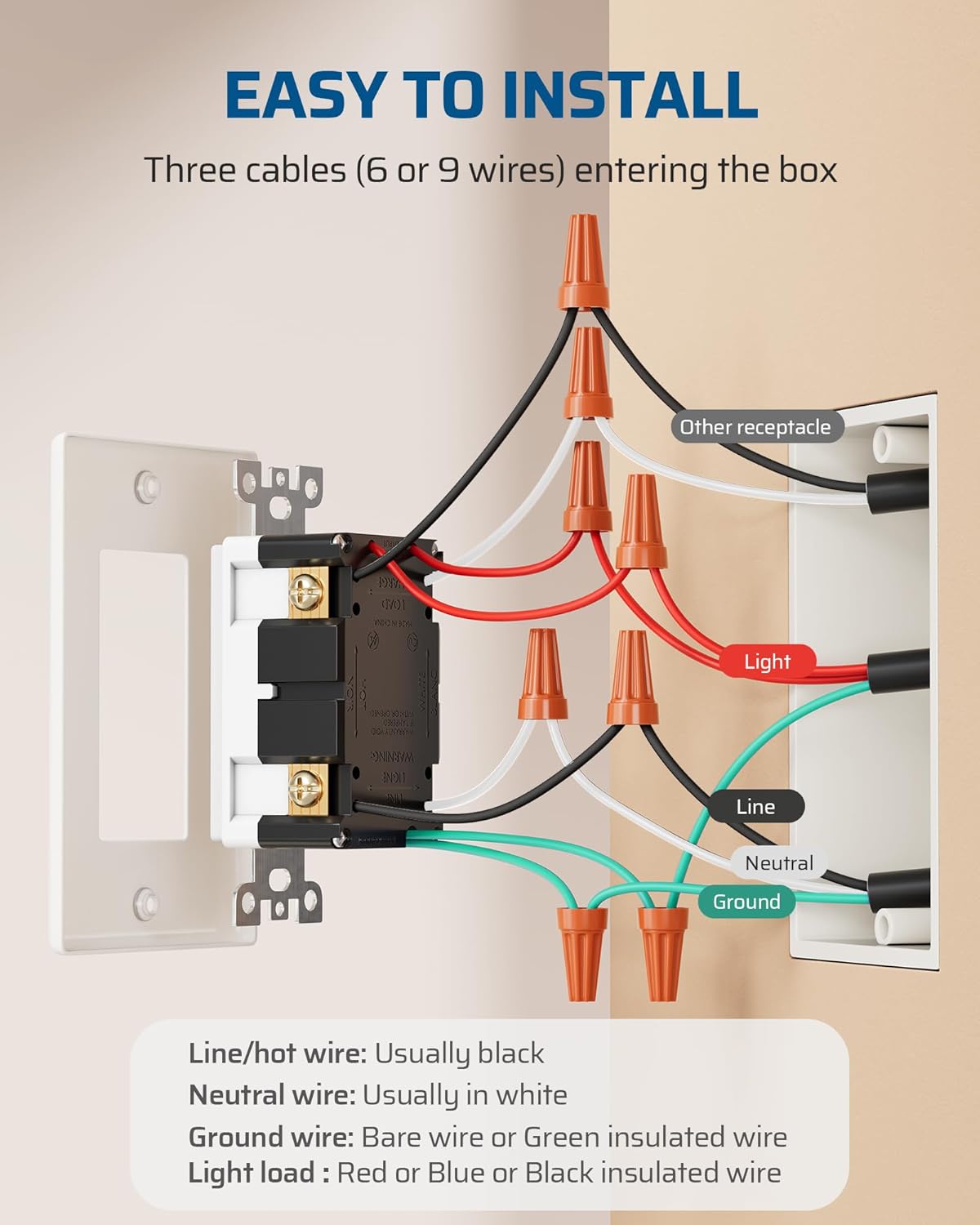
Image: Easy Installation Wiring Diagram
Method 1: Lighting Circuits Integrated into an Energized Household System
In this scenario, lighting wires in the electrical junction box are energized.
- Connect the line cable (bringing power from the circuit breaker) to the switch.
- Connect the switch leads to the switch-controlled LOAD (e.g., lamp load line, hot).
- Connect the LOAD (receptacle) cable wires to the GFCI LOAD terminals: white wire to the WHITE terminal, black wire to the HOT terminal.
- 접지선을 접지 단자에 연결하십시오.

Image: Wiring Methods Diagram
Method 2: Wiring Method for Non-Integrated Lighting Circuits
In this scenario, lighting wires in the electrical junction box extend solely from the fixture and remain non-energized.
- Connect the line cable (bringing power from the circuit breaker) to the switch.
- l을 연결하세요amp load and lamp 중성선.
- Connect the LOAD (receptacle) cable wires to the GFCI LOAD terminals: white wire to the WHITE terminal, black wire to the HOT terminal.
- 접지선을 접지 단자에 연결하십시오.
Method 3: Wiring Method for Switch-Controlled Outlet Operation
This method allows the switch to control the GFCI outlet itself.
- Connect the hot wire to the switch.
- Connect the switch output to the GFCI LINE terminals.
- Connect the neutral wire to the GFCI LINE neutral terminal.
- 접지선을 접지 단자에 연결하십시오.
7. 운영
Once installed and power is restored, the GFCI Switch Outlet Combo is ready for use.
- 스위치 작동: Press the top or bottom of the switch toggle to turn the connected lighting or appliance ON/OFF, depending on your wiring configuration.
- GFCI Outlet Use: Insert a plug into the tamper-resistant receptacle. The tamper-resistant shutters may require a firm, even push to open when first used.

Image: Integrated Outlet and Switch in Use

Image: Tamp오차 방지 기능

Image: Convenient Plugging and Unplugging
8. Self-Test Function and LED Indicators
The GFCI Switch Outlet Combo is equipped with a self-test function and LED indicators to ensure continuous protection.
- 녹색 LED 표시등: A continuous green light indicates that the GFCI socket is functioning properly and providing ground fault protection.
- Red LED Light (Blinking): The red LED light will briefly blink once every 40 seconds to indicate a successful automatic self-test. This is normal operation.
- Red LED Light (Solid ON): If the red LED light stays ON, it indicates that a ground fault has been detected, or the self-test has failed. In this case, the GFCI has tripped or is no longer providing protection and must be immediately replaced.

Image: Self-Test Function with LED Lights
To manually test the GFCI, press the "TEST" button. The GFCI should trip, and the red LED should turn on. Then, press the "RESET" button. The green LED should turn on, indicating it has reset and is providing protection.
9. 문제 해결
- GFCI Trips Frequently: This indicates a persistent ground fault. Unplug all devices from the GFCI outlet and any downstream outlets it protects. If it still trips, there may be a wiring issue or a fault within the GFCI device itself. Consult an electrician.
- GFCI Will Not Reset: Ensure there is power to the circuit. If the red LED is solid ON, the GFCI may be faulty and needs replacement. If there is no power, check your circuit breaker.
- No Power to Outlet: Check the circuit breaker. If the GFCI has tripped, press the "RESET" button. If the GFCI does not reset or the breaker is not tripped, inspect wiring connections.
- Switch Not Controlling Light/Appliance: Verify wiring connections for the switch. Ensure the load wires are correctly connected to the switch terminals.
10. 관리 및 유지 보수
To maintain the performance and longevity of your DEWENWILS GFCI Switch Outlet Combo:
- 청소: 부드러운 천으로 장치를 청소하십시오.amp 천. 연마성 세척제나 용매를 사용하지 마십시오.
- 정기 테스트: Perform the manual test monthly by pressing the "TEST" and then "RESET" buttons.
- 내후성: For outdoor installations, ensure the GFCI is protected by a suitable weatherproof enclosure to maintain its weather-resistant properties.

Image: Weather Resistance for Outdoor Use

Image: Wide Application Areas
11. 보증 및 지원
DEWENWILS 제품은 뛰어난 신뢰성과 성능을 위해 설계되었습니다. 보증 정보 또는 기술 지원이 필요하시면 구매 시 제공된 연락처 정보를 참조하시거나 DEWENWILS 공식 웹사이트를 방문하십시오. website. Please have your model number (15A) and purchase date available when contacting support.


