1. 서론
Thank you for choosing the GOBOULT Z40 V2.0 True Wireless Earbuds. These earbuds are designed to provide a high-quality audio experience with features such as extended playtime, clear call quality, and low-latency gaming. This manual provides instructions for setup, operation, maintenance, and troubleshooting to ensure optimal use of your device.

Image 1.1: GOBOULT Z40 V2.0 True Wireless Earbuds and Charging Case.
2. 제품 오버view
2.1 포함된 구성 요소
패키지에는 다음 품목이 포함됩니다.
- GOBOULT Z40 V2.0 Earbuds
- 충전 케이스
- USB 충전 케이블
- 이어팁(다양한 크기)
- 사용자 설명서
- 보증 카드
2.2 주요 특징
- 총 재생 시간 최대 70시간
- Quad Mic Environmental Noise Cancellation (ENC) for clear calls
- 13mm Bass Drivers for enhanced audio
- 45ms Low Latency Gaming Mode
- Bluetooth v5.4 for stable connectivity
- IPX5 방수 기능
- Smart Touch Controls with Voice Assistant support
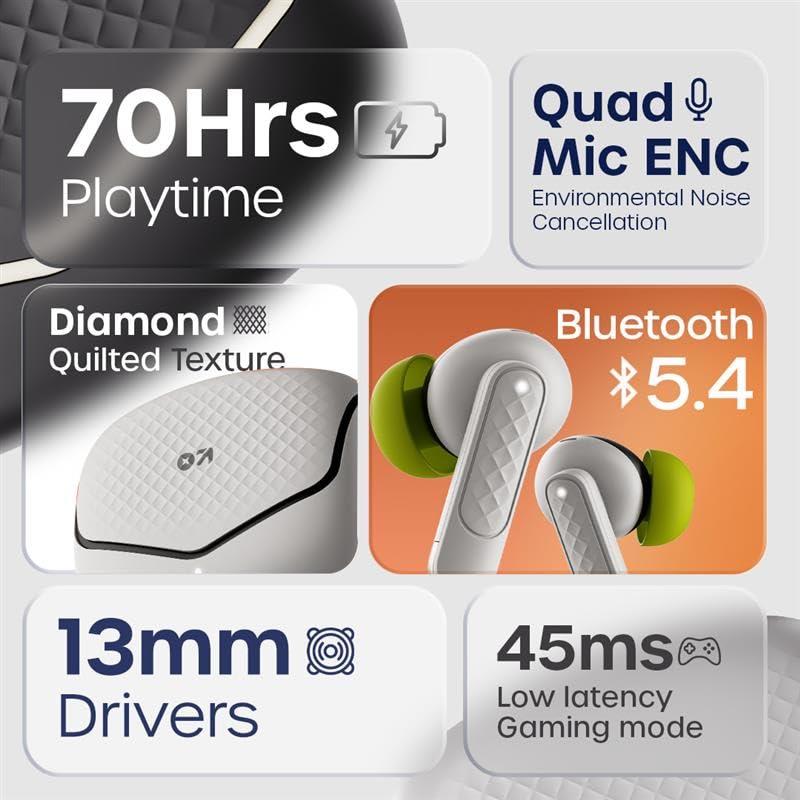
이미지 2.1: 이상view of GOBOULT Z40 V2.0 key features.
3. 설정 지침
3.1 이어버드와 케이스 충전
처음 사용하기 전에 이어버드와 충전 케이스를 완전히 충전하세요.
- 이어버드를 충전 케이스에 넣으세요.
- USB 충전 케이블을 케이스의 충전 포트와 전원에 연결하세요.
- 케이스의 표시등은 충전 상태를 보여줍니다.
- A 10-minute charge provides approximately 120 minutes of playtime. The case offers up to 70 hours of total battery life for the earbuds.

Image 3.1: Charging and battery life details.
3.2 블루투스 페어링
The GOBOULT Z40 V2.0 earbuds utilize Bluetooth v5.4 for quick and reliable pairing.
- Open the charging case. The earbuds will automatically enter pairing mode (Blink&Pair™ Tech).
- 기기(스마트폰, 태블릿, 노트북)에서 Bluetooth를 활성화하세요.
- 검색 available Bluetooth devices and select "GOBOULT Z40 V2.0" from the list.
- 연결되면 이어버드에 페어링이 성공적으로 완료되었다는 메시지가 표시됩니다.
- 케이스에서 이어버드를 꺼내면 마지막으로 페어링된 기기에 자동으로 다시 연결됩니다.

Image 3.2: Bluetooth 5.4 and Blink&Pair™ technology.
4. 사용 설명서
4.1 터치 컨트롤
The earbuds feature intuitive touch controls for managing various functions:
- 재생/일시 중지: 양쪽 이어버드를 한 번 탭하세요.
- 다음 트랙: 오른쪽 이어버드를 두 번 탭하세요.
- 이전 트랙 : 왼쪽 이어버드를 두 번 탭하세요.
- 전화 받기/종료: 양쪽 이어버드를 한 번 탭하세요.
- 전화 거부: 양쪽 이어버드를 2초 동안 길게 누릅니다.
- Voice Assistant 활성화 : 양쪽 이어버드를 세 번 탭하세요.
- 게임 모드 전환: Press and hold the right earbud for 2 seconds (specific gesture may vary, refer to quick start guide).

Image 4.1: Hands-free control and voice assistant activation.
4.2 전화 걸기 및 받기
The Quad Mic ENC system ensures clear voice transmission during calls by reducing environmental noise.
- Ensure earbuds are connected to your device.
- Use the touch controls to answer, end, or reject calls.

Image 4.2: Quad Mic ENC for clear calls.
4.3 게임 모드
Activate Combat™ Gaming Mode for a low-latency audio experience, ideal for gaming and video playback.
- Refer to the touch control section for activating Gaming Mode (typically a press and hold gesture).
- This mode reduces audio latency to 45ms, providing synchronized sound with on-screen action.

Image 4.3: Low Latency Gaming Mode.
5. 유지관리
5.1 청소
정기적으로 청소하면 이어버드의 성능과 수명을 유지하는 데 도움이 됩니다.
- 부드럽고 마른 보푸라기 없는 천으로 이어폰과 충전 케이스를 닦으세요.
- 작은 브러시나 면봉을 사용하여 이어팁과 스피커 메시에서 귀지나 이물질을 부드럽게 제거하십시오.
- 연마재, 알코올, 화학 세척제 사용은 피하세요.
5.2 방수 등급(IPX5)
The earbuds are rated IPX5 water-resistant, meaning they can withstand sweat and light splashes.
- 이어버드를 물에 담그지 마세요.
- Avoid exposing them to heavy rain or strong water jets.
- 손상을 방지하려면 이어버드를 충전 케이스에 다시 넣기 전에 반드시 건조되었는지 확인하세요.
Image 5.1: IPX5 Water Resistance.
6. 문제 해결
If you encounter any issues with your GOBOULT Z40 V2.0 earbuds, please refer to the following common solutions:
- 소리 없음: 이어버드가 충전되어 있고 기기와 제대로 페어링되었는지 확인하세요. 이어버드와 기기의 볼륨 레벨을 모두 확인하세요.
- 페어링 문제: 기기에서 블루투스가 켜져 있고 이어버드가 페어링 모드인지 확인하세요. 이어버드의 페어링을 해제했다가 다시 페어링해 보세요.
- 간헐적인 연결: 블루투스 연결 범위가 10미터 이내에 있는지 확인하십시오. 이어버드와 기기 사이에 장애물이 없도록 하십시오.
- 충전 문제: 충전 케이블이 제대로 연결되어 있고 전원이 켜져 있는지 확인하십시오. 이어버드와 케이스의 충전 접점을 청소하십시오.
- 마이크가 작동하지 않음: Ensure the earbuds are properly seated in your ears. Check if any debris is blocking the microphone ports.
If the problem persists, please contact GOBOULT customer support for further assistance.
7. 사양
Detailed technical specifications for the GOBOULT Z40 V2.0 True Wireless Earbuds:
| 특징 | 사양 |
|---|---|
| 모델명 | Z40 V2.0 (Airbass Earbuds) |
| 연결 기술 | 무선(블루투스) |
| 블루투스 버전 | 5.4 |
| 블루투스 범위 | 10 미터 |
| 오디오 드라이버 크기 | 13 밀리미터 |
| 오디오 드라이버 유형 | 동적 드라이버 |
| 주파수 응답 | 20Hz |
| 감광도 | 115데시벨 |
| 배터리 수명(이어버드) | 최대 70시간(충전 케이스 사용 시) |
| 충전 시간 | 10 Minutes for 120 minutes playtime |
| 마이크로폰 | Quad Mic with ENC |
| 오디오 지연 | 45밀리초(게임 모드) |
| 방수성 | IPX5 |
| 컨트롤러 유형 | 만지다 |
| 하드웨어 인터페이스 | USB 타입 C |
| 귀 위치 | 귀에 |
| 제품 치수 | 5.8 x 4 x 4.9cm |
| 품목 무게 | 600g (총 패키지 무게) |

Image 7.1: 13mm Bass Drivers for enhanced audio.
8. 보증 및 지원
8.1 제조업체 보증
The GOBOULT Z40 V2.0 True Wireless Earbuds come with a 1-year manufacturer’s warranty. This warranty covers manufacturing defects and ensures product quality and durability.
8.2 고객 지원
For any product-related queries, technical assistance, or warranty claims, please contact GOBOULT customer support. Refer to the warranty card included in your package for contact details or visit the official GOBOULT web대지.


