1. 서론
This manual provides essential information for the safe and efficient use of your DOOGEE Note56 Android 16 smartphone. Please read it thoroughly before using your device.

이미지: 앞면과 뒷면 view of the DOOGEE Note56 smartphone, showcasing its design and key specifications like 6150mAh battery, Android 16, 6.56-inch display, and 90Hz refresh rate.
2. 설정
2.1. 패키지 내용
패키지에 다음 품목이 포함되어 있는지 확인하십시오.
- DOOGEE Note56 Smartphone
- 전원 어댑터
- USB 케이블
- SIM 이젝터 도구
- 보호 케이스
- 빠른 시작 가이드(본 설명서)
2.2. SIM 카드 및 TF 카드 설치
The DOOGEE Note56 supports dual SIM cards and a TF (microSD) card for expandable storage.
- 기기 측면에서 SIM 카드 트레이를 찾으세요.
- SIM 꺼내기 도구를 트레이 옆에 있는 작은 구멍에 넣고 트레이가 튀어나올 때까지 살짝 누르세요.
- 나노 SIM 카드 및/또는 TF 카드를 트레이의 지정된 슬롯에 넣으십시오. 금색 접촉면이 아래쪽을 향하도록 하십시오.
- 트레이를 조심스럽게 전화기에 다시 삽입하여 제자리에 고정되도록 합니다.
2.3. 초기 전원 켜기 및 기본 구성
- DOOGEE 로고가 나타날 때까지 전원 버튼을 길게 누르세요.
- 화면의 안내에 따라 언어를 선택하고, Wi-Fi 네트워크에 연결하고, Google 계정을 설정하세요.
- Configure security settings such as screen lock (PIN, pattern, password) and face recognition.
2.4. 장치 충전
Connect the USB cable to the power adapter and then to the phone's charging port. Plug the adapter into a power outlet. The battery indicator will show charging status. For optimal battery life, use the provided charger.
3. 사용 설명서
3.1. 안드로이드 16 운영체제
The DOOGEE Note56 runs on the latest Android 16 system, offering an optimized and intuitive user experience. It features improved application launch speeds, enhanced responsiveness, and a refined user interface. A new Privacy Space function allows for hiding sensitive data and applications, ensuring secure usage.

이미지: 이상view of the Android 16 operating system interface, displaying various applications, settings menus, and system information.
3.2. 디스플레이 기능
The device is equipped with a 6.56-inch IPS waterdrop display, providing a smooth visual experience with a 90Hz high refresh rate. The 720x1612 HD+ resolution and 90% screen-to-body ratio enhance viewing of movies and videos. Two eye-friendly modes are included to reduce eye strain during prolonged use.

이미지: 클로즈업 view of the DOOGEE Note56's 6.56-inch IPS display, illustrating its vibrant colors and the smooth 90Hz refresh rate.
3.3. 카메라 기능
Capture vivid and beautiful photos with the 8MP main camera and take clear selfies with the 5MP front camera. The device utilizes AI functions for enhanced photography, including:
- AI 장면 인식: Automatically detects and optimizes settings for 12 different scenes.
- 야간 모드: 저조도 환경에서 사진 품질을 향상시킵니다.
- 세로 모드 : 배경을 흐리게 처리하여 전문가 수준의 사진을 만듭니다.
- HDR: Enhances dynamic range for balanced exposure.
- 전문 모드: Offers manual control over camera settings.
- 스마일 캡처: 미소가 감지되면 자동으로 사진을 촬영합니다.
- 파노라마: Captures wide-angle scenic shots.
- 연속 촬영 : 여러 장의 사진을 빠르게 연속해서 촬영합니다.
- Fun Filters: Apply various creative effects to your photos.

Image: Diagram illustrating the 8MP rear camera and 5MP front camera specifications, along with icons representing various AI scene recognition modes.

Image: The camera interface of the DOOGEE Note56, highlighting features like HDR, Pro Mode, Smile Capture, Panorama, Continuous Shooting, Night Mode, and Fun Filters, with a samp사진.

Image: The 5MP front camera's capabilities for selfies, demonstrating Beauty Mode and Portrait Effect for bright, natural, and shareable self-portraits.
3.4. 메모리 및 스토리지
The DOOGEE Note56 is equipped with 24GB RAM (3GB physical RAM + 21GB extended RAM) and 64GB of internal storage (ROM). It supports TF card expansion up to 2TB, providing ample space for photos, videos, and applications. This powerful memory configuration ensures smooth multitasking and minimizes lag during gaming or heavy app usage.

이미지: 내부 view diagram highlighting the 64GB ROM and 24GB RAM (composed of 3GB physical and 21GB extended RAM) for seamless performance.
3.5. 연결성 및 내비게이션
The device supports Bluetooth 4.2 for stable wireless connections and 4G Dual SIM for broad network compatibility both domestically and internationally. For navigation, it integrates three major positioning systems: GPS, GLONASS, and Galileo, ensuring accurate location services from urban areas to remote locations.
3.6. 기타 스마트 기능
- Instant Face Recognition: Unlock your device quickly and securely using your face.
- FM 라디오 : Enjoy local radio stations without an internet connection.
- 3.5mm 헤드폰 잭 : Connect your wired headphones for audio playback and calls.
- Smart Body Sensor: (Specific functionality not detailed, refers to general smart sensor capabilities).
- 듀얼 시스템 모드: Allows for separate user environments.
- 슈퍼 클립보드: 클립보드 기능이 향상되었습니다.
- Screen Optimization & Color Customization: Adjust display settings for personal preference.

Image: Visual representation of instant face recognition, accurate GPS navigation, and the FM radio interface on the DOOGEE Note56.

이미지: 콜라주 쇼asing various smart OS features of the DOOGEE Note56, including smart body sensor, dual system mode, super clipboard, RAM expansion, screen optimization, and screen color customization.
4. 유지관리
4.1. 배터리 관리
The DOOGEE Note56 features a 6150mAh large capacity battery, designed for extended use. It supports approximately 1000 charge/discharge cycles and offers up to 4 years of durable battery life. The device also supports 5W reverse charging, allowing it to act as a power bank for other devices.
- 배터리 수명을 극대화하려면 극한의 온도를 피하세요.
- 배터리를 정기적으로 완전히 방전하지 마십시오.
- Use the original charger for optimal charging performance.
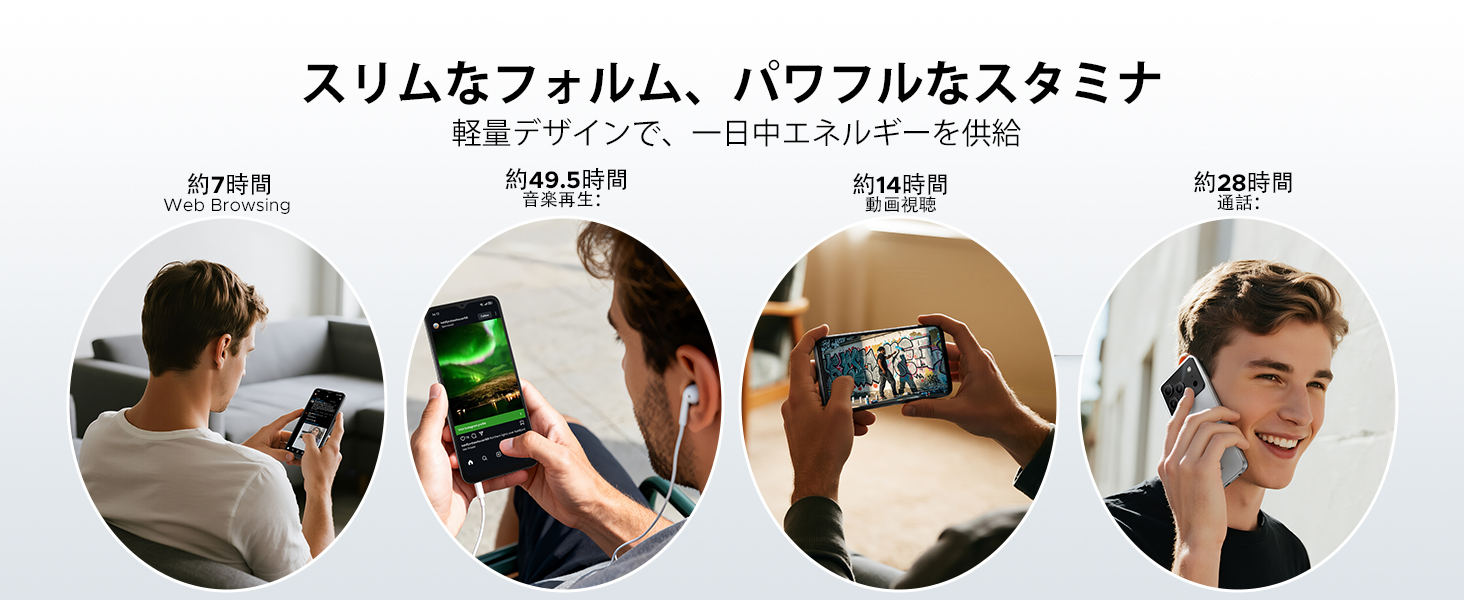
Image: Diagram illustrating the 6150mAh silicon-carbon battery, highlighting its features such as 1000 charge cycles, 4 years of durability, 20% smaller size, and 5W reverse charging capability.

Image: Infographic showing estimated battery life for different activities on the DOOGEE Note56: approximately 7 hours for web browsing, 49.5 hours for music playback, 14 hours for video watching, and 28 hours for calls.
4.2. 세척 및 관리
- 부드럽고 보푸라기가 없는 천을 사용하여 장치의 화면과 본체를 청소하십시오.
- 가혹한 화학물질이나 연마재의 사용은 피하세요.
- Keep the device away from excessive dust and moisture.
4.3. 소프트웨어 업데이트
Regularly check for and install software updates to ensure your device has the latest features, security patches, and performance improvements. You can usually find this option in the device's settings under 'System' or 'About phone'.
5. 문제 해결
If you encounter issues with your DOOGEE Note56, refer to the following common troubleshooting steps:
- 장치가 켜지지 않음: 배터리가 충전되어 있는지 확인하세요. 전원 버튼을 10~15초 이상 길게 눌러 강제로 다시 시작하세요.
- 앱이 충돌하거나 정지됨: 앱을 닫았다가 다시 여세요. 설정 > 앱에서 앱의 캐시와 데이터를 삭제하세요. 문제가 지속되면 앱을 제거하고 다시 설치하세요.
- 네트워크 연결 문제: Check if Airplane Mode is off. Restart the device. Verify your SIM card is correctly inserted and your mobile data plan is active. For Wi-Fi, try forgetting the network and reconnecting.
- 충전 문제: Ensure the charging cable and adapter are securely connected and undamaged. Try a different outlet or charger. Clean the charging port gently.
- 느린 성능: 불필요한 백그라운드 앱을 종료하세요. 캐시를 정기적으로 삭제하세요. 저장 공간을 확보하는 것을 고려해 보세요.
보다 복잡한 문제의 경우 지원 섹션을 참조하십시오.
6. 사양
| 특징 | 사양 |
|---|---|
| 화면 크기 | 6.56인치 |
| 배터리 용량 | 6150mAh |
| 색상 | 검정색 (다른 색상도 있습니다) |
| 브랜드 이름 | 두기 |
| 제조업체 | 두기 |
| 출시년도 | 2025 |
| 포함된 구성 요소 | 전원 어댑터 |
| 호환 OS | 안드로이드 16 |
| 기타 기능 | SIM-free |
| 모델명 | 노트56 |
| 디스플레이 유형 | IPS |
| 패키지 크기 | 19.3 x 10.5 x 5.1 cm; 410g |
| 제조업체 참조 | 노트56 |
| 설치된 RAM 크기 | 24GB (XNUMX기가바이트) |
| 메모리 저장 용량 | 64GB (XNUMX기가바이트) |
7. 보증 및 지원
7.1. 보증 정보
The DOOGEE Note56 comes with a 1년 보증 from the date of purchase, ensuring peace of mind for your usage. This warranty covers manufacturing defects under normal use conditions.
7.2. 고객 지원팀에 문의하는 방법
In the unlikely event of a product defect or if you require technical assistance, please contact our support team through the following methods:
- Via Amazon Purchase History: Navigate to your Amazon purchase history and contact our store directly regarding your order.
- Via Product Page: On the product page, click on the store name located below the 'Add to Cart' button. Then, click the 'Ask a Question' button displayed in the upper right corner to send us an inquiry.