1. 설정 가이드
This section provides instructions for the initial setup of your XIAOMI Poco M8 5G smartphone.
1.1 언박싱 및 패키지 구성품
기기를 조심스럽게 개봉하고 모든 구성품을 확인하십시오. 기본 패키지 구성품은 다음과 같습니다.
- XIAOMI Poco M8 5G Smartphone
- USB 케이블(C형)
- 전화 케이스
- SIM 트레이 이젝터
- 사용 설명서 (본 문서)
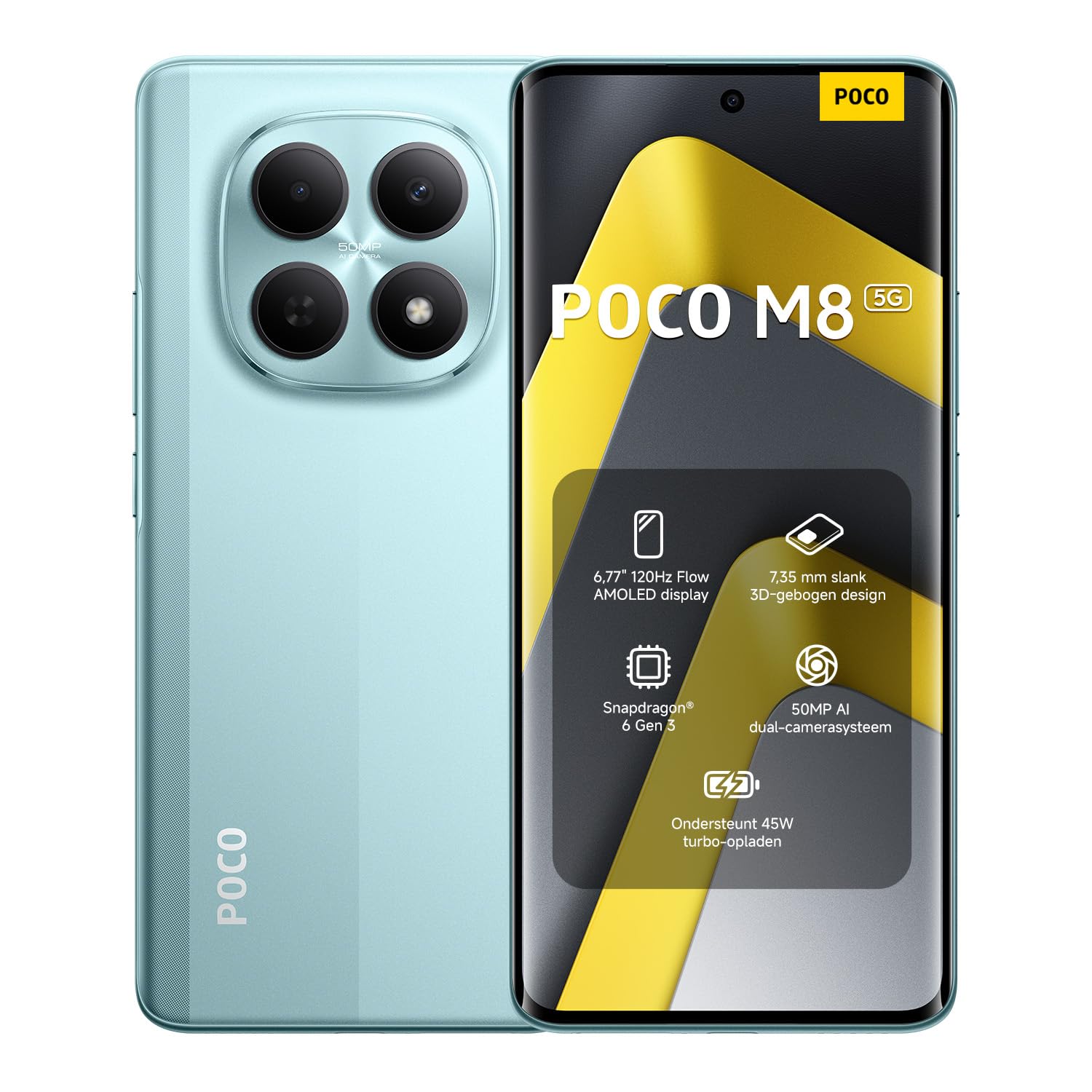
Image: The XIAOMI Poco M8 5G smartphone, USB-C cable, phone case, and SIM tray ejector pin, as typically found in the product box.
1.2 SIM 카드 설치
Your Poco M8 5G supports a nano SIM 1 and a hybrid slot for either a second nano SIM or a microSD card. eSIM is not supported.
- 기기 측면에서 SIM 트레이를 찾으세요.
- SIM 트레이 꺼내기 도구를 트레이 옆에 있는 작은 구멍에 넣고 트레이가 튀어나올 때까지 살짝 누르세요.
- Place your nano SIM card(s) and/or microSD card into the tray with the gold contacts facing down, ensuring they are correctly oriented.
- SIM 트레이를 조심스럽게 기기에 다시 삽입하여 제자리에 딸깍 소리가 날 때까지 밀어 넣으세요.
1.3 초기 전원 켜기 및 네트워크 호환성
Press and hold the power button until the XIAOMI logo appears. Follow the on-screen instructions to complete the initial setup, including language selection, Wi-Fi connection, and account setup.
네트워크 호환성:
- USA Market: This device is compatible with T-Mobile, Mint, Tello, or any carrier operating on the T-Mobile network. A pre-activated SIM card is required.
- 미국 이외 지역: The device works with any GSM carrier worldwide.
- 지원되는 밴드 :
- 5세대: 1/2/3/5/7/8/20/28/38/40/41/48/66/71/77/78
- 4G LTE FDD : B1/2/3/4/5/7/8/18/19/20/26/28/66/71
- 4G LTE TDD: B38/40/41/42/48
- 3G WCDMA: B1/2/4/5/6/8/19
- 2세대: 쿼드 밴드
2. 사용 설명서
Learn how to use the key features of your XIAOMI Poco M8 5G smartphone.
2.1 디스플레이 및 사용자 인터페이스
The Poco M8 5G features a 6.77-inch Flow AMOLED display with a resolution of 2392 x 1080 pixels. Key display features include:
- 새로 고침 빈도: Up to 120Hz (adjustable for supported apps).
- 터치 Samp링 비율: 240Hz, with an instant touch sampling rate of 2560Hz activated under Game Turbo Mode.
- 명도: Up to 3200 nits peak brightness, 800 nits typical.
- 색상 깊이: 12-bit (68.7 billion colors) with DCI-P3 wide color gamut.
- 디밍 : 3840 PWM dimming and 16,000 (Hardware Solution) for eye comfort.
- 운영 체제: The device runs on Hyper OS 2.
2.2 카메라 기능
Capture high-quality photos and videos with the integrated camera system.
- 후방 카메라:
- 메인 카메라: 50MP with Light Fusion 400 sensor (1/2.88", 1.22µm 4-in-1 Super Pixel, f/1.8 aperture, 5P lens).
- 깊이 카메라: 2MP.
- 비디오 녹화: Supports 4K at 30fps, 1080p at 30fps, and 720p at 30fps.
- 전면 카메라:
- 20MP sensor (1/4", f/2.2 aperture, 4P lens).
- 비디오 녹화: 1080p 해상도에서 초당 30프레임, 720p 해상도에서 초당 30프레임을 지원합니다.
2.3 오디오 및 연결
Experience immersive audio and seamless connectivity.
- 오디오: Dual speakers with Dolby Atmos certification and Hi-Res Audio certification. Features a 3.5mm headphone jack.
- 연결성: Supports 5G, Wi-Fi, Bluetooth, NFC, and GPS (L1 | GLONASS: G1 | BDS: B1I+B1C | Galileo E1).
- 센서: Virtual proximity sensor, ambient light sensor, accelerometer, electronic compass, IR blaster, gyroscope, in-screen fingerprint sensor, and AI face unlock.
2.4 Wet Touch Technology 2.0
The device features Wet Touch Technology 2.0, which intelligently detects water, oil, foam, sweat, and more, ensuring responsive and accurate screen operation even with wet or oily fingers.
3. 유지관리
Proper care and maintenance will extend the lifespan of your XIAOMI Poco M8 5G.
3.1 배터리 관리
- The device is equipped with a 5520mAh (typical) battery and supports 45W turbo charging.
- To optimize battery longevity, avoid extreme temperatures and fully discharging the battery frequently.
- The silicon-carbon battery technology is designed to retain over 80% capacity after 1,600 charge cycles.
- 승인된 충전기와 케이블만 사용하세요.
3.2 Screen and Device Cleaning
- The display features high-durability glass. To clean the screen, gently wipe it with a soft, lint-free cloth.
- 완고한 얼룩의 경우 약간 damp천에 물을 묻히거나 전자제품용으로 특별히 고안된 화면 세정제를 묻힙니다.
- 강한 화학 물질, 연마재 또는 과도한 습기를 사용하지 마십시오.
- Keep the device free from dust and debris, especially around ports and speaker grilles.
4. 문제 해결
이 섹션에서는 기기에서 발생할 수 있는 일반적인 문제에 대해 설명합니다.
4.1 일반적인 문제 및 해결 방법
- 장치가 켜지지 않음: 배터리가 충전되어 있는지 확인하세요. 기기를 충전기에 최소 15분 이상 연결한 후 다시 전원을 켜보세요.
- 화면이 반응하지 않음: If the screen is unresponsive, try a forced restart by holding the power button for approximately 10-15 seconds.
- 네트워크 연결 문제:
- SIM 카드가 제대로 삽입되었는지 확인하세요.
- Verify that mobile data is enabled in your settings.
- 네트워크 범위 내에 있는지 확인하세요.
- 장치를 다시 시작합니다.
- 배터리가 빠르게 소모됨:
- 백그라운드에서 실행 중인 사용하지 않는 애플리케이션을 닫습니다.
- 화면 밝기를 낮추세요.
- 사용하지 않을 때는 Wi-Fi, 블루투스, GPS 등의 기능을 비활성화하세요.
- Check for app updates, as outdated apps can sometimes consume more power.
- 앱이 충돌하거나 정지됨:
- Clear the cache and data for the problematic app in settings.
- 앱을 최신 버전으로 업데이트하세요.
- 문제가 지속되면 앱을 제거했다가 다시 설치하세요.
If you encounter issues not covered here or require further assistance, please refer to the Warranty & Support section.
5. 사양
Detailed technical specifications for the XIAOMI Poco M8 5G smartphone.
| 모델명 | Poco M8 5G |
| 품목 모델 번호 | MZB0NF7EU |
| 디스플레이 크기 | 6.77 Inches Flow AMOLED |
| 해결 | 2392 x 1080 |
| 새로 고침 빈도 | 최대 120Hz |
| 프로세서 | Snapdragon 6 Gen 3 Mobile Platform (4nm, Octa-core up to 2.4GHz) |
| 숫양 | 8GB (XNUMX기가바이트) |
| 저장 | 256 GB (Expandable up to 1TB via microSD in hybrid slot) |
| 운영 체제 | Hyper OS 2 |
| 후방 카메라 | 50MP 메인 카메라 + 2MP 심도 카메라 |
| 전면 카메라 | 20MP |
| 배터리 용량 | 5520mAh(일반) |
| 충전 중 | 45W Turbo Charge |
| 연결성 | 5G, Wi-Fi, 블루투스, NFC, GPS |
| 오디오 잭 | 3.5mm (XNUMXmm) |
| 치수 | 7.05 x 3.54 x 1.65인치(패키지) |
| 품목 무게 | 13 온스 |
| 색상 | 녹색 (현재 제품 변형 기준) |
6. 보증 및 지원
For warranty information and customer support, please refer to the official XIAOMI resources.
6.1 제품 보증
Your XIAOMI Poco M8 5G smartphone is covered by a limited manufacturer's warranty. Details regarding the warranty period and terms can typically be found on the official XIAOMI website or within the warranty card included in your product packaging. Please retain your proof of purchase for warranty claims.
6.2 고객 지원
If you require technical assistance, have questions about your device, or need to report an issue, please contact XIAOMI customer support through their official channels. This may include their website, dedicated support hotlines, or authorized service centers.
For the most up-to-date support information, visit the official XIAOMI web대지: www.mi.com/global/support


