1. 서론
The Eyoyo EY-016Z is a versatile 3-in-1 wearable finger ring barcode scanner designed to enhance efficiency in various scanning tasks. It supports multiple connection modes and is compatible with a wide range of devices and operating systems. This manual provides detailed instructions for setting up, operating, and maintaining your scanner.
2. 주요 특징
- 착용 가능한 반지 디자인: Ergonomic finger-worn design with 330° flexible adjustment for left or right-hand use, allowing hands-free operation.
- 3-in-1 연결성: Supports 2.4G wireless, Bluetooth 4.1, and USB wired connections for broad compatibility with various devices.
- 폭넓은 호환성: Works with Windows XP/7/8/10, Mac OS, Linux, Android, and iOS operating systems.
- 1D 및 2D 바코드 스캐닝: Capable of scanning most 1D and 2D barcodes from both paper and digital screens, including QR, DataMatrix, PDF417, EAN, UPC, Code 39, Code 128, and more.
- 소형 및 경량: Mini size and ultralight design (approximately 30g/1.05oz) for comfortable, extended use.
- 긴 배터리 수명: Equipped with a 450mAh rechargeable battery, providing up to 8 hours of continuous operation on a full charge.
- 다양한 구성 옵션: Features instant upload and storage modes, with customizable settings for sound, vibration, and adding keyboard keys (e.g., TAB, CR&LF).
3. 패키지 내용
패키지에 모든 품목이 들어 있는지 확인하세요.
- Eyoyo Ring 2D Scanner
- 2.4G USB 동글
- USB 케이블
- 사용자 설명서

Image: Contents of the Eyoyo EY-016Z package, including the scanner, 2.4G dongle, USB cable, and manual.
4. 설정 및 연결
4.1 스캐너 충전
Before first use, fully charge the scanner using the provided USB cable. Connect the USB cable to the scanner's charging port and a power source (e.g., computer USB port or USB wall adapter). The indicator light will show charging status.
4.2 스캐너 착용하기
The scanner is designed to be worn on your finger. Adjust the strap for a comfortable and secure fit. The scanner head can rotate 330 degrees to accommodate both left and right-hand users.

Image: The Eyoyo EY-016Z scanner worn on a finger, demonstrating its 330-degree rotation capability for flexible use.
4.3 연결 모드
스캐너는 세 가지 연결 방법을 지원합니다.
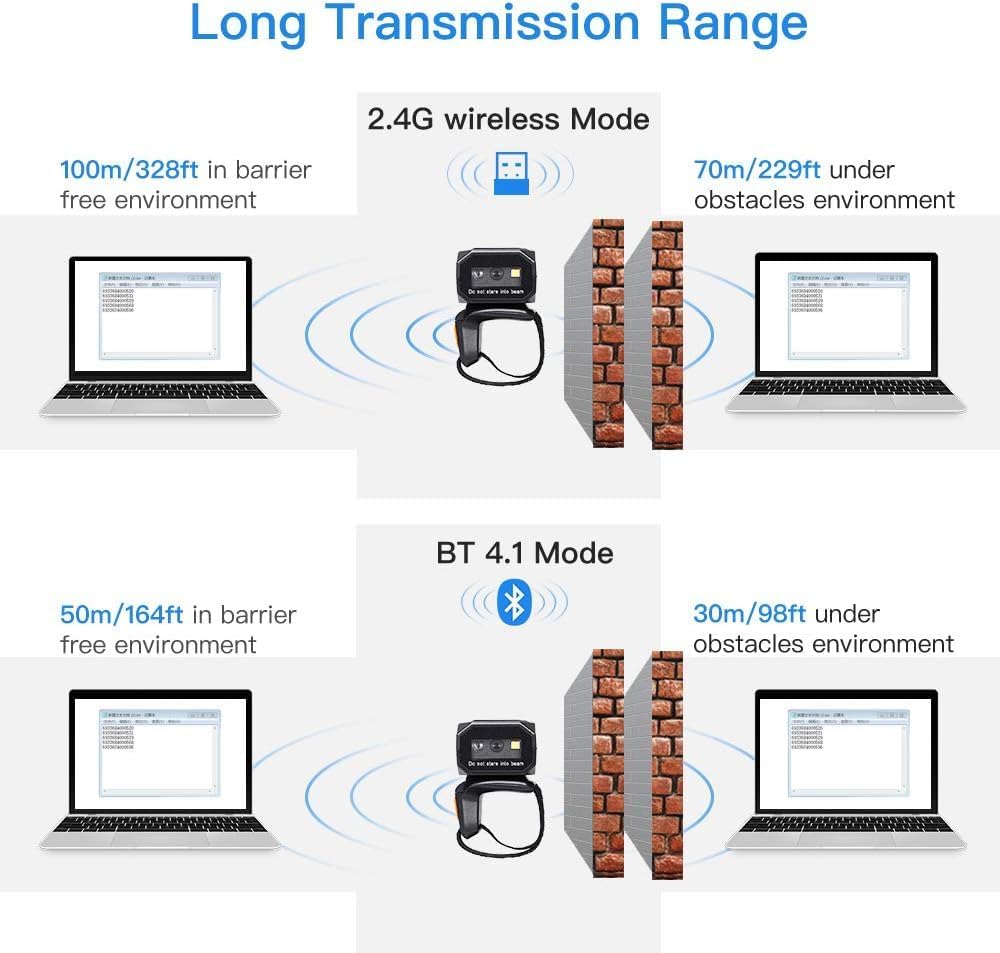
Image: Diagram illustrating the three connection modes: Bluetooth (Wireless Mode - BT 4.1), 2.4G Wireless (Wireless Mode - 2.4G Connection), and USB Wired (Wired Mode - USB Connection).
4.3.1 2.4G 무선 연결
- 2.4G USB 동글을 컴퓨터 또는 기기의 사용 가능한 USB 포트에 삽입하십시오.
- The scanner will automatically attempt to pair with the dongle. A successful connection is indicated by a specific sound or light pattern (refer to scanner's indicator guide).
4.3.2 블루투스 연결
- Ensure Bluetooth is enabled on your host device (PC, smartphone, tablet).
- Scan the Bluetooth pairing barcode (usually found in the full manual or on a setup card).
- On your host device, search for available Bluetooth devices and select "Eyoyo Scanner" (or similar name) to pair.
- A successful connection is indicated by a specific sound or light pattern.
4.3.3 USB 유선 연결
- 제공된 USB 케이블을 사용하여 스캐너를 컴퓨터에 연결합니다.
- The scanner will function as a plug-and-play device, typically requiring no additional driver installation.

Image: Illustration of transmission ranges for 2.4G wireless mode (up to 100m/328ft in barrier-free environment, 70m/229ft with obstacles) and Bluetooth 4.1 mode (up to 50m/164ft in barrier-free environment, 30m/98ft with obstacles).
5. 사용 설명서
5.1 바코드 스캐닝
To scan a barcode, point the scanner's window at the barcode and press the scan button. The scanner will emit a light beam to read the code. A successful scan is typically indicated by a beep and/or a green light.

Image: The Eyoyo EY-016Z scanner demonstrating its ability to capture various 1D and 2D barcodes, including QR Code, Data Matrix, Maxicode, Aztec code, UPC/EAN, and PDF417.
5.2 업로드 모드
스캐너는 두 가지 데이터 업로드 모드를 지원합니다.
- 자동 업로드 모드: 스캔된 데이터는 연결된 장치로 즉시 전송됩니다.
- 저장 모드 : Scanned data is stored in the scanner's internal memory and can be uploaded later. This is useful when out of range of a host device. To upload stored data, scan the 'Upload Data' barcode (refer to the full manual for specific configuration barcodes).

Image: Visual representation of the two upload modes: Instant Upload Mode (data sent immediately) and Storage Mode (data saved internally for later upload).
5.3 설정 사용자 정의
The scanner can be configured by scanning specific setup barcodes (provided in the full user manual). These settings include:
- Enabling/disabling sound.
- Enabling/disabling vibration.
- Adding keyboard keys (e.g., TAB, CR&LF) after each scan.
5.4 호환성
The Eyoyo EY-016Z scanner is compatible with a wide range of devices and operating systems, including:
- Laptops and PCs running Windows (XP/7/8/10), Mac OS, and Linux.
- Smartphones and tablets running Android and iOS.
- POS systems.

Image: The Eyoyo EY-016Z scanner shown with various compatible devices like laptops, PCs, smartphones, and tablets, highlighting compatibility with Windows, Android, iOS/MacOS, and Linux.
6. 유지관리
6.1 청소
스캐너를 청소할 때는 부드럽고 마른 천을 사용하십시오. 잘 지워지지 않는 얼룩은 약간 건조한 천으로 닦아내십시오.ampen the cloth with water or a mild, non-abrasive cleaning solution. Do not use harsh chemicals or immerse the scanner in liquid.
6.2 보관
스캐너는 직사광선과 극한의 온도를 피해 서늘하고 건조한 곳에 보관하십시오. 장시간 사용하지 않을 때는 배터리 수명을 연장하기 위해 배터리를 약 50% 정도 충전해 두십시오.
7. 문제 해결
7.1 스캐너가 연결되지 않음
- 배터리 확인: 스캐너가 충분히 충전되었는지 확인하십시오.
- 확인 모드: Confirm the scanner is in the correct connection mode (2.4G, Bluetooth, or Wired) for your setup.
- 수리하다: For wireless connections, try re-pairing the scanner with your device.
- USB 연결: If wireless fails, try connecting via USB cable to rule out wireless issues.
7.2 바코드를 스캔할 수 없음
- 바코드 유형: Ensure the scanner supports the type of barcode you are trying to scan (1D, 2D, specific symbology).
- 바코드 품질: 바코드가 손상되었거나, 번지거나, 인쇄 상태가 좋지 않은지 확인하세요.
- 거리/각도: 스캐너와 바코드 사이의 거리와 각도를 조정하세요.
- 조명: 적절한 조명을 확보하되, 바코드에 직접적인 눈부심은 피하세요.
7.3 Incorrect Data Transmission
- 출력 설정 : Review the scanner's configuration settings for prefix/suffix, carriage return, or other data formatting options.
- 소프트웨어 호환성 : Ensure the application receiving the data is correctly configured to accept input from a keyboard wedge device.
8. 안전 정보
- 스캐너를 극한의 온도, 습도 또는 부식성 물질에 노출시키지 마세요.
- Avoid dropping or subjecting the scanner to severe impact.
- 스캐너를 분해하거나 개조하지 마십시오. 그렇게 할 경우 보증이 무효화됩니다.
- Do not stare directly into the scanner's light beam, as it may cause eye discomfort.
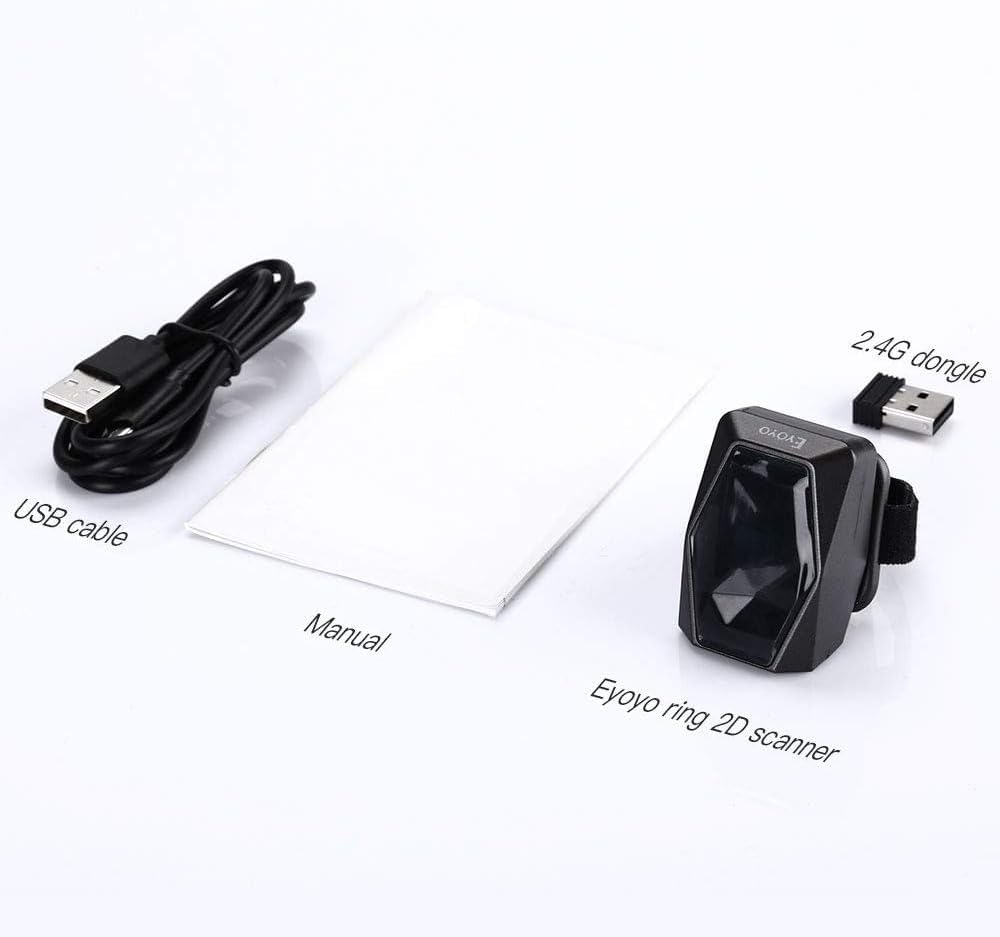
Image: Visual warnings against improper handling of the scanner, specifically advising not to twist the scanner head in certain directions or drag it incorrectly, to prevent damage.
9. 사양
| 특징 | 사양 |
|---|---|
| 모델 번호 | EY-016Z |
| 제품 치수 | 4.41 x 3.23 x 1.69인치(11.2 x 8.2 x 4.3cm) |
| 품목 무게 | 3.99 온스(113그램) |
| 연결 기술 | 2.4G 무선, 블루투스, USB 케이블 |
| 호환 장치 | 데스크탑, 노트북, POS, 스마트폰, 태블릿 |
| 배터리 유형 | 1 비표준 배터리(포함) |
| 배터리 용량 | 450mAh |
| 연속 작업 시간 | 최대 8시간 |
| 1D 바코드 지원 | EAN, UPC, Code 39, Code 93, Code 128, UCC/EAN 128, Codabar, Interleaved 2 of 5, ITF-6, ITF-14, ISBN, ISSN, MSI-Plessey, GS1 Databar, GS1 Composite Code, Code 11, Industrial 25, Standard 25, Plessey, Matrix 2 of 5 |
| 2D 바코드 지원 | QR, DataMatrix, PDF417, Aztec, Maxicode, Hanxin |
10. 보증 및 지원
Eyoyo products typically come with a standard manufacturer's warranty. Please refer to the warranty card included in your package or visit the official Eyoyo website for detailed warranty terms and conditions. For technical support, troubleshooting assistance, or service inquiries, please contact Eyoyo customer support through their official channels.


