소개
This manual provides detailed instructions for the setup, operation, and maintenance of your Eyoyo EY-009L 1D Mini Bluetooth Barcode Scanner. This compact and versatile device offers three connection modes: USB Wired, 2.4G Wireless, and Bluetooth, ensuring flexible integration with various systems and devices. Please read this manual thoroughly before using the scanner to ensure optimal performance and longevity.
제품 끝view
주요 특징
- 소형 및 휴대성: Weighing only 35g (1.2 oz), designed for easy carry and enhanced mobility.
- 트리플 모드 연결: Supports 2.4G wireless, Bluetooth, and USB wired connections for versatile use.
- 탁월한 1D 디코딩: Accurately reads standard 1D barcodes, including damaged, distorted, or reflective codes.
- 광범위한 호환성: Connects seamlessly with PCs, POS systems, smartphones, and tablets running Windows, Mac OS, and Linux.
- 긴 배터리 수명: 650mAh rechargeable battery provides up to 8 hours of continuous scanning, with a 2-hour charge time and up to 30 days standby.
- 데이터 사용자 정의: Options to add/hide prefixes/suffixes, delete characters, and append keyboard keys.
- 조절 가능한 피드백: Features adjustable volume control and a silent vibration mode for discreet operation.
- 저장 모드 : 16MB internal storage for over 100,000 barcodes when offline.
패키지 내용
- 1x Eyoyo 1D Barcode Scanner (Model: EY-009L)
- 1x USB 충전 케이블
- 1x 2.4G USB 동글
- 1x 라니어드
- 1x 사용자 설명서
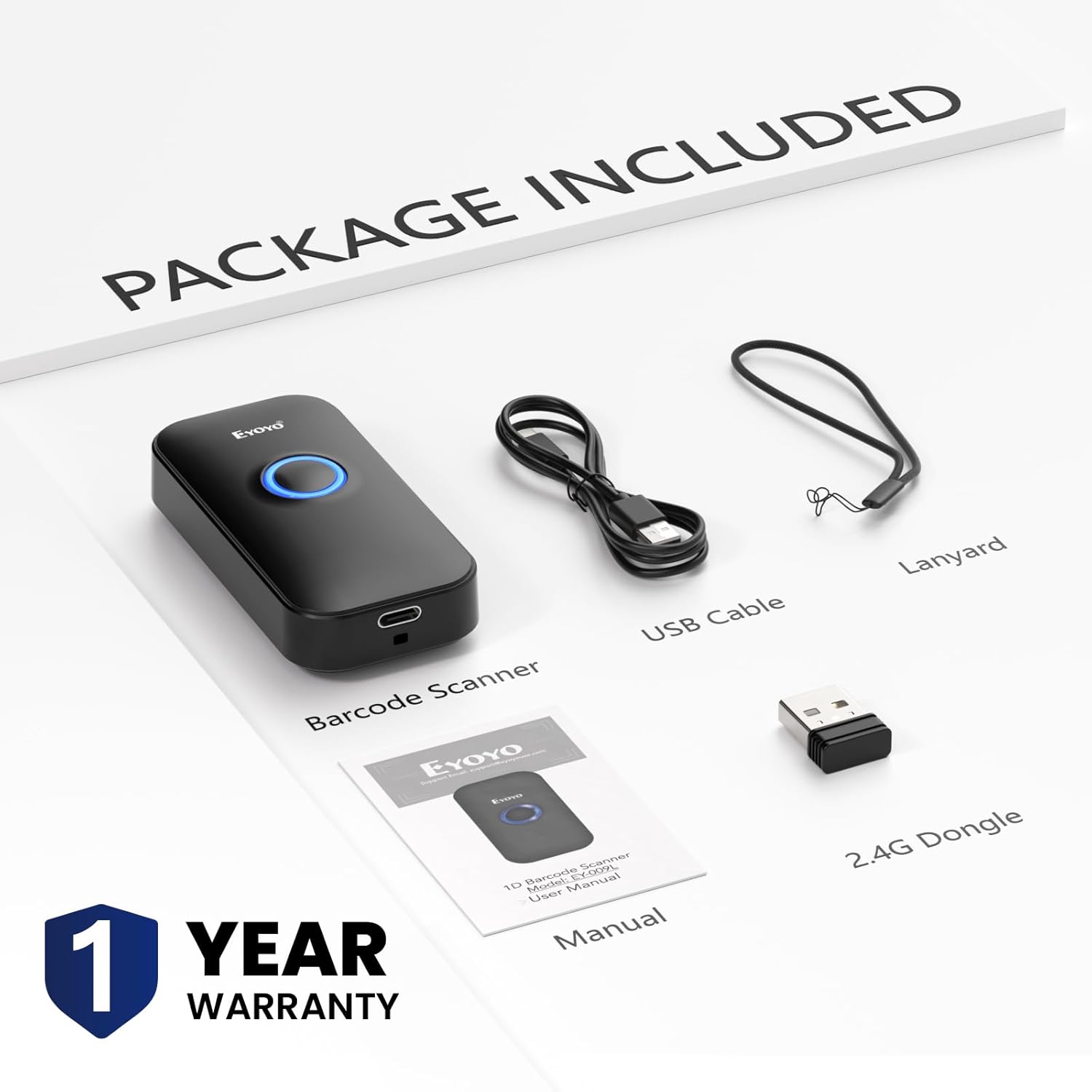
Image: Contents of the Eyoyo EY-009L barcode scanner package, including the scanner, USB cable, 2.4G dongle, lanyard, and user manual.

Image: The Eyoyo EY-009L barcode scanner being held in a pocket and scanning a package, illustrating its compact size and portability (35g/1.23oz).
설정
The Eyoyo EY-009L scanner supports three connection methods: USB Wired, 2.4G Wireless, and Bluetooth. Choose the method that best suits your needs.
1. USB 유선 연결
- 제공된 USB 케이블을 스캐너의 충전 포트에 연결하십시오.
- USB 케이블의 다른 쪽 끝을 컴퓨터 또는 POS 시스템의 사용 가능한 USB 포트에 꽂으십시오.
- The scanner will automatically enter USB wired mode and function as a keyboard input device.

Image: Diagram showing the Eyoyo EY-009L scanner connected to a laptop via a USB cable, indicating USB Wired Connection mode.
2. 2.4G 무선 연결
- 2.4G USB 동글을 컴퓨터의 사용 가능한 USB 포트에 삽입합니다.
- Turn on the barcode scanner. It will automatically attempt to pair with the dongle.
- 연결이 성공적으로 이루어지면 특정 소리 또는 빛 패턴으로 표시됩니다(전체 설명서의 스캐너 LED 표시등 안내를 참조하십시오).
- The wireless transmission distance is up to 30m (98 ft) in barrier-free environments and 15m (49 ft) with obstacles.

Image: Diagram showing the Eyoyo EY-009L scanner wirelessly connected to a laptop via a 2.4G USB dongle, indicating 2.4G Wireless Connection mode.
3. 블루투스 연결
- 바코드 스캐너를 켭니다.
- 호스트 장치(스마트폰, 태블릿, 컴퓨터)에서 Bluetooth를 활성화합니다.
- 검색 available Bluetooth devices and select the scanner (usually named 'Barcode Scanner HID' or similar).
- Pair the devices. A successful connection is indicated by a specific sound or light pattern.
- The Bluetooth transmission distance is up to 50m (164 ft) in barrier-free environments and 20m (66 ft) with obstacles.

Image: Diagram showing the Eyoyo EY-009L scanner connected to a tablet and smartphone via Bluetooth, indicating Bluetooth Wireless Connection mode.
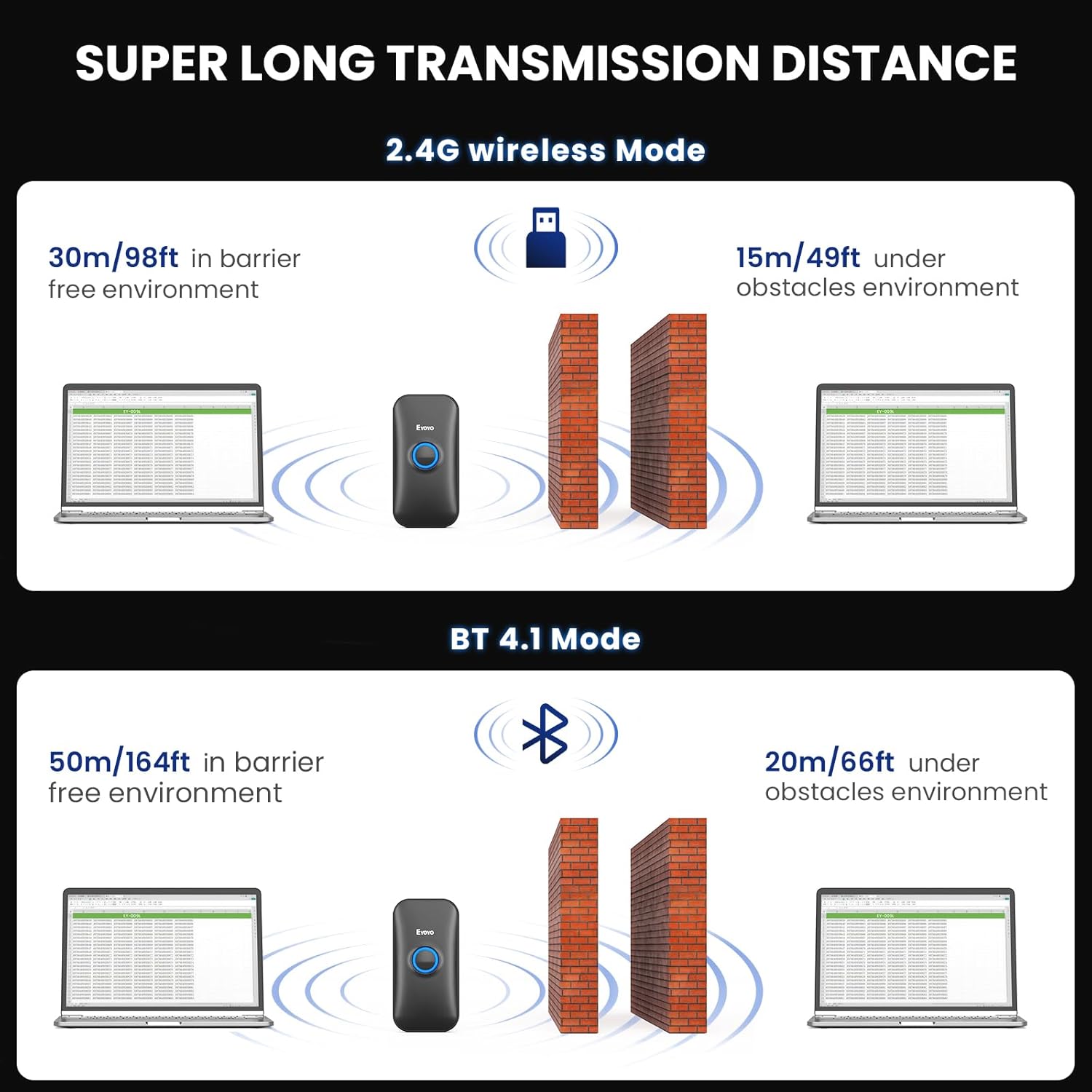
Image: Illustration of the transmission distances for 2.4G wireless mode (30m barrier-free, 15m with obstacles) and Bluetooth mode (50m barrier-free, 20m with obstacles).
작동 지침
바코드 스캔
Point the scanner's light beam at the 1D barcode you wish to scan. Ensure the beam covers the entire barcode. A successful scan is typically indicated by a beep (if enabled) and/or vibration (if enabled).

Image: The Eyoyo EY-009L scanner actively scanning various 1D barcodes on paper, demonstrating its superior decoding capability for different barcode types.
스캔 모드
스캐너는 두 가지 기본 데이터 업로드 모드를 지원합니다.
- 자동 업로드 모드: Barcode data is transmitted directly to the connected device immediately after scanning. This is the default mode.
- 저장 모드 : Barcode data is stored in the scanner's internal 16MB memory. This mode is useful when out of range or not connected to a host device. Data can be uploaded later by scanning a specific command barcode (refer to the full manual for command barcodes). The scanner can store over 100,000 barcodes in this mode.

Image: Illustration showing two upload modes: Storage Mode (with 16MB capacity) and Instant Upload Mode, indicating how data is handled by the scanner.
소리 및 진동 설정
The scanner provides audible and tactile feedback for successful scans. These settings can be adjusted:
- Turn On/Off Sound: Scan the appropriate command barcode from the full user manual to enable or disable the beep sound.
- Turn On/Off Vibration: Scan the appropriate command barcode from the full user manual to enable or disable vibration feedback. This is ideal for quiet environments.

Image: Visual representation of options to turn on/off sound and turn on/off vibration for the Eyoyo EY-009L scanner, showing a hand scanning a book.
Data Customization
You can configure the scanner to modify the output data:
- Add/Hide Prefixes/Suffixes: Append custom characters before or after the scanned barcode data.
- 문자 삭제: Remove specific characters from the scanned data.
- Append Keyboard Keys: Add special keys like TAB or Enter after each scan for automated data entry.
Refer to the comprehensive programming guide in the full user manual for specific command barcodes to implement these customizations.
유지
배터리 충전
The scanner is equipped with a 650mAh rechargeable battery. To charge:
- Connect the scanner to a power source (computer USB port or USB wall adapter) using the provided USB charging cable.
- 완전 충전에는 약 2시간이 걸립니다.
- The scanner provides up to 8 hours of continuous scanning time and up to 30 days of standby time.

Image: Diagram illustrating the battery performance of the Eyoyo EY-009L scanner: 8 hours working time, 2 hours charging time, and 720 hours (30 days) standby time.
청소
최적의 스캔 성능을 유지하려면 스캐너의 광학 창을 깨끗하게 유지하십시오. 부드럽고 보풀이 없는 천을 사용하여 살짝 닦아주세요.amp물이나 순한 세척액으로 닦으십시오. 연마제나 독한 화학 물질은 사용하지 마십시오.
문제 해결
Scanner Not Connecting
- 전원 확인: 스캐너가 충전되어 있고 전원이 켜져 있는지 확인하세요.
- 확인 모드: 스캐너가 사용 환경에 맞는 연결 모드(USB, 2.4G 또는 블루투스)로 설정되어 있는지 확인하십시오.
- Re-pair Bluetooth/2.4G: If using wireless, try re-pairing the scanner with your device or re-inserting the 2.4G dongle.
- USB 케이블 : For wired connection, ensure the USB cable is securely connected to both the scanner and the host device.
- 드라이버 설치: For some systems, a driver might be required for the 2.4G dongle or USB connection. Check your operating system's device manager.
Scanner Not Reading Barcodes
- 바코드 유형: This device is exclusively designed to read printed 1D 바코드. It cannot scan electronic codes from screens (e.g., 1D or 2D QR codes on phones/computers) or any printed 2D codes.
- 바코드 상태: Ensure the barcode is not severely damaged, smudged, or poorly printed. While the scanner has superior decoding, extreme damage can prevent reading.
- 거리 및 각도: 스캐너와 바코드 사이의 거리와 각도를 조정하세요.
- 조명: 적절한 조명을 확보하되, 바코드에 직접적인 눈부심은 피하세요.
- 스캐너 창: Clean the scanner's optical window if it is dirty.

Image: Illustration showing a 1D barcode being scanned successfully, with crossed-out 2D QR codes and screen-based barcodes, emphasizing that the scanner only reads printed 1D barcodes.
호환성 정보
- Not compatible with Square POS or Square Register systems.
- Compatible with Windows XP, Win7, Win8, Win10, Mac OS, Linux, Android, and iOS devices.

Image: Visual representation of the Eyoyo EY-009L scanner's compatibility with various operating systems and devices, including Windows, Mac OS, Linux, tablets, and smartphones.
명세서
| 모델 번호 | EY-009L |
| 제품 치수 | 4.8 x 2.44 x 1.99 인치 |
| 품목 무게 | 3.84 ounces (35g / 1.23oz for scanner only) |
| 연결 기술 | 2.4G 무선, 블루투스, USB 케이블 |
| 배터리 | 1 Nonstandard Battery (650mAh, included) |
| 근무시간 | 최대 8시간 연속 스캔 가능 |
| 충전 시간 | 약 2시간 |
| 대기 시간 | 최대 30일 |
| 저장 용량 | 16MB(100,000만개 이상의 바코드 저장) |
| 2.4G Transmission Range | 30m (98 ft) barrier-free, 15m (49 ft) with obstacles |
| 블루투스 전송 범위 | 50m (164 ft) barrier-free, 20m (66 ft) with obstacles |
| 호환 장치 | 데스크탑, 노트북, POS, 스마트폰, 태블릿 |
| 호환 OS | 윈도우 XP/7/8/10, 맥 OS, 리눅스, 안드로이드, iOS |
보증 및 지원
보증 정보
Eyoyo EY-009L 바코드 스캐너는 다음과 같은 구성품을 포함합니다. 1년 보증 구매일로부터. 본 보증은 정상적인 사용 중 발생한 제조상의 결함 및 고장에 적용됩니다. 보증 청구를 위해 구매 증빙 자료를 보관해 주십시오.
고객 지원
For technical assistance, troubleshooting, or warranty inquiries, please contact Eyoyo customer support. Refer to the contact information provided in the packaging or on the official Eyoyo web대지.


