소개
This manual provides detailed instructions for the safe and effective use of your NEEWER RGB1 LED Tube Light Stick. Please read this manual thoroughly before operating the device and retain it for future reference.
제품 끝view
패키지 내용
- 1 x RGB1 Light Stick
- 1 x Metal Barndoor
- 1 x Handgrip
- 벌집형 격자 1개
- 1 x Pouch
- 방수 가방 1개
- 1 x 손목 스트랩
- 2 x Corner Protector
- 4 x Adhesive Metal Pad
- 1 x USB 타입 C 케이블
- 1 x 사용자 설명서
주요 특징
- Magnetic/Handheld Design with Barndoor: Mountable via 1/4" thread or 5/8" receiver. Features inner magnets for metal surfaces and includes 4 adhesive metal pads for non-metallic surfaces. The metal barndoor helps control light spill and shadow effects. A lanyard is included for portability and security.
- Responsive RGB Touch Bar & 17 Scenes: Offers HSI Mode for blending hue, saturation, and brightness via a touch bar. A lock button prevents accidental changes. Scene Mode provides 17 pre-programmed lighting effects.
- Bi-Color Light with GM Correction: CCT Mode allows for 3200K-5600K variable color temperature and 0-100% flicker-free dimming. The GM (Green/Magenta) function assists with color correction. 150 SMD LEDs ensure soft, stable lighting with a CRI of 98+. A honeycomb grid is included for focused light output.
- Intelligent Wireless App Control: The 'NEEWER' app provides wireless control up to 164ft/50m. Features include RGB color wheel selection, brightness, color temperature, hue, saturation adjustments, scene selection, preset saving, and Source Match.
- 6400mAh 충전식 배터리: Built-in battery offers approximately 90 minutes of runtime at 100% brightness, ideal for outdoor use. Charges via USB Type-C port using wall, portable, or car chargers. Includes a carrying pouch, waterproof bag, and rubber corner protectors.

그림 1: 제품 이상view and Included Accessories. This image displays the RGB1 light stick along with its various components and accessories, including the barndoors, handgrip, honeycomb grid, pouch, waterproof bag, wrist strap, corner protectors, adhesive metal pads, USB Type C cable, and user manual.
설정
Attaching the Handgrip and Barndoor
- Align the 1/4" screw on the handgrip with the corresponding thread on the RGB1 light stick.
- Rotate the handgrip clockwise until securely fastened.
- Attach the metal barndoor to the light stick by sliding it onto the designated grooves until it clicks into place.
장착 옵션
- 핸드헬드 사용: Utilize the attached handgrip for portable operation. Secure the wrist strap for added safety.
- 자석 부착: The light stick features internal magnets. For non-metallic surfaces, apply the adhesive metal pads to the desired location, then attach the light stick.
- 삼각대/조명 스탠드: The handgrip includes a 5/8" receiver for mounting on compatible light stands or tripods (not included).
배터리 충전
Connect the included USB Type-C cable to the light stick's Type-C port and a compatible USB power source (wall charger, portable charger, or car charger). The battery indicator on the display will show charging status. A full charge provides approximately 90 minutes of runtime at 100% brightness.

Figure 2: RGB1 Light Stick with Barndoor and Handgrip. This image shows the light stick assembled with the metal barndoor and handgrip, demonstrating its versatile mounting options.

Figure 3: Built-in Battery and USB Type-C Port. This image highlights the integrated 6400mAh battery and the USB Type-C charging port for convenient power management.
작동 지침
전원 켜기/끄기
Long press the power button (marked with a power symbol) to turn the light stick on or off.
모드 선택
Short press the 'M-' button to cycle through the main modes: CCT (Correlated Color Temperature), HSI (Hue, Saturation, Intensity), and Scene Mode.
CCT Mode (White Light)
- 색온도 조정: Use the '+' and '-' buttons to adjust the color temperature between 3200K and 5600K.
- 밝기 조정: Use the '1L' and '1M' buttons to adjust brightness from 0% to 100%.
- GM Correction: The GM (Green/Magenta) function allows for fine-tuning color balance. Use the dedicated GM controls to adjust as needed.
Figure 4: CCT Mode Display and Controls. This image illustrates the display showing color temperature, brightness, and GM settings, along with the corresponding control buttons.
HSI Mode (RGB Colors)
- Hue Selection: Glide your fingertip along the RGB touch bar to select the desired hue (0-360°).
- 채도 조절: Use the '+' and '-' buttons to adjust color saturation (0-100%).
- 밝기 조정: Use the '1L' and '1M' buttons to adjust brightness (0-100%).
- Touch Bar Lock: Press the lock button below the touch bar to prevent accidental changes to the hue.

Figure 5: HSI Mode and Touch Bar. This image demonstrates the use of the touch bar for hue selection and the display showing HSI values.
Scene Mode (Special Effects)
In Scene Mode, you can select from 17 pre-programmed lighting effects. Use the '+' and '-' buttons to cycle through the available scenes. These scenes are designed to add dynamic lighting to your video productions.
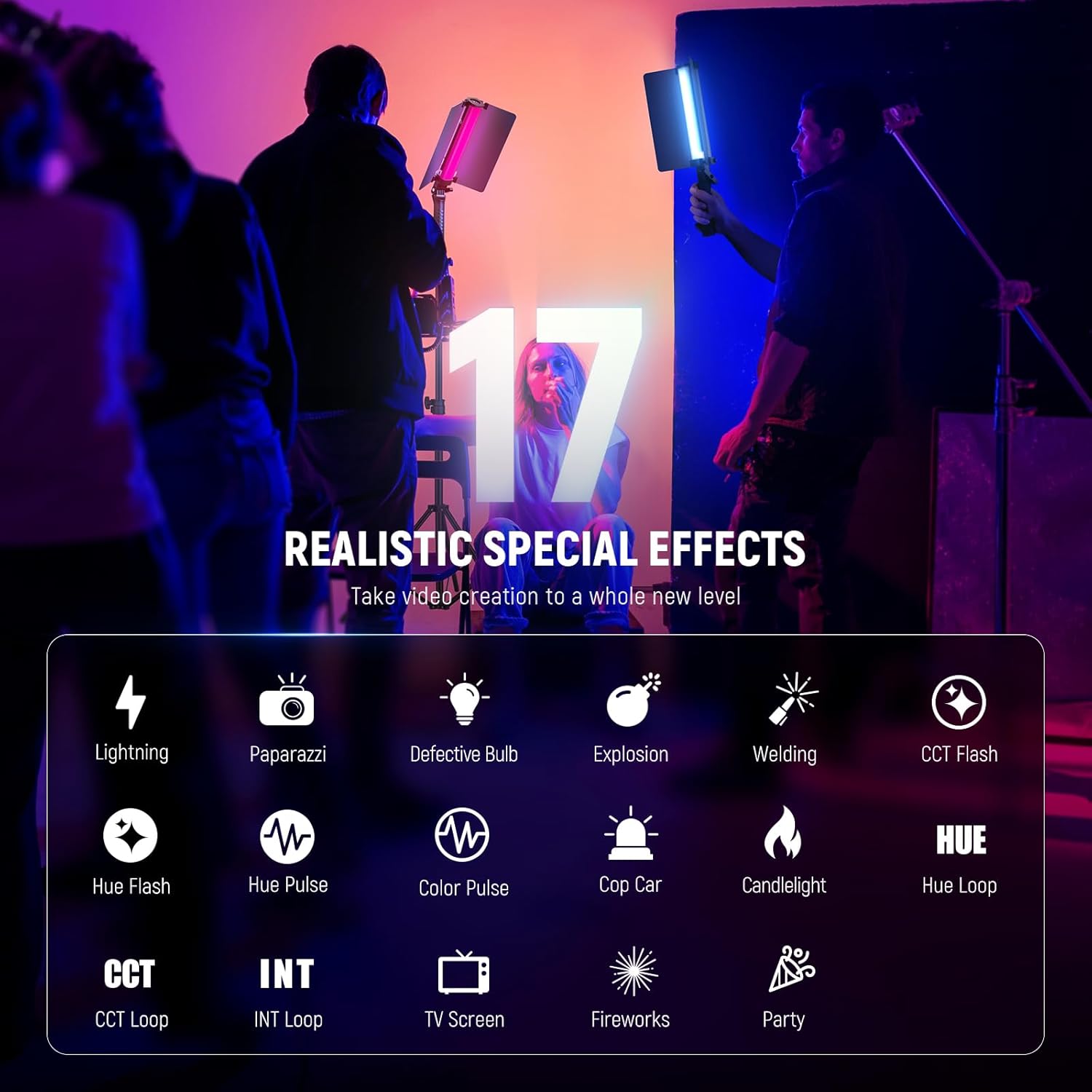
Figure 6: 17 Realistic Special Effects. This image displays the various scene options available, such as Lightning, Paparazzi, Candlelight, and more.
앱 제어
The NEEWER RGB1 LED Tube Light Stick can be controlled wirelessly via the 'NEEWER' app, available for iOS and Android devices. This allows for convenient remote adjustments and access to advanced features.
앱에 연결하기
- Download the 'NEEWER' app from your device's app store.
- 스마트폰에서 Bluetooth가 활성화되어 있는지 확인하세요.
- Power on the RGB1 light stick.
- Open the NEEWER app and follow the on-screen instructions to connect to your device. For Android users, location/GPS services may need to be enabled, and the Bluetooth icon on the light should be blinking during connection.
앱 기능
- Pick any color using an RGB color wheel.
- Adjust brightness, color temperature, hue, and saturation.
- Select and customize scenes.
- Save custom presets.
- Utilize the Source Match function.

Figure 7: App Wireless Control Interface. This image shows the NEEWER app interface on a smartphone, demonstrating the various controls for the RGB1 light stick.
Video 1: NEEWER RGB1 LED Tube Light Stick with Metal Barndoor. This video demonstrates the features and functionality of the NEEWER RGB1 LED Tube Light Stick, including its metal barndoor and various lighting modes.
유지
청소
To clean the light stick, use a soft, dry cloth. Avoid using abrasive cleaners or solvents, as these can damage the surface or internal components.
배터리 관리
- 처음 사용하기 전에 배터리를 완전히 충전하십시오.
- 최적의 배터리 수명을 위해 배터리를 자주 완전히 방전시키지 마세요.
- If storing the device for an extended period, charge it to approximately 50% and recharge every 3-6 months to prevent deep discharge.
- Always power off the device completely when not in use to prevent battery drain, especially if Bluetooth is enabled.
저장
Store the light stick in its included pouch or waterproof bag in a cool, dry place away from direct sunlight and extreme temperatures.
문제 해결
불이 켜지지 않음
- Ensure the battery is charged. Connect the USB Type-C cable to a power source and check the charging indicator.
- Perform a long press on the power button to ensure it is properly activated.
앱 연결 문제
- Verify Bluetooth is enabled on your smartphone and the light stick.
- For Android devices, ensure location/GPS services are active.
- Try resetting the Bluetooth connection on the light stick by long pressing the '2.4G/Bluetooth Mode' button for 5 seconds.
- Ensure the light stick is within the 164ft/50m wireless control range.
배터리가 빠르게 소모됨
- If the light stick is left in Bluetooth standby mode, it may experience significant battery drain. Always power off the device completely when not in use.
- Ensure the light is not operating at 100% brightness for extended periods, as this consumes more power.
명세서
| 특징 | 사양 |
|---|---|
| 모델 번호 | RGB1 |
| 패키지 크기 | 12.76 x 6.22 x 2.95 인치 |
| 품목 무게 | 2.73파운드 |
| 필요한 배터리 | 내장형 6400mAh 충전식 배터리 |
| 배터리 용량 | 6400mAh |
| 배터리 사용 시간 (밝기 100% 기준) | 90 분 |
| 연결 기술 | USB, 블루투스 |
| 하드웨어 인터페이스 | USB 타입-C |
| 색온도 범위 | 3200K-5600K |
| 크리 | 98+ |
| LED | 150 SMD LED |
보증 및 지원
보증 정보 또는 기술 지원에 대해서는 NEEWER 공식 웹사이트를 참조하십시오. web사이트를 방문하거나 고객 서비스에 직접 문의하세요. 보증 청구에 대비해 구매 증빙 자료로 구매 영수증을 보관하세요.


