1. 중요 안전 지침
전기 제품을 사용할 때는 화재, 감전 및/또는 인명 부상의 위험을 줄이기 위해 다음 사항을 포함한 기본적인 안전 예방 조치를 항상 따라야 합니다.
- 모든 지침을 읽으세요.
- 뜨거운 표면을 만지지 마십시오. 손잡이나 손잡이를 사용하십시오.
- 화재, 감전 및 신체적 부상을 예방하려면 코드, 플러그 또는 기기를 물이나 기타 액체에 담그지 마십시오.
- 어린이가 가전제품을 사용하거나 어린이 근처에서 사용할 때는 면밀한 감독이 필요합니다.
- 사용하지 않을 때와 세척하기 전에는 콘센트에서 플러그를 뽑으세요. 부품을 끼우거나 떼기 전에 식힌 후, 그리고 기기를 세척하기 전에 식히세요.
- 손상된 코드나 플러그가 있는 기기나 기기가 오작동하거나 어떤 식으로든 손상된 후에는 기기를 작동하지 마십시오. 기기를 가장 가까운 공인 서비스 시설로 돌려보내 검사, 수리 또는 조정하십시오.
- 기기 제조업체에서 권장하지 않는 부속품을 사용하면 화재, 감전 또는 부상이 발생할 수 있습니다.
- 옥외에서는 사용하지 마십시오.
- 코드가 테이블이나 카운터 가장자리에 걸려 있거나 뜨거운 표면에 닿지 않도록 하세요.
- 뜨거운 가스나 전기 버너 근처 또는 가열된 오븐에 두지 마십시오.
- 항상 제품에 플러그를 먼저 꽂은 후, 코드를 벽면 콘센트에 꽂으세요. 전원을 끊으려면 모든 조절기를 "끔"으로 돌린 후 벽면 콘센트에서 플러그를 뽑으세요.
- 본 제품을 본래 용도 외에는 사용하지 마십시오.
- 커피를 끓이는 동안 뚜껑을 열면 화상을 입을 수 있습니다.
- 우유통은이 제품에만 사용하도록 설계되었습니다. 레인지 상단에서 사용해서는 안됩니다.
- 뜨거운 카라페를 차갑거나 젖은 표면 위에 올려놓지 마세요.
- 깨진 카라페나 손잡이가 느슨하거나 약해진 카라페는 사용하지 마세요.
- 세척제, 스틸 울 패드 또는 기타 연마재로 우유통을 청소하지 마십시오.
2. 제품 구성품
The Gevi 10-Cup Grind & Brew Coffee Maker includes the following components:
- 1 x Drip Coffee Maker (Main Unit)
- 1 x Glass Coffee Pot (Carafe)
- 1 스쿱
- 1 x Permanent Filter
- 1 x Filter Ring
- 1 x Removable Filter Holder
- 1 x 매뉴얼

Figure 2.1: Included components of the Gevi 10-Cup Grind & Brew Coffee Maker.
3. 설정
3.1 초기 청소
Before first use, wash all removable parts (glass carafe, scoop, permanent filter, filter ring, removable filter holder, and water tank) in warm, soapy water. Rinse thoroughly and dry. Wipe the exterior of the coffee maker with a soft, damp 옷감.
3.2 조립
- Install the Filter Holder: Open the swing-out filter basket. Place the removable filter holder into its designated slot.
- Insert Permanent Filter: Place the permanent filter into the removable filter holder.
- Add Filter Ring: Place the filter ring on top of the permanent filter.
- 카라페 위치: 빈 유리 카라페를 보온판 위에 올려놓습니다.
- 물 탱크 채우기: Open the water tank lid. Fill the removable water tank with clean, room-temperature water up to the desired cup mark (e.g., MAX 10). Ensure the water level matches the amount of coffee you intend to brew.
- 물탱크 닫기: 물탱크 뚜껑을 단단히 닫으세요.

Figure 3.1: Removable and visible water tank.
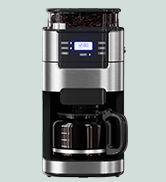
Figure 3.2: Adding water to the tank.
Video 3.1: Step-by-step guide on how to set up the Gevi 10-Cup Grind & Brew Coffee Maker.
4. 사용 설명서
4.1 Making Coffee with Whole Beans
- 기계 준비: Ensure the filter holder, permanent filter, filter ring, and carafe are correctly in place, and the water tank is filled to the desired level.
- 커피콩 추가: Open the bean hopper lid and add whole coffee beans using the provided scoop. Close the bean hopper lid.
- 분쇄도 조절: Rotate the grind regulator on the bean hopper to select your preferred grind size (finer or coarser).
- 전원 켜기: Plug in the coffee maker and press the 켜짐/꺼짐 버튼을 눌러 켜세요.
- 컵 사이즈 선택: 를 누르세요 그라인드 컵 button to select the desired number of cups (4-10).
- Choose Brewing Style: 를 누르세요 요리법 button to cycle through the available brewing styles: CLASSIC, INTENSE, RICH, or ICE.
- 양조 시작: 를 누르세요 켜짐/꺼짐 button again to start the grinding and brewing process. The machine will automatically grind the beans and then brew the coffee.
- 보온 기능: After brewing, the warming plate will automatically keep the coffee hot for up to 4 hours (60-240 minutes, adjustable via touchscreen).

Figure 4.1: Adding whole beans or ground coffee.
Video 4.1: Instructions on how to make coffee using whole beans with the Gevi 10-Cup Grind & Brew Coffee Maker.
Video 4.2: Guide to setting the powder amount and strength for brewing.
4.2 Making Coffee with Ground Coffee
- 기계 준비: Ensure the filter holder, permanent filter, filter ring, and carafe are correctly in place, and the water tank is filled to the desired level.
- 분쇄 커피 추가: Add your desired amount of pre-ground coffee into the permanent filter.
- Disable Grinding: 를 누르세요 그라인드 오프 button to ensure the grinder does not activate.
- 전원 켜기: Plug in the coffee maker and press the 켜짐/꺼짐 버튼을 눌러 켜세요.
- 컵 사이즈 선택: 를 누르세요 그라인드 컵 button to select the desired number of cups (4-10).
- Choose Brewing Style: 를 누르세요 요리법 button to cycle through the available brewing styles: CLASSIC, INTENSE, RICH, or ICE.
- 양조 시작: 를 누르세요 켜짐/꺼짐 button again to start the brewing process.
- 보온 기능: After brewing, the warming plate will automatically keep the coffee hot for up to 4 hours (60-240 minutes, adjustable via touchscreen).
Video 4.3: Instructions on how to make coffee using pre-ground coffee with the Gevi 10-Cup Grind & Brew Coffee Maker.
4.3 Programmable Brewing (Delay Brew)
The coffee maker features a 24-hour programmable timer, allowing you to set a delay brew for fresh coffee at a specific time.
- 현재 시간 설정: With the machine plugged in and powered on, use the 시간 그리고 최소 현재 시간을 설정하는 버튼.
- 맥주 양조 준비: Follow steps 1-6 from either "Making Coffee with Whole Beans" or "Making Coffee with Ground Coffee" sections.
- 지연 시간 설정: 를 누르세요 딜레이 브루 button. The display will show "PM" or "AM" and the time will flash. Use the 시간 그리고 최소 buttons to set your desired brew start time.
- Activate Delay Brew: 를 누르세요 딜레이 브루 button again to confirm. The delay brew indicator will light up, and the machine will start brewing at the set time.

Figure 4.2: Setting the 24-hour programmable timer for delay brew.
Video 4.4: Guide on how to set the delay brew function.
Video 4.5: Instructions for scheduling brewing time on the Gevi coffee maker.
5. 유지관리
5.1 일일 청소
- 플러그를 뽑다: 청소하기 전에는 항상 커피 메이커의 플러그를 뽑으세요.
- Clean Carafe: Wash the glass carafe, permanent filter, filter ring, and removable filter holder in warm, soapy water. Rinse thoroughly and dry. These parts are not dishwasher safe.
- 외부 닦기: 커피메이커의 외부 표면(보온판 포함)을 부드러운 천으로 닦으세요.amp 옷감. 연마성 세제나 수세미를 사용하지 마십시오.
5.2 석회질 제거
Mineral deposits (limescale) can build up in your coffee maker over time, affecting performance and coffee taste. Descale your machine regularly (e.g., every 2-3 months, or more often if you have hard water).
- 석회질 제거 용액을 준비하세요: Fill the water tank with a mixture of white vinegar and water (e.g., 1:2 ratio) or a commercial descaling solution according to product instructions.
- 청소 주기 시작: 선택하세요 깨끗한 mode on the touchscreen. Press the 켜짐/꺼짐 button to start the cleaning process. The machine will run a cycle to flush the internal water lines.
- 헹굼 주기: After the descaling cycle is complete, empty the carafe. Fill the water tank with fresh, clean water and run 2-3 full brewing cycles (without coffee) to rinse out any remaining descaling solution.
Video 5.1: Detailed instructions on how to descale the Gevi 10-Cup Drip Coffee Maker.
5.3 Cleaning the Bean Hopper
The bean hopper is removable for easy cleaning. Regularly remove any residual coffee beans or grounds to prevent clogging and maintain optimal grinding performance.
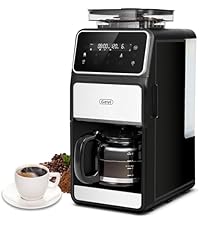
Figure 5.2: Removable bean hopper for easy cleaning.
6. 문제 해결
| 문제 | 가능한 원인 | 해결책 |
|---|---|---|
| 커피가 추출되지 않습니다. | No water in tank; machine not plugged in; delay brew set. | Fill water tank; ensure power connection; check delay brew settings. |
| 연한 커피. | Insufficient coffee grounds; coarse grind setting; incorrect brewing style. | Add more coffee; select finer grind; choose a stronger brewing style (e.g., Intense, Rich). |
| 분쇄기가 작동하지 않습니다. | Bean hopper empty; grind off selected; bean hopper not locked. | Fill bean hopper; ensure GRIND OFF is not selected; ensure bean hopper is locked in place. |
| 커피가 넘친다. | Too much water; filter basket clogged. | Do not overfill water tank; clean filter basket and ensure proper placement. |
| 터치스크린이 응답하지 않습니다. | 일시적인 소프트웨어 오류 및 전원 문제입니다. | Unplug the machine for 30 seconds, then plug back in. If issue persists, contact customer support. |
7. 사양
- 상표: 게비
- 모델 이름: Drip Coffee Machine (DCMF0-BK0A1)
- 색상: 검은색
- 제품 크기: 10.7인치 깊이 x 7.9인치 너비 x 17.8인치 높이
- 품목 무게: 4.7파운드
- 커피 메이커 유형: 드립 커피 머신
- 작동 모드: 완전 자동
- 권tage: 120 볼트
- 커피 입력 유형: 통콩
- 식기세척기는 안전한가요? No (for most components)
- 특징: Programmable, Built-in Burr Grinder, Touch Screen, 4-Hour Keep Warm

Figure 7.1: Product dimensions of the Gevi 10-Cup Grind & Brew Coffee Maker.
8. 보증 및 지원
Every Gevi product (purchased through official or authorized channels) includes a 12-month warranty and lifetime technical support.
If you encounter any problems when using your Gevi coffee machine, please feel free to contact us for assistance.
- 보증 기간: 12개월
- 지원하다: 평생 기술 지원


