1. 소개 및 이상view
The Zoom PodTrak P4next is a portable podcast recorder designed for high-quality audio capture and production. This device offers a comprehensive solution for podcasters, featuring multiple inputs, advanced audio processing, and flexible recording options. Its compact design and battery power capability make it suitable for both studio and on-the-go recording environments.
주요 특징:
- 뛰어난 오디오 품질: 4 XLR inputs with -125 dBu EIN for professional-grade recordings.
- 향상된 휴대성: Lightweight (10.58 oz / 300g) and compact (4.95 x 4.72 x 1.57 inches) for mobile use.
- 배터리 수명 연장: Up to 8.5 hours of continuous recording with lithium batteries.
- 견고한 내구성: Sturdy construction for demanding environments.
- Intuitive Ease of Use: Clear 128 x 64 OLED display and user-friendly controls.
- 내장 효과: AI Noise Reduction, Tone, and Compression.
- 다양한 연결성: Phone input for call-in guests, USB audio interface mode.
- 사운드 패드: Customizable sound pads for instant playback.
2. 설정
2.1 장치 전원 공급
The PodTrak P4next can be powered in multiple ways:
- AA 배터리: Insert 2 AA batteries into the battery compartment located on the underside of the device.
- USB-C 전원: Connect a USB-C cable to the DC 5V port on the side of the unit and to a compatible USB power adapter or power bank.

그림 2.1: 후면 view of the PodTrak P4next, illustrating the battery compartment for 2 AA batteries.

그림 2.2: 측면 view of the PodTrak P4next, highlighting the microSD card slot and USB-C power input.
2.2 마이크 연결
The PodTrak P4next features 4 XLR inputs for connecting microphones. These inputs provide phantom power for condenser microphones.
- Connect your XLR microphones to the corresponding input jacks (1-4) on the top of the device.
- Ensure phantom power is enabled for condenser microphones via the dedicated switches if required.

그림 2.3: 전면 view of the PodTrak P4next, displaying the four XLR microphone inputs at the top.
2.3 헤드폰 연결
Four independent headphone outputs are available for monitoring.
- Plug your headphones into the 3.5mm jacks (1-4) located on the front edge of the device.
- Each output has an individual volume control knob.

그림 2.4: 측면 view of the PodTrak P4next, illustrating the four headphone output jacks and their respective volume controls.
2.4 Inserting SD Card
The PodTrak P4next records directly to an SD card.
- Open the microSD card slot cover on the side of the device.
- microSD 카드(최대 1TB 지원)를 딸깍 소리가 날 때까지 삽입하세요.
그림 2.5: 측면 view of the PodTrak P4next, indicating the microSD card slot for recording media.
2.5 Connecting to Phone/Computer
The device supports external connections for various recording scenarios.
- 전화 입력: Use a TRRS cable to connect your smartphone to the dedicated phone input for recording call-in guests.
- USB 오디오 인터페이스: Connect the PodTrak P4next to a computer via USB-C to use it as an audio interface for recording directly to your digital audio workstation (DAW).

Figure 2.6: The PodTrak P4next connected to a smartphone, demonstrating its capability to integrate phone calls into your podcast.
3. Operating the PodTrak P4next
3.1 기본 녹음
녹음을 시작하려면:
- Ensure microphones and headphones are connected and powered.
- Adjust the gain knobs for each microphone input to achieve optimal levels, avoiding clipping.
- 빨간색을 눌러 기록 button to start recording. The button will illuminate.
- 를 누르세요 기록 버튼을 다시 눌러 녹음을 중지합니다.
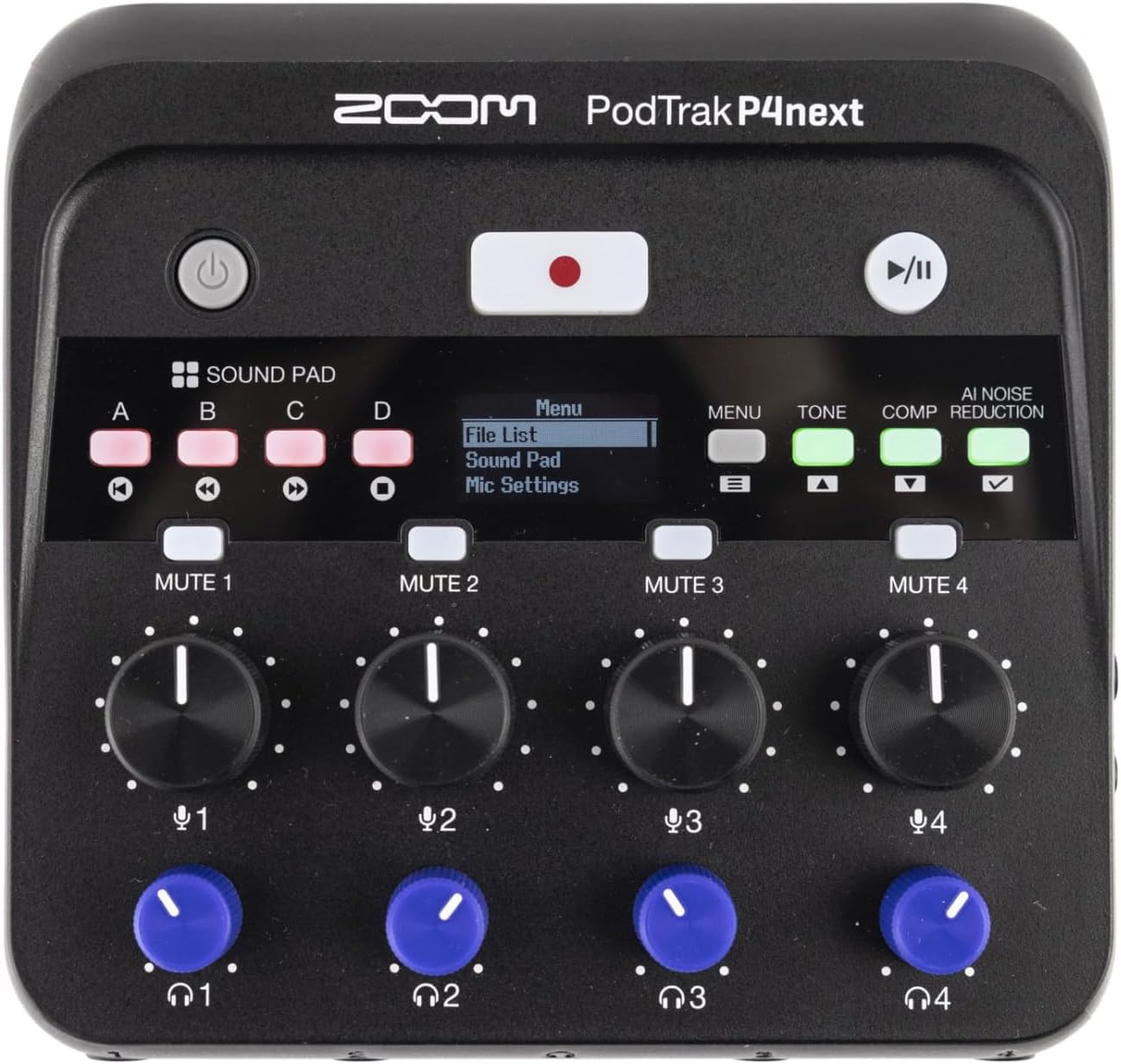
그림 3.1: 상향식 view of the PodTrak P4next, highlighting the main controls including the record button and input gain knobs.
3.2 사운드 패드
The four sound pads (A, B, C, D) can be used to trigger pre-recorded audio clips or sound effects during your podcast.
- Press a sound pad button (A, B, C, or D) to play the assigned sound.
- Adjust the volume of the sound pads using the dedicated knob.
3.3 음소거 버튼
Each microphone input has a dedicated mute button (MUTE 1-4) to quickly silence a participant.
- 를 누르세요 음소거 button for the desired channel to mute it. The button will illuminate to indicate it is muted.
- 다시 누르면 음소거가 해제됩니다.
3.4 Audio Effects (AI Noise Reduction, Tone, Comp)
Enhance your audio with built-in effects:
- AI 노이즈 감소: Activates intelligent noise cancellation to minimize background distractions.
- 음정: Adjusts the tonal characteristics of the audio.
- Comp (Compression): Applies compression to even out audio levels.
- Press the respective buttons (AI NOISE REDUCTION, TONE, COMP) to toggle these effects on or off.

그림 3.2: 클로즈업 view of the PodTrak P4next's control panel, highlighting the AI Noise Reduction, Tone, and Compression effect buttons.
3.5 Recording Phone Calls and USB Audio
The PodTrak P4next allows seamless integration of phone calls and USB audio.
- Connect your phone to the dedicated input using a TRRS cable. The device automatically creates a mix-minus feed to prevent echo for the caller.
- When connected as a USB audio interface, audio from your computer can be routed through the P4next and recorded alongside your microphones.
4. 유지관리
Proper maintenance ensures the longevity and optimal performance of your PodTrak P4next.
- 청소: 기기 외부를 닦을 때는 부드럽고 마른 천을 사용하십시오. 연마성 세척제나 용제는 사용하지 마십시오.
- 저장: 직사광선과 극한 온도 변화를 피해 서늘하고 건조한 곳에 보관하십시오. 장기간 보관 시에는 누액 방지를 위해 배터리를 제거하십시오.
- 펌웨어 업데이트: Zoom 공식 웹사이트를 주기적으로 확인하세요. web장치에 최신 기능과 버그 수정 사항이 적용되었는지 확인하려면 펌웨어 업데이트 사이트를 방문하세요.
5. 문제 해결
If you encounter issues with your PodTrak P4next, refer to the following common solutions:
- 전원 없음: Ensure batteries are correctly inserted and charged, or that the USB-C power source is functioning.
- 오디오 입력 없음: Check microphone connections, ensure phantom power is on for condenser mics, and verify gain levels are appropriately set.
- No Headphone Audio: Confirm headphones are plugged in correctly and individual headphone volume knobs are turned up.
- 녹음 문제: Check if the SD card is properly inserted and has sufficient free space. Ensure the card is formatted correctly (FAT32).
- Echo on Phone Calls: The P4next features automatic mix-minus. Ensure your phone is connected via a TRRS cable to the dedicated phone input.
6. 사양
| 특징 | 사양 |
|---|---|
| 품목 무게 | 12 온스(340g) |
| 제품 치수 | 4.95 x 4.72 x 1.57인치(12.57 x 11.99 x 3.99cm) |
| 품목 모델 번호 | P4next/230EU |
| 마이크 입력 | 4 x XLR (with -125 dBu EIN) |
| 헤드폰 출력 | 4 x 3.5mm stereo mini jack (with individual volume control) |
| 기록 매체 | microSD/microSDHC/microSDXC card (up to 1TB) |
| 배터리 수명 | (리튬 배터리 사용 시) 최대 8.5시간 |
| Audio Interface Mode | USB-C를 통해 지원됨 |
7. 공식 제품 영상
Video 7.1: An official introduction to the Zoom PodTrak P4next, showcasin디자인과 주요 특징.
8. 보증 및 지원
For warranty information, technical support, and additional resources, please visit the official Zoom web사이트를 방문하거나 고객 서비스 부서에 문의하세요. 보증 청구를 위해 구매 증빙 자료를 보관하세요.
- 온라인 지원: Visit the Zoom Store on Amazon
- 제품 등록 : 제품을 온라인으로 등록하면 업데이트와 지원을 받을 수 있습니다.


