1. 서론
The Audizio Desio is a versatile digital radio that combines classic aesthetics with modern audio technology. It features DAB, DAB+, and FM tuning for clear radio reception, along with Bluetooth 5.0 for wireless streaming, a USB port for media playback, and a 3.5mm AUX input for wired connections. The radio is equipped with a 2.4-inch color LCD display and integrated stereo speakers, making it suitable for various environments such as living rooms, kitchens, or bedrooms.
This manual provides detailed instructions for setting up, operating, and maintaining your Audizio Desio radio. Please read it thoroughly before use to ensure proper functionality and to maximize your listening experience.
2. 안전 정보
- 전원 어댑터의 볼륨을 확인하세요tag연결하기 전에 해당 지역의 전원 공급 장치와 일치해야 합니다.
- 본 제품을 비, 습기 또는 극한의 온도에 노출시키지 마십시오.
- 장치를 열원 근처나 직사광선에 노출시키지 마십시오.
- c를 열지 마세요asing; 모든 서비스는 자격을 갖춘 인력에게 의뢰하세요.
- 장치를 강한 자기장으로부터 멀리 두십시오.
- 부드럽고 마른 천으로만 장치를 청소하십시오.
3. 패키지 내용
포장을 풀 때 모든 품목이 있는지 확인하세요.
- Audizio Desio DAB/DAB+/FM Radio
- 전원 어댑터(DC 5V)
- 원격 제어
- 사용자 설명서
4. 제어 및 연결
전면 패널 컨트롤
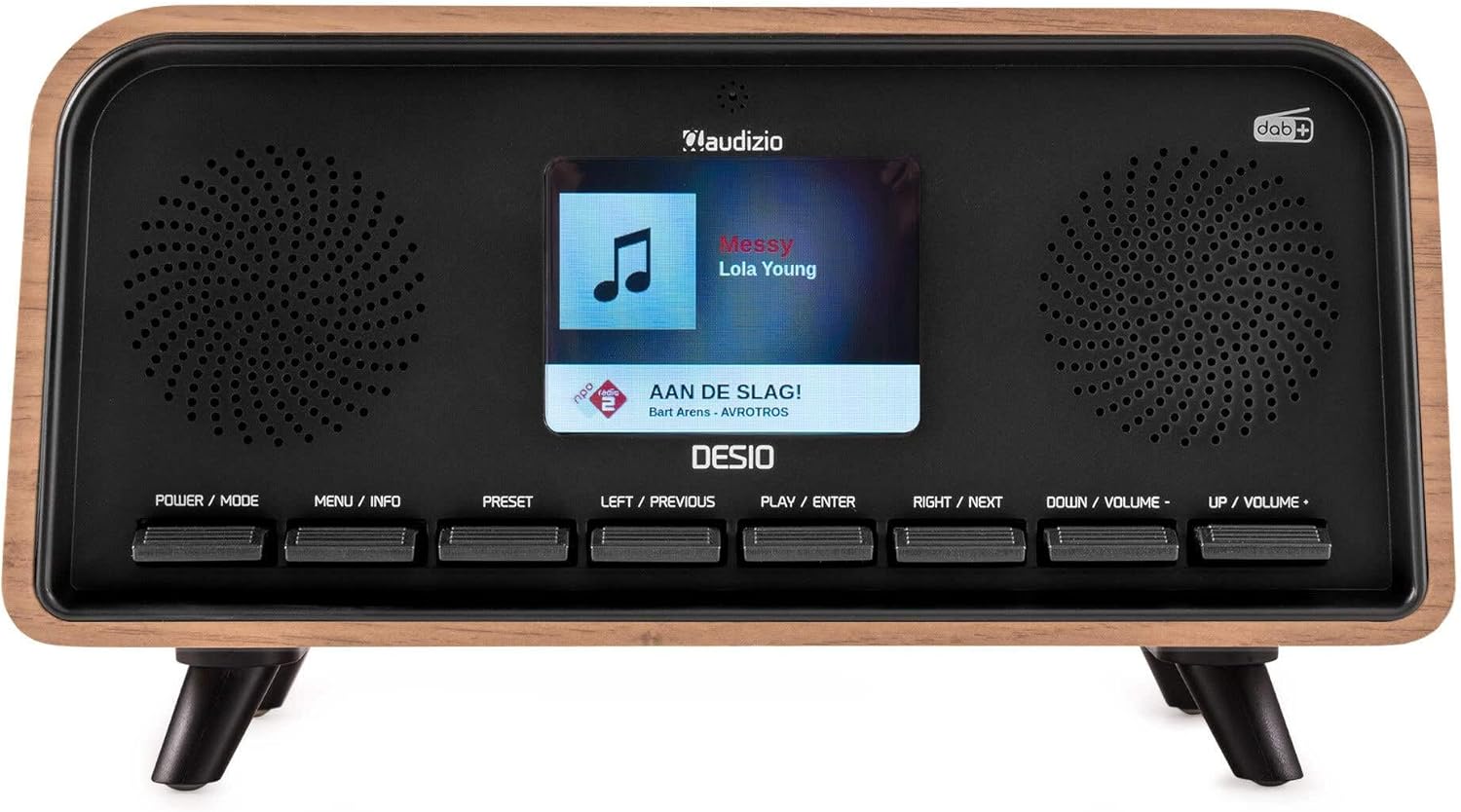
앞쪽 view of the Audizio Desio radio, showing the display playing music with artist and track information. The control buttons are visible below the screen.
- POWER / MODE: Press to turn on/off. Press and hold to switch between DAB, FM, Bluetooth, USB, and AUX modes.
- MENU / INFO: Press to access menu options. In playback mode, press to cycle through information display.
- 사전 설정 : Press to recall saved stations. Press and hold to save current station.
- LEFT / PREVIOUS: Navigate left in menus, or skip to previous track/station.
- PLAY / ENTER: Confirm selection in menus, or play/pause media.
- RIGHT / NEXT: Navigate right in menus, or skip to next track/station.
- DOWN / VOLUME -: Decrease volume, or navigate down in menus.
- UP / VOLUME +: Increase volume, or navigate up in menus.
후면 패널 연결
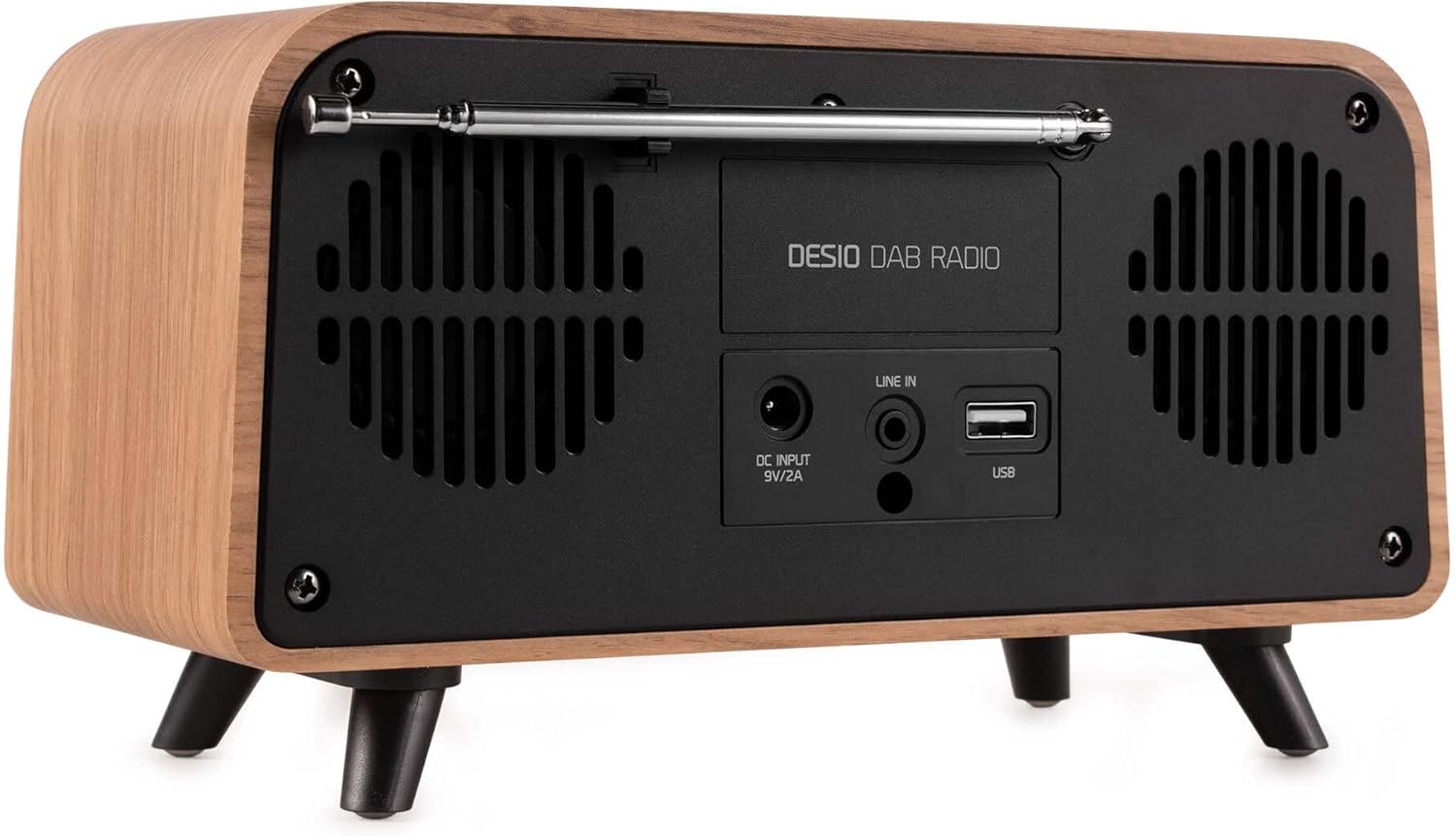
뒤쪽 view of the Audizio Desio radio, highlighting the DC INPUT 9V/2A, LINE IN (3.5mm AUX), and USB ports. The telescopic antenna is extended.
- DC INPUT 9V/2A: 제공된 전원 어댑터를 여기에 연결하세요.
- LINE IN (3.5mm AUX): 3.5mm 오디오 케이블을 사용하여 외부 오디오 장치를 연결합니다.
- USB: MP3 재생을 위해 USB 플래시 드라이브를 삽입하세요.
- 텔레스코픽 안테나: Extend fully for optimal DAB/DAB+ and FM reception.
5. 초기 설정
- 전원 연결: Plug the provided DC 5V power adapter into the DC INPUT port on the rear of the radio, then plug the adapter into a wall outlet.
- 안테나 확장: Fully extend the telescopic antenna located on the rear of the unit for best reception.
- 전원 켜기: 를 누르세요 전원 / 모드 버튼을 눌러 라디오를 켭니다.
- First-time DAB Scan: Upon first power-on, the radio will automatically perform a full scan for DAB/DAB+ stations. This may take a few minutes. The display will show the scanning progress.
- 시간/날짜 설정: The time and date will usually be set automatically via DAB signal. If not, you can manually set them via the menu.
6. 사용 설명서
6.1 DAB/DAB+ 라디오 작동

앞쪽 view of the Audizio Desio radio, displaying a DAB radio station ('NPO Klassiek') and current time.
- Select DAB Mode: 를 누르세요 전원 / 모드 button repeatedly until 'DAB' is displayed.
- 방송국 검색: If no stations are found or you wish to rescan, press 메뉴 / 정보, 그런 다음 사용하세요 LEFT / PREVIOUS or 바로 옆에 to select 'Full Scan' and press PLAY / ENTER.
- 역을 선택하세요: 사용하세요 LEFT / PREVIOUS or 바로 옆에 buttons to browse available stations. Press PLAY / ENTER 방송국을 선택합니다.
- 사전 설정 저장 : 방송국을 저장하려면 버튼을 길게 누르세요. 사전 설정 단추. 사용하다 LEFT / PREVIOUS or 바로 옆에 to choose a preset number (1-50), then press PLAY / ENTER 확인합니다.
- 프리셋 불러오기: 저장된 방송국을 불러오려면 버튼을 누르세요. 사전 설정 button (do not hold). Use LEFT / PREVIOUS or 바로 옆에 원하는 사전 설정을 선택한 다음 누르세요. PLAY / ENTER.

앞쪽 view of the Audizio Desio radio, showing the 'Preset Recall' menu on the display, indicating empty preset slots.
6.2 FM 라디오 작동
- FM 모드를 선택하세요: 를 누르세요 전원 / 모드 button repeatedly until 'FM' is displayed.
- 자동 스캔: 누르고 있으세요 PLAY / ENTER 사용 가능한 FM 방송국을 자동으로 검색하고 저장합니다.
- 수동 조정 : 사용 LEFT / PREVIOUS or 바로 옆에 주파수를 미세 조정하기 위해.
- Save/Recall Presets: Follow the same procedure as for DAB radio (Section 6.1).
6.3 Bluetooth (BT) Operation

앞쪽 view of the Audizio Desio radio, with the display showing 'BT' (Bluetooth) mode and 'Connected' status.
- 블루투스 모드를 선택하세요: 를 누르세요 전원 / 모드 button repeatedly until 'BT' is displayed. The radio will enter pairing mode, indicated by a flashing Bluetooth icon.
- 페어링 장치: On your smartphone, tablet, or laptop, enable Bluetooth and search for available devices. Select 'Audizio Desio' from the list.
- 연결하다: Once paired, the display will show 'Connected'. You can now stream audio from your device to the radio.
- 재생 제어: Use your connected device or the radio's PLAY / ENTER, LEFT / PREVIOUS, 그리고 바로 옆에 재생을 제어하는 버튼.
6.4 USB 재생

앞쪽 view of the Audizio Desio radio, with the display showing 'USB' mode, current time, and details of an MP3 file 연주되고 있습니다.
- USB 드라이브를 삽입하세요: MP3 파일이 들어 있는 USB 플래시 드라이브(FAT32 형식으로 포맷됨)를 삽입하세요. file라디오 뒷면의 USB 포트에 연결하세요.
- USB 모드 선택: 를 누르세요 전원 / 모드 button repeatedly until 'USB' is displayed. The radio will automatically start playing the first compatible audio file.
- 탐색하다 Files: 사용 LEFT / PREVIOUS or 바로 옆에 to skip tracks. Press PLAY / ENTER 재생을 일시 중지/다시 시작합니다.
6.5 AUX 입력
- 장치 연결: Connect an external audio device (e.g., MP3 player, smartphone) to the 'LINE IN' (3.5mm AUX) port on the rear of the radio using a 3.5mm audio cable (not included).
- AUX 모드를 선택하세요: 를 누르세요 전원 / 모드 button repeatedly until 'AUX' is displayed.
- 재생 제어: Playback is controlled directly from your connected external device. Adjust volume using the radio's volume controls.
6.6 알람 및 타이머 기능
- 알람 설정: 알람 설정은 다음을 통해 접근할 수 있습니다. 메뉴 / 정보 button. You can set multiple alarms with customizable sources (DAB, FM, Buzzer), volume, and recurrence (daily, weekdays, weekends).
- 수면 타이머 : The sleep timer allows the radio to turn off automatically after a set period. Access this function via the 메뉴 / 정보 button and select the desired duration.
- 스누즈 기능 : When an alarm sounds, press any button (except Power) to activate the snooze function for a short period.
7. 유지관리
- 청소: Use a soft, dry, lint-free cloth to clean the radio's surface. Do not use abrasive cleaners, waxes, or solvents.
- 안테나 관리: 접이식 안테나는 구부러지거나 부러지지 않도록 조심스럽게 다루십시오.
- 저장: 라디오를 장기간 보관할 경우 전원 공급 장치에서 분리하고 서늘하고 건조한 곳에 보관하십시오.
8. 문제 해결
| 문제 | 가능한 원인 | 해결책 |
|---|---|---|
| 전원이 없습니다 | 전원 어댑터가 연결되지 않았거나 콘센트에 결함이 있습니다. | 전원 어댑터 연결 상태를 확인하고 다른 콘센트에 연결해 보세요. |
| DAB/FM 수신 상태가 좋지 않음 | Antenna not fully extended or poor signal area. | Fully extend the antenna. Try repositioning the radio. Perform a full scan. |
| 블루투스가 연결되지 않습니다 | Radio not in BT mode, device not in pairing mode, or too far away. | Ensure radio is in BT mode. Put your device in pairing mode. Move device closer to the radio (within 10m). |
| USB 재생이 작동하지 않습니다 | USB drive not inserted correctly, unsupported file format, or drive not FAT32. | USB 드라이브를 다시 삽입하십시오. files are MP3. Check USB drive format (FAT32). |
| AUX에서 소리가 나지 않습니다 | Radio not in AUX mode, cable faulty, or external device volume low. | Select AUX mode. Check 3.5mm cable. Increase volume on both radio and external device. |
9. 기술 사양
- 상표: 오디지오
- 모델: Desio
- 튜너 기술: FM, DAB+
- 블루투스: Version 5.0 (Range: 10m)
- 재생 옵션: Bluetooth, USB, 3.5mm AUX input
- 사전 설정된 방송국: 50
- 표시하다: 2.4 인치 컬러 LCD
- 기능: Alarm, Sleep Timer, Snooze, Dimming, Week/Weekend Alarm
- Max Speaker Power: 30와트
- 전원 공급 장치: DC 5V (Power Adapter)
- 제품 치수(H x W x D): 32 x 16 x 18cm
- 무게: 1.66kg
10. 보증 및 지원
This product comes with a standard manufacturer's warranty. For detailed warranty terms and conditions, please refer to the documentation provided at the time of purchase or contact your retailer.
For technical support, troubleshooting assistance, or service inquiries, please contact the Audizio customer support team or your local dealer. Please have your product model number (Desio) and purchase information ready when contacting support.


