1. 서론
Thank you for choosing the ATLETICA Flash Folding Treadmill. This manual provides essential information for the safe and efficient use of your new fitness equipment. Please read it thoroughly before assembly, operation, or maintenance. Proper use and care will ensure a long lifespan for your treadmill and a safe workout experience.
The ATLETICA Flash treadmill is designed for home use, offering a compact and foldable design with a powerful 4.5 HP motor, a running surface of 140 x 50 cm, 12 incline levels, and 36 pre-set training programs, including Zwift compatibility.
2. 중요 안전 지침
경고: To reduce the risk of serious injury, read all instructions before using this treadmill. ATLETICA assumes no responsibility for personal injury or property damage sustained by or through the use of this product.
- 운동 프로그램을 시작하기 전에 의사와 상담하십시오.
- 항상 어린이와 애완동물을 런닝머신에 가까이 두지 마십시오.
- 러닝머신을 단단하고 평평한 표면에 놓고 뒤쪽으로 최소 2미터(6.5피트), 양쪽 측면으로 0.6미터(2피트)의 여유 공간을 확보하십시오.
- Ensure the safety key is properly attached to your clothing during operation.
- 코드나 플러그가 손상되었거나, 제대로 작동하지 않는 경우에는 러닝머신을 작동하지 마세요.
- 적절한 운동복과 운동화를 착용하세요. 몸에 걸릴 수 있는 헐렁한 옷은 피하세요.
- Do not use the treadmill outdoors or in areas of high humidity.
- Always hold the handrails when starting or stopping the treadmill, or when making speed/incline adjustments.
- 벨트가 움직이는 동안에는 절대로 런닝머신에 오르거나 내리지 마십시오.
- Disconnect the power cord from the outlet when not in use, before cleaning, and before performing maintenance.
- This treadmill is designed for adult home use only.
3. 설정
3.1 풀기
Carefully remove all components from the packaging. Inspect for any damage during transit. Retain packaging materials until you are satisfied with the product.
3.2 배치
Choose a flat, stable surface for your treadmill. Ensure adequate clearance around the unit as specified in the safety instructions. Avoid placing it near water or in direct sunlight.
3.3 러닝머신 펼치기
The ATLETICA Flash treadmill comes pre-assembled and folded for transport. To unfold:
- 러닝머신이 안정적인 표면에 놓여 있는지 확인하십시오.
- Locate the folding mechanism release (refer to image below).
- Gently lower the running deck until it is fully flat on the floor. Ensure it locks securely into place.
- Raise the console mast to its upright position and secure it if necessary.

Image: ATLETICA Flash Treadmill in its unfolded, operational position, view측면에서 에드.
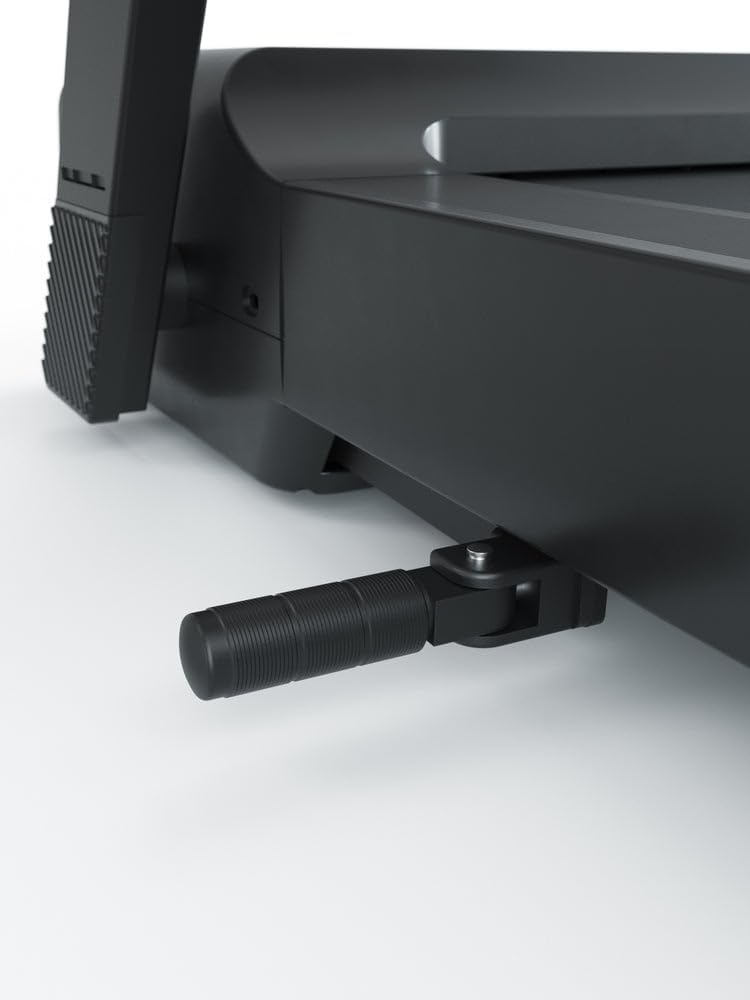
이미지: 클로즈업 view of the folding mechanism or foot support on the ATLETICA Flash Treadmill.
3.4 Folding the Treadmill for Storage
To fold the treadmill for space-saving storage:
- 러닝머신의 전원이 꺼져 있고 플러그가 뽑혀 있는지 확인하세요.
- Carefully lift the running deck until it clicks into the upright, folded position.
- Verify that the deck is securely locked to prevent accidental unfolding.
- The treadmill can then be moved using its transport wheels.
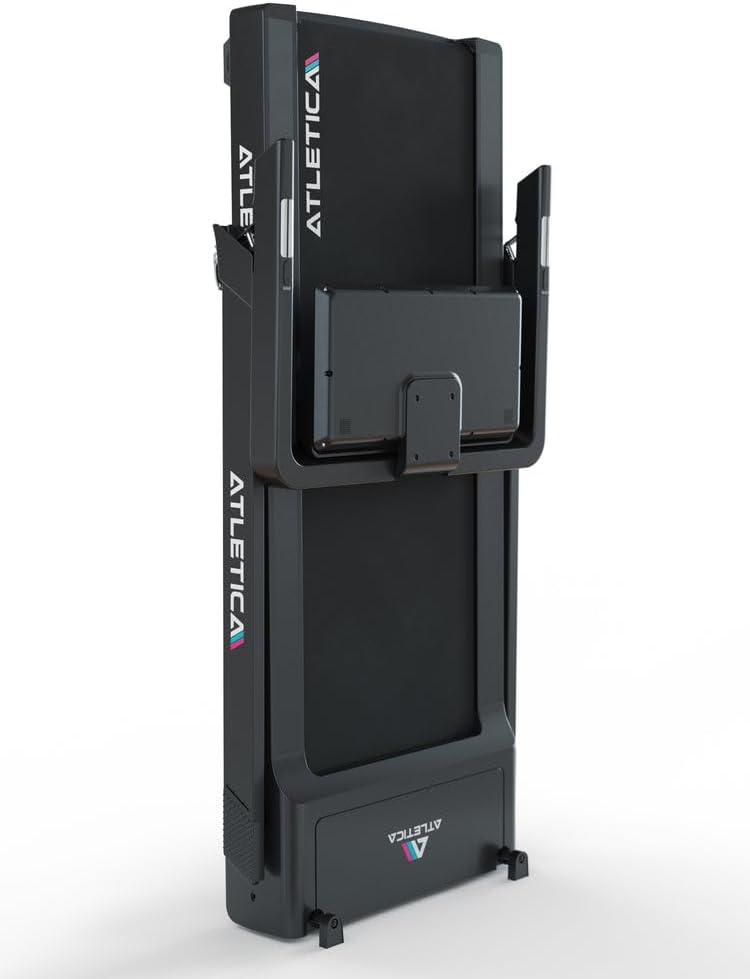
Image: The ATLETICA Flash Treadmill shown in its vertically folded position, ideal for compact storage.
3.5 전원 연결
Connect the power cord to a grounded electrical outlet. Ensure the power switch on the treadmill is in the "ON" position.
4. 운영
4.1 콘솔 종료view
The console displays key workout metrics and allows control over speed, incline, and programs.

이미지: 자세한 view of the ATLETICA Flash Treadmill's control console, showing digital readouts for calories, speed, time, distance, incline, and heart rate.
Typical displays include:
- 시간: 운동 시간.
- 거리: 이동한 총 거리.
- 속도: Current speed of the running belt (up to 16 km/h).
- 경사: Current incline level (0-12 levels, up to 6%).
- 칼로리: 추정 칼로리 소모량
- 심박수: (If equipped with sensors) Your pulse during exercise.
4.2 운동 시작하기
- 러닝머신 위로 올라가서 발을 측면 레일에 올려놓으세요.
- Attach the safety key clip to your clothing. Insert the safety key into its designated slot on the console.
- 를 누르세요 시작 버튼을 누르세요. 벨트가 저속으로 움직이기 시작합니다.
- 움직이는 벨트 위로 조심스럽게 올라서서 걷기 시작하세요.
4.3 속도 및 경사 조절
Speed and incline can be adjusted using the controls on the console or the convenient side adjustment controls.
- 사용하세요 속도 +/- buttons to increase or decrease the belt speed.
- 사용하세요 인클라인 +/- buttons to adjust the incline level.
- The side adjustment controls allow for quick changes without interrupting your stride.
4.4 사전 설정 프로그램 사용
The ATLETICA Flash treadmill features 36 pre-set training programs designed for various fitness goals.
- 메인 메뉴에서 프로그램 단추.
- Browse through the available programs using the +/- 버튼.
- Select your desired program and press 시작 시작하다.
- The treadmill will automatically adjust speed and incline according to the program profile.
4.5 Zwift Connectivity
The treadmill is compatible with Zwift, allowing you to connect and engage in virtual running experiences.
- Download and install the Zwift application on your compatible device (smartphone, tablet, PC).
- 기기에서 Bluetooth가 활성화되어 있는지 확인하세요.
- Follow the instructions within the Zwift app to pair your ATLETICA Flash treadmill.
- Once paired, your speed and incline data will be transmitted to Zwift, and Zwift can control your treadmill's incline.
4.6 운동 중단
- 를 누르세요 멈추다 button. The belt will gradually slow down and stop.
- Alternatively, pull the safety key from the console. The treadmill will stop immediately.
- 벨트가 완전히 멈추면 런닝머신에서 내려오세요.
5. 유지관리
Regular maintenance ensures optimal performance and extends the lifespan of your treadmill. Always unplug the treadmill before performing any maintenance.
5.1 청소
- 콘솔과 기타 표면을 광고로 닦으세요.amp 사용 후에는 천으로 닦아주세요. 연마성 세제나 용제는 사용하지 마세요.
- 러닝머신 아래쪽을 주기적으로 진공청소기로 청소하여 먼지와 이물질이 쌓이는 것을 방지하십시오.
5.2 런닝 벨트 윤활
The running belt requires periodic lubrication to reduce friction and wear. The frequency depends on usage:
- Light use (less than 3 hours/week): Every 6 months.
- Moderate use (3-5 hours/week): Every 3 months.
- Heavy use (more than 5 hours/week): Every 6-8 weeks.
윤활하려면:
- 런닝머신을 끄고 플러그를 뽑으세요.
- 벨트를 들어 올리려면 뒤쪽 롤러 볼트를 약간 풀어주세요.
- Apply a thin line of 100% silicone lubricant (specifically designed for treadmills) under the center of the belt, from front to back.
- 뒷쪽 롤러 볼트를 조이세요.
- Run the treadmill at a slow speed (e.g., 3 km/h) for 5 minutes to distribute the lubricant.
5.3 런닝 벨트 조정
러닝 벨트가 한쪽으로 치우치거나 미끄러지면 조정이 필요할 수 있습니다.
- 벨트 중앙 정렬: If the belt drifts to the left, turn the left rear roller bolt clockwise 1/4 turn. If it drifts to the right, turn the right rear roller bolt clockwise 1/4 turn. Run the treadmill for 2 minutes and re-check. Repeat until centered.
- 벨트 조이기: If the belt slips during use, turn both rear roller bolts clockwise 1/4 turn simultaneously. Run the treadmill for 2 minutes and re-check. Repeat until slipping stops. Do not overtighten.
6. 문제 해결
This section addresses common issues you might encounter with your ATLETICA Flash treadmill.
| 문제 | 가능한 원인 | 해결책 |
|---|---|---|
| 러닝머신의 전원이 켜지지 않습니다. | Power cord unplugged, power switch off, circuit breaker tripped, safety key not inserted. | Check power cord connection, ensure power switch is ON, reset circuit breaker, insert safety key. |
| 작동 벨트가 갑자기 멈춥니다. | Safety key dislodged, motor overload, power interruption. | Re-insert safety key, reduce load, check power supply. |
| 러닝 벨트 슬립. | 벨트가 너무 느슨해서 벨트에 윤활유를 바르는 것이 필요합니다. | Adjust belt tension (see Section 5.3), lubricate belt (see Section 5.2). |
| 런닝벨트가 한쪽으로 쏠려있습니다. | 벨트 정렬 문제입니다. | Adjust belt alignment (see Section 5.3). |
| 러닝머신에서 이상한 소음이 납니다. | 부품이 헐거워졌거나, 벨트 마찰이 심하거나, 모터에 문제가 있는 경우입니다. | Inspect for loose bolts, lubricate belt, contact customer support if noise persists. |
7. 사양
- 모델: ATLETICA Flash (555-2279)
- 실행 표면: 140 x 50cm
- 모터: 4.5 HP (Peak)
- 속도 범위: 16 km / h까지
- 경사 수준: 12 levels (up to 6%)
- 프로그램: 36개의 사전 설정된 교육 프로그램
- 연결성: Zwift compatible
- 접이식: Yes, compact folding to 27 cm height
- 치수(펼쳐진 상태): Approximately 170 x 79 cm (Length x Width)
- 주요 소재: 합금강, 플라스틱
- 색상: 검은색
8. 보증 및 지원
The ATLETICA Flash Treadmill comes with a 모터 5년 보증, covering defects in materials and workmanship under normal use. For warranty claims or technical support, please contact ATLETICA customer service through your retailer or the official ATLETICA web대지.
보증 확인을 위해 구매 증빙서류를 보관하세요.


