소개
Thank you for choosing the Blukar K9187 Rechargeable Flashlight. This manual provides detailed instructions for the safe and efficient operation, maintenance, and troubleshooting of your new flashlight. Please read this manual thoroughly before use and retain it for future reference.
패키지 내용
아래 나열된 모든 품목이 패키지에 포함되어 있는지 확인하세요.
- 1 x Blukar K9187 Rechargeable Flashlight
- 1 x 5000mAh Rechargeable Battery (pre-installed or separate)
- 1 x 395nm UV Mini Flashlight
- AAA 배터리 3개
- 2 x USB-C 충전 케이블
- 4 x Waterproof Sealing Rings (spare)
- 1 x Dry Battery Rack (for AAA batteries)
- 1 x Dry Battery Sleeve
- 1 x 보관 상자
- 2 x 라니어드
- 1 x Flashlight Case/Holster

영상: 폭발했다 view of the Blukar K9187 flashlight, detailing its various components and included accessories.
제품 특징
- 이중 광원: Main beam for long-range illumination and COB side light for close-range lighting.
- 조정 가능한 초점: Seamlessly switch between floodlight and spotlight modes.
- Multiple Modes & Color Temperatures: 7 lighting modes including white, warm, red, and SOS, with stepless dimming for main light.
- 오래 지속되는 배터리: Built-in 5000mAh rechargeable battery providing 6-24 hours of continuous use.
- 전원 은행 기능: USB-A output port to charge other devices.
- 디지털 배터리 디스플레이: Real-time monitoring of remaining power.
- 내구성 및 방수성: Crafted from impact-resistant aluminum alloy with IP67 waterproof rating.
- 스마트 메모리 기능: Remembers the last used mode and brightness settings.
설정
배터리 설치
The Blukar K9187 flashlight operates with either the included 5000mAh rechargeable battery or three AAA batteries using the provided dry battery rack and sleeve.
- 손전등의 테일 캡을 푸십시오.
- 충전식 배터리의 경우: Insert the 5000mAh battery with the positive (+) end facing towards the flashlight head.
- AAA 배터리의 경우: Place three AAA batteries into the dry battery rack, ensuring correct polarity. Insert the rack into the flashlight with the positive (+) end facing towards the flashlight head.
- 꼬리 캡을 다시 단단히 조여 고정합니다.
초기 충전
처음 사용하기 전에 충전식 배터리를 완전히 충전하세요.
- Locate the Type-C input port on the side of the flashlight, protected by a rubber cover.
- Connect one end of the USB-C charging cable to the flashlight's Type-C port and the other end to a compatible USB power adapter (not included) or a computer's USB port.
- The digital display will show the charging progress. A full charge typically takes several hours.
- Once fully charged, disconnect the cable and ensure the rubber cover is securely closed to maintain waterproofing.

영상: The Blukar K9187 flashlight connected for USB-C charging, displaying battery level.
작동 지침
전원 켜기/끄기
- 켜려면: Press the ON/OFF button once. The flashlight will activate in the last used mode due to its memory function.
- 끄기: Press and hold the ON/OFF button for 3 seconds. Alternatively, if the flashlight has been active for more than 8 seconds in any mode, a single press of the ON/OFF button will turn it off.
Main Light Operation (White & Warm Light)
- Switch Color Temperature: With the main light on, short press the dedicated Color Temperature button (located next to the ON/OFF button) to switch between white and warm light.
- 무단계 디밍: With the main light on, long press the Color Temperature button to adjust brightness from 100% down to 30% and vice versa. Release the button at your desired brightness level.
- Main Light SOS Mode: Double-click the ON/OFF button quickly to activate the main light's SOS flashing mode (available for both white and warm light).

영상: Illustration of the Blukar K9187's white and warm light modes and stepless dimming function.
COB Side Light Operation
After cycling through the main light modes, further presses of the ON/OFF button will activate the COB side light modes:
- COB White High Brightness
- COB Red High Brightness
- COB Red SOS (flashing)
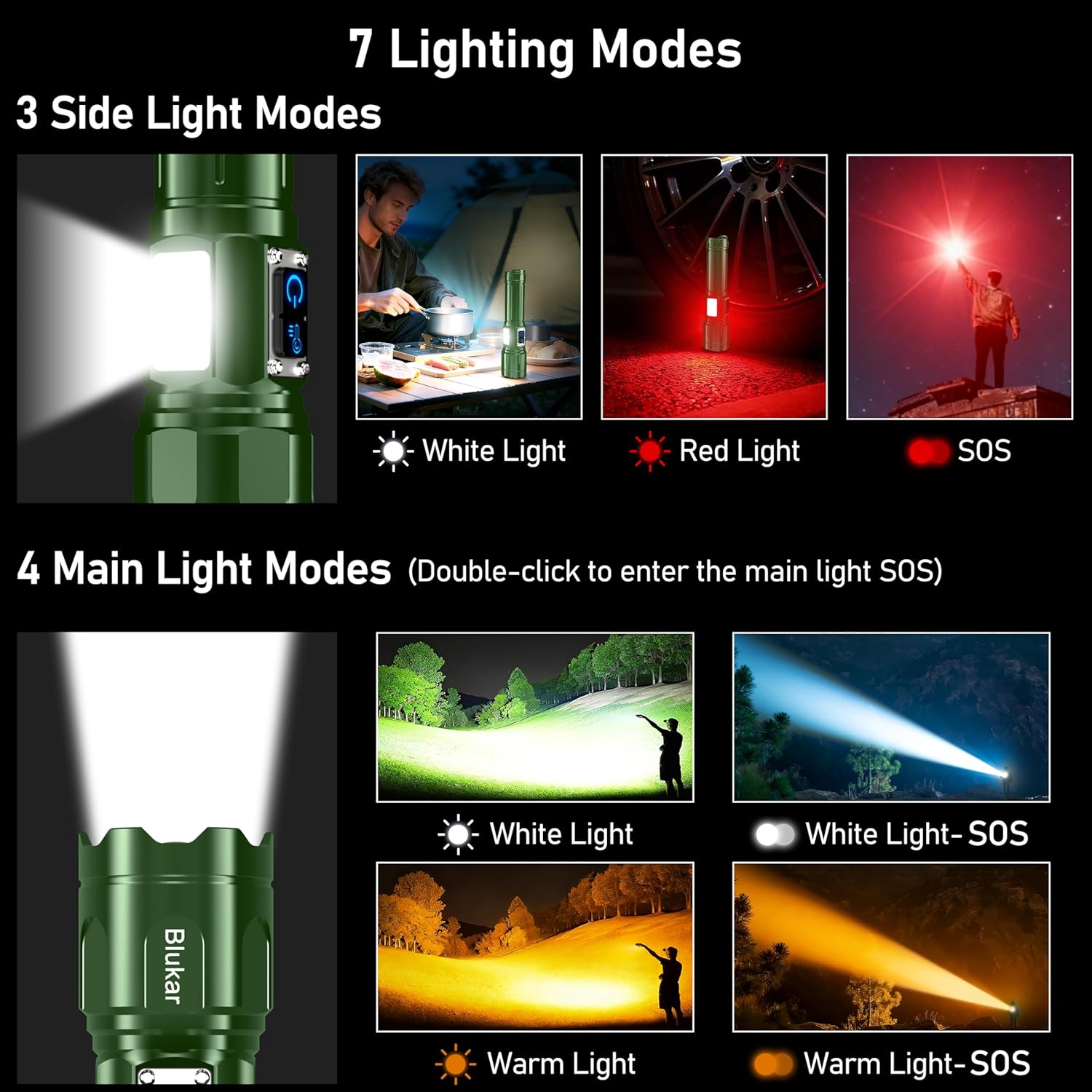
영상: Visual guide to the 7 lighting modes, including main beam and COB side light options.
조정 가능한 초점
To adjust the beam focus, gently slide the head of the flashlight forward or backward. Sliding forward narrows the beam for a focused spotlight, while sliding backward widens it for a broad floodlight.

영상: Demonstration of the adjustable focus, transitioning between spotlight and floodlight beams.
파워뱅크 기능
The flashlight can serve as an emergency power bank. Locate the USB-A output port next to the Type-C input port. Connect your device's charging cable to the USB-A port to begin charging.
배터리 디스플레이
통합 LED 디지털 디스플레이는 남은 배터리 용량을 표시합니다.tage in real-time, allowing you to monitor power levels accurately.
충전 중
The Blukar K9187 flashlight is equipped with a Type-C input for convenient charging. A full charge provides approximately 6-24 hours of continuous use, depending on the selected lighting mode and brightness level.
- Use the provided USB-C cable to connect the flashlight to a 5V/2A power source.
- 디지털 디스플레이에 충전 상태가 표시됩니다.
- Avoid overcharging by disconnecting once the battery is full.
영상: The Blukar K9187 flashlight connected for USB-C charging, displaying battery level.
유지
- 청소: 손전등 본체를 부드러운 천으로 닦으세요.amp 천을 사용하십시오. 연마성 세제나 용제는 사용하지 마십시오. 최적의 광 출력을 위해 렌즈를 깨끗하게 유지하십시오.
- 방수 씰: Periodically inspect the waterproof sealing rings (O-rings) for wear or damage. Replace them with the provided spare rings if necessary to maintain the IP67 waterproof rating.
- 저장: Store the flashlight in a cool, dry place away from direct sunlight when not in use. If storing for extended periods, charge the battery every 3-6 months to prolong its lifespan.
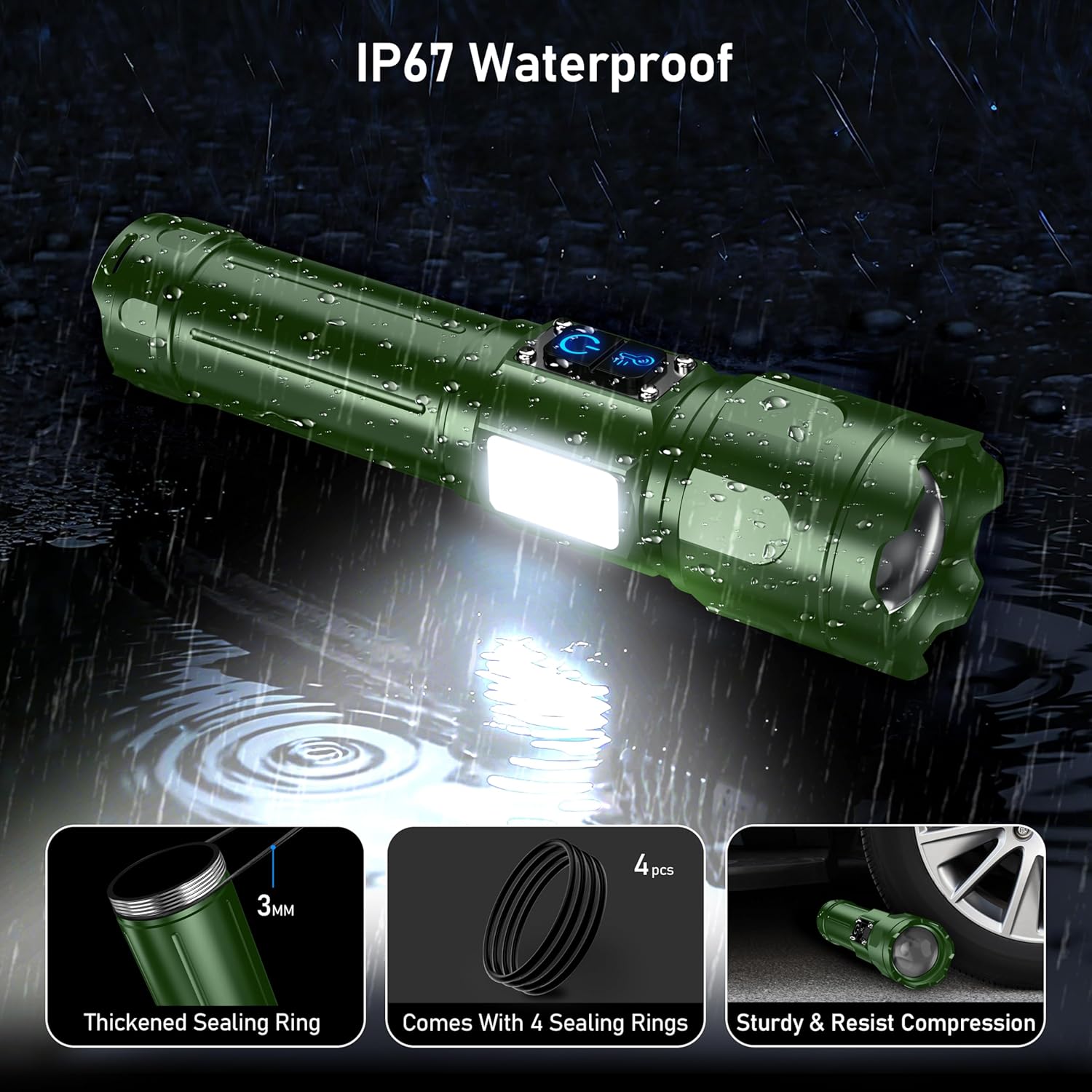
영상: The Blukar K9187 flashlight demonstrating its IP67 waterproof capability and durable construction.
문제 해결
| 문제 | 가능한 원인 | 해결책 |
|---|---|---|
| 손전등이 켜지지 않습니다. | 배터리가 방전되었거나 잘못 설치되었습니다. | 배터리를 충전하거나 극성이 올바르게 설치되었는지 확인하십시오. |
| 빛이 어둡거나 깜빡입니다. | 배터리가 약하거나 연결이 느슨합니다. | Recharge the battery. Ensure the tail cap is tightly screwed on. |
| 손전등이 충전되지 않습니다. | Charging cable or adapter issue; port obstruction. | 다른 USB-C 케이블이나 전원 어댑터를 사용해 보세요. 충전 포트에 이물질이 있는지 확인해 보세요. |
| 물이 침투함. | Damaged or improperly seated sealing rings. | Inspect and replace sealing rings if damaged. Ensure all caps and covers are securely closed. |
명세서
| 특징 | 세부 사항 |
|---|---|
| 모델 번호 | 케이9187 |
| 상표 | 블루카르 |
| 색상 | 암록색 |
| 재료 | 알루미늄 합금 |
| 제품 치수 | 6.69"D x 1.64"W x 1.32"H (17cm x 4.19cm x 3.36cm) |
| 품목 무게 | 9.7온스(274그램) |
| 배터리 유형 | 5000mAh Lithium Ion (Rechargeable) / 3 x AAA (Alternative) |
| 충전 포트 | USB Type-C 입력 |
| 출력 포트 | USB Type-A Output (Power Bank Function) |
| 방수 등급 | IP67 |
안전 정보
- Do not look directly into the flashlight beam or the UV light. High intensity light can cause eye damage.
- 어린이의 손이 닿지 않는 곳에 보관하세요.
- Do not disassemble or modify the flashlight. This may cause damage and void the warranty.
- Use only the specified battery types and charging cables.
- 손전등을 극한 온도나 화염에 노출시키지 마십시오.
- 충전하지 않을 때는 방수 기능을 유지하기 위해 충전 포트 덮개를 단단히 닫아 두십시오.
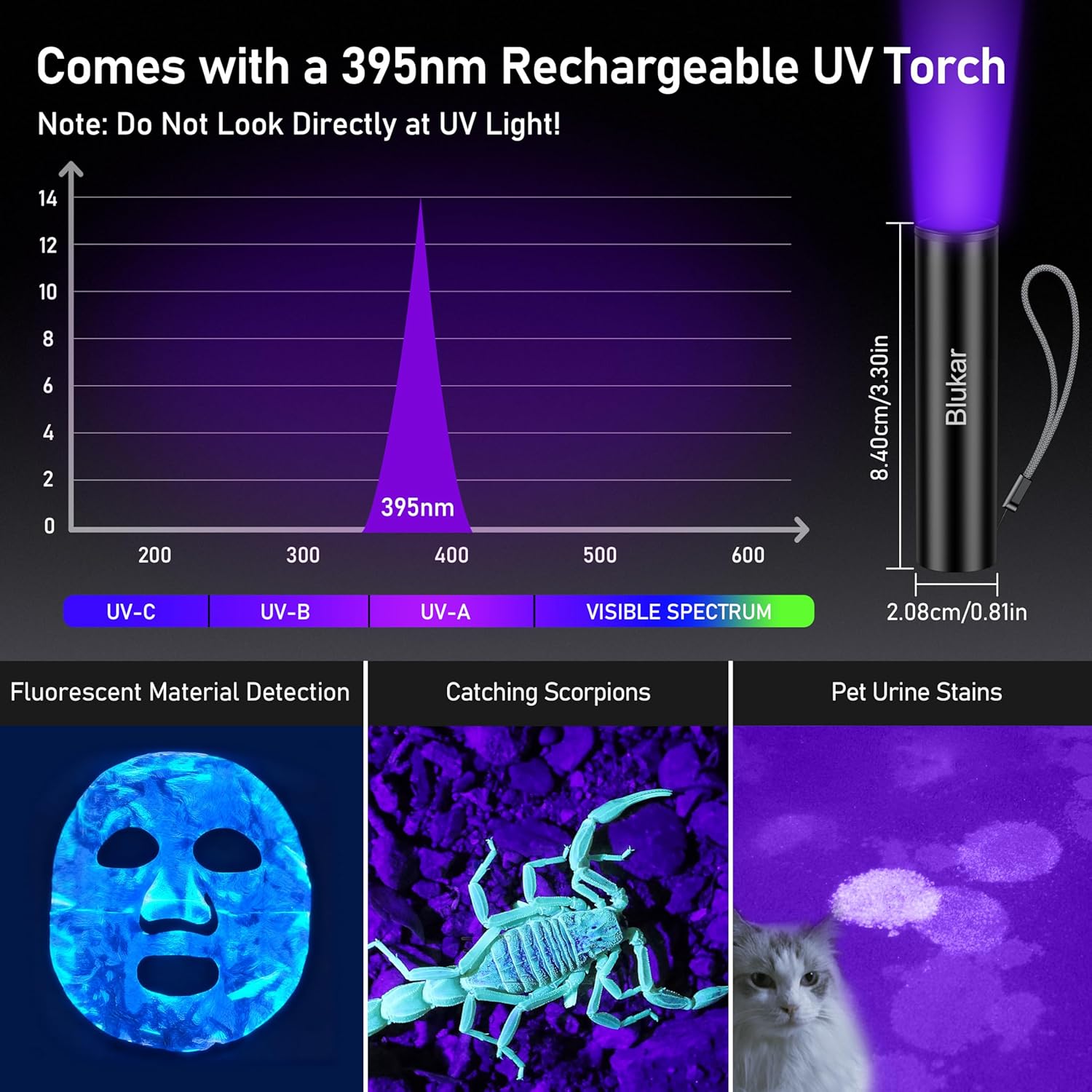
영상: The 395nm UV mini flashlight and its applications, with a warning not to look directly at UV light.
제품 비디오
동영상: Demonstration of the Blukar K9187 flashlight's features, including its solid build, various lighting modes, adjustable beam, and power bank functionality.
보증 및 지원
Blukar products are designed for reliability and performance. For warranty information, technical support, or any inquiries regarding your Blukar K9187 flashlight, please refer to the contact information provided with your purchase or visit the official Blukar web해당 사이트입니다. 고객 지원팀에 문의하실 때는 모델 번호(K9187)와 구매 정보를 준비해 주시기 바랍니다.


