1. 서론
This manual provides detailed instructions for the safe and effective operation of your Neoteck 6000 Counts Digital Multimeter, Model VC746A. This True RMS (Root Mean Square) multimeter is designed for measuring AC/DC voltage, AC/DC current, resistance, diode, continuity, frequency, duty cycle, capacitance, and temperature. It features auto-ranging, a large backlit display, and Non-Contact Voltage (NCV) detection, making it suitable for both professional and DIY electrical tasks.
2. 안전 정보
본 기기를 사용하기 전에 모든 안전 경고 및 작동 지침을 반드시 읽고 숙지하십시오. 안전 경고를 무시할 경우 심각한 부상이나 사망에 이를 수 있습니다.
- This multimeter is CE certified and rated to CAT III 600V. Adhere to these safety ratings.
- 정격용량 이상을 적용하지 마십시오.tag단자 간 또는 단자와 접지 사이의 e.
- 볼륨을 사용할 때는 주의하세요tag30V AC RMS, 42V 피크 또는 60V DC 이상입니다. 이러한 볼륨tag이것은 충격 위험을 초래합니다.
- 기능이나 범위를 변경하기 전에 항상 회로에서 테스트 리드를 분리하세요.
- Ensure the test leads are in good condition, without damaged insulation.
- 배터리 부족 표시등이 켜지면 정확한 측정값을 얻기 위해 즉시 배터리를 교체하십시오.
- 계량기가 손상된 것처럼 보이거나 케이스가 열려 있는 경우 작동하지 마십시오.
3. 패키지 내용
패키지에 모든 품목이 들어 있는지 확인하세요.
- 1 x Neoteck 6000 Counts Digital Multimeter (VC746A)
- 1 x 테스트 리드 한 쌍
- 온도 프로브 1개 (K형 열전대)
- 악어 클립 1쌍
- 1 x 드라이버
- 2V AA 배터리 1.5 개
- 1 x 보관 가방
- 1 x 사용자 매뉴얼(이 문서)

그림 3.1: Complete Neoteck VC746A Digital Multimeter kit. This image displays the full kit contents: the Neoteck VC746A multimeter, a pair of test leads, a temperature probe, alligator clips, a screwdriver, two 1.5V AA batteries, and a storage bag, all ready for immediate use.
4. 제품 오버view
The Neoteck VC746A Digital Multimeter is designed for ease of use and accuracy. Key features include a 6000-count display, True RMS measurement capability, and auto-ranging for simplified operation. It also incorporates a large backlit screen and a built-in flashlight for visibility in low-light conditions.

그림 4.1: Neoteck VC746A Multimeter with highlighted functions. This image illustrates the Neoteck VC746A Digital Multimeter highlighting its comprehensive range of measurement capabilities, including voltage, current, resistance, capacitance, temperature, frequency, duty cycle, non-contact voltage (NCV), live wire detection, diode test, and continuity.

그림 4.2: Multimeter display and controls. The multimeter's clear 3.5-inch backlit display shows a 6000-count reading, making it easy to read in various lighting conditions. A voltage warning icon enhances safety during measurements.
5. 설정
5.1 배터리 설치
The multimeter requires two 1.5V AA batteries (included). To install or replace batteries:
- 멀티미터의 전원이 꺼져 있고 테스트 리드가 분리되어 있는지 확인하십시오.
- 측정기 뒷면에서 배터리 덮개를 찾으세요.
- Use the included screwdriver to loosen the screw on the battery cover.
- Remove the cover and insert the two AA batteries, observing correct polarity (+/-).
- 배터리 커버를 교체하고 나사로 고정합니다.
5.2 테스트 리드 연결
테스트 리드를 멀티미터의 해당 입력 단자에 연결하십시오.
- 삽입하다 빨간색 테스트 리드 인 VΩHz 잭 포 볼륨tag예를 들어 저항, 주파수, 용량, 다이오드 및 연속성 측정 등이 있습니다.
- 삽입하다 검은색 테스트 리드 인 코. (common) jack for all measurements.
- For current measurements (up to 20A), insert the 빨간색 테스트 리드 인 20A 잭.
- 마이크로의 경우amp에레/밀리ampere current measurements, insert the 빨간색 테스트 리드 인 우아마 잭.
6. 사용 설명서
Turn the rotary switch to select the desired measurement function. The meter will automatically select the appropriate range (auto-ranging) for most functions.
동영상 6.1 : Neoteck 6000 Counts Digital Multimeter Demonstration. This video demonstrates the key features and operational procedures of the Neoteck 6000 Counts Digital Multimeter, including DC voltage measurement, resistance testing, diode and continuity checks, temperature measurement, and non-contact voltag전자 탐지.
6.1 DC 볼륨tage 측정
- 로터리 스위치를 V~ position. The meter will default to DC voltag측정.
- 빨간색 테스트 리드를 회로의 양극(+)에 연결하고 검은색 테스트 리드를 음극(-)에 연결합니다.
- vol을 읽어보세요tag디스플레이의 e 값.
6.2 AC 볼륨tage 측정
- 로터리 스위치를 V~ 위치.
- 를 누르세요 선택하다 AC 볼륨으로 전환하는 버튼tage measurement (indicated by 'AC' on the display).
- AC 볼륨에 테스트 리드를 연결합니다.tag출처.
- vol을 읽어보세요tag디스플레이의 e 값.
6.3 저항 측정
- 로터리 스위치를 Ω 위치.
- 테스트 대상 회로의 전원이 차단되었는지 확인하십시오.
- 부품 양단에 테스트 리드를 연결하여 저항을 측정하십시오.
- 디스플레이에서 저항 값을 읽으십시오.
6.4 다이오드 테스트
- 로터리 스위치를 Ω 위치.
- 를 누르세요 선택하다 다이오드 기호가 나타날 때까지 버튼을 누르십시오.→|)가 디스플레이에 나타납니다.
- 빨간색 테스트 리드를 다이오드의 양극에, 검은색 테스트 리드를 음극에 연결하십시오.
- 디스플레이에는 앞으로 나오는 볼륨이 표시됩니다.tag전압 강하. 리드를 반대로 연결하십시오. 정상적인 다이오드라면 디스플레이에 'OL'(개방선)이 표시되어야 합니다.
6.5 연속성 테스트
- 로터리 스위치를 Ω 위치.
- 를 누르세요 선택하다 연속성 기호가 나타날 때까지 버튼을 누르세요.))))가 디스플레이에 나타납니다.
- 테스트 리드를 회로 또는 부품에 연결하십시오.
- 회로에 연속성이 있으면(저항이 약 50Ω 미만이면) 부저가 울립니다.
6.6 NCV(비접촉식 볼tage) & Live Wire Detection
이 기능은 AC 전압을 안전하게 감지할 수 있도록 합니다.tag직접적인 접촉 없이.
- 로터리 스위치를 NCV/라이브 위치.
- Move the top end of the multimeter near the conductor or outlet.
- The meter will beep and the LED indicator will flash, with faster beeping and flashing indicating higher voltage.
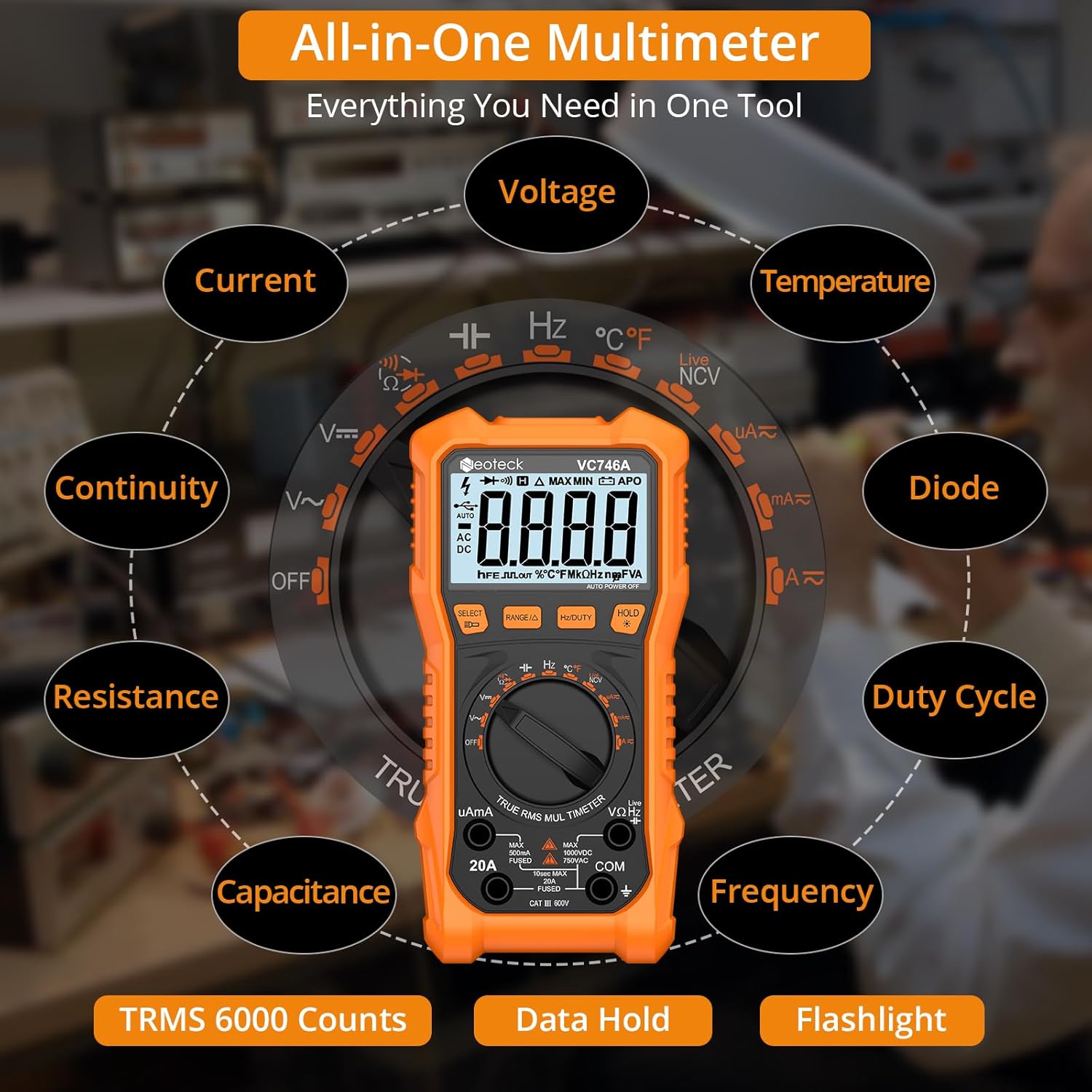
그림 6.1: NCV detection in progress. This image demonstrates the Non-Contact Voltage (NCV) feature of the multimeter, allowing for safe detection of live wires without direct contact. The device provides sound and visual warnings.
6.7 온도 측정
- 로터리 스위치를 ° C / ° F 위치.
- Insert the K-type thermocouple probe into the VΩHz and COM jacks, observing polarity.
- Place the tip of the thermocouple on or in the object whose temperature is to be measured.
- Read the temperature on the display. Press 선택하다 섭씨와 화씨 사이를 전환합니다.
6.8 기타 기능
- 전류 측정(AC/DC): 적절한 것을 선택하십시오 우아마 or 20A range. Connect the meter in series with the circuit.
- 정전용량 측정: 선택하세요 정전 용량 position. Connect the leads across the capacitor.
- 주파수/듀티 사이클: 선택하세요 헤르츠/% position. Connect the leads to the signal source.
- 데이터 보유 : 를 누르세요 잡고 있다 버튼을 누르면 디스플레이에 현재 측정값이 고정됩니다. 다시 누르면 고정이 해제됩니다.
- 백라이트/손전등: 를 누르세요 빛 button to turn on the backlight. Hold the 빛 button to activate the flashlight.

그림 6.2: Multimeter with foldable stand and probe holders. The image highlights the thoughtful design of the multimeter, including a protective rubber case for durability, integrated pen holders for convenience, and a foldable kickstand for stable tabletop measurements.
7. 유지관리
7.1 청소
광고로 케이스를 닦으세요amp 천과 순한 세제를 사용하십시오. 연마제나 용제를 사용하지 마십시오. 단자에 먼지와 습기가 닿지 않도록 하십시오.
7.2 배터리 교체
Refer to Section 5.1 for battery replacement instructions. Always replace both batteries at the same time with new 1.5V AA batteries.
7.3 퓨즈 교체
If the current measurement function fails, the fuse may need replacement. Fuse replacement should only be performed by qualified personnel. Refer to the specifications for the correct fuse type.
8. 문제 해결
- 미터 전원이 켜지지 않습니다: 배터리가 올바르게 설치되었는지, 충전량이 충분한지 확인하십시오. 필요한 경우 교체하십시오.
- No reading or 'OL' displayed (except for diode reverse bias): Ensure test leads are properly connected to the correct jacks and making good contact with the circuit. Verify the function and range are appropriate for the measurement.
- 부정확한 판독값: Check battery level. Ensure test leads are not damaged. Avoid strong electromagnetic interference.
- 현재 측정 기능이 작동하지 않습니다. Check the fuse. If blown, replace with the specified type.
9. 사양
| 매개변수 | 값 |
|---|---|
| 모델 번호 | VC746A |
| 표시하다 | 6000 카운트 |
| DC 볼륨tage | 최대 1000V |
| AC 볼륨tage | 최대 750V |
| 직류 전류 | 최대 20A |
| AC 전류 | 최대 20A |
| 저항 | 최대 60MΩ |
| 정전 용량 | 최대 60mF |
| 빈도 | 최대 10MHz |
| 온도 | -20°C ~ 1000°C / -4°F ~ 1832°F |
| 안전 등급 | CATⅢ 600V |
| 전원 | 2V AA 배터리 1.5 개 |
| 제품 치수 | 7.48 x 3.54 x 1.77 인치 |
| 품목 무게 | 1.06파운드(480그램) |
10. 보증 및 지원
Neoteck products are designed for reliability and performance. For any questions, technical support, or warranty inquiries, please contact Neoteck customer service through the retailer where the product was purchased or visit the official Neoteck website. Please retain your purchase receipt for warranty validation.


