Neoteck VC746A Digital TRMS Multimeter User Manual
Model: VC746A
1. 서론
The Neoteck VC746A is a True RMS (TRMS) digital multimeter designed for accurate and reliable electrical measurements. Featuring a 6000-count display and auto-ranging capabilities, it is suitable for both professional electricians and home users. This manual provides detailed instructions for safe operation, setup, measurement functions, maintenance, and troubleshooting.
This multimeter can measure AC/DC voltage, AC/DC current, resistance, capacitance, frequency, duty cycle, temperature, diode, and continuity. It also includes advanced safety features such as Non-Contact Voltage (NCV) detection and Live wire testing.
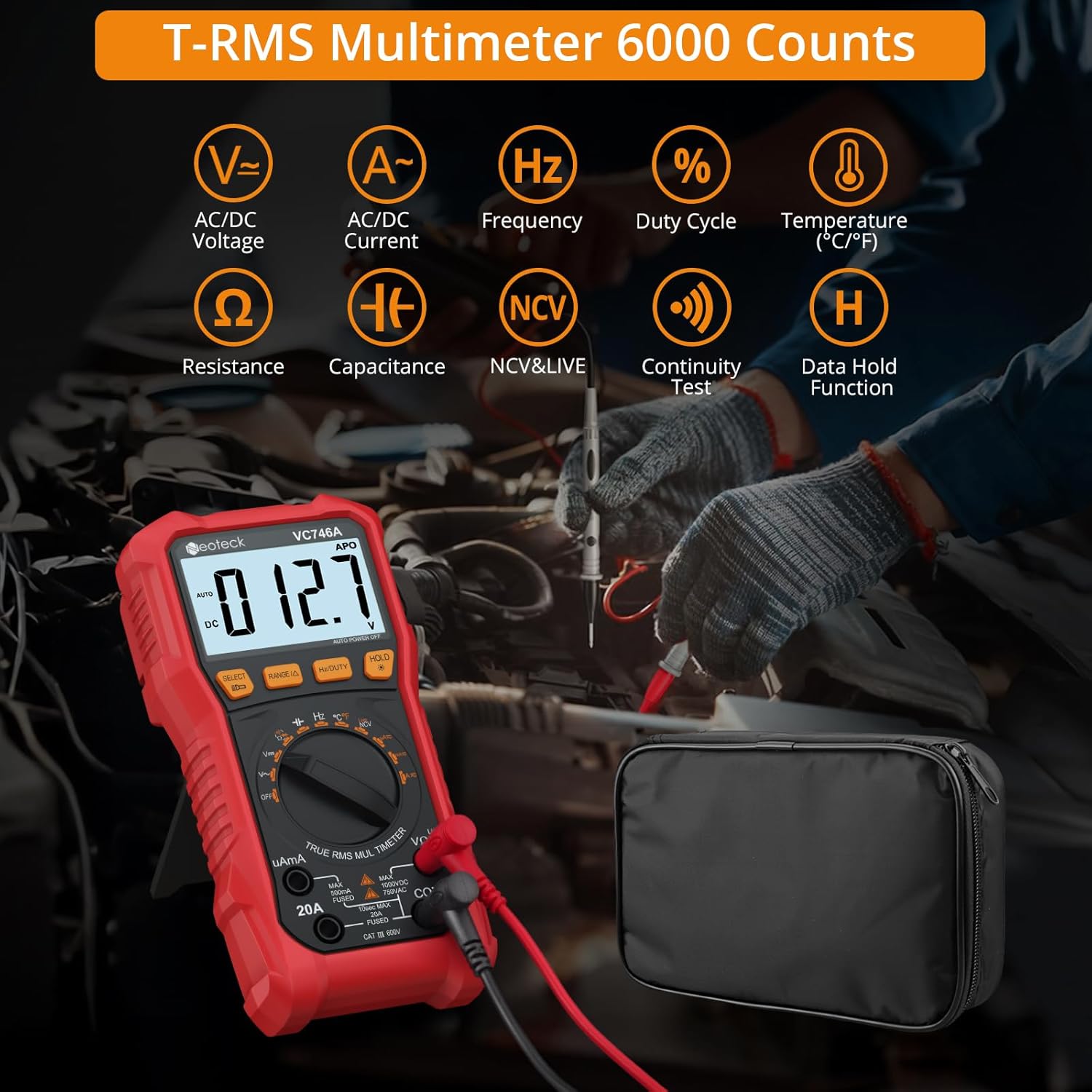
Figure 1.1: Neoteck VC746A Multimeter displaying its range of measurement capabilities including AC/DC Voltage, Current, Frequency, Duty Cycle, Temperature, Resistance, Capacitance, NCV & Live, Continuity Test, and Data Hold Function.
2. 안전 정보
To ensure safe operation and avoid electric shock or personal injury, please read all safety information carefully before using the multimeter. Always adhere to local and national safety codes.
- 어떤 함수든 최대 입력값을 초과하지 마십시오.
- 미터기나 테스트 리드가 손상된 것처럼 보이면 사용하지 마십시오.
- vol으로 작업할 때 극도의 주의를 기울이십시오.tag30V AC RMS, 42V 피크 또는 60V DC 이상입니다. 이러한 볼륨tag이것은 충격 위험을 초래합니다.
- 기능을 변경하기 전에 항상 테스트 리드를 회로에서 분리하십시오.
- 측정에 적합한 기능과 범위가 선택되었는지 확인하세요.
- 비접촉식 볼륨을 사용하세요tage (NCV) detection and Live test features to identify live wires before making contact measurements. The multimeter provides visual warnings for high voltage.
- The device features double fuse protection. If a fuse blows, replace it with one of the specified type and rating.
- 폭발성 가스, 증기 또는 먼지가 있는 환경에서는 계량기를 작동하지 마십시오.
- 측정하는 동안에는 손가락을 테스트 프로브의 손가락 보호대 뒤에 두십시오.

Figure 2.1: The multimeter's clear 3.5-inch backlit LCD display, showing a voltage warning icon to enhance safety during operation, especially in low-light conditions.

Figure 2.2: Demonstrating the Live & NCV (Non-Contact Voltage) safety detection feature, indicating the multimeter's ability to detect live wires without physical contact, providing sound and visual warnings.
3. 제품 특징
The Neoteck VC746A Multimeter offers a range of features for versatile and accurate electrical testing:
- True RMS (TRMS) Measurement: 비정현파 파형에 대해 정확한 측정값을 제공합니다.
- 6000 카운트 디스플레이: High-resolution digital display for precise measurements.
- 자동 범위 지정: 측정 범위를 자동으로 선택하여 조작을 간소화합니다.
- 포괄적인 측정 기능: AC/DC 볼륨 측정tage, AC/DC Current (up to 20A), Resistance, Capacitance, Frequency, Duty Cycle, and Temperature.
- 다이오드 및 연속성 테스트: 회로 진단에 필수적인 기능들.
- 비접촉 Voltage (NCV) 감지: AC 볼륨 감지tag물리적 접촉 없이 안전성을 높입니다.
- 활선 감지: Identifies live wires for safe electrical work.
- 대형 백라이트 LCD 화면: Ensures clear readability even in dimly lit environments.
- 통합 손전등: 어두운 곳에서 작업할 수 있도록 조명을 제공합니다.
- 데이터 홀드 기능: 기록이 편리하도록 표시된 값을 고정합니다.
- Kickstand and Pen Holder Design: Allows for hands-free operation and convenient storage of test leads.
- Protective Rubber Case: 내구성이 뛰어난 casing for enhanced protection against drops and impacts.
- 자동 전원 끄기 : 사용하지 않을 때 배터리 수명을 절약합니다.
- 배터리 부족 표시기: 배터리 교체가 필요할 때 알림을 보냅니다.

그림 3.1: 오버view of the Neoteck VC746A Multimeter's comprehensive capabilities, including Voltage, Current, Temperature, Diode, Duty Cycle, Frequency, Capacitance, Resistance, Continuity, TRMS 6000 Counts, Data Hold, and Flashlight.
4. 패키지 내용
패키지에 모든 품목이 들어 있는지 확인하세요.
- Neoteck VC746A Digital TRMS Multimeter
- 테스트 리드 (1쌍)
- 온도 프로브
- Alligator Clips (1 pair)
- 드라이버
- AA Batteries (2 pcs)
- 보관 가방
- 사용 설명서 (본 문서)

Figure 4.1: The complete package contents, including the Neoteck VC746A Multimeter, test leads, temperature probe, alligator clips, screwdriver, AA batteries, storage bag, and operation manual.

그림 4.2: 클로즈업 view of the included accessories (test leads, alligator clips, temperature probe), the integrated pen holder design, the protective rubber case, and the foldable stand support for hands-free convenience.
5. 설정
5.1 배터리 설치
- 멀티미터가 꺼져 있는지 확인하십시오.
- 멀티미터 뒷면에서 배터리 칸 덮개를 찾으세요.
- 동봉된 드라이버를 사용하여 배터리 덮개를 고정하는 나사를 풀어주세요.
- Remove the cover and insert two AA batteries, observing the correct polarity (+/-).
- 배터리 커버를 교체하고 나사를 조입니다.
5.2 테스트 리드 연결
- 검은색 테스트 리드를 "COM"(공통) 입력 잭에 삽입합니다.
- 대부분의 볼륨의 경우tage, resistance, continuity, diode, capacitance, and frequency measurements, insert the red test lead into the "VΩHz" input jack.
- For current measurements (up to 600mA), insert the red test lead into the "uAmA" input jack.
- For high current measurements (up to 20A), insert the red test lead into the "20A" input jack.
6. 사용 설명서
6.1 일반 작업
- 전원 켜기/끄기: Rotate the rotary switch to the desired function to turn on the multimeter. Rotate to "OFF" to turn it off.
- 자동 범위: The multimeter automatically selects the best measurement range. Press the "RANGE" button to switch to manual ranging if desired. Press again to return to auto-ranging.
- 데이터 보유 : "HOLD" 버튼을 누르면 디스플레이에 현재 측정값이 고정됩니다. 다시 누르면 버튼이 해제됩니다.
- 백라이트/손전등: Press and hold the "HOLD" button to turn on the backlight. Press it again to turn on the flashlight. A third press turns off both.
- 기능 선택: 여러 모드가 있는 기능의 경우 (예: AC/DC 볼륨)tage, Diode/Continuity), press the "SELECT" button to cycle through the modes.
6.2 측정 함수
Always ensure the test leads are connected to the correct input jacks and the rotary switch is set to the appropriate function before making any measurements.
6.2.1 AC/DC 볼륨tag측정 (V∼ / V—)
- Set the rotary switch to "V".
- Press "SELECT" to choose between AC (V∼) or DC (V—) voltage.
- 테스트 리드를 테스트 중인 회로나 부품에 병렬로 연결합니다.
- vol을 읽어보세요tag디스플레이의 e 값.
6.2.2 AC/DC Current Measurement (uA∼/—, mA∼/—, A∼/—)
- Set the rotary switch to "uAmA" or "20A" depending on the expected current.
- Press "SELECT" to choose between AC (∼) or DC (—) current.
- 중요한: Disconnect power to the circuit. Open the circuit where the current is to be measured. Connect the multimeter in series with the circuit.
- Apply power to the circuit. Read the current value on the display.
- After measurement, disconnect power, remove the multimeter, and restore the circuit.
6.2.3 저항 측정 (Ω)
- Set the rotary switch to "Ω".
- Ensure the circuit is de-energized and any capacitors are discharged.
- 측정할 부품에 테스트 리드를 연결합니다.
- 디스플레이에서 저항 값을 읽으십시오.
6.2.4 Capacitance Measurement (㎏)
- Set the rotary switch to "㎏".
- 테스트 리드를 연결하기 전에 콘덴서가 완전히 방전되었는지 확인하십시오.
- 테스트 리드를 커패시터에 연결합니다.
- 디스플레이에서 커패시턴스 값을 읽습니다.
6.2.5 주파수(Hz) 및 듀티 사이클(%) 측정
- Set the rotary switch to "Hz%".
- Press "SELECT" to toggle between Frequency (Hz) and Duty Cycle (%).
- 테스트 리드를 신호 소스에 병렬로 연결합니다.
- 디스플레이에 표시된 주파수 또는 듀티 사이클 값을 읽으십시오.
6.2.6 온도 측정 (℃/℉)
- Set the rotary switch to "TEMP".
- Connect the temperature probe to the input jacks (red to VΩHz, black to COM).
- 온도 측정 프로브의 끝부분을 측정 대상 물체 또는 환경에 놓으십시오.
- Read the temperature value on the display. Press "SELECT" to switch between Celsius (℃) and Fahrenheit (℉).
6.2.7 Diode Test (→|—)
- Set the rotary switch to "→|—" (Diode/Continuity).
- Press "SELECT" to select the Diode Test function.
- 빨간색 테스트 리드를 다이오드의 양극에, 검은색 테스트 리드를 음극에 연결하십시오.
- 전진 볼륨tag전압 강하가 표시됩니다. 리드를 반대로 연결하면 정상적인 다이오드의 경우 개방 회로(OL)가 표시됩니다.
6.2.8 Continuity Test (♪)
- Set the rotary switch to "→|—" (Diode/Continuity).
- Press "SELECT" to select the Continuity Test function.
- 테스트 리드를 회로 또는 부품에 연결하십시오.
- 저항값이 약 50Ω 미만이면 부저가 울려 회로가 연결되어 있음을 알려줍니다.
6.2.9 비접촉 Voltage(NCV) 검출
- Set the rotary switch to "NCV/LIVE".
- Press "SELECT" to select the NCV function.
- Move the top end of the multimeter near the conductor or outlet.
- The meter will beep and the NCV indicator light will flash with increasin교류 전압을 감지할 때의 g 주파수tage.
6.2.10 활선 감지
- Set the rotary switch to "NCV/LIVE".
- Press "SELECT" to select the LIVE function.
- Insert the red test lead into the live wire or socket hole. The black lead is not used for this test.
- The display will show "LIVE" and the meter will beep and flash if a live wire is detected.
7. 유지관리
7.1 청소
광고로 케이스를 닦으세요amp 천과 순한 세제를 사용하십시오. 연마제나 용제를 사용하지 마십시오. 입력 단자에 먼지와 습기가 들어가지 않도록 하십시오.
7.2 배터리 교체
When the low battery indicator appears on the display, replace the batteries as described in Section 5.1. Always use two new AA batteries.
7.3 퓨즈 교체
전류 측정 기능이 작동하지 않으면 퓨즈를 교체해야 할 수 있습니다. 올바른 퓨즈 종류와 정격은 제품 사양을 참조하십시오. 퓨즈 교체는 자격을 갖춘 전문가만 수행해야 합니다.
7.4 보관
장기간 사용하지 않을 경우 배터리 누액을 방지하기 위해 배터리를 제거하십시오. 직사광선과 극한 온도 변화를 피해 서늘하고 건조한 곳에 보관하십시오.
8. 문제 해결
| 문제 | 가능한 원인 | 해결책 |
|---|---|---|
| 미터의 전원이 켜지지 않습니다. | 배터리 방전; 배터리 설치 오류. | 배터리를 교체하십시오. 배터리 극성을 확인하십시오. |
| "OL"(과부하)이 표시됩니다. | Input value exceeds selected range; Open circuit (for continuity/resistance). | Switch to a higher range (if in manual range); Check circuit connection. |
| 부정확한 판독값. | Incorrect function selected; Poor test lead connection; External interference. | Verify function and range; Ensure secure connections; Move away from strong electromagnetic fields. |
| 현재 측정 기능이 작동하지 않습니다. | Blown fuse; Incorrect input jack. | Replace fuse (see Section 7.3); Ensure red lead is in "uAmA" or "20A" jack. |
| NCV/LIVE not detecting. | Weak signal; Shielded wires. | Ensure close proximity to conductor; NCV may not detect through thick insulation or metal conduits. |
9. 사양
| 매개변수 | 값 |
|---|---|
| 모델 번호 | VC746A |
| 표시하다 | 6000 카운트, 백라이트 LCD |
| 진정한 RMS | 예 |
| 자동 범위 | 예 |
| DC 볼륨tage | 최대 1000V |
| AC 볼륨tage | 최대 750V |
| 직류 전류 | 최대 20A |
| AC 전류 | 최대 20A |
| 저항 | 예 |
| 정전 용량 | 예 |
| 빈도 | 예 |
| 듀티 사이클 | 예 |
| 온도 | Yes (with included probe) |
| 다이오드 테스트 | 예 |
| 연속성 테스트 | 예 (부저 포함) |
| NCV 감지 | 예 |
| 활선 감지 | 예 |
| 전원 | 2 x AA 배터리 |
| 치수(길이 x 너비 x 높이) | 19 x 9.2 x 4.5cm |
| 무게 | 480그램 |
10. 보증 및 지원
네오텍 제품은 뛰어난 신뢰성과 성능을 위해 설계되었습니다. 보증 정보 또는 기술 지원이 필요하시면 구매 시 제공된 연락처 정보를 참조하시거나 네오텍 공식 웹사이트를 방문하십시오. web사이트. 보증 청구를 위해 구매 증빙 자료로 구매 영수증을 보관하세요.


