제품 끝view
The iHome 3-in-1 Magnetic Wireless Charging Mount provides a versatile solution for securing and charging your smartphone in your vehicle. This device offers multiple mounting options for your dashboard, windshield, or air vent, ensuring your phone remains accessible and powered during your travels. It features MagSafe-compatible magnetic attachment and delivers 15W fast wireless charging for compatible devices.
상자 안에 무엇이 들어있나요?
- iHome Magnetic Wireless Charging Base
- Extendable Arm with Lockable Suction Cup Base
- Vent Clip Attachment
- USB-C 충전 케이블 (전원 어댑터는 포함되지 않음)
설정 및 설치
This mount offers three primary installation methods: vent, dashboard, and windshield. Choose the method that best suits your vehicle and preference.
1. Vent Mount Installation
- Attach the vent clip to the back of the magnetic wireless charging base. Ensure it clicks securely into place.
- Locate a suitable air vent in your vehicle. The vent clip features silicone padding for a secure grip.
- Gently push the vent clip onto one of the vent slats until it is firmly attached.
- Adjust the angle of the magnetic charging base for optimal view주고받음.
2. Dashboard/Windshield Mount Installation
- Attach the extendable arm with the lockable suction cup base to the back of the magnetic wireless charging base. Ensure it clicks securely into place.
- Clean the desired mounting surface on your dashboard or windshield thoroughly. Ensure it is free of dust and grease.
- Press the suction cup firmly onto the clean surface.
- Engage the lock lever on the suction cup base to create a strong vacuum seal.
- Adjust the extendable arm (from 3.5" to 5.5") and pivot the magnetic base (240°) to achieve your preferred view잉 각도.
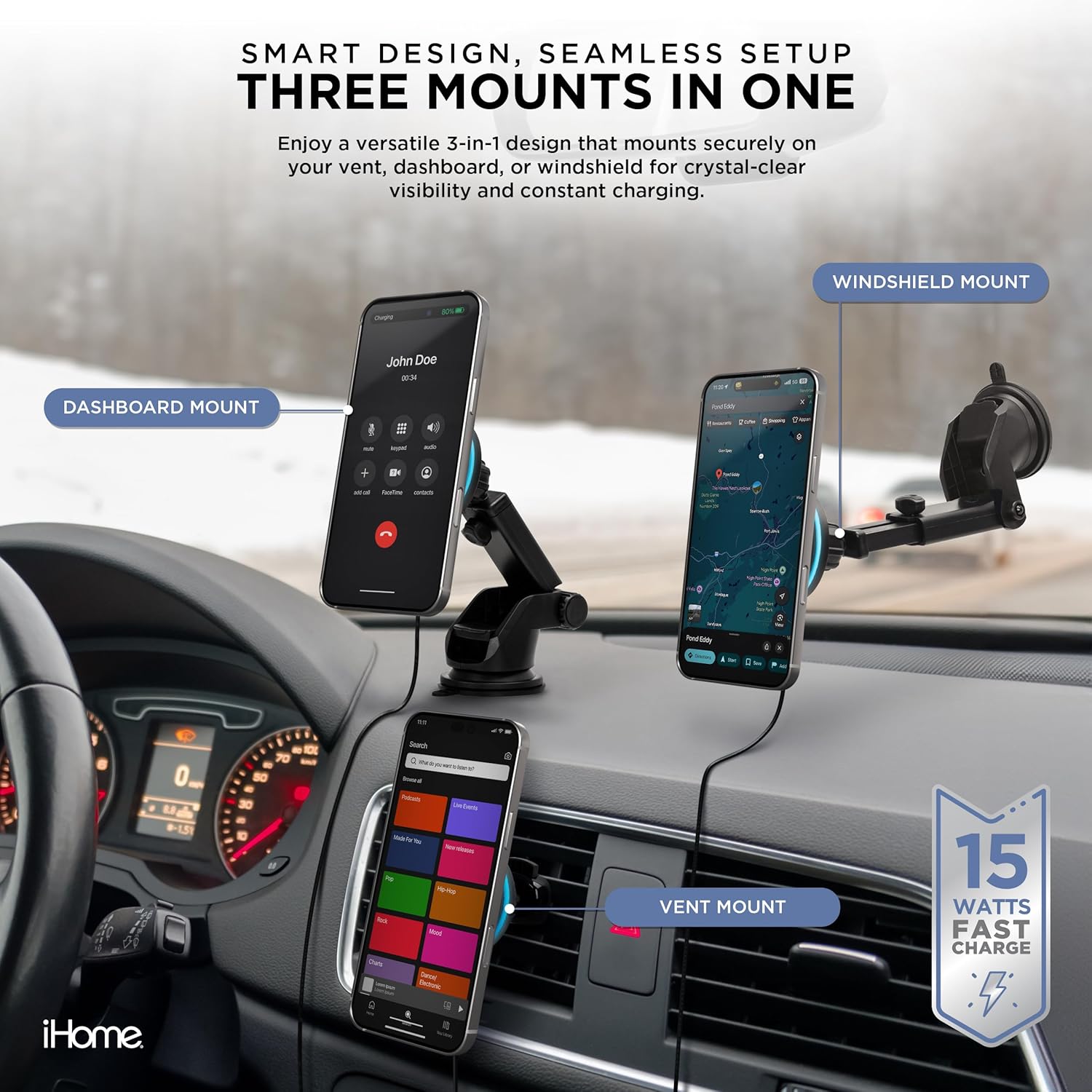
Image: The iHome 3-in-1 Magnetic Wireless Charging Mount demonstrating its versatility with dashboard, windshield, and vent mounting configurations.
작업
1. 휴대폰 연결하기
- Ensure your smartphone is MagSafe-compatible (iPhone 12 or newer) or has a MagSafe-compatible case.
- Simply bring your phone close to the magnetic charging base. The powerful magnets will automatically align and secure your phone in place.
2. 무선 충전
- Connect the provided USB-C cable to the charging base and plug the other end into a compatible car charger (not included).
- Once your phone is magnetically attached, wireless charging will begin automatically, indicated by a charging icon on your phone screen. The mount delivers up to 15W fast wireless charging.

Image: A smartphone is shown securely attached to the iHome magnetic wireless charging mount, illustrating the active charging process.
3. Adjusting the Mount
- The magnetic base allows for easy rotation of your phone between portrait and landscape orientations.
- If using the extendable arm, loosen the adjustment knobs to extend or retract the arm and pivot the head to find your ideal viewing angle. Tighten the knobs to secure the position.
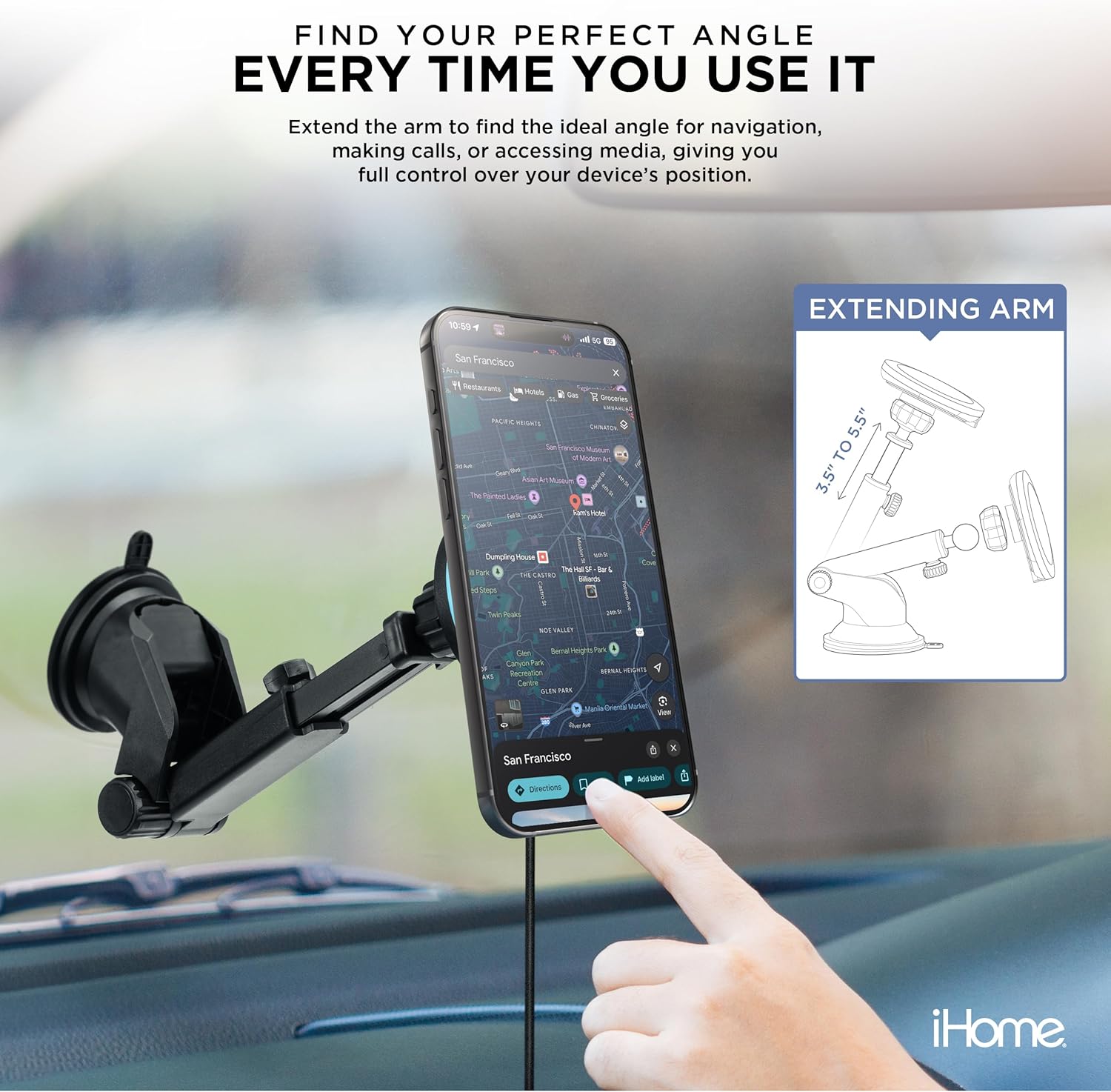
Image: The iHome mount with its extendable arm holding a smartphone, demonstrating its adjustability for navigation and media view주고받음.
관리 및 유지 보수
- Keep the magnetic charging surface clean and free of debris to ensure optimal magnetic connection and charging efficiency.
- 부드러운 천으로 마운트를 닦아주세요.amp 옷감. 가혹한 화학 물질이나 연마성 세제를 사용하지 마십시오.
- For the suction cup base, if it loses stickiness, rinse it with warm water and let it air dry. This can help restore its adhesive properties.
- Avoid exposing the mount to extreme temperatures for prolonged periods, as this may affect its materials and performance.
문제 해결
전화가 충전되지 않음
- Ensure the USB-C cable is securely connected to both the mount and a functioning car charger.
- Verify that your car charger is providing sufficient power (a 15W or higher output car charger is recommended for fast charging).
- Check if your phone is MagSafe-compatible or if your phone case is MagSafe-compatible. Thick or non-magnetic cases may interfere with charging.
- Ensure there are no foreign objects (e.g., metal plates, credit cards) between your phone and the charging surface.
Mount Not Holding Securely
- Vent Mount: Ensure the vent clip is fully inserted and tightened onto a vent slat.
- 흡입 컵 마운트: Clean the dashboard/windshield surface thoroughly before application. Ensure the lock lever is fully engaged after pressing the suction cup down. If the suction cup is dirty, clean it with water and let it air dry.
Phone Not Attaching Magnetically
- Confirm your phone model is iPhone 12 or newer, or that you are using a MagSafe-compatible case.
- Remove any non-MagSafe cases or accessories that might block the magnetic connection.
명세서
| 모델 번호 | 2IHCM1008-BLK-G7 |
| 상표 | 아이홈 |
| 색상 | 검은색 |
| 호환 장치 | Smartphones (MagSafe-compatible, iPhone 12 or newer) |
| 장착 유형 | Vent, Dashboard, Windshield |
| 무선 충전 출력 | Up to 15W Fast Charge |
| Extendable Arm Length | 3.5인치에서 5.5인치까지 |
| 품목 무게 | 10.6 온스 |
| 패키지 크기 | 9.06 x 5.16 x 2.68 인치 |
| 제조업체 | 라이프웍스 테크놀로지 그룹 유한회사 |
보증 및 지원
보증 정보
This product is covered by a limited manufacturer's warranty. Please refer to the packaging or the official iHome web자세한 보증 약관은 해당 사이트에서 확인하세요.
고객 지원
추가 지원, 제품 등록 또는 view additional iHome products, please visit the official iHome store:


