1. 서론
The Black Shark Wireless Gaming Headset Goblin X8 offers a versatile audio experience for gamers across multiple platforms. Featuring tri-mode connectivity (2.4GHz wireless, Bluetooth 6.0, and wired 3.5mm audio), 7.1 virtual surround sound, and a noise-canceling microphone, this headset is designed for immersive gameplay and clear communication. Its ergonomic design ensures comfort during extended use, complemented by a long-lasting battery.
2. 상자 안에 무엇이 들어있나요?
- Black Shark BS-X8 Gaming Headset
- Wireless Dongle (USB & USB-C)
- 3.5mm 오디오 케이블
- USB-C 충전 케이블
- 사용자 설명서

3. 제품 특징
3.1 Tri-Mode Connectivity & Ultra-Low Latency
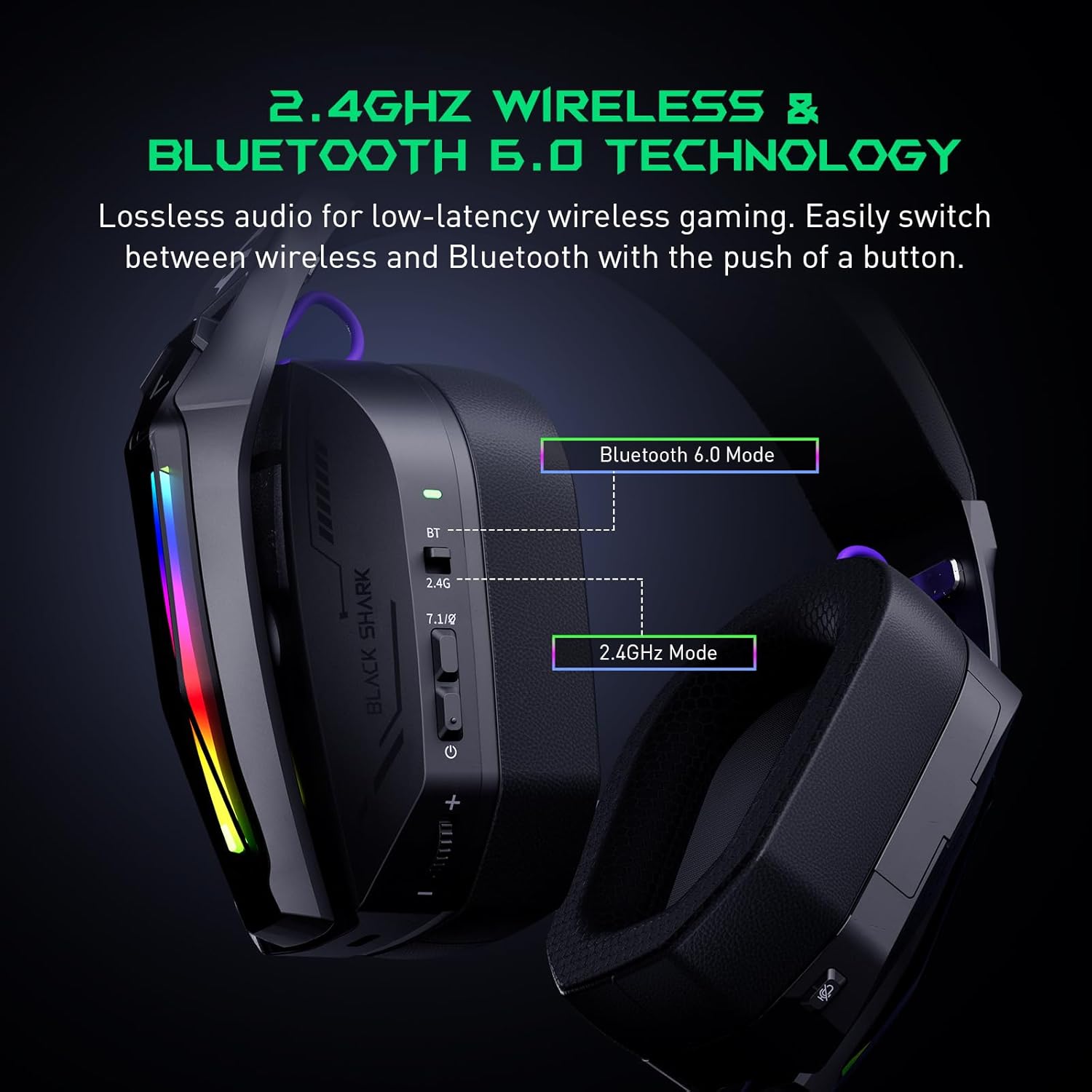
The Goblin X8 offers three connection methods: 2.4GHz wireless (via USB/Type-C dongle), Bluetooth 6.0, and a wired 3.5mm audio connection. The 2.4GHz mode provides ultra-low latency (under 20ms), ideal for competitive gaming. Bluetooth 6.0 ensures stable connectivity with under 30ms delay.


3.2 7.1 가상 서라운드 사운드
Equipped with 40mm magnetic neodymium drivers and 2.4GHz lossless wireless technology, the headset delivers virtual 7.1 surround sound. This expands the audio dynamic range, providing exceptional scene reproduction and an immersive 3D sound experience in games.

소음 제거 마이크 3.3개
The 120° adjustable, high-sensitivity microphone features omnidirectional noise cancellation technology. This effectively suppresses background noise, ensuring clear voice capture for communication during games or chats. It includes a one-touch mic mute switch for convenience.

3.4 폭넓은 호환성
This headset is compatible with a broad range of gaming devices, including PC, PS4, PS5, Switch, Xbox, laptops, tablets, TVs, iPads, and mobile phones, thanks to its triple-mode connectivity.

3.5 인체공학적 디자인 및 편안함
Designed for all-day comfort, the headset features an adjustable, ergonomic headband and breathable protein leather ear cups. This design reduces pressure and heat, preventing fatigue during long gaming sessions.
3.6 긴 배터리 수명
The gaming headphones offer up to 40 hours of battery life for continuous use without RGB lights. With RGB lights on, the battery lasts for 20 hours. A low battery alert is provided when voltage가 3.2V 이하로 떨어집니다.

4. 컨트롤 및 표시기
The headset features intuitive controls for easy management of audio and settings:
- 상태 표시기: 연결 상태와 배터리 상태를 표시합니다.
- 2.4G & Bluetooth Switching: Toggle between wireless modes.
- Virtual 7.1 Surround Sound On/Off: Activate or deactivate surround sound.
- 전원 버튼: 헤드셋을 켜거나 끕니다.
- 볼륨 휠: 오디오 볼륨을 조절합니다.
- USB-C 충전 포트: 헤드셋을 충전합니다.
- 마이크 음소거 버튼: 마이크를 음소거하거나 음소거 해제합니다.
- Hidden 2.4G USB Dongle: Stores the wireless dongle securely.

5. 설정
5.1 2.4GHz 무선 연결
- Locate the hidden 2.4G USB dongle on the headset.
- Plug the USB-A or USB-C end of the dongle into your PC, PS4, PS5, or Switch.
- Slide the connectivity switch on the headset to the '2.4G' position.
- 헤드셋이 자동으로 동글에 연결됩니다.
5.2 블루투스 6.0 연결
- Slide the connectivity switch on the headset to the 'BT' (Bluetooth) position.
- On your device (smartphone, tablet, laptop), go to Bluetooth settings and search for 'Black Shark Goblin X8'.
- Select the headset to pair and connect.
5.3 Wired 3.5mm Audio Connection
- Connect one end of the included 3.5mm audio cable to the headset's 3.5mm jack.
- Connect the other end to the 3.5mm audio port on your device (PC, PS4, PS5, Xbox controller, Switch, etc.).
- 헤드셋은 유선 모드로 작동합니다.
6. 사용 설명서
6.1 전원 켜기/끄기
- To power on, press and hold the Power Button until the status indicator lights up.
- To power off, press and hold the Power Button until the status indicator turns off.
6.2 볼륨 조절
- 볼륨 조절 다이얼을 위로 돌리면 볼륨이 커집니다.
- 볼륨 조절 다이얼을 아래로 돌리면 볼륨이 줄어듭니다.
6.3 마이크 사용
- To use the microphone, gently pull it down from its hidden position on the earcup.
- To mute the microphone, press the Mic Mute Button. Press again to unmute.
- To store the microphone, push it back into its hidden slot.
6.4 7.1 가상 서라운드 사운드
- Press the Virtual 7.1 Surround Sound On/Off button to toggle the surround sound feature.
6.5가지 RGB 조명 효과
- Double-press the Virtual 7.1 Surround Sound On/Off button to turn the RGB lights on or off.
7. 유지관리
- 부드럽고 마른 천으로 닦아 헤드셋을 깨끗하게 유지하세요.
- 헤드셋을 극한의 온도, 습도 또는 직사광선에 노출시키지 마세요.
- Do not attempt to disassemble or repair the headset yourself. Contact customer support for assistance.
- 헤드셋을 사용하지 않을 때는 손상을 방지하기 위해 안전한 장소에 보관하십시오.
8. 문제 해결
8.1 No Sound/Poor Sound Quality
- 헤드셋 전원이 켜져 있고 제대로 연결되어 있는지 확인하십시오(2.4GHz 동글, 블루투스 또는 3.5mm 케이블).
- 헤드셋과 연결된 기기의 볼륨 레벨을 확인하세요.
- If using 2.4GHz wireless, ensure the dongle is securely plugged in and the headset is in 2.4G mode.
- 블루투스를 사용하는 경우, 기기의 블루투스 설정에서 헤드셋이 페어링되고 연결되어 있는지 확인하십시오.
- 기기 관련 문제를 배제하기 위해 다른 오디오 소스나 기기로 테스트해 보세요.
8.2 마이크가 작동하지 않음
- Ensure the microphone is pulled down and not muted (check the Mic Mute Button).
- 연결된 기기의 마이크 입력 설정을 확인하십시오.
- Some devices (e.g., Nintendo Switch in 2.4GHz mode) may have limitations on microphone usage. Refer to the device's manual.
8.3 연결 문제
- For 2.4GHz, ensure the dongle is within range and there are no major obstructions.
- Bluetooth의 경우, 헤드셋이 페어링 모드에 있고 기기의 Bluetooth가 활성화되어 있는지 확인하세요. 페어링을 해제했다가 다시 페어링해 보세요.
- 헤드셋이 완전히 충전되었는지 확인하세요.
9. 사양
| 특징 | 사양 |
|---|---|
| 모델명 | Goblin X8 (BS-X8) |
| 연결 기술 | 유선, 무선(2.4GHz, 블루투스 6.0) |
| 오디오 드라이버 유형 | 동적 드라이버 |
| 오디오 드라이버 크기 | 40 밀리미터 |
| 오디오 지연 | 20밀리초(2.4GHz) |
| 블루투스 버전 | 6.0 |
| 블루투스 범위 | 10 미터 |
| 배터리 수명 | 40 Hours (lights off), 20 Hours (lights on) |
| 충전 시간 | 3시간 |
| 마이크로폰 | Noise Cancelling, 120° Adjustable |
| 특별 기능 | Surround Sound, Volume Control, Rechargeable Battery |
| 호환 장치 | PC, PS4, PS5, Switch, Xbox, Laptops, Tablets, TVs, iPads, Mobile Phones |
| 품목 무게 | 325그램(11.5온스) |
10. 보증 및 지원
보증 정보, 기술 지원 또는 서비스 문의는 블랙 샤크 공식 웹사이트를 참조하십시오. web사이트를 방문하거나 고객 서비스에 직접 문의하세요. 보증 청구를 위해 구매 영수증을 보관하세요.


