소개
This manual provides detailed instructions for the setup, operation, maintenance, and troubleshooting of your HP ProStudio 4 AiO G1i All-in-One Computer. Refer to this guide for optimal performance and longevity of your device.
Your HP ProStudio 4 AiO G1i is a powerful all-in-one desktop computer designed for efficiency. This package includes the main unit, power adapter, HP 125 v2 Wired Keyboard, and HP 125 Wired Mouse.
설정
1. 풀기 및 배치
Carefully remove all components from the packaging. Place the HP ProStudio 4 AiO G1i on a stable, flat surface with adequate ventilation around the unit.
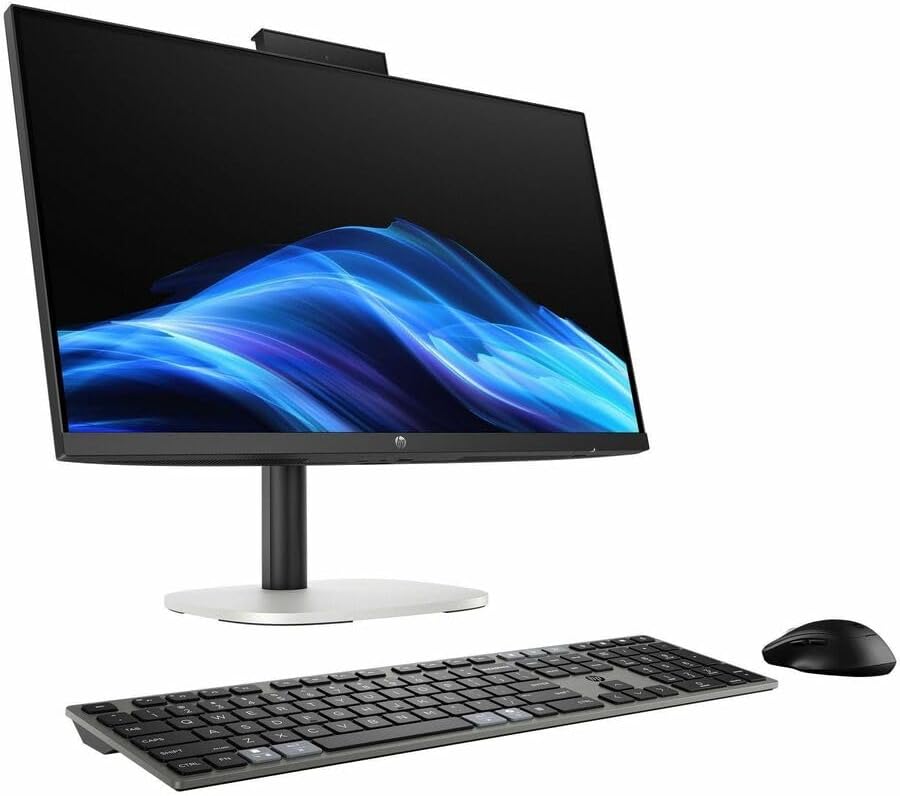
Figure 1: HP ProStudio 4 AiO G1i All-in-One Computer with included keyboard and mouse.
2. 주변기기 연결하기
- Connect the HP 125 v2 Wired Keyboard to an available USB port on the computer.
- HP 125 유선 마우스를 다른 사용 가능한 USB 포트에 연결합니다.
- 뒷면을 참고하세요 view 항구 위치를 보여주는 이미지입니다.

그림 2: 후면 view of the HP ProStudio 4 AiO G1i, showing various ports for connectivity.
3. 전원 연결
- Connect the power adapter cable to the power input port on the rear of the computer.
- 전원 어댑터의 다른 쪽 끝을 접지된 콘센트에 꽂으세요.
4. 초기 부팅
- 일반적으로 디스플레이 측면 또는 하단 베젤에 있는 전원 버튼을 누르십시오.
- Follow the on-screen instructions to complete the Windows 11 Pro operating system setup, including language selection, network connection, and user account creation.
운영
1. 윈도우 11 프로 기본 사항
The HP ProStudio 4 AiO G1i runs on Windows 11 Pro. Familiarize yourself with the Start Menu, Taskbar, and File Explorer for basic navigation and application management. Consult Microsoft's official documentation for detailed Windows 11 Pro usage guides.
2. 네트워크 연결성
- 와이파이: To connect to a wireless network, click the Wi-Fi icon in the system tray, select your desired network, and enter the password if prompted. The system supports 802.11ax for high-speed wireless connections.
- 블루투스: Bluetooth 장치를 페어링하려면 다음으로 이동하세요. 설정 > Bluetooth 및 기기. Ensure Bluetooth is enabled and select 'Add device' to pair.
3. Using Integrated Features
The All-in-One design includes an integrated webcam and microphone, typically located at the top bezel of the display. These are ready for use with video conferencing applications and voice commands.

그림 3: 상단 view of the HP ProStudio 4 AiO G1i, showing the integrated web캠과 마이크.
4. AI 기능
Equipped with an Intel Core Ultra 7 processor, this system features integrated AI capabilities designed to enhance performance and user experience in compatible applications. These features operate in the background to optimize tasks and workflows.
유지
1. 청소
- 화면: 전자제품용으로 특별히 제작된 부드럽고 보푸라기가 없는 천을 사용하세요.Dampen the cloth slightly with water or a screen cleaner solution (do not spray directly onto the screen).
- 외부: 외부 표면은 부드럽고 마른 천으로 닦으세요. 연마성 세제나 용제는 사용하지 마세요.
- 통풍: 과열을 방지하기 위해 통풍구에 먼지나 방해물이 없는지 확인하세요.
2. 소프트웨어 업데이트
Regularly check for and install updates for Windows 11 Pro and HP drivers. This ensures system stability, security, and optimal performance. You can typically find updates through Windows Update in Settings.
3. 데이터 백업
Periodically back up your important data to an external drive or cloud storage service to prevent data loss in case of system failure.
문제 해결
이 섹션에서는 발생할 수 있는 일반적인 문제에 대해 설명합니다. 보다 복잡한 문제의 경우 HP의 공식 지원 자료를 참조하십시오.
전원이 없습니다
- 전원 어댑터가 컴퓨터와 작동하는 콘센트에 제대로 연결되어 있는지 확인하십시오.
- 다른 장치를 연결하여 전원 콘센트가 작동하는지 확인하세요.
디스플레이 없음
- 컴퓨터의 전원이 켜져 있는지 확인하세요.
- If an external monitor is connected, ensure it is powered on and correctly connected.
키보드 또는 마우스가 응답하지 않습니다
- Ensure the USB cables for the keyboard and mouse are firmly plugged into the computer's USB ports.
- 다른 USB 포트에 연결해보세요.
느린 성능
- 백그라운드에서 실행 중인 불필요한 애플리케이션을 닫으세요.
- 보류 중인 Windows 또는 드라이버 업데이트가 있는지 확인하고 설치하십시오.
- 열 스로틀링을 방지하기 위해 적절한 환기를 확보하십시오.
명세서
| 특징 | 사양 |
|---|---|
| 모델 번호 | C72S2UT#ABA |
| 디스플레이 크기 | 23.8 인치 |
| 화면 해상도 | 1920 x 1080(풀HD) |
| 프로세서 | 인텔 코어 울트라 7(5.3GHz) |
| 숫양 | 16GB DDR5 |
| 저장 | 512GB NVMe SSD |
| 운영 체제 | 윈도우 11 프로 |
| 무선 연결 | 802.11ax, 블루투스 |
| 제품 크기(LxWxH) | 29.3 x 18.9 x 7.8 인치 |
| 품목 무게 | 13.89파운드 |
보증 및 지원
This HP product is covered by a standard manufacturer's warranty. For detailed warranty information, terms, and conditions, please refer to the documentation included with your product or visit the official HP support web대지.
기술 지원, 드라이버 다운로드 또는 추가 문제 해결을 위해서는 다음을 방문하세요. HP 지원 web대지. When contacting support, please have your product model number (C72S2UT#ABA) and serial number readily available.