중요한 안전 정보
Please read all safety instructions carefully before using your new television. Keep this manual for future reference. Always follow basic safety precautions to reduce the risk of fire, electric shock, and injury.
- TV를 비나 습기에 노출시키지 마세요.
- TV를 열지 마세요asing; 모든 서비스는 자격을 갖춘 인력에게 의뢰하세요.
- TV 주변의 환기가 잘 되는지 확인하세요.
- 전원 코드가 밟히거나 끼지 않도록 보호하세요.
- 번개가 칠 때나 장기간 사용하지 않을 때는 TV의 플러그를 뽑아 두세요.
1. 설정
1.1 포장 풀기 및 초기 검사
Carefully remove the television and all accessories from the packaging. Check for any damage. The package should include:
- THOMSON 24HT2S15 Smart TV
- 원격 제어
- 전원 어댑터
- 사용 설명서 (본 문서)
- 보증 카드
- TV 스탠드 (2개) 및 나사
1.2 TV 스탠드 설치
Place the TV face down on a soft, flat surface to prevent screen damage. Attach the two stand feet to the designated slots on the bottom of the TV using the provided screws. Ensure they are securely fastened. The adjustable feet allow for two positions (60 cm or 30 cm apart) to fit your furniture.


1.3 외부 장치 연결
Refer to the diagram below for available ports and connect your devices accordingly.
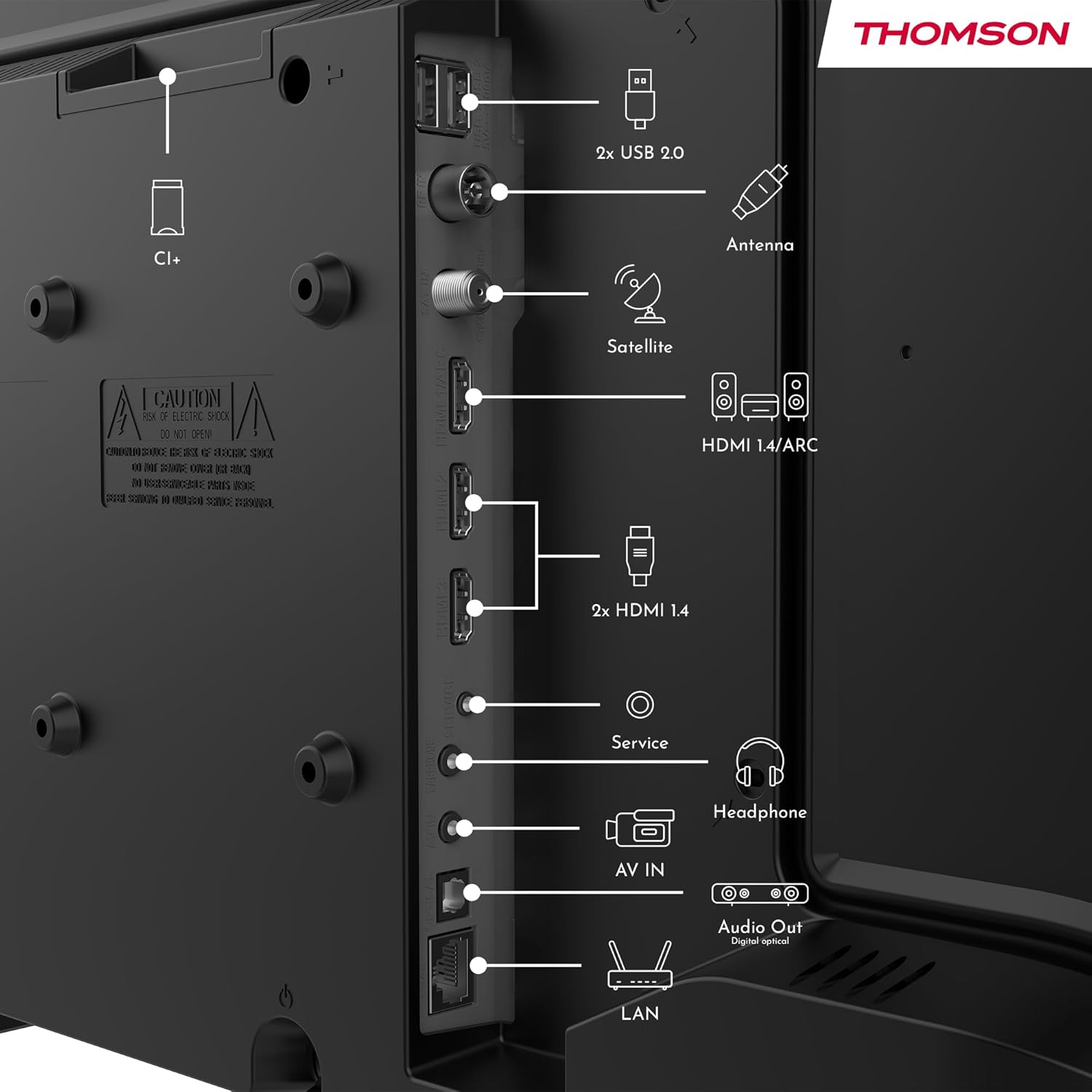
- 힘: Connect the power adapter to the TV and then to a power outlet.
- 안테나/위성: Connect your terrestrial antenna or satellite dish cable to the respective inputs.
- HDMI : Use HDMI cables to connect devices like Blu-ray players, game consoles, or set-top boxes. HDMI 1.4/ARC supports Audio Return Channel.
- USB: 미디어 재생이나 소프트웨어 업데이트를 위해 USB 드라이브를 삽입하세요.
- LAN(이더넷): 유선 인터넷 연결을 위해 이더넷 케이블을 연결합니다.
- 헤드폰: 개인 청취를 위해 헤드폰을 연결하십시오.
- 디지털 광 오디오 출력: 고품질 오디오를 위해 외부 사운드 시스템에 연결하세요.
- AV 입력 : 컴포지트 비디오 및 스테레오 오디오 케이블을 사용하는 구형 기기의 경우.
- CI+ 슬롯: Insert a Conditional Access Module (CAM) for encrypted digital channels.
2. 사용 설명서
2.1 First-Time Setup and TiVo System
Upon first power-on, the TV will guide you through the initial setup process. This includes language selection, network connection (Wi-Fi or Ethernet), and channel scanning. The integrated TiVo system provides a user-friendly interface that combines live TV and streaming applications, offering personalized recommendations.

2.2 리모콘 기능
The included remote control is backlit for easy use in low light and features direct access buttons for popular streaming services.

- 전원 버튼: TV를 켜거나 끕니다.
- 음성 제어 버튼: Activates the voice assistant for commands like searching for content or adjusting settings.
- 탐색 패드(위/아래/왼쪽/오른쪽/확인): 메뉴를 탐색하고 옵션을 선택합니다.
- 볼륨 높이기/낮추기: 사운드 레벨을 조정합니다.
- 채널 위/아래: TV 채널을 변경합니다.
- 직접 접근 버튼: One-touch access to Netflix, YouTube, Prime Video, Disney+, and Canal+.
- 뒤로/나가기: 이전 화면으로 돌아가거나 현재 메뉴를 종료합니다.

2.3 무선 디스플레이(화면 미러링)
The Wireless Display function allows you to project the screen of your smartphone, tablet, or computer onto the TV. This feature is convenient for sharing photos, videos, or presentations.

2.4 오디오 및 화면 설정
Your TV supports Dolby Audio for rich and precise sound, enhancing dialogues and immersion. HDR10 technology provides more natural images with balanced contrast and faithful colors for a realistic view경험.


Access the TV's settings menu to adjust picture modes (e.g., Standard, Dynamic, Movie), sound modes (e.g., Standard, Music, Movie), and other advanced options to customize your view경험.
3. 유지관리
3.1 TV 화면 청소
부드럽고 보풀이 없는 천으로 화면을 부드럽게 닦으세요. 잘 지워지지 않는 얼룩은 가볍게 닦아주세요.amp천에 물이나 특수 화면 세척제를 묻혀 닦으세요. 화면에 직접 액체를 뿌리지 마세요.
3.2 TV 청소 Casing
부드럽고 마른 천을 사용하여 TV를 닦으세요.asing. 연마성 세척제, 왁스 또는 용제는 마감재를 손상시킬 수 있으므로 사용을 피하십시오.
3.3 원격 제어 관리
Keep the remote control dry and clean. Replace batteries when necessary, ensuring correct polarity. If the remote will not be used for an extended period, remove the batteries to prevent leakage.
4. 문제 해결
TV에 문제가 발생하면 지원팀에 문의하기 전에 다음의 일반적인 문제와 해결 방법을 참조하세요.
4.1 전원 없음
- 전원 코드가 TV와 전원 콘센트에 단단히 연결되어 있는지 확인하세요.
- 다른 장치를 연결하여 전원 콘센트가 작동하는지 확인하세요.
- 리모컨이 아닌 TV 본체의 전원 버튼을 누르세요.
4.2 화면은 없지만 소리는 있습니다
- Check the input source. Press the "Source" button on your remote and select the correct input (e.g., HDMI 1, Antenna).
- Ensure all cables (HDMI, antenna) are securely connected.
- TV와 연결된 장치를 다시 시작해 보세요.
4.3 소리는 없지만 영상은 있음
- 볼륨 레벨을 확인하고 TV가 음소거되어 있지 않은지 확인하세요.
- TV 메뉴에서 오디오 설정을 확인하십시오.
- 외부 스피커를 사용하는 경우 스피커가 제대로 연결되고 전원이 켜져 있는지 확인하세요.
4.4 리모컨이 작동하지 않음
- 배터리를 새 배터리로 교체하고 극성이 올바른지 확인하세요.
- 리모컨과 TV의 IR 센서 사이에 장애물이 없는지 확인하세요.
- 리모컨을 TV에 직접 대세요.
4.5 Wi-Fi 연결 문제
- Wi-Fi 라우터가 켜져 있고 올바르게 작동하는지 확인하세요.
- 공유기와 TV를 재시작하세요.
- Check the Wi-Fi password in the TV's network settings.
- Move the TV closer to the router or use a wired Ethernet connection if possible.
5. 사양
| 모델 번호 | 24HT2S15 |
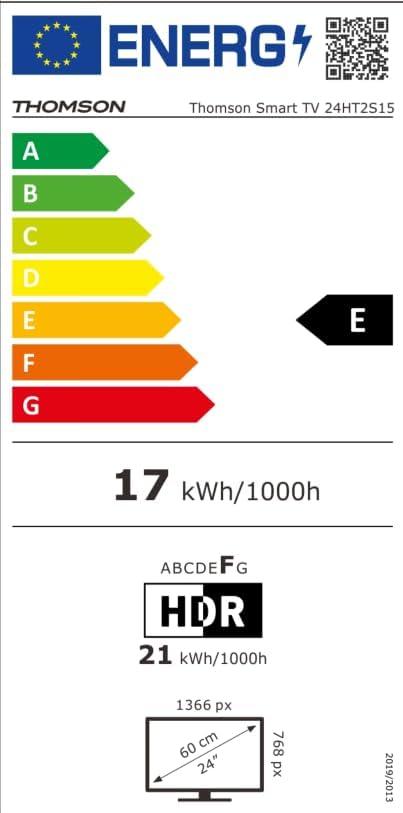
| 화면 크기 | 24인치(60cm) |
| 디스플레이 기술 | 주도의 |
| 해결 | 768p(HD) |
| 새로 고침 빈도 | 60Hz |
| 종횡비 | 16시 9분 |
| 특별 기능 | TiVo System with Voice Control, Dolby Audio, HDR10, Wireless Display, Backlit Remote with Direct Access Buttons |
| 연결성 | Wi-Fi, Ethernet, HDMI (x3, one with ARC), USB (x2), Antenna, Satellite, AV In, Digital Optical Audio Out, Headphone Out, CI+ |
| 치수(폭 x 높이 x 깊이) | 53 x 37 x 8cm(스탠드 제외) |
| 무게 | 3.33kg |
| 포함된 구성 요소 | Power Adapter, Remote Control, User Manual, Warranty Card |
| 제조업체 | 개울view 주식회사 |
| 에너지 효율 등급 | E |

6. 보증 및 지원
Your THOMSON 24HT2S15 Smart TV comes with a warranty card included in the box. Please refer to this card for specific warranty terms and conditions applicable in your region.
For technical support, service, or warranty claims, please contact the manufacturer, Streamview GmbH, or your local authorized service center. Contact information can typically be found on the warranty card or the manufacturer's official web대지.
제조사: Streamview 주식회사
Web대지: www.streamview.com


