소개
This manual provides detailed instructions for the installation, operation, maintenance, and troubleshooting of your AINAVI 7-inch Car Stereo Radio. Please read this manual thoroughly before using the product to ensure proper function and safety.
패킹 리스트
아래 나열된 모든 품목이 패키지에 포함되어 있는지 확인하세요.
- Head Unit (1280*720) for Volkswagen *1
- 사용설명서 *1
- 전원 케이블 * 1
- AHD 1080P 후면 View 카메라*1
- 마이크 *1
- Frame Removal Tool *1
- GPS Antenna *1
- USB Cables (4Pin & 6Pin)
- RCA 케이블
- CANbus Decoder (if required by vehicle model)
- 24 Hours Engineer--Pre and after-sale Services.

텍스트 설명: This image displays the various components included in the AINAVI car stereo package. It shows the front and back of the 7-inch head unit, a power cable with CANbus decoder, an RCA cable, a car microphone, a GPS module, 2 USB cables, a reversing control cable, a 1080P rear view camera, and a frame removal tool. The text clarifies that cables may vary by model.
설정 및 설치
Proper installation is crucial for optimal performance. If you are unsure about any steps, please consult a professional or contact our technical support.
1. Removing the Original Car Radio
Carefully remove the trim around your existing car radio using the provided frame removal tool. Unscrew the mounting screws and disconnect all cables from the back of the original radio.

텍스트 설명: 이 이미지는 분할을 보여줍니다. view of a car's dashboard. The top half displays three different original car radios in various Volkswagen/SEAT/Skoda models. The bottom half shows the AINAVI 7-inch car stereo seamlessly integrated into a dashboard, demonstrating the modern upgrade.
2. 배선 연결
Connect the provided power cable, RCA cables, GPS antenna, and USB cables to the corresponding ports on the AINAVI head unit. Ensure all connections are secure.
텍스트 설명: This video provides a step-by-step guide for installing the wiring for a Volkswagen car radio. It shows how to remove the original radio, connect the power cord to the original car's power cord, and test the power connection. It also demonstrates how to connect the emergency button wire to the new frame and install the new radio into the dashboard.
3. 후면 View 카메라 배선(선택 사항)
If installing the optional rear view camera, connect the camera's video cable to the "Rear Camera Input" on the head unit and its power cable to the vehicle's reverse light circuit (12V). Ensure the trigger wire is correctly connected to the power harness.
텍스트 설명: This video demonstrates the wiring process for the backup camera. It shows how to connect the extension cable, power cable, and the rear view camera to the car stereo unit and the vehicle's electrical system. It also illustrates how to route the cables through the car's interior and trunk, and how to install the camera in the license plate area. The video concludes with testing the camera functionality.
4. 최종 설치
Carefully slide the head unit into the dashboard opening. Reinstall the mounting screws and reattach the trim panel. Test all functions before fully securing the trim.
작동 지침
1. 전원 켜기/끄기
Press and hold the power button (usually labeled VOL or POWER) on the front panel to turn the unit on or off. A short press typically mutes/unmutes the audio.
2. CarPlay 및 Android Auto
The unit supports both wired and wireless CarPlay and Android Auto. Connect your smartphone via USB or Bluetooth. Once connected, select the CarPlay or Android Auto icon on the home screen to access your phone's features on the stereo display.
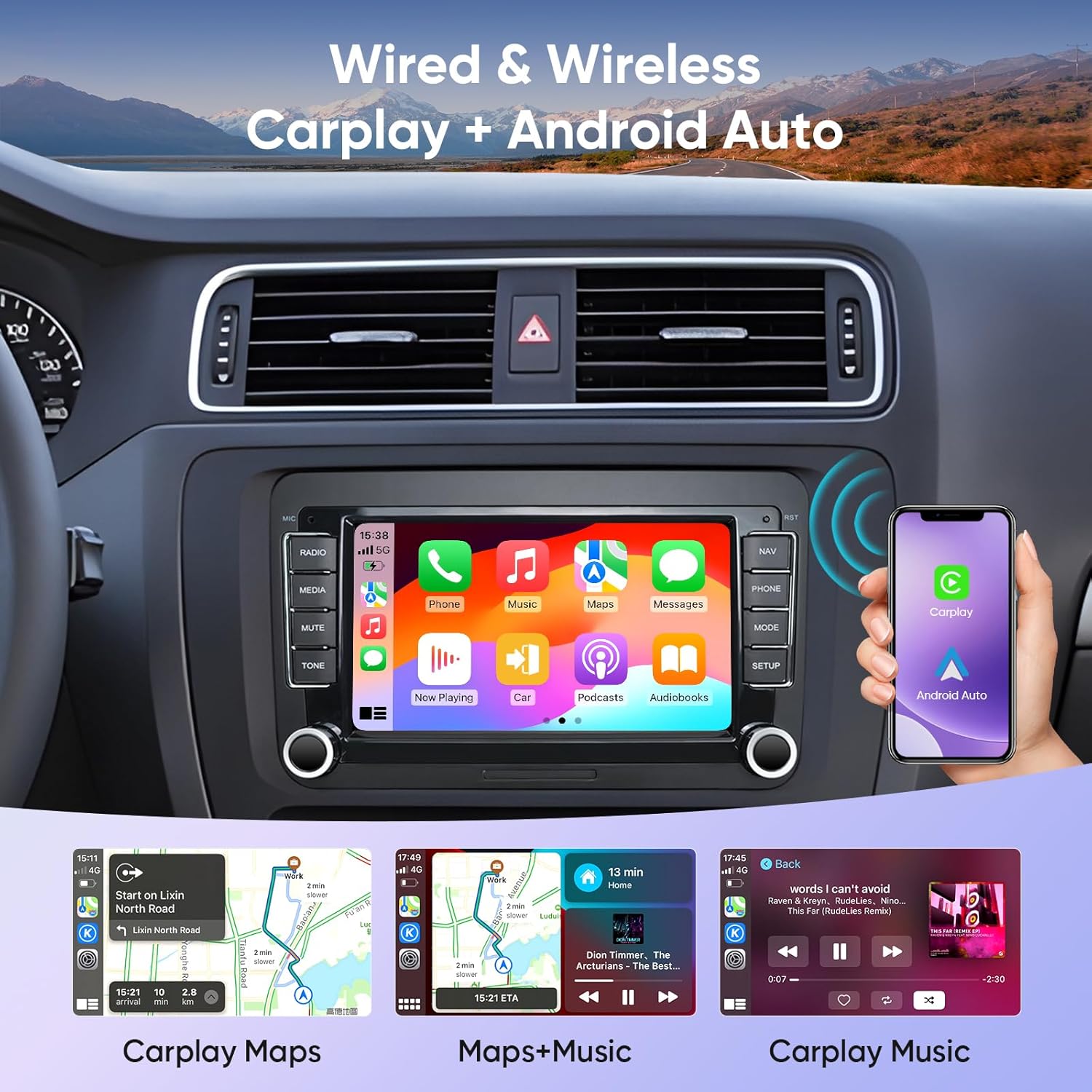
텍스트 설명: This image displays the AINAVI car stereo's 7-inch screen with the Apple CarPlay interface active. The screen is divided into several app icons for Phone, Music, Maps, Messages, Now Playing, Exit, Podcasts, and Audiobooks. Below the main screen, smaller images show examples of CarPlay Maps, Maps+Music, and CarPlay Music in action.
3. GPS 내비게이션
The unit features built-in GPS navigation with 5G WiFi support for accurate real-time mapping. Access Google Maps or other compatible navigation apps from the home screen.

텍스트 설명: This image shows the AINAVI car stereo's 7-inch screen displaying a detailed GPS navigation map within a car's dashboard. The map shows a route with estimated arrival time and distance. The surrounding dashboard elements are visible, indicating seamless integration.
4. 블루투스 연결
Pair your smartphone via Bluetooth for hands-free calling and audio streaming. Access the Bluetooth menu to manage devices and settings.

텍스트 설명: This image illustrates the AINAVI car stereo's screen with options for WiFi and Bluetooth connectivity. Below the main screen, two smaller insets show "WiFi Connection" and "Bluetooth music" interfaces, with a hand holding a smartphone demonstrating the Bluetooth connection process.
5. 분할 화면 기능
Utilize the split screen feature to run two applications simultaneously, such as navigation and music playback, without switching between apps.

텍스트 설명: This image shows the AINAVI car stereo's screen in a split-screen mode, displaying two different applications simultaneously. One side shows a video playing, and the other side shows a navigation map. A smartphone is also shown mirroring its screen content to the car stereo.
6. 스티어링 휠 제어
The unit supports learning steering wheel controls. Access the settings menu to configure your vehicle's steering wheel buttons for convenient control of the stereo.
7. 후면 View 카메라 디스플레이
When the vehicle is shifted into reverse gear, the 1080P HD rear view camera display will automatically activate, providing a clear view of the area behind your car with guiding lines.

텍스트 설명: This image displays the AINAVI car stereo's 7-inch screen showing a clear 1080P AHD rear view camera feed. The view is from the back of the car, showing a parking lot with other vehicles, and includes colored parking guidelines (red, yellow, green) overlaid on the image for assistance.
유지
AINAVI 차량용 스테레오의 수명과 최적의 성능을 유지하려면 다음 유지 관리 지침을 따르십시오.
- 화면 청소: 부드럽고 보풀이 없는 천을 사용하여 터치스크린을 부드럽게 닦으세요. 잘 지워지지 않는 얼룩은 가볍게 닦아주세요.amp천에 물이나 화면에 안전한 세척제를 묻혀 닦아주세요. 강한 화학 물질이나 연마재는 사용하지 마세요.
- 일반 관리 : 먼지나 이물질이 기기에 닿지 않도록 주의하세요. 기기를 극한 온도나 직사광선에 장시간 노출시키지 마세요.
- 소프트웨어 업데이트: Periodically check for software updates to ensure you have the latest features and bug fixes. Updates can usually be performed via Wi-Fi.
문제 해결
If you encounter any issues with your AINAVI car stereo, please refer to the common problems and solutions below. If the problem persists, contact our technical support team.
- 장치가 켜지지 않음:
- 전원 케이블 연결부가 모두 단단히 고정되어 있는지 확인하십시오.
- Verify that the vehicle's power supply is active.
- If your vehicle requires a CANbus decoder, ensure it is correctly connected.
- "Ultra High Definition Eats" video playing unexpectedly:
- This may indicate a software glitch or an unintended pre-installed video. Try performing a factory reset or contacting support for a firmware update.
- Backup camera issues (snow/9-grid display):
- This often indicates an incorrect image format setting. Long-press the screen for 5 seconds to access image format settings and select AHD720P25. Alternatively, navigate to Settings > Factory Settings (Password) > Camera-RVC Channel Config > AHD.
- Ensure all camera wiring, including the trigger cable, is correctly installed and secured.
- Device not fitting flush in dashboard:
- Verify compatibility with your specific vehicle model (Volkswagen, SEAT, Skoda). Some models, like the 2014 Volkswagen Beetle, may have specific fitment challenges due to bottom corner dimensions.
- 핸들 조작 버튼이 작동하지 않습니다.
- Access the steering wheel learning function in the settings menu to program the buttons.
명세서
| 특징 | 세부 사항 |
|---|---|
| 품목 무게 | 3.32파운드 |
| 패키지 크기 | 13.78 x 9.92 x 5.2 인치 |
| 품목 모델 번호 | 2G+64G |
| 디스플레이 크기 | 7 인치 |
| 운영 체제 | 안드로이드 12.0 |
| 메모리(RAM) | 2GB |
| 저장 장치(ROM) | 64GB |
| 연결 기술 | Bluetooth, USB, Wi-Fi (2.4GHz & 5GHz), Wireless/Wired CarPlay & Android Auto |
| 특별 기능 | 48EQ (Sound Point Control) + Premium DSP, Highest Level QLED Screen, Split Screen Function, Touchscreen |
| 지도 유형 | Europe, North America, South America, Worldwide (Google Maps) |
| 오디오 출력 모드 | 서라운드 사운드 스테레오 |
| 뒤쪽 View 카메라 입력 | 1080P HD AHD (included) |
보증
Your AINAVI 7-inch Car Stereo Radio comes with a 12개월 제조사 보증보증 청구를 위해 구매 증빙 서류를 보관하세요.
고객 지원
For professional technical support regarding installation, operation, or any other inquiries, please contact our dedicated support team:
- 핸드폰: +1 (833) 858-5016
- 근무 시간: 오후 1시부터 오전 0시까지 (태평양 표준시)
- 이메일: info@ainavi.com
아마존 주문 센터를 통해서도 도움을 요청할 수 있습니다.

텍스트 설명: This image displays AINAVI's customer support information. It features a smiling customer service representative wearing a headset. Below the image, contact details are provided: a phone number (+1 (833) 858-5016), working hours (01:00 PM to 00:00 AM PST), and an email address (info@ainavi.com).


