1. 서론
The PUSOKEI A78SD3 is a versatile computer motherboard designed to support AM3 interface APU processors and DDR3 memory. It offers robust performance and extensive connectivity for various computing needs, from gaming to multimedia tasks. This manual provides detailed instructions for installation, operation, and maintenance to ensure optimal performance and longevity of your motherboard.
주요 특징은 다음과 같습니다.
- 강력한 호환성: Supports AM3 interface APU processors and dual-channel DDR3 memory up to 16GB (8GB per stick).
- High Definition Experience: Equipped with HDMI and VGA video outputs, 100Mbps Ethernet, and 5.1 channel sound for rich multimedia.
- 대용량 저장 용량: Features 4 Serial ATA 3.0 ports for connecting multiple storage devices.
- 안정적인 성능: Multi-phase power design ensures stable operation and optimal performance.
- Versatile Interface Expansion: Includes 4 USB 2.0 ports and various headers for peripheral connectivity.
2. 기술 사양
The following table details the technical specifications of the PUSOKEI A78SD3 Computer Motherboard:
| 특징 | 사양 |
|---|---|
| 품목 유형 | A78SD3 Computer Motherboard |
| 재료 | 인쇄 회로 기판 |
| 마더보드 칩 | Integrated Sound Card, Network Card with Integrated Graphics |
| 메인 칩셋 | for RS780 Series |
| Network Card Chip | Integrated 100Mbps Ethernet |
| 사운드 칩 | Integrated 6 Channel Sound Chip |
| 프로세서 지원 | Supports AM3 Interface for APU Processors |
| CPU 소켓 | AM3 |
| 메모리 유형 | DDR3 1600/1333/1066MHz |
| 메모리 슬롯 | 2 x DDR3 (Max 16GB, 8GB per stick) |
| 확장 슬롯 | 1 x PCI-E X16 Graphics Card Slot, 1 x COM Serial Port Header, 2 x USB 2.0 Headers, 4 x Serial ATA 3.0 Ports |
| I / O 인터페이스 | PS/2 (Keyboard/Mouse), 1 x RJ45 Ethernet, 1 x VGA, 1 x HDMI, 4 x USB 2.0, Sound Interfaces |
| 마더 보드 크기 | Approx. 17x21.3cm / 6.7x8.4in |
| 배터리 유형 | 1 x CR2032L Battery (Included) |
| 전원 커넥터 | 4 Pin and 24 Pin Power Connector |
| 전원 공급 모드 | 4단계 |

3. 구성요소 종료view
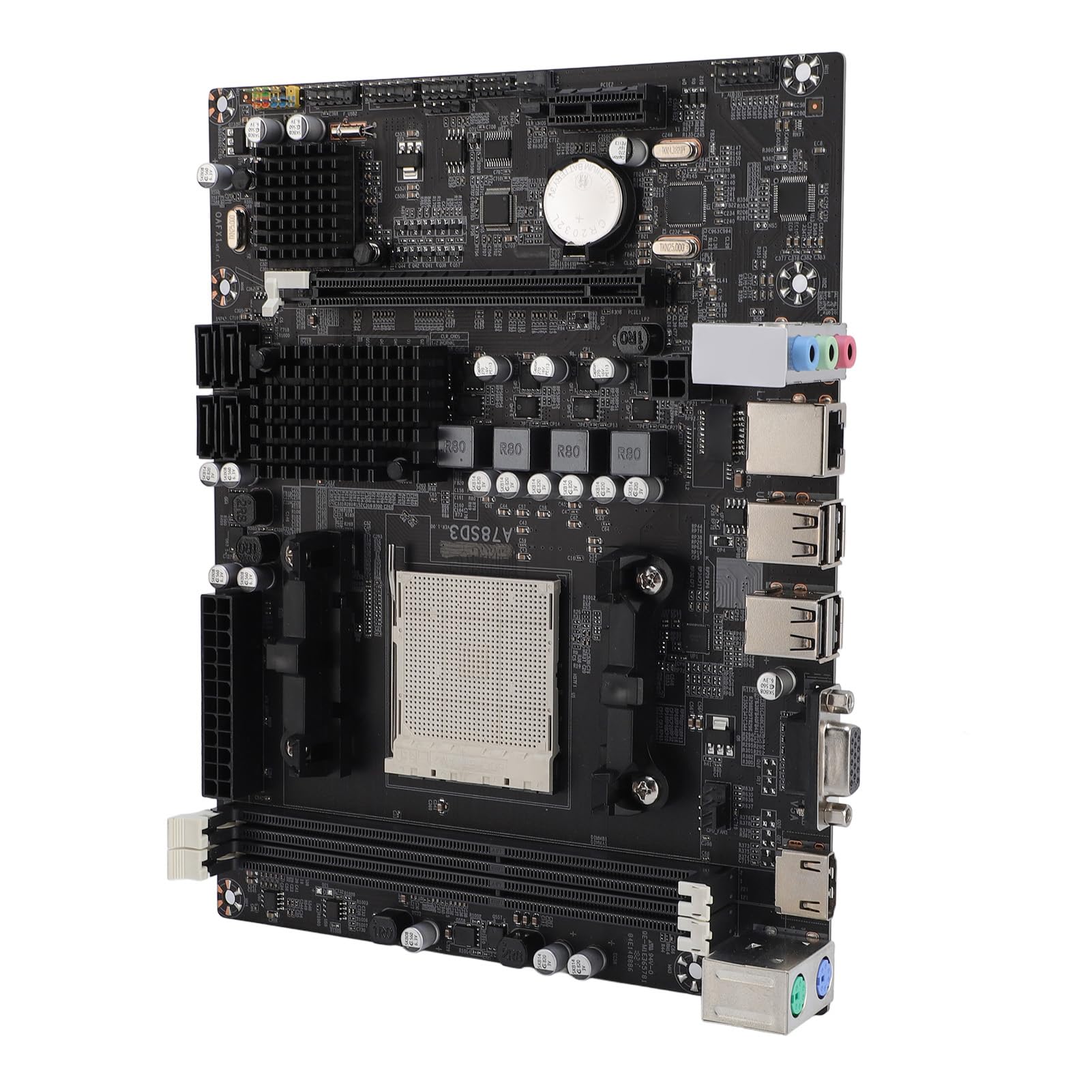
Familiarize yourself with the various components and connectors on the A78SD3 motherboard using the diagram below:

- CPU 소켓(AM3): For installing compatible AMD AM3 series processors.
- DDR3 메모리 슬롯: Two slots for DDR3 RAM modules.
- PCIe X16 슬롯: For installing a dedicated graphics card.
- SATA 3.0 포트: Four ports for connecting storage devices like HDDs and SSDs.
- 24핀 ATX 전원 커넥터: Main power input from the power supply unit (PSU).
- 4핀 CPU 전원 커넥터: CPU에 추가 전력을 제공합니다.
- I/O 패널: Includes PS/2 ports, USB 2.0 ports, RJ45 Ethernet, VGA, HDMI, and audio jacks.
- USB 2.0 헤더: For connecting front panel USB ports or other internal USB devices.
- COM Serial Port Header: For legacy serial port connections.
4. 설치 및 설정
This section guides you through the process of installing your PUSOKEI A78SD3 motherboard and its components.
4.1 풀기
Carefully unpack the motherboard and check the contents against the packing list:
- 1 x A78SD3 Computer Motherboard
- I/O 배플 1개
- 1 x Serial ATA Cable
- 1 x 사용자 매뉴얼(이 문서)

4.2 마더 보드 설치
올바른 설치를 위해 다음 단계를 따르세요.
- 사례 준비: Ensure your computer case is ready, with standoffs correctly aligned for the motherboard.
- I/O 쉴드를 설치하세요: Snap the I/O shield (baffle) into the corresponding opening at the rear of your computer case.
- CPU 설치:
- CPU 소켓 레버를 엽니다.
- CPU의 삼각형 표시와 소켓의 표시가 일치하는지 확인하여 CPU를 소켓에 조심스럽게 맞춰 장착하십시오. CPU를 억지로 끼워 넣지 마십시오.
- CPU를 소켓에 조심스럽게 내려놓으세요.
- 소켓 레버를 닫아 CPU를 고정합니다.

Figure 4.2: Close-up of the AM3 CPU socket on the A78SD3 motherboard, ready for processor installation. - CPU 쿨러 설치: 서멀 그리스를 바르고(미리 바르지 않은 경우) CPU 쿨러를 제조사의 지침에 따라 설치하세요. CPU 팬 케이블을 마더보드의 CPU_FAN 헤더에 연결하세요.
- RAM 설치:
- DDR3 메모리 슬롯의 양쪽 끝에 있는 클립을 엽니다.
- Align the notch on the RAM module with the notch in the memory slot.
- 클립이 제자리에 고정될 때까지 RAM 모듈의 양쪽 끝을 단단히 누릅니다.

Figure 4.3: Close-up of the two DDR3 memory slots on the A78SD3 motherboard, indicating where RAM modules are to be installed. - 마더보드 장착: 마더보드를 케이스에 조심스럽게 넣고 나사 구멍과 스탠드오프를 맞춰주세요. 나사를 사용하여 고정합니다.
- 전원 연결: 파워서플라이의 24핀 ATX 전원 커넥터와 4핀 CPU 전원 커넥터를 마더보드에 연결하십시오.
- 그래픽 카드 설치(선택 사항): If using a dedicated graphics card, insert it into the PCIe X16 slot until it clicks into place. Secure it with a screw to the case. Connect any required PCIe power cables from the PSU to the graphics card.
- 저장 장치 연결: Use the provided Serial ATA cable to connect your SSDs/HDDs to the SATA 3.0 ports on the motherboard. Connect power cables from the PSU to your storage devices.
- 전면 패널 케이블 연결: Connect the power button, reset button, HDD LED, power LED, and front panel USB/audio cables to their respective headers on the motherboard. Refer to the motherboard diagram (Figure 3.1) and your case manual for correct pin assignments.
- 주변기기 연결: Connect your monitor, keyboard, mouse, and other peripherals to the I/O panel ports.
5. 운영
모든 구성 요소를 설치하고 연결하면 시스템의 전원을 켤 수 있습니다.
- 초기 부팅: Press the power button on your computer case. The system should power on, and you should see a display on your monitor.
- BIOS/UEFI 설정: During the initial boot sequence, you may need to press a specific key (commonly Del, F2, F10, or F12) to enter the BIOS/UEFI setup utility. Here, you can configure boot order, system time, and other advanced settings.
- 운영 체제 설치: If you are building a new system, you will need to install an operating system (e.g., Windows, Linux) from a bootable USB drive or DVD.
- 드라이버 설치: After installing the operating system, install the necessary drivers for the motherboard's chipset, integrated graphics (if used), network, and audio. These are typically provided on a CD/DVD with the motherboard or can be downloaded from the PUSOKEI web대지.
6. 유지관리 및 관리
적절한 유지 관리는 마더보드의 수명 연장과 안정적인 성능을 보장합니다.
- 깨끗하게 유지하세요: Regularly clean dust from inside your computer case using compressed air. Dust can accumulate on components and lead to overheating.
- 환경 조건: Operate the motherboard in a well-ventilated area with stable temperature and humidity. Avoid extreme temperatures and direct sunlight.
- 조심스럽게 다루십시오: Always handle the motherboard by its edges to avoid touching sensitive components or static discharge. Use an anti-static wrist strap when working inside your computer.
- BIOS 업데이트: Periodically check the PUSOKEI website for BIOS updates. Updates can improve stability, compatibility, and performance. Follow update instructions carefully.
- 케이블 관리 : 케이스 내부의 케이블은 공기 흐름을 개선하고 간섭을 방지하기 위해 깔끔하게 정리해야 합니다.
7. 문제 해결
메인보드에 문제가 발생하면 다음의 일반적인 문제 해결 단계를 참조하십시오.
- 전원 없음:
- Check if the PSU is switched on and all power cables (24-pin ATX, 4-pin CPU) are securely connected.
- 전면 패널 전원 버튼 케이블이 마더보드 헤더에 올바르게 연결되어 있는지 확인하십시오.
- 디스플레이 없음:
- Verify that the monitor is connected to the correct video output (motherboard's VGA/HDMI or dedicated graphics card).
- RAM 모듈을 다시 장착하십시오. RAM 스틱 하나만 장착하고 부팅을 시도해 보십시오.
- 전용 그래픽 카드를 사용하는 경우, 그래픽 카드가 제대로 장착되어 있고 전원이 공급되고 있는지 확인하십시오.
- Clear CMOS (refer to motherboard manual for jumper location or remove/reinsert the CR2032L battery).
- 시스템 불안정/충돌:
- CPU와 GPU 온도를 확인하세요. 쿨러가 제대로 설치되었는지, 팬이 정상적으로 작동하는지 확인하십시오.
- 메모리 진단 도구를 실행하여 RAM에 오류가 있는지 확인하십시오.
- 모든 드라이버가 최신 상태인지 확인하세요.
- Check PSU wattag예; 구성 요소에 충분하지 않을 수 있습니다.
- 주변 장치가 감지되지 않음:
- 주변 장치를 다른 포트에 연결해보세요.
- 주변기기 드라이버가 설치되어 있는지 확인하십시오.
- BIOS 설정을 확인하여 포트가 활성화되어 있는지 확인하세요.
8. 보증 및 지원
For warranty information and technical support, please refer to the official PUSOKEI web사이트를 방문하거나 판매점에 문의하세요. 보증 청구를 위해 구매 증빙 자료를 보관하세요.