1. 서론
Thank you for choosing the OLIXIS 50-Inch L-Shaped Desk. This versatile desk is designed to maximize your workspace, offering a spacious and functional surface for office work, gaming, or studying. Its robust construction and thoughtful features ensure durability and convenience. Please read this manual carefully before assembly and use to ensure proper setup and longevity of your desk.
2. 제품 특징
- Amp워크스페이스: Configure the desk in an L-shaped layout to create a large surface area, accommodating multiple monitors and various equipment.
- 튼튼하고 내구성 있는 구조: Built with a robust metal frame for excellent stability. The desktop features a waterproof surface for easy cleaning and long-term use.
- 양면 디자인: The L-shape can be assembled with the longer side on either the left or right, adapting to your room layout. The CPU shelf can also be installed on either side.
- 스마트 스토리지 솔루션: Includes a side storage bag for accessories and a built-in CPU stand to keep your computer tower elevated for better ventilation and off the floor.
- 간편한 설치: Designed for straightforward assembly with clear instructions and a helpful video guide.
3. 패키지 내용
조립을 시작하기 전에 아래 나열된 모든 구성품이 있는지 확인하세요. 부품이 누락되었거나 손상된 경우 고객 지원 센터에 문의하세요.

그림 3.1: 패키지에 포함된 모든 구성품.
구성 요소:
- A, B, C: Desktop Panels (x1 each)
- D, E, F: Leg Frames (x1 each)
- G: Crossbars (x2)
- H, I, J: Support Bars (x1, x1, x2 respectively)
- K, L: X-shaped Stabilizer Bars (x1 each)
- M: Side Storage Bag (x1)
하드웨어:
- 1: 나사(x21)
- 2: 나사(x8)
- 3: 나사(x1)
- 4: 나사(x2)
- 5: 나사(x2)
- 6: 나사(x1)
- 8: 알렌 렌치(x1)
4. 설치 및 조립 지침
Assembly typically requires 2 people. Please follow the steps carefully. It is recommended to tighten screws by 50% initially, then fully tighten all screws once the desk is assembled.
조립 비디오 가이드:
Video 4.1: Official OLIXIS 50-Inch L-Shaped Desk Assembly Guide.
단계별 조립:
- Assemble Desktop Panels: Connect panels A, B, and C using the provided screws. Ensure they form the L-shape correctly.
- 크로스바 부착: Secure Crossbars G to the underside of the desktop panels. Pay attention to the orientation of the holes. Tighten screws by 50%.
- Install Leg Frames: Attach Leg Frames D, E, and F to the desktop panels. Ensure the holes align for proper attachment. Tighten screws by 50%.
- Connect Stabilizer Bars: Attach the X-shaped Stabilizer Bars K and L to the leg frames. These provide additional stability. Tighten screws by 50%.
- Install CPU Shelf: Attach the CPU shelf to the desired side (left or right) of the desk. This shelf is reversible. Tighten screws by 50%.
- Attach Side Storage Bag: Secure the Side Storage Bag M to the side of the desk using the designated attachment points.
- 최종 조임: 모든 부품이 제자리에 정렬되면 모든 나사를 완전히 조여 최대한의 안정성을 확보하십시오.

Figure 4.1: The CPU stand provides elevated storage for your computer tower.

Figure 4.2: The desk's reversible design allows for flexible placement in any corner.
5. 사용 설명서
The OLIXIS L-Shaped Desk is designed for straightforward use. Place your computer, monitors, and other equipment on the spacious desktop. Utilize the side storage bag for documents, notebooks, or small accessories, and the CPU stand for your computer tower.
중량 용량:
책상에는 최대 권장 하중이 명시되어 있습니다. 264 파운드. Avoid exceeding this limit to prevent damage or instability.

그림 5.1: 책상은 다음과 같은 기능을 제공합니다. ample space for gaming setups and multiple monitors.
6. 유지관리
To maintain the appearance and longevity of your OLIXIS L-Shaped Desk, follow these simple care instructions:
- 청소: 책상과 금속 프레임을 닦아주세요.amp 천으로 닦으세요. 마감재를 손상시킬 수 있는 강한 화학 물질이나 연마성 세제는 사용하지 마세요.
- 유출: Promptly clean any spills to prevent staining, especially on the wooden surfaces.
- 점검: 모든 나사와 연결부가 단단히 조여져 있는지 정기적으로 점검하세요. 안정성을 유지하기 위해 필요하면 다시 조여주세요.
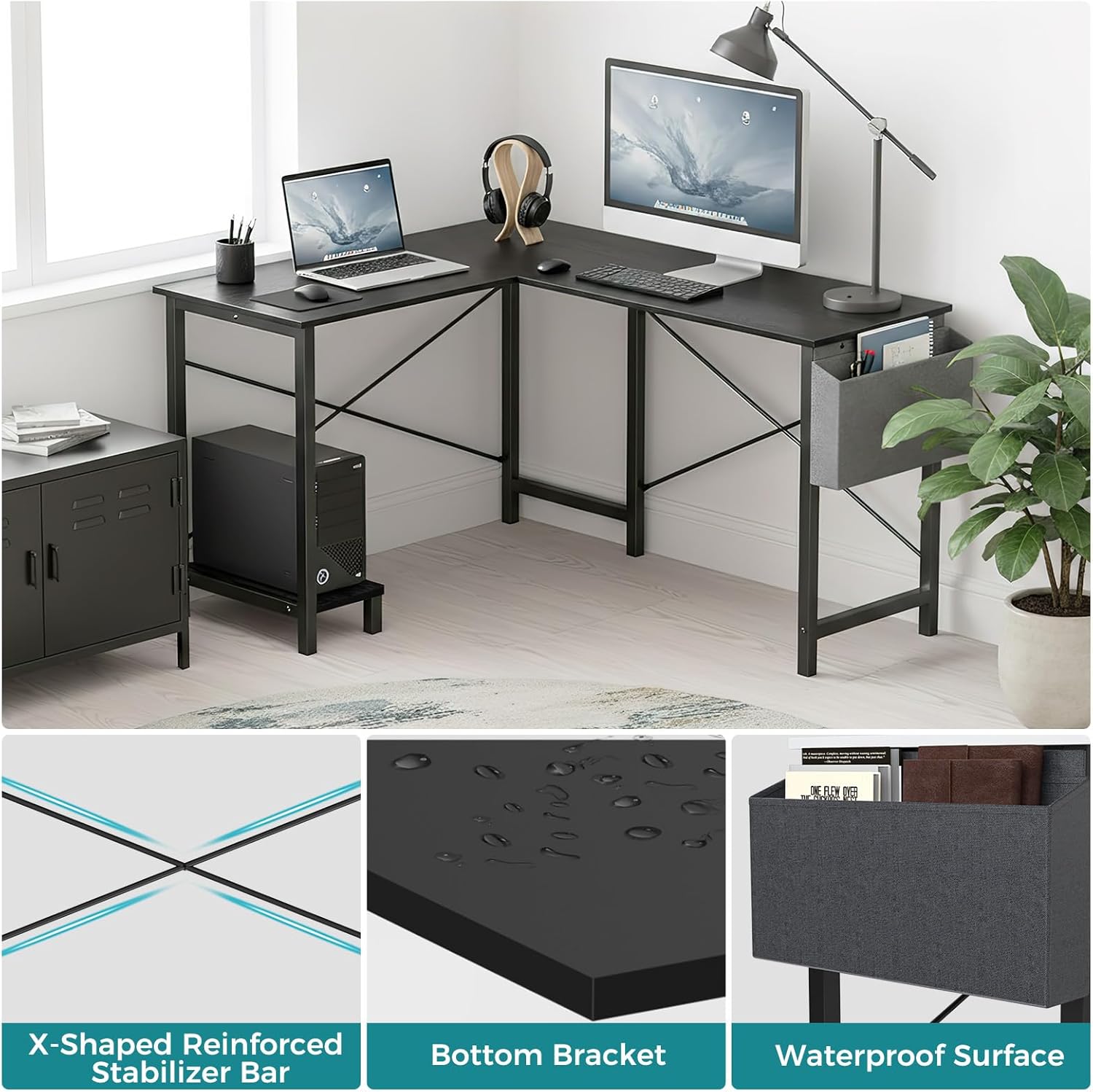
Figure 6.1: Key features like the waterproof surface simplify maintenance.
7. 문제 해결
If you encounter any issues with your OLIXIS L-Shaped Desk, please refer to the following common solutions:
- 흔들리는 책상: Ensure all screws are fully tightened. Check that the desk is placed on a level surface. Adjust the foot pads if available.
- 조립 난이도: Re-check the assembly video and instructions. Ensure all parts are oriented correctly, especially the crossbars and leg frames. Do not force parts together.
- 잃어버린 부분들: Refer to the 'Package Contents' section. If any parts are missing, contact OLIXIS customer support for assistance.
8. 사양
| 상표 | 올릭시스 |
| 모델 번호 | OLYMHJ3-DL02-49IN-BK |
| 제품 치수 | 50인치 깊이 x 43.3인치 너비 x 29.53인치 높이 |
| 품목 무게 | 32.85 파운드 |
| 최대 중량 권장 사항 | 264 파운드 |
| 재료 유형 | 금속, 목재 |
| 색상 | 검은색 |
| 특징 | Reversible, Side Storage Bag, Built-in CPU Stand |
| 필요한 조립 | 예 |
| 조립 권장 인원 | 2 |
| 제품 관리 지침 | D로 닦기amp 옷감 |

Figure 8.1: Detailed dimensions of the OLIXIS L-Shaped Desk.
9. 보증 및 지원
The OLIXIS L-Shaped Desk comes with a 한정 보증. For specific details regarding warranty coverage, terms, and conditions, please refer to the warranty card included in your package or contact OLIXIS customer support.
For any questions, technical assistance, or to report missing/damaged parts, please visit the official OLIXIS store on Amazon or contact their customer service directly.
OLIXIS Store: Visit OLIXIS Store


