1. 서론
This manual provides instructions for the setup, operation, and maintenance of your BEITONG KP70 Haptic Feedback Elite Gaming Controller. Please read this manual thoroughly before use to ensure proper functionality and to maximize your gaming experience.
2. 패키지 내용

이미지: 이상view of the BEITONG KP70 controller and its included accessories, detailing the model, dimensions, connection types, battery capacity, and contents.
패키지에 모든 품목이 들어 있는지 확인하세요.
- 컨트롤러 x 1
- Receiver x 1 (for 2.4G wireless connection)
- Cable x 1 (for wired connection and charging)
- Replaceable Joystick x 2
- 사용자 설명서 1부 (본 문서)
- 충전 도크 x 1
3. 컨트롤러 레이아웃 및 기능
Familiarize yourself with the various components and features of the BEITONG KP70 controller.

이미지: 상세 view of the adaptive auto-sensing trigger mechanism, highlighting the high-performance chip, haptic feedback servo, high-precision gear set, auto-sensing switching mechanism, and haptic feedback triggers.
Adaptive Auto-Sensing Triggers: The triggers incorporate a high-performance chip, haptic feedback servo, and a high-precision gear set for responsive and immersive haptic feedback. An auto-sensing switching mechanism adjusts trigger response based on gameplay.

Image: Illustration of the damping adjustment joystick, showing the mechanism for adjusting resistance from 30gf (lighter) to 100gf (heavier).
Damping Adjustment Joystick: The joysticks feature a seamless damping adjustment mechanism, allowing users to customize resistance from 30gf (lighter, agile movement) to 100gf (heavier, precise control). Rotate clockwise for heavier resistance and counter-clockwise for lighter resistance.
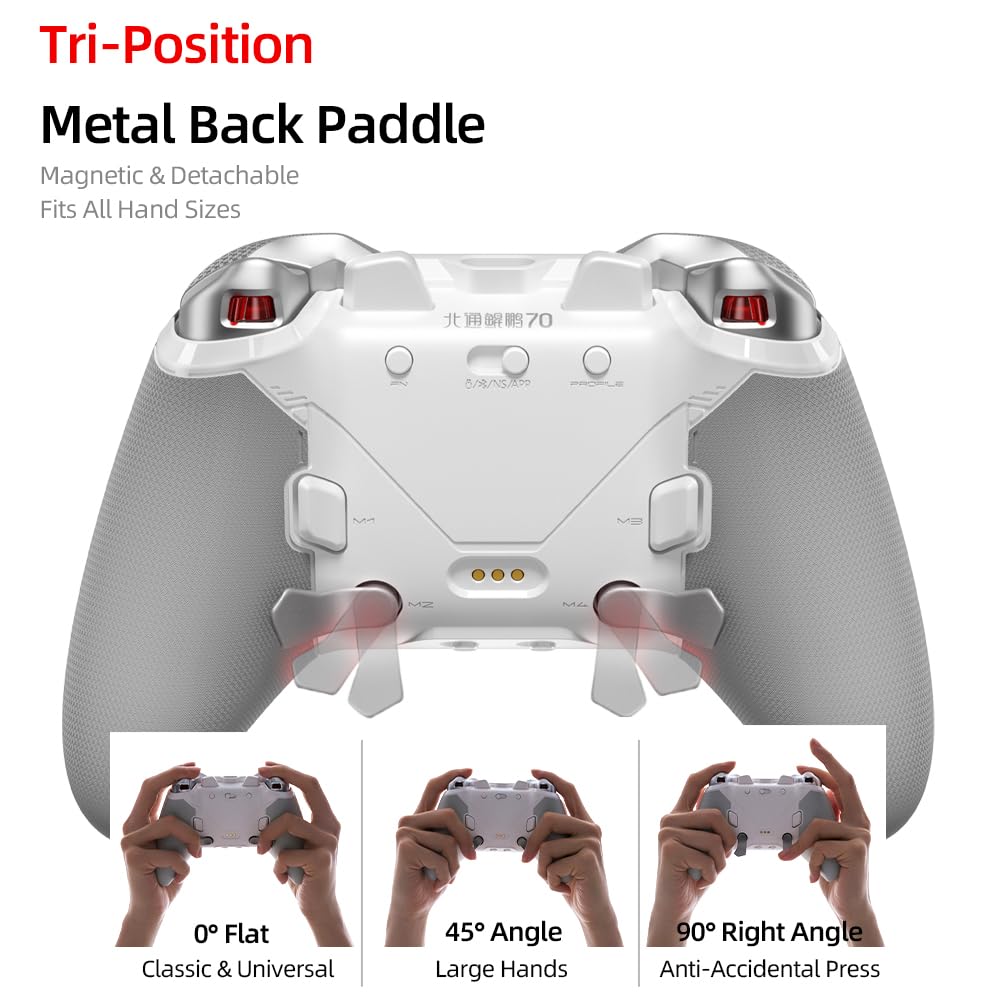
영상: View of the controller's rear, showcasing the magnetic and detachable tri-position metal back paddles and their three adjustable positions: 0° Flat, 45° Angle, and 90° Right Angle.
3-포지션 메탈 백 패들: The controller is equipped with magnetic and detachable metal back paddles that can be adjusted to three positions: 0° Flat (classic), 45° Angle (for large hands), and 90° Right Angle (to prevent accidental presses).

Image: Comparison diagram illustrating the faster actuation and minimal delay of KP70 optical buttons (60gf actuation, 0.002s delay) compared to traditional mechanical buttons.
Optical Axis Buttons: The main action buttons utilize optical switches, providing a lighter and faster response with 60gf actuation force and an ultra-low delay of 0.002 seconds, designed for over 80 million presses.

이미지: 클로즈업 views of the controller's details, including the anti-slip pattern on the grips, the location of the 6 programmable buttons, and the motion sensing switch.
추가 기능:
- 6개의 프로그래밍 가능 버튼: Customize button functions for personalized gameplay.
- 미끄럼 방지 패턴: Textured grips for enhanced comfort and control.
- 모션 감지 스위치: Enables motion control functionalities in compatible games.
- 펄스 조명: Intelligent lighting effects linked to trigger actions.
- 스마트 페이스플레이트: Supports intelligent recognition and software customization.
- 1000Hz 폴링 속도: Ensures a stable and responsive connection with ultra-low latency.
4. 설정 및 연결
The BEITONG KP70 controller supports multiple connection methods: Wired, 2.4G Wireless, and Bluetooth. It is compatible with PC, NS (Nintendo Switch), NS2, iOS, and Android devices.
4.1 유선 연결
- 제공된 USB-C 케이블의 한쪽 끝을 컨트롤러의 USB-C 포트에 연결합니다.
- USB-C 케이블의 다른 쪽 끝을 PC 또는 호환 장치의 사용 가능한 USB 포트에 연결하십시오.
- 컨트롤러가 자동으로 인식되어 사용할 준비가 됩니다.
4.2 2.4G Wireless Connection (using Receiver)
- Insert the 2.4G wireless receiver into an available USB port on your PC or compatible device.
- 컨트롤러의 전원을 켜세요.
- The controller will automatically pair with the receiver. An indicator light on the controller will confirm a successful connection.
4.3 블루투스 연결
- 컨트롤러의 전원이 꺼져 있는지 확인하세요.
- Press and hold the Bluetooth pairing button (refer to controller diagram for exact location) until the indicator light begins to flash rapidly, indicating pairing mode.
- On your device (PC, NS, iOS, Android), navigate to the Bluetooth settings.
- 검색 available devices and select "BEITONG KP70" from the list.
- 페어링이 완료되면 컨트롤러의 표시등이 켜집니다.
5. 사용 설명서
5.1 전원 켜기/끄기
- 전원 켜기: Press the central Home button to power on the controller.
- 전원 끄기 : Press and hold the Home button for approximately 5 seconds to power off the controller. The controller will also automatically power off after a period of inactivity.
5.2 조이스틱 D 조정amp잉
Image: Illustration of the damping adjustment joystick, showing the mechanism for adjusting resistance from 30gf (lighter) to 100gf (heavier).
To adjust the joystick damping:
- For heavier, more precise control: Rotate the joystick ring clockwise. This setting is suitable for aiming in precision-based games.
- For lighter, more agile movement: Rotate the joystick ring counter-clockwise. This setting is suitable for fast-paced action games.
5.3 Configuring Back Paddles
영상: View of the controller's rear, showcasing the magnetic and detachable tri-position metal back paddles and their three adjustable positions: 0° Flat, 45° Angle, and 90° Right Angle.
The metal back paddles are magnetic and detachable. They can be set to three positions:
- 0° 평면: A classic, universal position.
- 45° 각도: Recommended for users with larger hands.
- 90° 직각: Designed to prevent accidental presses during intense gameplay.
To adjust, gently pull the paddle away from the controller and reposition it into one of the three slots until it clicks magnetically into place.
5.4 Programming Buttons
The controller features 6 programmable buttons (including the back paddles). Refer to the controller's dedicated software (if available) or the specific programming instructions provided in the full manual for detailed steps on how to remap these buttons.
5.5 Haptic Feedback and Trigger Response

이미지: 이상view of new features including adaptive haptic feedback triggers, pulse lighting, and smart faceplate capabilities.
The adaptive haptic feedback triggers provide dynamic resistance and vibration based on in-game actions. This feature is automatically managed by the controller's internal mechanisms. The pulse lighting effect is linked to trigger actions, providing visual feedback.
6. 컨트롤러 충전
The BEITONG KP70 controller is equipped with a 1500mAh battery. To charge the controller:
- 제공된 USB-C 케이블을 컨트롤러의 USB-C 포트에 연결하십시오.
- 케이블의 다른 쪽 끝을 USB 전원(예: PC, USB 벽면 어댑터)에 연결합니다.
- Alternatively, place the controller on the included charging dock. Ensure the charging pins align correctly.
- The charging indicator light on the controller will illuminate during charging and turn off or change color when fully charged.
A full charge typically takes approximately 2-3 hours. Avoid using non-standard chargers or cables to prevent damage.
7. 유지관리
- 청소: 부드럽고 마른 천을 사용하여 컨트롤러를 청소하세요. 찌든 때는 가볍게 닦아주세요.amp 천을 사용할 수 있지만 컨트롤러의 구멍에 습기가 들어가지 않도록 하십시오. 독한 화학 약품이나 연마성 세척제를 사용하지 마십시오.
- 저장: 컨트롤러는 직사광선과 극한의 온도를 피해 서늘하고 건조한 곳에 보관하세요.
- 배터리 관리 : 배터리 수명을 최적화하려면 컨트롤러를 자주 완전히 방전시키지 마십시오. 장기간 보관할 경우 몇 달에 한 번씩 배터리를 약 50%까지 충전하십시오.
- 케이블 관리: Avoid bending or twisting the charging cable excessively to prevent internal damage.
8. 문제 해결
8.1 컨트롤러 전원이 켜지지 않음
- Ensure the controller is sufficiently charged. Connect it to a power source and allow it to charge for at least 30 minutes before attempting to power on again.
- Try pressing and holding the Home button for a longer duration (up to 10 seconds) to force a power cycle.
8.2 Connection Issues (Wireless/Bluetooth)
- 2.4G 무선: Ensure the receiver is securely plugged into a USB port. Try a different USB port. Re-pair the controller by following the 2.4G wireless connection steps.
- 블루투스: Ensure Bluetooth is enabled on your device. Forget the controller from your device's Bluetooth settings and attempt to pair again. Ensure the controller is in pairing mode (rapidly flashing indicator light).
- 간섭: 기기에 더 가까이 다가가고 간섭을 일으킬 수 있는 다른 무선 기기에서 멀리 떨어지세요.
8.3 버튼이나 조이스틱이 응답하지 않음
- Connect the controller via a wired connection to rule out wireless issues.
- 컨트롤러와 장치를 다시 시작하세요.
- 버튼이나 조이스틱에 이물질이 끼어 있지 않은지 확인하십시오.
- If using a PC, ensure controller drivers are up to date.
8.4 충전 문제
- USB-C 케이블이 컨트롤러와 전원에 모두 단단히 연결되어 있는지 확인하세요.
- 다른 USB-C 케이블 및/또는 전원 어댑터를 사용해 보세요.
- If using the charging dock, ensure the controller is seated correctly and the charging pins are making contact.
9. 사양
Image: Detailed product information table for the BEITONG KP70 controller, including model number, dimensions, connection types, battery capacity, and package contents.
| 특징 | 세부 사항 |
|---|---|
| 모델 | BTP-KP70B |
| 차원 | 156 x 107 x 63mm |
| 연결 | 유선 / 2.4G 무선 / 블루투스 |
| 배터리 | 1500mAh |
| 호환성 | PC, NS, NS2, iOS, Android |
| 폴링 속도 | 1000Hz |
| 조이스틱 Damp잉 | 30-100gf Adjustable |
| Optical Buttons | 60gf Actuation, 0.002s Delay, 80M+ Presses |
10. 보증 및 지원
For warranty information and technical support, please refer to the warranty card included with your product or visit the official BEITONG website. You may also contact BEITONG customer service directly for assistance with product issues or inquiries.
BEITONG Official Web대지: 아마존에서 BEITONG 스토어를 만나보세요


