1. 서론
This manual provides essential information for the VIMIN 10-Port 10G/2.5G Unmanaged Ethernet Switch. This device is designed to expand your network capacity with high-speed connectivity, featuring 8x 2.5 Gigabit Ethernet ports and 2x 10 Gigabit Ethernet ports. It offers a non-blocking 80Gbps switching capacity, ensuring efficient data transfer for demanding applications like 4K streaming, gaming, and NAS connections. The switch operates on a plug-and-play principle, requiring no complex configuration for immediate use.
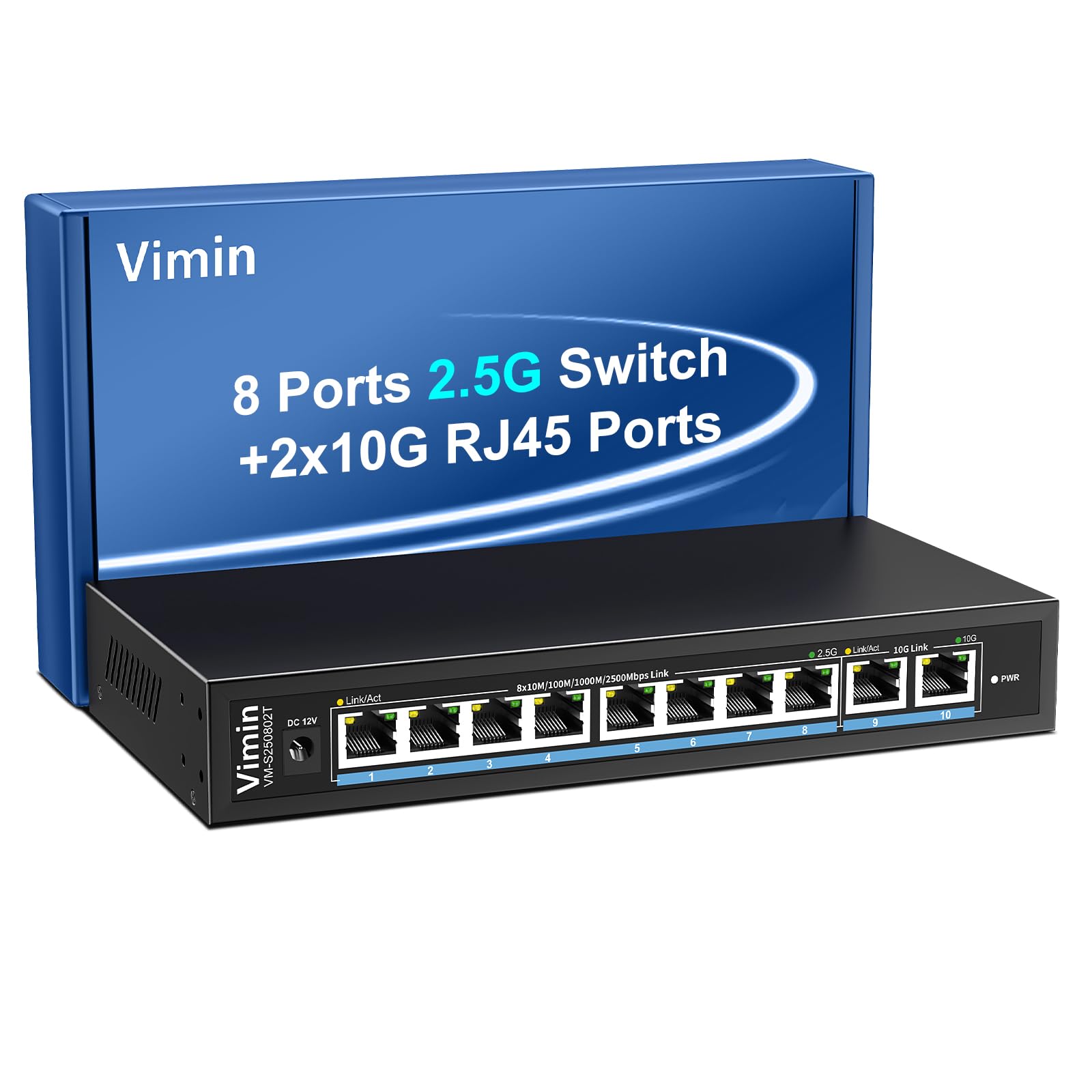
Figure 1: VIMIN 10-Port 2.5Gb Unmanaged Ethernet Switch in a typical setup.
2. 패키지 내용
포장을 개봉하신 후 모든 구성품이 있는지, 그리고 양호한 상태인지 확인해 주십시오. 구성품이 누락되었거나 손상된 경우 고객 지원 센터로 문의해 주시기 바랍니다.
- 1x VIMIN 10-Port 2.5G Unmanaged Ethernet Switch
- 1x 사용자 설명서
- 1x 전원 케이블

Figure 2: Package contents of the VIMIN 10-Port 2.5G Ethernet Switch.
3. 제품 오버view
3.1 전면 패널
The front panel of the switch features ten RJ45 Ethernet ports and LED indicators for status monitoring.
- 포트 1-8: 2.5 Gigabit Ethernet ports (10/100/1000/2500Mbps auto-negotiation).
- 포트 9-10: 10 Gigabit Ethernet ports (10/100/1000/2500/5000/10000Mbps auto-negotiation).
- Link/Act LED (Yellow/Green): Indicates link status and data activity.
- 2.5G Link LED (Green, for ports 1-8): 2.5Gbps 연결을 나타냅니다.
- 10G Link LED (Green, for ports 9-10): 10Gbps 연결을 나타냅니다.
- 전원 LED: 전원 상태를 나타냅니다.

Figure 3: Front and rear panel of the VIMIN 10-Port 2.5G Ethernet Switch.

그림 4: 상세 view of the RJ45 ports and LED indicators.
3.2 후면 패널
The rear panel includes the DC 12V 1A power input port.
4. 설정
The VIMIN 10-Port Ethernet Switch is designed for simple plug-and-play operation, requiring no software configuration.
4.1 전원 연결
- Connect the provided power adapter to the DC 12V 1A power input port on the rear panel of the switch.
- Plug the power adapter into a standard electrical outlet. The PWR LED on the front panel will illuminate, indicating the switch is powered on.
4.2 장치 연결
- Connect your network devices (e.g., NAS, PC, Wireless AP, WiFi 7 Routers, 10G Adapter/NIC, Gaming PC, 4K/8K Video devices) to any of the RJ45 ports (1-10) using appropriate Ethernet cables.
- The switch automatically detects the speed and duplex mode of the connected device. The Link/Act LED for the respective port will light up when a valid connection is established and flash during data transmission.

Figure 5: Plug and Play connectivity with various network devices.

그림 6: 예ample applications for the 10-Port 2.5G Ethernet Switch.
4.3 Cable Type Recommendations
For optimal performance, especially for 2.5G and 10G connections, use appropriate Ethernet cable types:
| 케이블 유형 | 10M | 100M | 1G | 2.5G | 5G | 10G |
|---|---|---|---|---|---|---|
| 고양이 3/4 | ✓ | ✗ | ✗ | ✗ | ✗ | ✗ |
| 고양이 5 | ✓ | ✓ | ✗ | ✗ | ✗ | ✗ |
| CAT 5e | ✓ | ✓ | ✓ | ✗ | ✗ | ✗ |
| 고양이 6 | ✓ | ✓ | ✓ | ✓ | ✓ | (<55m) |
| CAT 6A/7 | ✓ | ✓ | ✓ | ✓ | ✓ | ✓ |
Figure 7: Ethernet cable type compatibility and performance.
4.4 장착 옵션
The compact design of the switch allows for both desktop placement and wall mounting to save space.

Figure 8: Desktop and wall-mount installation options.
5. 사용 설명서
The VIMIN 10-Port Unmanaged Ethernet Switch operates automatically once connected, requiring no user intervention for basic network functions.
5.1 자동 협상
Each port on the switch supports auto-negotiation, automatically adjusting the transmission method and speed (10/100/1000/2500Mbps for ports 1-8, and up to 10Gbps for ports 9-10) to match the connected device. This ensures optimal performance without manual configuration.

Figure 9: Self-Negotiation Functionality.
5.2 흐름 제어
The switch supports IEEE 802.3x flow control for full-duplex mode and backpressure for half-duplex mode. These mechanisms prevent data packet loss during periods of high network traffic by temporarily pausing data transmission from congested devices, ensuring stable and reliable connections.
6. 유지관리
To ensure the longevity and optimal performance of your VIMIN Ethernet Switch, follow these maintenance guidelines:
- 청소: 부드럽고 마른 천으로 스위치 외부를 닦으세요. 액체나 에어로졸 세척제는 사용하지 마세요.
- 통풍: Ensure proper airflow around the switch. Do not block ventilation openings. The fanless design relies on natural convection for cooling.
- 환경: 스위치를 직사광선, 열원 및 과도한 습기를 피해 서늘하고 건조한 곳에 두십시오.
- 힘: 제공된 전원 어댑터만 사용하세요. 뇌우 시 또는 장기간 사용하지 않을 때는 전원을 분리하세요.
7. 문제 해결
If you encounter issues with your VIMIN Ethernet Switch, refer to the following common troubleshooting steps:
- 전원 없음:
- 전원 어댑터가 스위치와 작동하는 콘센트에 제대로 연결되어 있는지 확인하십시오.
- 다른 장치를 연결하여 전원 콘센트가 작동하는지 확인하세요.
- Check if the PWR LED on the switch is illuminated.
- 포트에 링크/활동이 없습니다.
- 이더넷 케이블이 스위치 포트와 연결된 장치에 모두 안전하게 연결되어 있는지 확인하세요.
- 연결된 장치의 전원이 켜져 있고 올바르게 작동하는지 확인하세요.
- 케이블 고장 가능성을 배제하려면 다른 이더넷 케이블을 사용해 보세요.
- 스위치의 다른 포트를 사용하여 테스트해 보세요.
- 네트워크 속도가 느립니다:
- Ensure you are using appropriate cable types (e.g., CAT6 or CAT6A/7 for 2.5G/10G connections) as indicated in Section 4.3.
- Check the network adapter settings on your connected device to ensure it supports the desired speed.
- Verify that the Link/Act LED indicates the expected speed (e.g., green for 2.5G/10G).
- 동시에 발생하는 고대역폭 활동을 제한하여 네트워크 혼잡을 줄입니다.
- 간헐적인 연결:
- 느슨한 케이블 연결을 확인하십시오.
- Ensure the switch is placed in a stable environment, free from excessive vibrations or temperature fluctuations.
- 다른 전자 기기에서 발생할 수 있는 전자기 간섭을 고려하십시오.
8. 사양
| 특징 | 설명 |
|---|---|
| 상표 | 비민 |
| 모델 번호 | 8x2.5G Ethernet (Unmanaged) |
| 포트 수 | 10 (8x 2.5G RJ45, 2x 10G RJ45) |
| 인터페이스 유형 | RJ45 |
| 데이터 전송 속도 | 최대 10기가비트/초 |
| 스위칭 용량 | 80Gbps |
| 흐름 제어 | IEEE 802.3x (Full-Duplex), Backpressure (Half-Duplex) |
| 표준 | IEEE 802.3bz, IEEE 802.3u, IEEE 802.3ab, IEEE 802.3z |
| 전원 입력 | DC 12V 1A (AC 100-240V adapter) |
| 품목 무게 | 1.83파운드(약 0.83kg) |
| 패키지 크기 | 9.53 x 6.5 x 2.99인치(약 24.2 x 16.5 x 7.6cm) |
| 색상 | 검은색 |
| 호환 장치 | Desktop, Gaming Console, Laptop, NAS, Wireless AP |
9. 보증 및 지원
VIMIN products are designed for reliability and performance. For warranty information, technical support, or any product-related inquiries, please refer to the warranty card included with your product or visit the official VIMIN website. You may also contact VIMIN customer service through the retailer where the product was purchased.
추가 지원이 필요하면 다음을 방문하세요. VIMIN Store on Amazon.


