소개
Thank you for choosing the HONOR Choice Earbuds Clip. These open-ear wireless headphones are designed for comfortable listening with advanced features like Bluetooth 5.2 connectivity, AI call noise cancellation, and a long-lasting battery. This manual provides detailed instructions for setup, operation, maintenance, and troubleshooting to ensure optimal performance and user experience.
패키지 내용
- HONOR Choice 이어버드 클립 (좌우 이어버드용)
- 무선 충전 케이스
- USB 충전 케이블
- 사용자 설명서
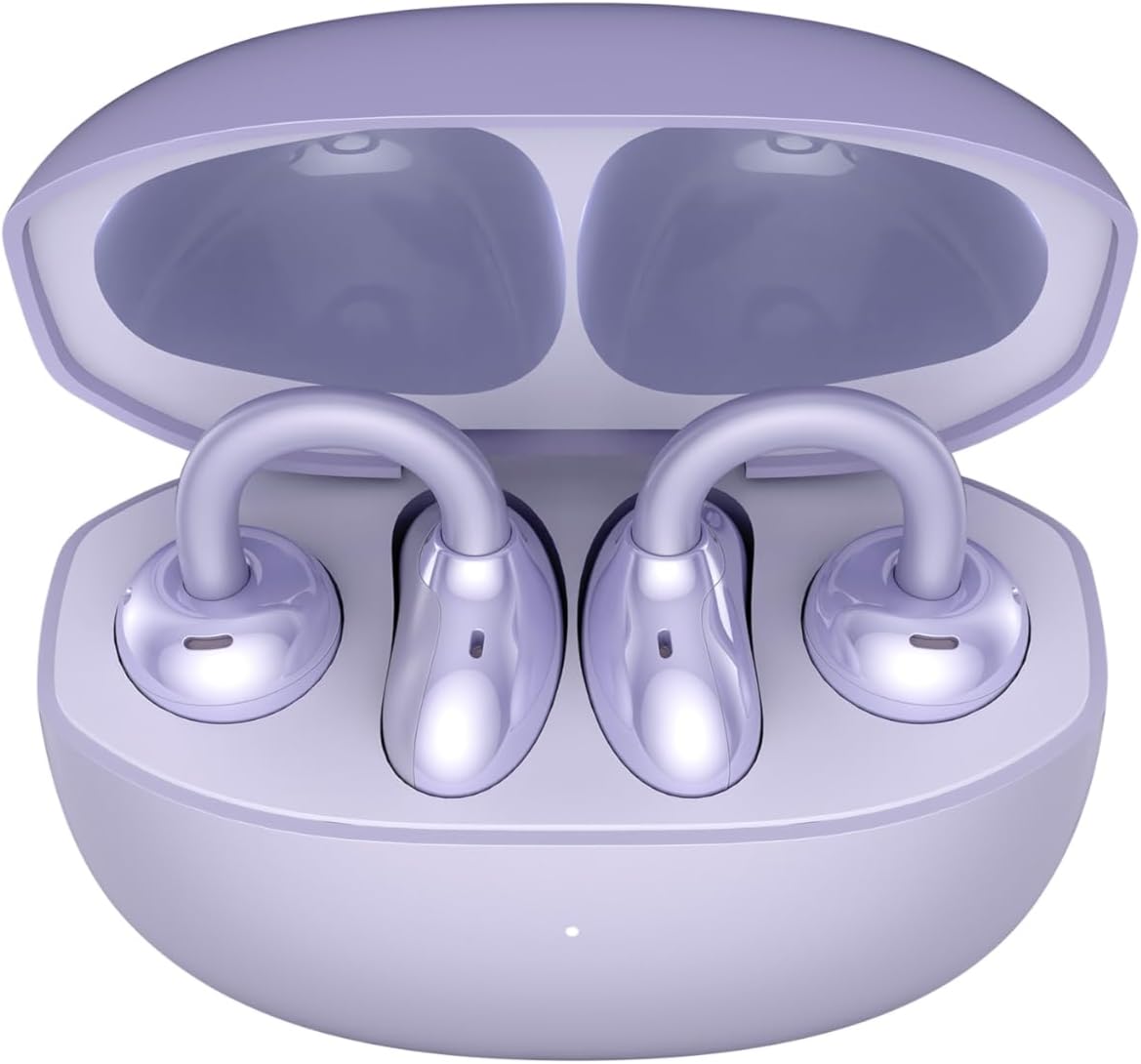
Image: The HONOR Choice Earbuds Clip, showing both earbuds inside their open charging case.
제품 끝view
The HONOR Choice Earbuds Clip features an innovative design and advanced technology for a superior audio experience.
주요 특징:
- Titanium Arch Bridge Design: High-performance titanium alloy material covered with scratch and corrosion-resistant PC material for strength and lightweight comfort.
- Asymmetrical Open-Ear Design: Adapts naturally to the ear cup, combined with two rear vents for direct sound waves and reduced sound leakage.
- Dual Magnetic Driver: 10.8 mm driver with PEEK + Pen titanium-coated membrane for stronger bass, lower distortion, and higher sensitivity.
- 배터리 수명 연장: Up to 7 hours of single-song playback, extendable to 36 hours with the charging case.
- AI Call Noise Cancellation (DNN): Dual highly sensitive microphones intelligently filter ambient noise for crystal clear calls.
- 블루투스 5.2 연결: 안정적이고 효율적인 무선 연결을 보장합니다.
- IP54 방수 기능: 먼지와 물 튀김으로부터 보호해 줍니다.

Image: Diagram highlighting the Titanium Alloy Arch Design of the earbuds, emphasizing comfort and aesthetics.
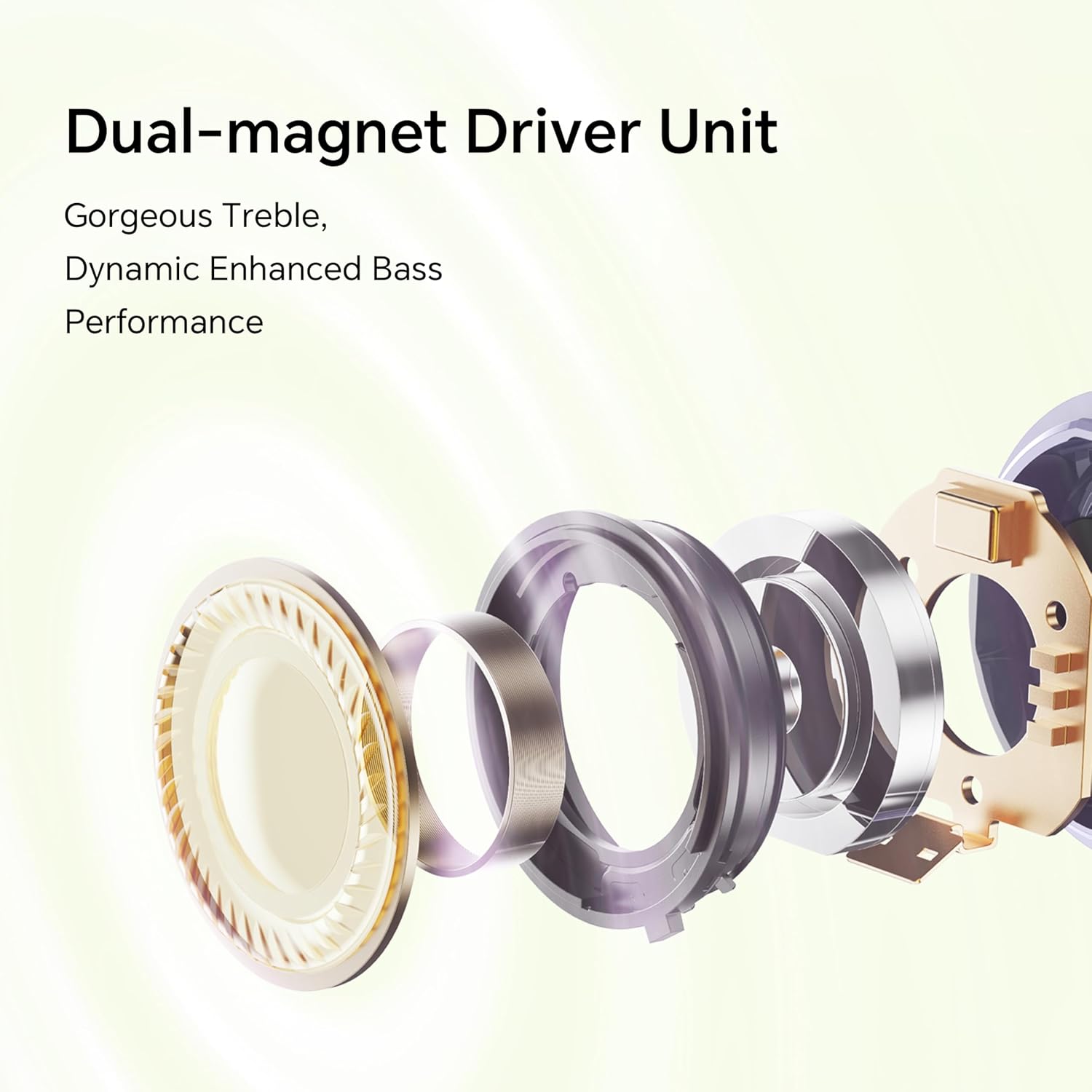
이미지: 폭발 view diagram of the dual-magnet driver unit, illustrating its components for enhanced audio performance.
설정
1. 이어버드와 케이스 충전
처음 사용하기 전에 이어버드와 충전 케이스를 완전히 충전하세요.
- 양쪽 이어버드를 충전 케이스에 넣습니다.
- Connect the charging case to a power source using a USB charging cable.
- 충전 케이스의 표시등은 충전 상태를 보여줍니다. 완전히 충전하면 최대 36시간 동안 음악을 감상할 수 있습니다.

Image: Graphic illustrating the 36-hour extended battery life of the earbuds with their charging case.
2. 장치와 페어링
Follow these steps to pair your HONOR Choice Earbuds Clip with your Bluetooth-enabled device.
- 이어버드가 충전 케이스에 들어 있고 케이스 뚜껑이 열려 있는지 확인하세요.
- On your device (e.g., smartphone, laptop), go to the Bluetooth settings.
- 검색 available devices and select "HONOR Choice Earbuds Clip" from the list.
- 연결되면 오디오 안내가 나오고 이어버드를 사용할 수 있습니다.
3. 이어버드 착용
The open-ear clip design ensures a comfortable and secure fit.
- Gently clip each earbud onto your ear, ensuring the sound outlet is positioned towards your ear canal.
- Adjust for a comfortable and stable fit. The asymmetrical curve is designed to adapt naturally to the ear cup.

Image: A woman demonstrating the proper way to wear the HONOR Choice Earbuds Clip, highlighting its open clip design and natural fit.
작동 지침
터치 컨트롤
이어버드는 오디오 재생과 통화를 관리하기 위한 직관적인 터치 컨트롤을 갖추고 있습니다.
- 재생/일시 중지: 양쪽 이어버드를 한 번 탭하세요.
- 다음 트랙: 오른쪽 이어버드를 두 번 탭하세요.
- 이전 트랙 : 왼쪽 이어버드를 두 번 탭하세요.
- 전화 받기/종료: 양쪽 이어버드를 한 번 탭하세요.
- 전화 거부: 이어버드 중 하나를 2초 동안 길게 누르세요.
- Voice Assistant 활성화 : 양쪽 이어버드를 세 번 탭하세요.
AI 통화 소음 제거
The earbuds utilize dual microphones and an AI multi-channel call noise cancellation algorithm (DNN) to reduce ambient noise during calls, ensuring your voice is clear to the recipient. This feature is automatically active during phone calls.
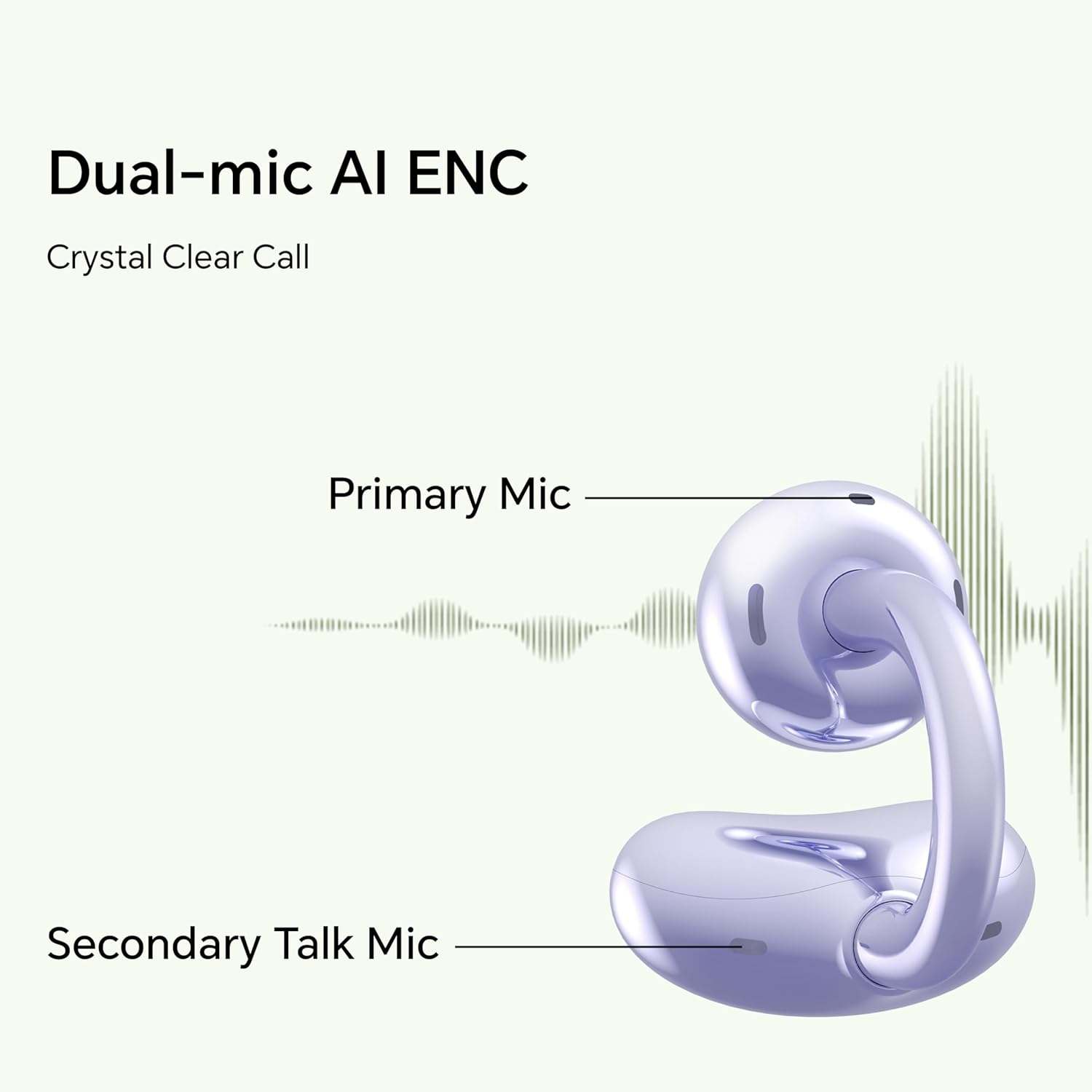
Image: Diagram illustrating the primary and secondary microphones used for AI Enhanced Noise Cancellation (ENC) during calls.
듀얼 장치 연결
The HONOR Choice Earbuds Clip supports simultaneous connection to two devices. This allows for seamless switching between audio sources, such as listening to music on a laptop and answering a call on a smartphone.
- 이어버드를 첫 번째 기기와 페어링하세요.
- Disconnect from the first device (or put earbuds back in case and re-enter pairing mode if needed).
- 이어버드를 두 번째 기기와 페어링하세요.
- The earbuds will now remember both devices and automatically switch between them based on active audio or call.
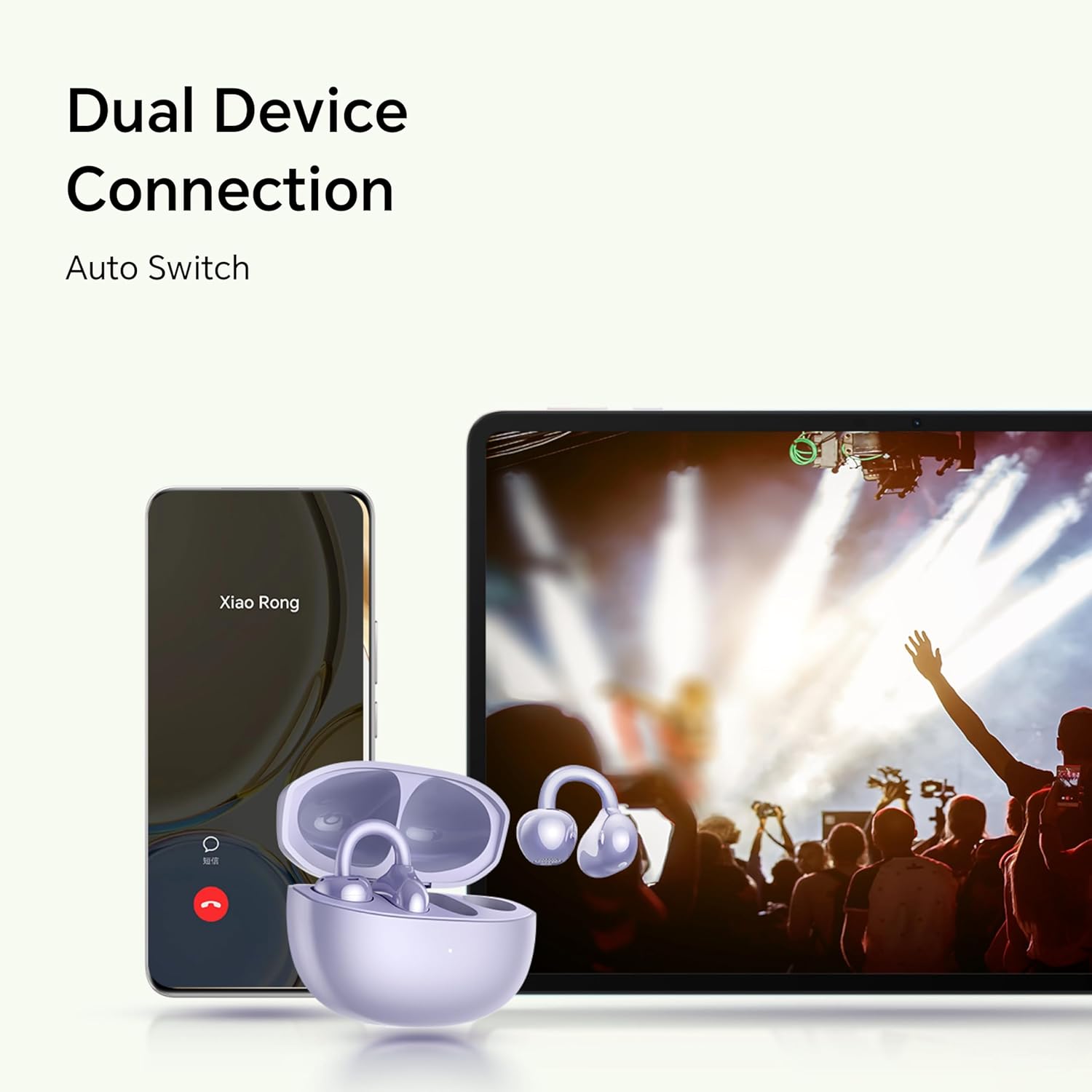
Image: Illustration showing the earbuds connected to both a smartphone and a tablet, demonstrating the dual device connection feature with automatic switching.
유지
적절한 유지관리는 이어버드의 수명과 최적의 성능을 보장합니다.
- 청소: 이어버드와 충전 케이스는 부드럽고 마른 보풀 없는 천으로 닦아주세요. 거친 재질이나 독한 화학 약품은 사용하지 마세요.
- 방수 기능: The earbuds are IP54 rated, meaning they are protected against dust ingress and splashing water from any direction. Do not submerge them in water or expose them to heavy rain. Dry them thoroughly if they get wet.
- 저장: 사용하지 않을 때는 이어버드를 충전 케이스에 보관하여 보호하고 충전 상태를 유지하세요. 서늘하고 건조한 곳에 극한의 온도를 피해 보관하세요.
- 충전 연락처: Periodically check and clean the charging contacts on both the earbuds and inside the case to ensure proper charging.
문제 해결
이어폰 사용에 문제가 발생하면 다음의 일반적인 해결 방법을 참고하세요.
| 문제 | 해결책 |
|---|---|
| Earbuds do not turn on or charge. |
|
| 이어폰이 제 기기와 페어링되지 않습니다. |
|
| 소리가 나지 않거나 볼륨이 작습니다. |
|
| 통화 품질이 좋지 않습니다. |
|
| 한쪽 이어버드가 작동하지 않습니다. |
|
명세서
Detailed technical specifications for the HONOR Choice Earbuds Clip.
| 모델명 | HONOR CHOICE 이어버드 클립 |
| 모델 번호 | 5504ADMY |
| 상표 | 명예 |
| 연결 기술 | 무선(블루투스) |
| 블루투스 버전 | 5.2 |
| 귀 위치 | 오픈 이어 |
| 폼 팩터 | 귀에 |
| 소음 제어 | None (AI Call Noise Cancellation only) |
| 특징 | Noise Cancellation (AI Call Noise Cancellation) |
| 오디오 드라이버 유형 | 동적 드라이버 |
| 오디오 드라이버 크기 | 10 밀리미터 |
| 배터리 수명(이어버드) | 7시간(1회 충전) |
| 총 배터리 수명(케이스 포함) | 최대 36시간 |
| 제어 유형 | 터치 컨트롤 |
| 재료 | Titanium Alloy, Plastic |
| 품목 무게 | 0.12킬로그램(4.2온스) |
| 제품 치수 | 2.36 x 2.36 x 1.18 인치 |
| IP 등급 | IP54 |
| 포함된 구성 요소 | 무선 충전 케이스 |
보증 및 지원
For warranty information and customer support, please refer to the official HONOR website or contact your local HONOR service center. Keep your proof of purchase for warranty claims.
- 온라인 지원: HONOR 공식 지원 페이지를 방문하세요. web자주 묻는 질문(FAQ), 드라이버 및 소프트웨어 업데이트 사이트입니다.
- 연락처 정보: 제품 포장이나 공식 설명서를 참조하세요. web고객 서비스 연락처 정보는 사이트에서 확인하세요.


