1. 서론
This manual provides essential information for the safe and efficient use of your Fossibot F107 Pro 5G Rugged Smartphone. Please read it thoroughly before operating your device.
상자 안에 무엇이 들어있나요?
- Fossibot F107 Pro 5G Smartphone
- USB Type-C 케이블
- 전원 어댑터(66W)
- SIM 이젝터 도구
- 사용자 설명서
- 보증 카드
2. 제품 특징
The Fossibot F107 Pro is engineered for durability and high performance, offering a range of advanced features:
- Massive 28000mAh Battery with 66W Fast Charge: Experience extended usage with a large battery and rapid charging capabilities. The OTG function allows charging of other devices.
- 고급 카메라 시스템: Features a 200MP AI main camera for detailed photos, a 2MP Night Vision Camera for clear low-light imaging, and a 50MP front camera for high-quality selfies. Supports 4K video recording and various modes including underwater, HDR, and 360° panorama.
- Robust Performance and Storage: Equipped with 12GB RAM (expandable up to 18GB virtual RAM for a total of 30GB) and 512GB internal storage, utilizing DDR5 technology for faster performance and lower power consumption.
- Immersive 6.95" FHD+ Display: A 2.4K display with 2400x1080 resolution and a 120Hz Smart Dynamic Refresh Rate provides smooth visuals and responsive interaction.
- 5G 네트워크 연결: Supports 5G networks (T-Mobile compatible; Verizon and AT&T are not supported). Please verify local frequency band compatibility before purchase.
- 견고한 디자인: Built to MIL-STD-810H standards, with IP68 and IP69K ratings for water, dust, and drop resistance.
- 통합 손전등: A powerful flashlight with a 50-meter beam distance for outdoor activities and emergencies.
- 보안 및 편의성: Includes NFC for contactless payments, Face ID, and Fingerprint unlock for secure and quick access.

이미지: 이상view of Fossibot F107 Pro's main features, highlighting its large battery, memory, camera, and rugged certifications.
3. 장치 레이아웃
Familiarize yourself with the physical components of your Fossibot F107 Pro.

이미지: 앞면과 뒷면 view of the Fossibot F107 Pro, showcasin견고한 디자인과 카메라 모듈이 특징입니다.

이미지: 사이드 프로file of the Fossibot F107 Pro, indicating the location of the power button, volume rocker, and SIM/TF card slot.
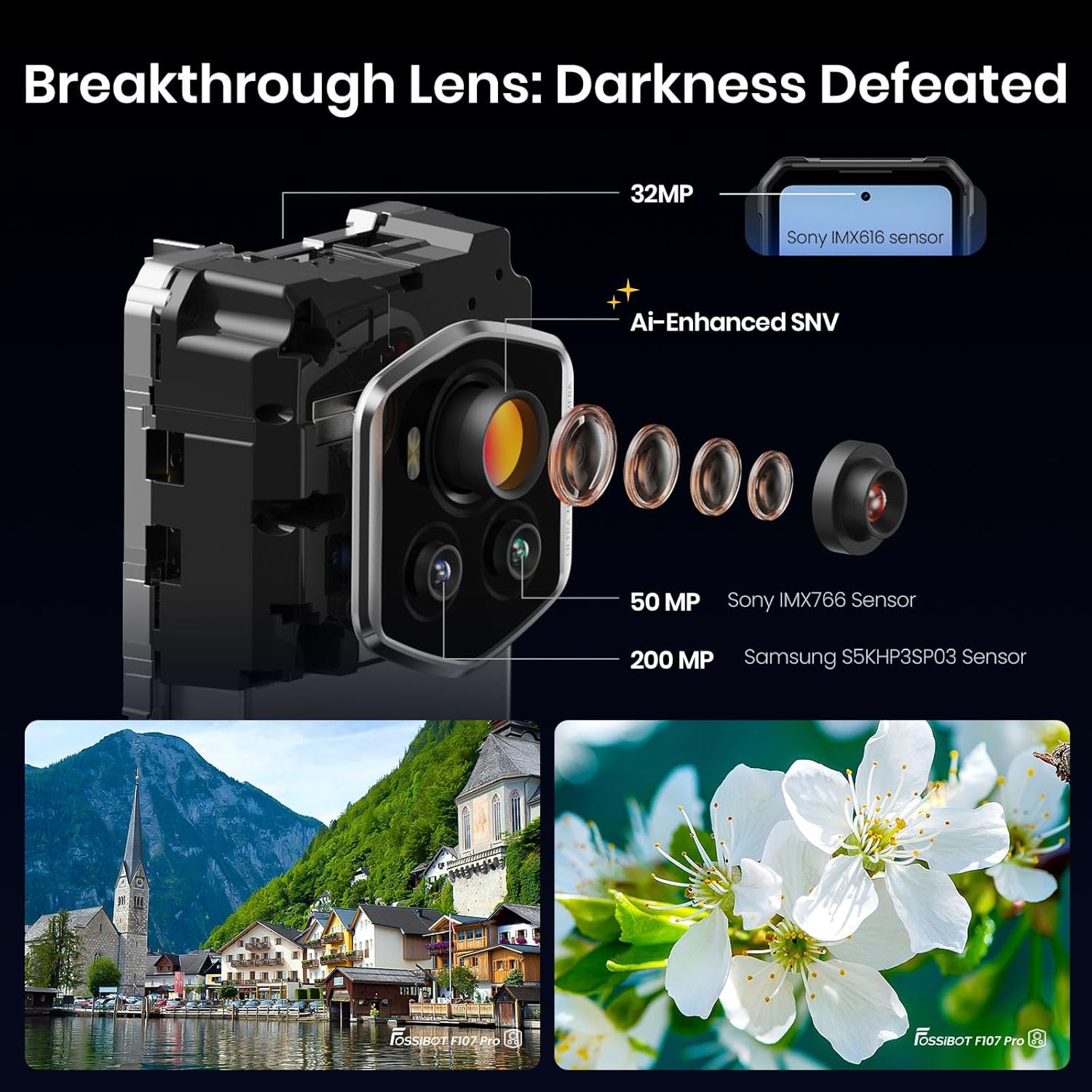
이미지: 상세 view of the Fossibot F107 Pro's multi-lens camera system, including the 200MP main sensor and night vision lens.
4. 설정
4.1 SIM 카드 및 TF 카드 설치
- 기기 측면에 있는 SIM/TF 카드 트레이를 찾으세요.
- SIM 꺼내기 도구를 트레이 옆에 있는 작은 구멍에 넣고 트레이가 튀어나올 때까지 가볍게 누르세요.
- Place your Nano-SIM card(s) and/or TF card (microSD) into the designated slots on the tray. Ensure the gold contacts face downwards.
- 트레이를 조심스럽게 전화기에 다시 삽입하여 제자리에 고정되도록 합니다.
4.2 초기 충전
Before first use, fully charge your device. Use the provided 66W power adapter and USB Type-C cable for optimal charging speed.
- USB Type-C 케이블을 휴대폰 하단의 충전 포트에 연결합니다.
- 케이블의 다른 쪽 끝을 전원 어댑터에 연결합니다.
- 전원 어댑터를 벽면 콘센트에 꽂으세요.
- 충전 표시등이 화면에 나타납니다.
4.3 전원 켜기/끄기
- 전원을 켜려면: Press and hold the Power button (located on the side) until the Fossibot logo appears.
- 전원을 끄려면: 전원 버튼을 길게 누른 다음, 화면에 나오는 옵션에서 "전원 끄기"를 선택하세요.
- 재시작하기 위해: 전원 버튼을 길게 누른 다음, 화면에 나오는 옵션에서 "다시 시작"을 선택하세요.
4.4 초기 설정
Upon first power-on, follow the on-screen prompts to configure your device, including language, Wi-Fi connection, Google account, and security settings.
5. 사용 설명서
5.1 기본 탐색(Android 15)
Your Fossibot F107 Pro runs on Android 15. Navigate using gestures or the traditional three-button navigation bar (configurable in Settings).
- 홈 화면: Swipe left/right to access app pages.
- 앱 서랍: 화면 하단에서 위로 스와이프하여 view 설치된 모든 응용 프로그램.
- 알림 및 빠른 설정: 화면 상단에서 아래로 살짝 밀어 알림과 빠른 설정 토글에 접근하세요.
5.2 카메라 사용
The Fossibot F107 Pro features a versatile camera system.
- 카메라 앱을 엽니다.
- Select your desired mode (Photo, Video, Night Vision, Portrait, etc.).
- 셔터 버튼을 눌러 사진을 찍거나 비디오 녹화를 시작/중지하세요.

이미지: 폭발 view of the camera module, showing the 200MP Samsung S5KHP3SP03 sensor, 50MP Sony IMX766 sensor, and 32MP Sony IMX616 sensor.

Image: Demonstrates the difference between Starlight Night Vision (full-color) and traditional Infrared Night Vision (black and white).
5.3 손전등 작동
The powerful integrated flashlight can be accessed via Quick Settings or a dedicated button (if configured).

Image: The Fossibot F107 Pro's flashlight illuminating a path, highlighting its 50-meter beam distance.
5.4 OTG 기능
The On-The-Go (OTG) feature allows your phone to act as a power bank to charge other devices or connect USB accessories.
- Connect an OTG adapter (not included) to your phone's USB-C port.
- Connect the device you wish to charge or the USB accessory to the OTG adapter.
- Ensure OTG is enabled in your phone's settings if it doesn't activate automatically.
5.5 보안 기능 (얼굴 인식, 지문 인식)
Set up Face ID or Fingerprint unlock for convenient and secure access to your device.
- 이동하다 설정 > 보안 및 개인정보 보호 > 기기 잠금 해제.
- Follow the on-screen instructions to register your face or fingerprint.
5.6 디스플레이 설정
Customize your display experience, including the 120Hz refresh rate.

Image: Visual representation of the Fossibot F107 Pro's display specifications, including resolution, refresh rate, and brightness.
6. 유지관리
To ensure the longevity and optimal performance of your Fossibot F107 Pro, follow these maintenance guidelines:
- 방수 및 방진 기능: The device is IP68/IP69K rated. Ensure all port covers are securely closed before exposing the phone to water or dust. Do not intentionally submerge the phone in corrosive liquids or extreme temperatures.
- 청소: 부드러운 d를 사용하세요amp 휴대전화 표면을 닦을 때는 천을 사용하세요. 강한 화학 약품이나 연마재는 사용하지 마세요.
- 배터리 관리 : Avoid extreme temperatures. Do not fully discharge the battery regularly. Use the original charger for optimal battery health.
- 화면 보호 : While the screen is durable, consider using a screen protector for added scratch resistance.
- 온도: 권장 온도 범위(일반적으로 0°C ~ 35°C) 내에서 기기를 작동하십시오.
7. 문제 해결
If you encounter issues with your Fossibot F107 Pro, refer to the following common solutions:
7.1 휴대전화 전원이 켜지지 않음
- 배터리가 충전되어 있는지 확인하세요. 휴대폰을 충전기에 최소 30분 이상 연결해 두세요.
- 전원 버튼을 10~15초간 길게 눌러 강제로 다시 시작하세요.
7.2 충전 문제
- 충전 케이블과 어댑터가 안전하게 연결되고 손상되지 않았는지 확인하세요.
- 다른 호환 충전기와 케이블을 사용해 보세요.
- Clean the charging port gently with a dry, soft brush to remove any debris.
7.3 네트워크 연결 문제
- 유심 카드가 제대로 삽입되었는지 확인하십시오.
- Ensure mobile data is enabled in Settings.
- 휴대폰을 다시 시작하세요.
- Verify that your carrier (T-Mobile) has coverage in your area. Remember, Verizon and AT&T are not supported.
7.4 카메라가 작동하지 않음
- Restart the Camera app or the phone.
- Check app permissions for the Camera app in Settings.
- 카메라 렌즈에 물리적인 장애물이 없는지 확인하십시오.
7.5 느린 성능
- 불필요한 백그라운드 애플리케이션을 닫습니다.
- 자주 사용하는 앱의 캐시 데이터를 지웁니다.
- 충분한 저장 공간을 확보하세요.
- 최후의 수단으로 공장 초기화를 고려하세요(먼저 데이터를 백업하세요).
8. 사양
| 특징 | 사양 |
|---|---|
| 상표 | 포시봇 |
| 모델명 | fossibot f107 pro |
| 운영 체제 | 안드로이드 15 |
| 화면 크기 | 6.95 인치 |
| 해결 | 2400 x 1080 |
| 새로 고침 빈도 | 120Hz |
| 설치된 RAM 메모리 크기 | 12 GB (expandable to 30GB virtual RAM) |
| 메모리 저장 용량 | 512GB (XNUMX기가바이트) |
| 배터리 용량 | 28000밀리amp 시간 |
| 연결 기술 | 5G, NFC, OTG, GPS |
| 무선 통신 사업자 지원 | T-Mobile (Verizon and AT&T not supported) |
| 견고함 | MIL-STD-810H, IP68, IP69K |
| 품목 무게 | 3.04파운드 |
| 패키지 크기 | 9.25 x 8.19 x 2.4 인치 |
| 첫 번째 이용 가능 날짜 | 17년 2025월 XNUMX일 |
9. 보증 및 지원
Your Fossibot F107 Pro comes with a standard manufacturer's warranty. For detailed warranty information, please refer to the warranty card included in your product packaging or visit the official FOSSIBOT web대지.
For technical support, troubleshooting assistance, or service inquiries, please contact FOSSIBOT customer support through their official channels. Keep your purchase receipt and product serial number handy when contacting support.
10. 제품 비디오 끝view
비디오: 오버view of the Fossibot F107 Pro, showcasing its features, ruggedness, and battery life in various usage scenarios.


