1. 서론
The Marstek Venus E GEN 3.0 is a powerful and flexible AC energy storage system designed for residential and small commercial applications. This manual provides essential information for the safe and efficient operation of your device. Please read it thoroughly before installation and use.
Key features include a compact design, integrated Plug & Play technology for quick setup, dedicated LAN port for stable communication, and expandability up to 7.5 kW power and 15.36 kWh storage capacity. It also offers an integrated backup power output of up to 2,500 W during outages and is 100% compatible with existing PV installations.

그림 1: 위에view of Marstek Venus E GEN 3.0 key features, including new design, PV system compatibility, stable LAN connection, expandability, MARSTEK Intelligence, 2500W on-grid input/output, 6000+ life cycles, 10-year warranty, grid feed-in with smart meter, and potential annual savings.
2. 안전 지침
Always adhere to the following safety guidelines to prevent injury, damage to the device, or property damage:
- 장치를 작동하기 전에 모든 지침을 읽으십시오.
- 제품을 분해, 수리 또는 개조하지 마십시오. 모든 서비스는 자격을 갖춘 전문가에게 맡기십시오.
- 장치 주변의 환기가 잘 되도록 하세요. 환기구를 막지 마세요.
- 기기를 물, 습기 및 인화성 물질로부터 멀리하십시오.
- 제공되거나 승인된 액세서리만 사용하십시오.
- 기기가 어떤 식으로든 손상된 경우 작동하지 마십시오.
- Ensure the unit is installed on a stable, level surface.
- This device contains a LiFePO4 battery. Handle with care and dispose of according to local regulations.
3. 패키지 내용
패키지에 모든 품목이 들어 있는지 확인하세요.
- Marstek Venus-E GEN 3.0 Unit
- AC 전원 케이블
- 와이파이 안테나
- 장착 액세서리
- 사용 설명서 (본 문서)
4. 설정
4.1 포장 풀기 및 배치
Carefully remove the Venus E GEN 3.0 from its packaging. Place the unit on a flat, stable surface in a well-ventilated area, away from direct sunlight, heat sources, and moisture. Ensure sufficient clearance for air circulation around the unit.
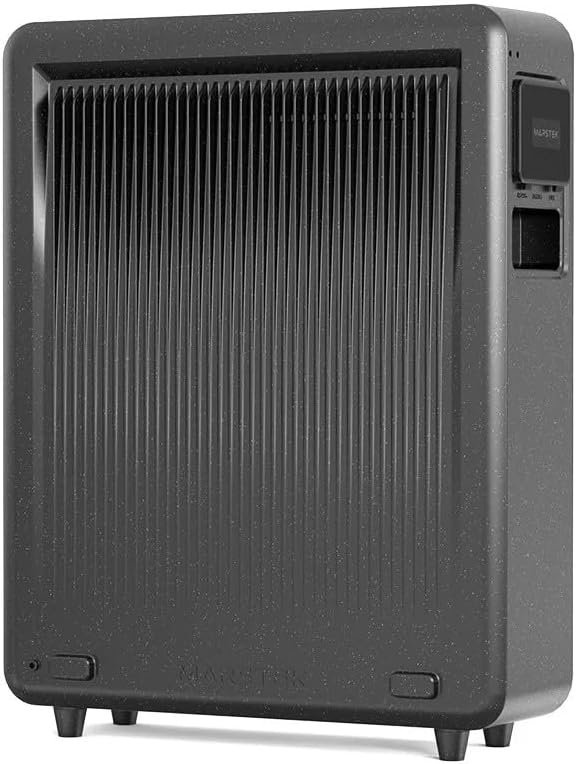
그림 2: 뒤쪽 view of the Marstek Venus E GEN 3.0, highlighting the ventilation fins for optimal heat dissipation.
4.2 전원 연결
- Connect the provided AC power cable to the AC input port on the Venus E GEN 3.0.
- Plug the other end of the AC power cable into a grounded wall outlet.
- 기기는 자동으로 충전을 시작하거나 대기 모드로 전환됩니다.

그림 3: Side panel of the Marstek Venus E GEN 3.0, showing the protective cover open to reveal the AC input and output ports for connecting to the grid and appliances.
4.3 Network Connection (LAN/Wi-Fi)
For optimal performance and smart features, connect the device to your home network.
- 랜 연결: For a stable and faster connection, use an Ethernet cable to connect the dedicated LAN port on the Venus E GEN 3.0 to your router.
- Wi-Fi 연결: Attach the provided Wi-Fi antenna to the designated port. Follow the instructions in the MARSTEK app to configure the Wi-Fi connection.
4.4 초기 전원 켜기
Press and hold the power button on the unit for a few seconds until the indicators light up. The unit will perform a self-check. Refer to the display indicators for status.
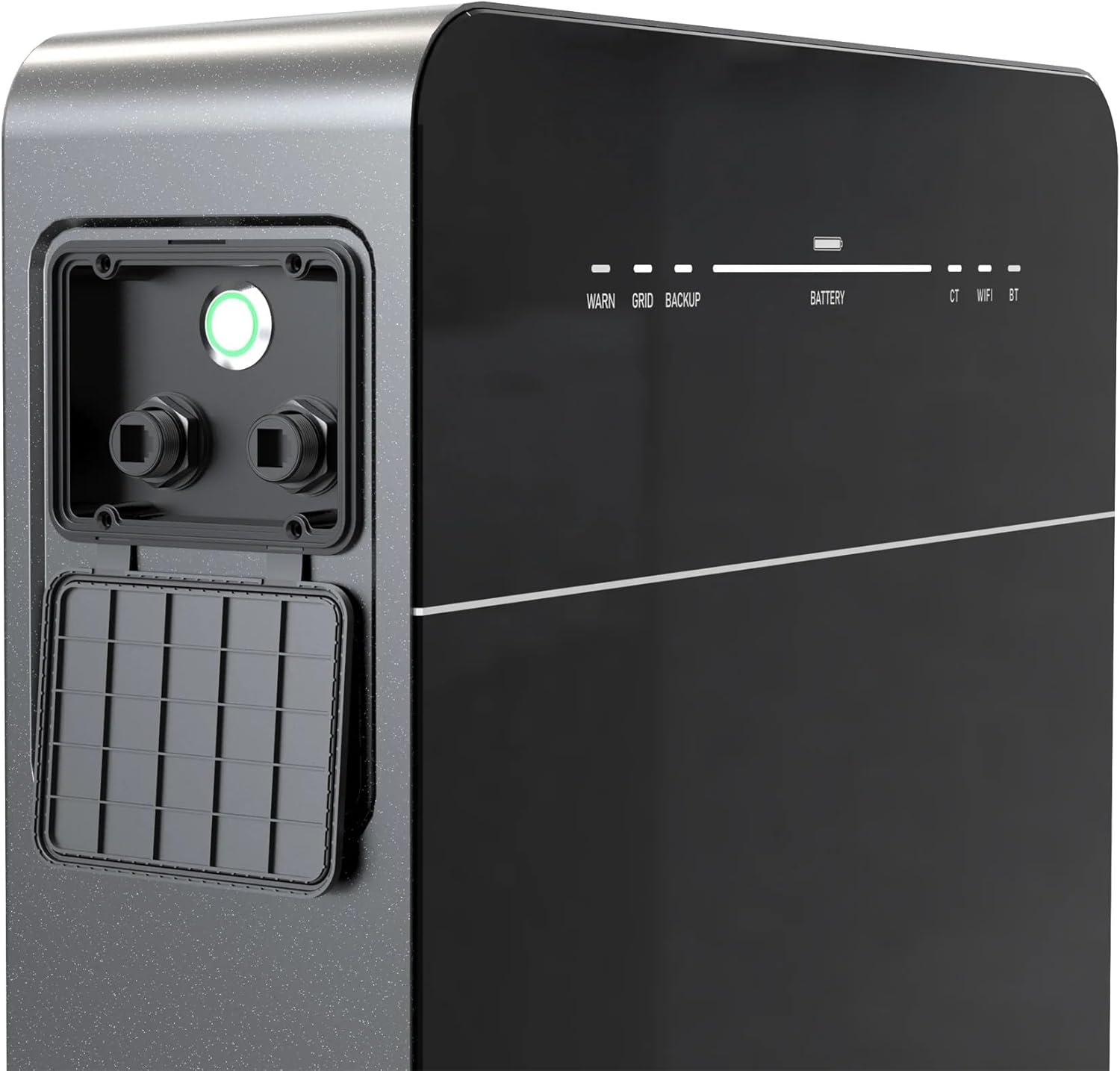
그림 4: Front panel of the Marstek Venus E GEN 3.0, displaying LED indicators for WARN, GRID, BACKUP, BATTERY level, CT, WIFI, and BT status.
5. 사용 설명서
5.1 MARSTEK App Control
The Venus E GEN 3.0 is primarily controlled via the MARSTEK mobile application. Download the app from your device's app store.
- Install the MARSTEK app on your smartphone.
- 계정을 등록하고 로그인합니다.
- Follow the in-app instructions to add your Venus E GEN 3.0 device.
- Through the app, you can monitor energy flow, battery status, and select operating modes.
5.2 작동 모드
The MARSTEK app offers various operating modes to optimize energy usage:
- 자가 소비 모드: Prioritizes using stored energy from the battery or solar panels before drawing from the grid.
- 수동 제어 모드: Allows direct control over charging and discharging times.
- AI Optimized Mode: Utilizes dynamic electricity tariffs, consumption habits, and weather forecasts to automatically optimize charge/discharge cycles for maximum savings.
5.3 백업 전원 기능
정전이 발생한 경우tage, the integrated backup output provides up to 2,500 W of power to essential appliances. For full home backup (single-phase or three-phase), additional equipment may be required.
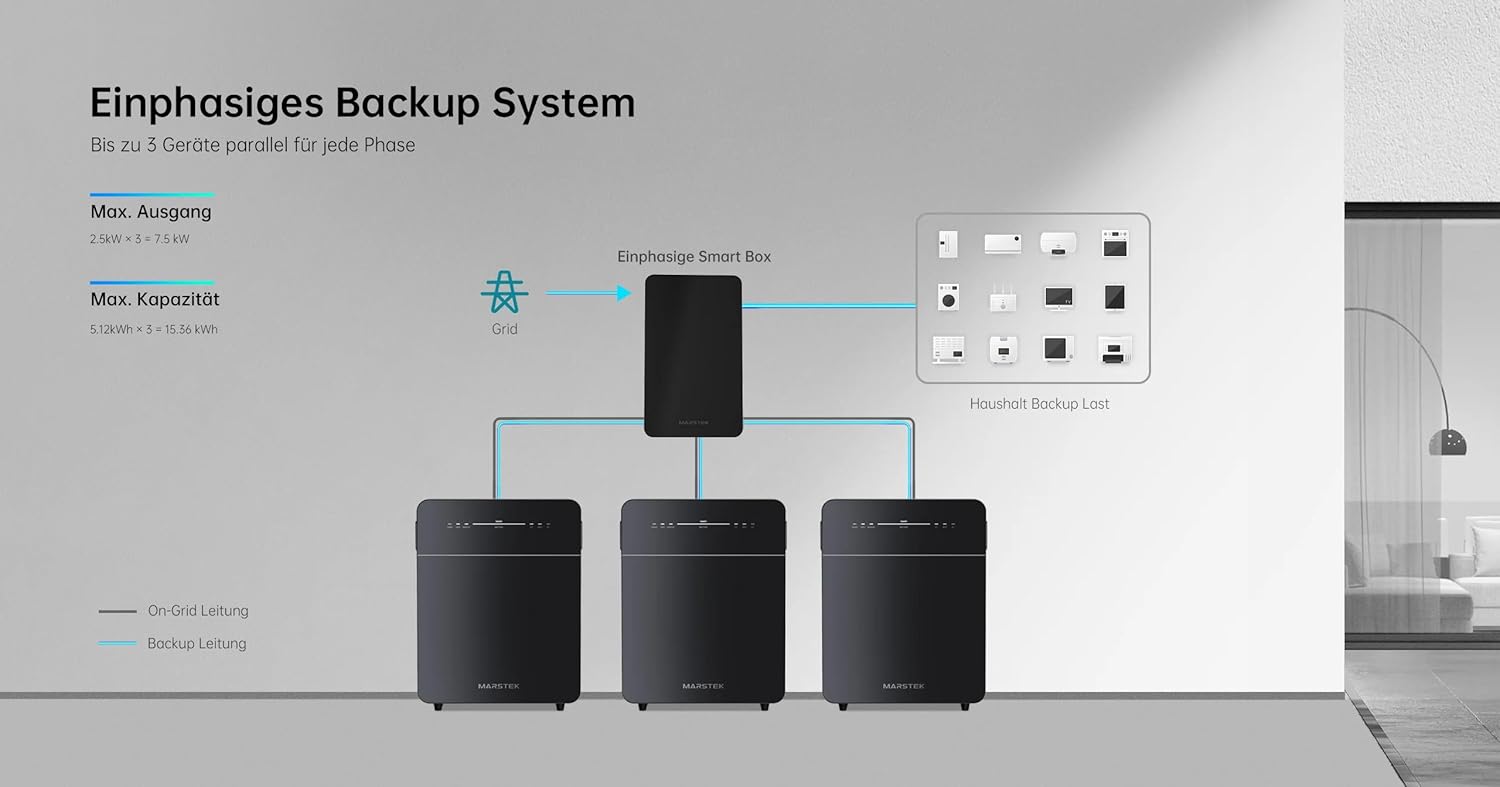
그림 5: Schematic illustrating a single-phase backup system configuration, showing how multiple Marstek Venus E GEN 3.0 units can be integrated with a Smart Box and the grid to provide backup power to household loads.

그림 6: Schematic illustrating a three-phase backup system configuration, detailing the connection of multiple Marstek Venus E GEN 3.0 units, a Smart Box, PV inverters, and micro-inverters to the grid and household backup loads.
6. 유지관리
Regular maintenance ensures the longevity and optimal performance of your Venus E GEN 3.0.
- 청소: 부드럽고 마른 천을 사용하여 기기 외부를 닦으세요. 액체 세척제나 용제는 사용하지 마세요.
- 통풍: 환기구에 먼지와 이물질이 없는지 주기적으로 점검하십시오.
- 펌웨어 업데이트: Ensure the MARSTEK app and device firmware are kept up-to-date for new features and performance improvements.
- 배터리 상태: The LiFePO4 battery is designed for over 6,000 charge cycles. Monitor its health via the MARSTEK app.
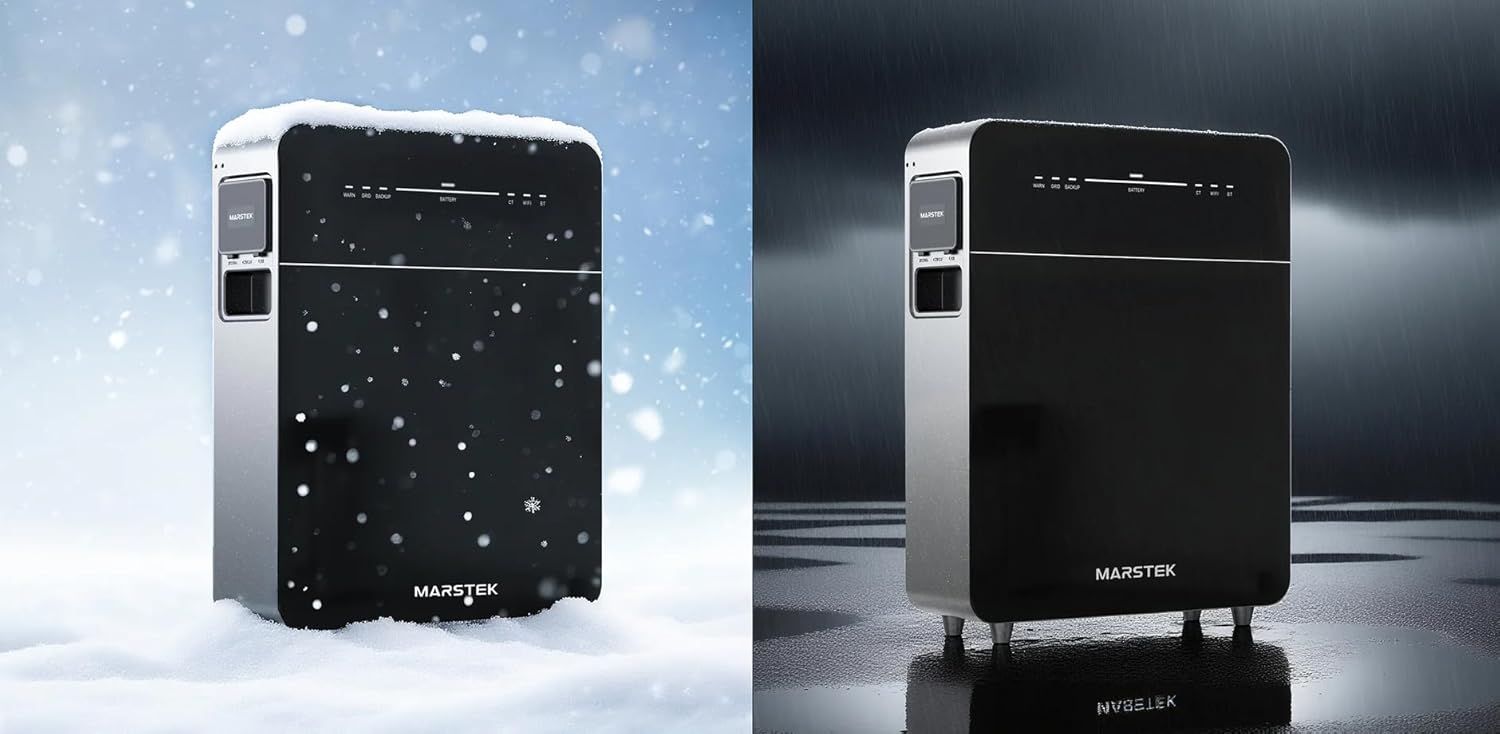
그림 7: The Marstek Venus E GEN 3.0 demonstrating its robust design and IP65 protection, suitable for operation in various environmental conditions, including snow and rain.
7. 문제 해결
문제가 발생하면 다음의 일반적인 문제와 해결 방법을 참조하세요.
| 문제 | 가능한 원인 | 해결책 |
|---|---|---|
| 장치의 전원이 켜지지 않습니다. | No power from AC outlet; power cable not connected; unit fault. | Check AC power connection; ensure outlet is functional; contact support if problem persists. |
| 네트워크에 연결되지 않았습니다. | Wi-Fi antenna not attached; incorrect Wi-Fi password; LAN cable disconnected; router issue. | Ensure Wi-Fi antenna is attached; re-enter Wi-Fi password in app; check LAN cable connection; restart router. |
| 배터리가 충전되지 않습니다. | AC input issue; charging mode not active; temperature outside operating range. | Verify AC input; check app for charging mode; ensure ambient temperature is within -20°C to 50°C. |
| Backup power not activating. | Backup function not enabled; battery low; overload. | Ensure backup mode is enabled in app; check battery level; reduce load on backup output. |
For issues not listed here, please contact Marstek customer support.
8. 사양
| 특징 | 세부 사항 |
|---|---|
| 모델 | MVE3 |
| 치수(길이 x 너비 x 높이) | 62.4 x 48 x 15.3cm |
| 배터리 유형 | 인산철(LiFePO4) |
| 용량 | 5120 Wh (extensible up to 15.36 kWh) |
| AC Input/Output Power | Up to 2500 W (800 W default) |
| Backup Power Output | 최대 2500W |
| 연결성 | LAN (RJ45), Wi-Fi |
| 작동 온도 | Up to -20 °C |
| 소음 수준 | 30dB 이하 |
| 보호 등급 | IP65 |
| PV System Compatibility | 100 % 호환 |
9. 보증 및 지원
9.1 보증 정보
The Marstek Venus E GEN 3.0 comes with a 10년 보증 on the integrated LiFePO4 battery, ensuring long-term reliability with over 6,000 charge cycles while maintaining 80% capacity. Please retain your proof of purchase for warranty claims.
9.2 고객 지원
For technical assistance, warranty claims, or further inquiries, please contact Marstek customer support through their official website or the MARSTEK app. Ensure you have your model number (MVE3) and purchase details ready.
공식적인 Web대지: www.marstek.com (참고: 이것은 플레이스홀더입니다. URL, please refer to your product documentation for the actual support web대지.)


