소개
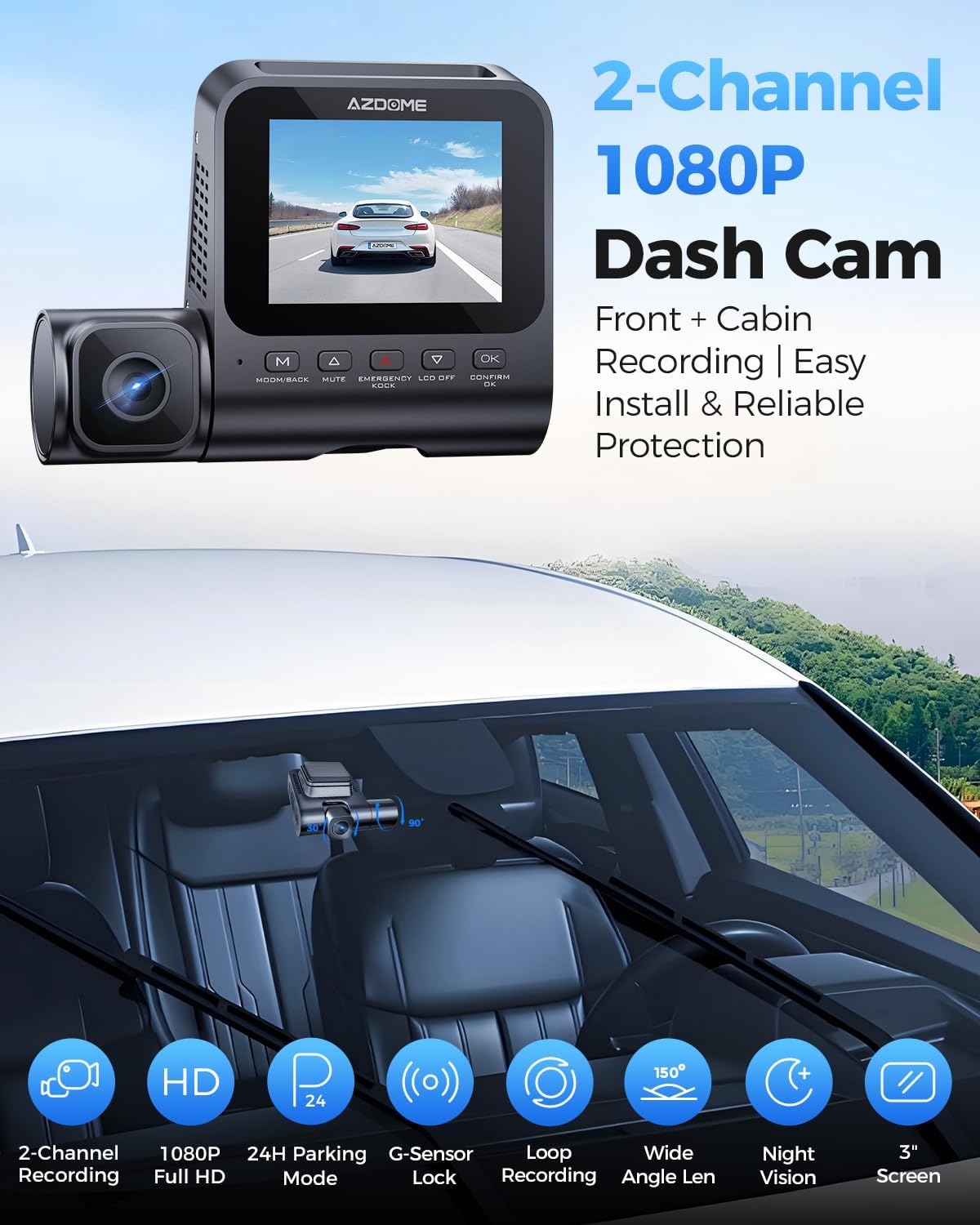
This manual provides detailed instructions for the installation, operation, and maintenance of your AZDOME V600 Dual Dash Cam. Please read this manual thoroughly before using the device to ensure proper functionality and safety. The AZDOME V600 is designed to record both front road views and interior cabin activity simultaneously, offering comprehensive coverage for your vehicle.

Image: The AZDOME V600 Dual Dash Cam, illustrating its compact design and dual-channel recording capability for both front road and interior cabin views.
패키지 내용
아래 나열된 모든 품목이 패키지에 포함되어 있는지 확인하세요.
- Dash camera × 1
- Type-C Car Charger × 1
- Electrostatic Films × 2
- 3M 접착제 × 1
- 케이블 클립 × 5
- Pry Tool × 1
- 사용 설명서 × 1

Image: A visual representation of all items included in the AZDOME V600 Dash Cam package, such as the camera, charger, mounting accessories, and user manual.
제품 끝view
The AZDOME V600 features a compact design with a 3-inch screen, dual lenses for front and cabin recording, and intuitive controls. It is equipped with infrared night vision for clear interior recording in low light conditions.

이미지: 예시적인 설명view of the AZDOME V600 Dash Cam, highlighting its 2-channel 1080P recording, parking mode, G-sensor, loop recording, wide-angle lens, and night vision capabilities.
듀얼 채널 녹음
The V600 records both the road ahead and the vehicle's interior simultaneously. The front lens captures external road details, while the interior lens records cabin activity and audio.
이미지: 분할 view demonstrating the front camera's perspective of the road and the interior camera's view of the cabin, both recording in 1080P Full HD.
넓은 분야 View
The dashcam system provides a wide field of view, with a 121° front lens and a 131° cabin lens, designed to capture more of the road and interior surroundings, reducing blind spots.
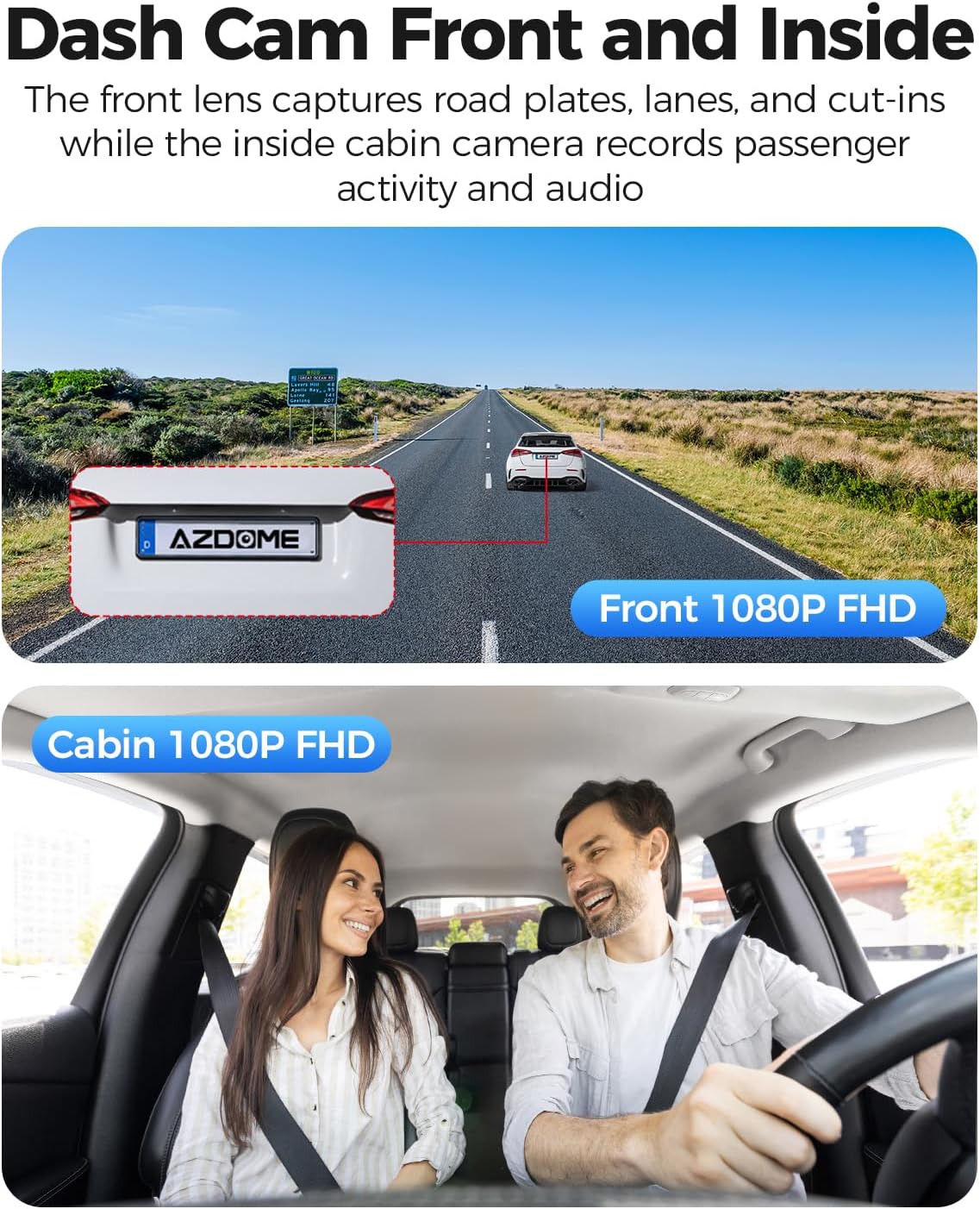
Image: A diagram illustrating the wide-angle coverage of the front (121°) and cabin (131°) cameras, showing how they capture a broad area around the vehicle.
설정 및 설치
Follow these steps for quick and secure installation of your dash cam.
- 깨끗한 앞 유리: Ensure the chosen area on your windshield is clean and dry for optimal adhesion.
- 정적 스티커를 적용하세요: Place the electrostatic film on the desired spot on the windshield. This helps in easy removal and repositioning without leaving residue.
- 마운트 대시캠: Attach the dash cam to the static sticker using the provided 3M adhesive. Ensure the lenses have a clear view 도로와 오두막.
- 전원 연결: Plug the Type-C car charger into the dash cam and then into your vehicle's cigarette lighter socket. Route the cable neatly using the provided cable clips and pry tool.
- MicroSD 카드 삽입: Before powering on, insert a compatible MicroSD card (up to 128GB, not included) into the designated slot. Ensure the card is inserted correctly until it clicks into place.
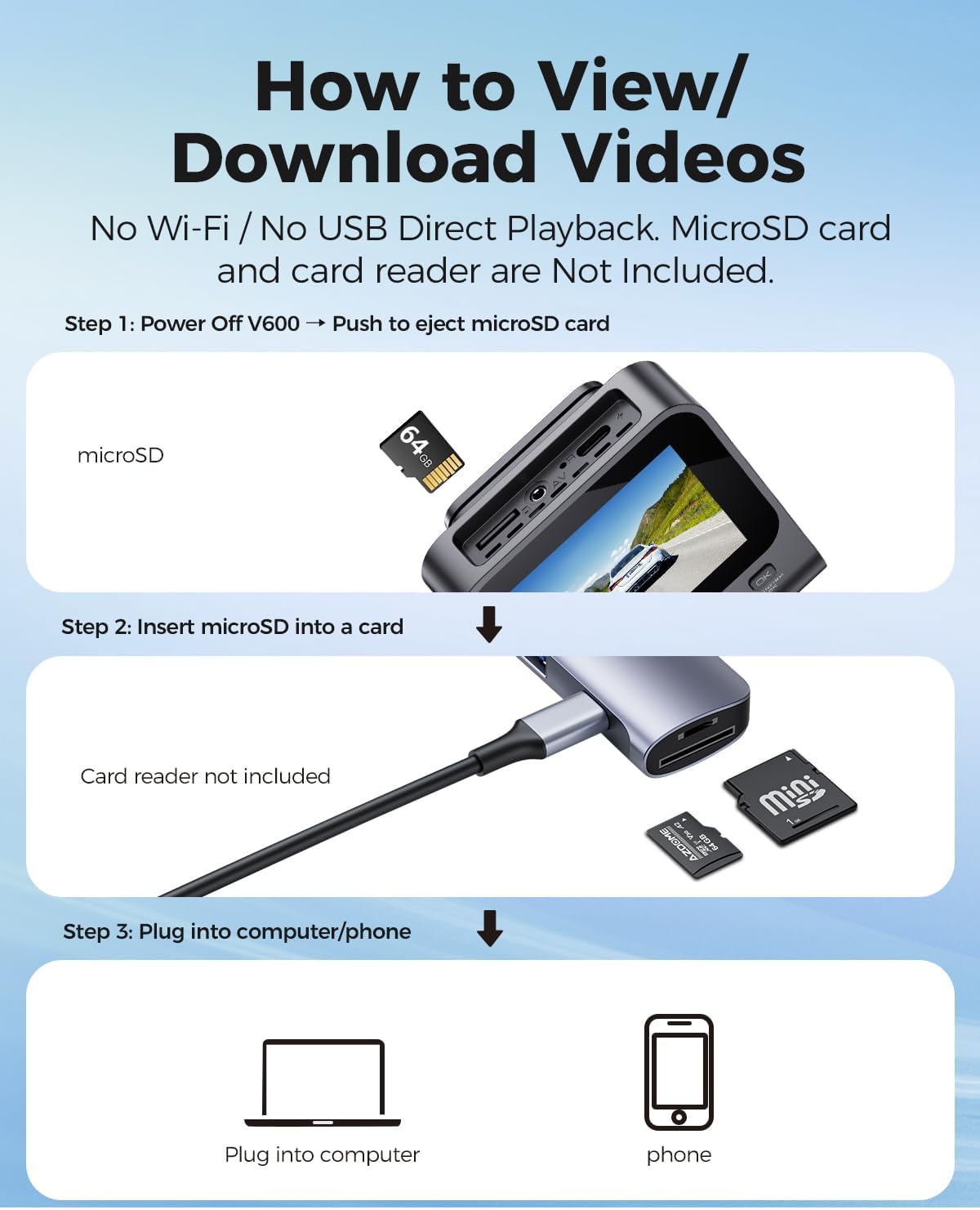
Image: A visual guide demonstrating the quick installation process of the dash cam, including cable routing and camera placement on the windshield.
작동 지침
기본 녹음(반복 녹음)
Once powered on, the dash cam will automatically begin recording. The loop recording function continuously records video in segments (e.g., 1, 3, or 5 minutes) and overwrites the oldest unlocked files when the memory card is full. This ensures continuous recording without manual deletion.

Image: A visual representation of the loop recording feature, showing how new footage overwrites older, unlocked file지속적인 녹화를 보장합니다.
G-센서(비상 잠금 장치)
내장된 G센서는 갑작스러운 충격이나 충돌을 감지합니다. 이벤트가 감지되면 현재 비디오 세그먼트가 자동으로 잠금 처리되어 루프 녹화로 인해 덮어쓰기되는 것을 방지합니다.tage serves as crucial evidence in case of an accident.

Image: An illustration depicting the G-Sensor Auto Lock feature, showing how it detects impacts and automatically locks video clips to protect them from being overwritten.
24시간 주차 모드
To enable continuous 24-hour parking monitoring, a 3-lead hardwire kit (not included, search ASIN: B096G6FKZP) is required. In parking mode, the dash cam can detect impacts (Collision Detection Parking Mode) or record continuously at a low frame rate (Time-Lapse Parking Mode). It also features low voltag차량 배터리 방전을 방지하는 보호 장치입니다.

Image: A graphic detailing the 24-Hour Parking Mode, including collision detection, time-lapse recording, and low voltage protection, with a note about the required hardwire kit.
IR 야간 투시경
The dash cam is equipped with IR lights to enhance interior cabin clarity in low-light conditions. For optimal night vision, the interior recording may switch to black-and-white mode to capture clearer details.

Image: An illustration highlighting the Clear Night Vision capabilities, showing how it brightens dark roads and reduces glare to capture more details, especially with infrared for the cabin.
Viewing and Downloading Videos
에게 view or download recorded videos, follow these steps:
- 전원 끄기 : Ensure the V600 dash cam is powered off.
- Eject MicroSD Card: Gently push the MicroSD card to eject it from the slot.
- Insert into Card Reader: Insert the MicroSD card into a card reader (not included).
- 장치에 연결: Plug the card reader into a computer or compatible phone to access the video files.

Image: A step-by-step guide demonstrating how to remove the MicroSD card from the V600, insert it into a card reader, and connect it to a computer or phone to view 그리고 비디오를 다운로드하세요.
유지
적절한 유지관리는 대시캠의 수명과 최적의 성능을 보장합니다.
- 청소: 카메라 렌즈와 화면은 부드럽고 마른 천으로 닦으십시오. 연마성 세척제나 용제는 사용하지 마십시오.
- 온도: Do not expose the dash cam to extreme temperatures for extended periods.
- MicroSD 카드: Regularly format your MicroSD card (at least once a month) to prevent data corruption and ensure smooth recording. Back up important files를 포맷하기 전에.
- 펌웨어 업데이트: AZDOME 공식 홈페이지에서 확인하세요 web성능 향상 및 새로운 기능 추가를 위해 사용 가능한 펌웨어 업데이트가 있는지 정기적으로 사이트를 확인하십시오.
문제 해결
일반적인 문제에 대한 해결책은 이 섹션을 참조하세요.
| 문제 | 해결책 |
|---|---|
| 대시캠 전원이 켜지지 않습니다. | Ensure the car charger is securely connected to both the dash cam and the vehicle's cigarette lighter. Check if the vehicle's power outlet is functioning. |
| 녹화가 예기치 않게 중단됩니다. | The MicroSD card may be full or corrupted. Format the card regularly. Ensure you are using a high-speed (Class 10 or U1/U3) MicroSD card. |
| 비디오 푸tage는 흐릿하거나 불분명합니다. | Clean the camera lenses with a soft cloth. Ensure the protective film has been removed from the lenses. Check if the camera is securely mounted and not vibrating. |
| 주차 모드가 작동하지 않습니다. | Parking mode requires a dedicated hardwire kit (ASIN: B096G6FKZP) for continuous power. Ensure the hardwire kit is correctly installed and connected. |
| G-센서가 너무 민감하거나 충분히 민감하지 않습니다. | 블랙박스 메뉴에서 G센서 감도 설정을 조정하세요. |
명세서
| 특징 | 세부 사항 |
|---|---|
| 모델명 | V600 |
| 비디오 캡처 해상도 | 1080p (전면 및 객실) |
| Front Field Of View | 150도 |
| 특별 기능 | G-Sensor, Loop Recording, IR Night Vision, 24-Hour Parking Mode |
| 표시하다 | 3인치 화면 |
| 스토리지 지원 | 최대 128GB MicroSD 카드 |
| 장착 유형 | 대시 보드 마운트 |
| 전원 | Charging Cable (Type-C Car Charger) |
| 제품 치수 | 16 x 14 x 6 인치 |
| 품목 무게 | 10.2 온스 |
보증 및 지원
For warranty information and technical support, please refer to the official AZDOME website or contact AZDOME customer service directly. Keep your purchase receipt as proof of purchase for warranty claims.
제조업체: 아즈돔
Web대지: Amazon의 AZDOME 스토어를 방문하세요 (브랜드 일반 정보용)


