1. 서론
This manual provides essential instructions for the setup, operation, and maintenance of your innioasis G3 160GB MP3 Player. Please read this guide thoroughly to ensure optimal performance and longevity of your device.
2. 상자 안에 무엇이 들어있나요?
- MP3 플레이어 1개
- 128GB SD 카드 1개
- USB-C 케이블 x 1
- 유선 헤드폰 1개
- 사용설명서 x 1

Figure 2.1: Included components with the innioasis G3 MP3 Player.
3. 설정
3.1. 장치 충전
Connect the provided USB-C cable to the device's USB-C port and the other end to a compatible USB power adapter or computer. The device features a 1500mAh battery, providing up to 25 hours of continuous music playback with wired earphones or 5 hours of video on a single charge. A full charge typically takes about 2 hours.

Figure 3.1: USB-C charging port and 3.5mm audio output.
3.2. SD 카드 삽입
The device comes with a pre-installed 128GB SD card. The expansion slot supports up to 1TB for additional storage. To insert or replace an SD card, locate the card slot on the side of the device and gently push the card until it clicks into place.

그림 3.2: 저장 용량 초과view and SD card slot.
3.3. Wi-Fi에 연결하기
The innioasis G3 supports Dual-Band Wi-Fi (2.4GHz & 5GHz). To connect:
- 이동하다 설정.
- 선택하다 네트워크 및 인터넷.
- Wi-Fi 전환 On.
- 원하는 Wi-Fi 네트워크를 선택하고, 메시지가 나타나면 비밀번호를 입력하세요.
3.4. 블루투스 기기 연결하기
The device features Bluetooth 4.2 with two-way sending for connecting to wireless headphones, speakers, or car audio systems. To connect:
- 이동하다 설정.
- 선택하다 연결된 장치.
- 블루투스 전환 On.
- 선택하다 새 기기 페어링 목록에서 기기를 선택하세요.

Figure 3.3: Bluetooth connectivity for audio output.
4. 사용 설명서
4.1. 기본 탐색
The device features a 4-inch HD touchscreen for easy navigation. Swipe left or right to access different app screens. Use the on-screen navigation buttons (Home, Back, Recent Apps) at the bottom of the display.

Figure 4.1: Device interface with app icons.
4.2. 음악 재생
The MP3 player supports a wide range of audio formats (MP3, WAV, FLAC, AAC, APE, OGG, M4A, WMA, MP2, etc.) and comes pre-installed with popular music apps like Spotify, Amazon Music, Apple Music, Pandora, Tidal, and Deezer.
- 로컬 음악: Use the pre-installed 'Music' app to scan and import your entire library, create custom playlists, and search for songs.
- 스트리밍 앱: Open any pre-installed streaming app, log in with your account, and enjoy online music via Wi-Fi.
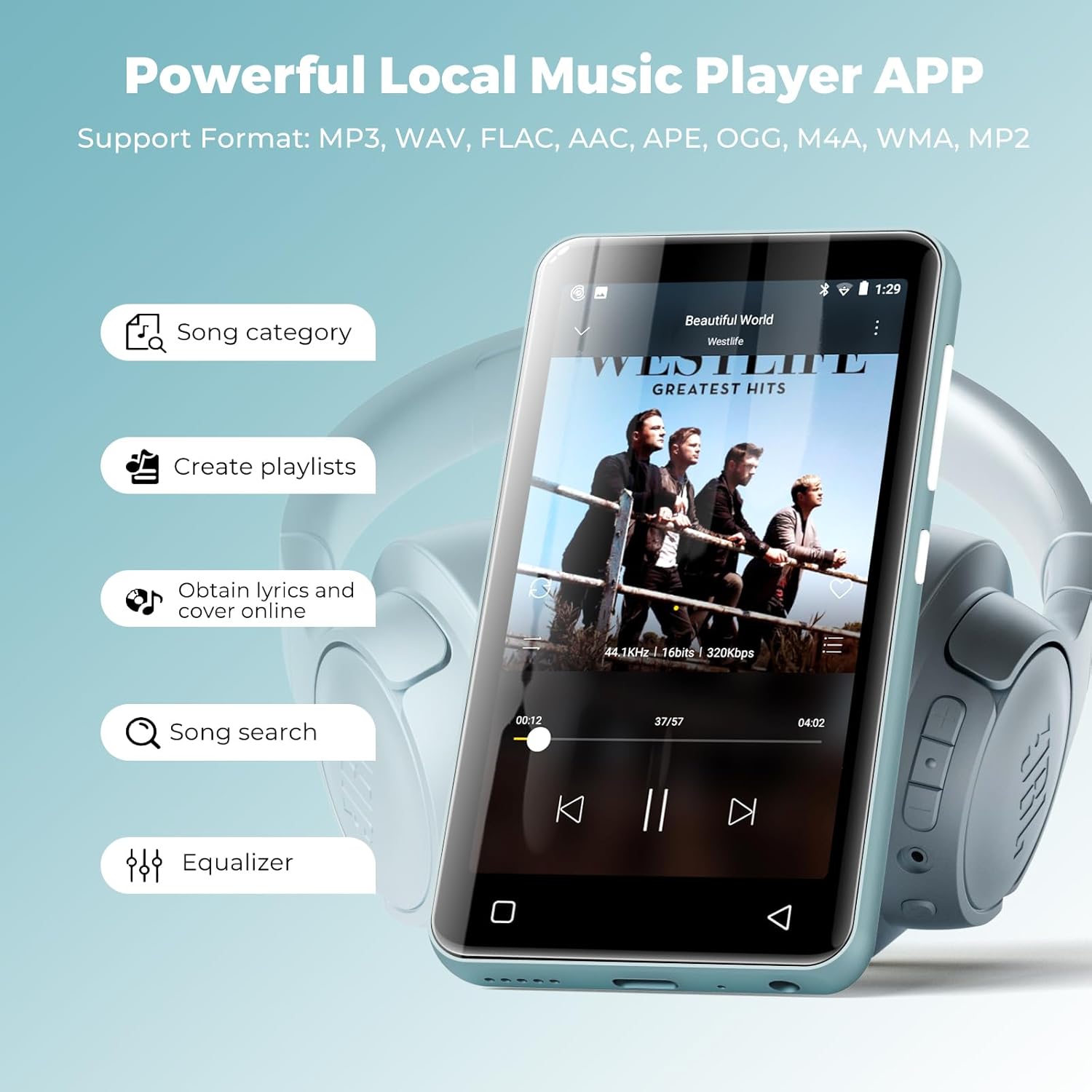
Figure 4.2: Local music player interface and features.
4.3. 오디오북 재생
The device comes pre-loaded with audiobook apps such as Audible, Libby, and Audiobooks. Launch the desired app, log in, and access your audiobook library.

Figure 4.3: Audiobook listening experience.
4.4. 비디오 재생
The 4-inch HD touchscreen supports 720p or 1080p video playback. Compatible formats include AVI, MKV, MP4, MPEG, MOV, VOB, WMV, WEBM, DIVX, F4V, FLV, Xvid, 3GP, etc. Transfer video files to the device's internal storage or SD card and access them via the 'Videos' app.

Figure 4.4: Video playback on the device.
4.5. 앱 관리 및 자녀 보호 기능
You can install new apps and update existing ones. The parental control feature requires your approval before any app can be downloaded. Apps that require Google Play services (e.g., YouTube, YouTube Music) are not supported. You can also easily uninstall apps to free up space.
- To Manage Apps: 이동하다 설정 > 앱 및 알림.
- 보호자 관리: 입장 설정 > 보호자 통제 to set a password and manage app installation permissions.

Figure 4.5: Parental control settings interface.
4.6. Other Applets
The device includes a collection of handy apps such as FM radio, e-book reader, voice recorder, file manager, clock, calendar, and calculator.

그림 4.6: 이상view of additional utility apps.
5. 사양
| 특징 | 세부 사항 |
|---|---|
| 제품 치수 | 0.39 x 2.36 x 4.33 인치 |
| 품목 무게 | 0.018 온스 |
| 품목 모델 번호 | G3 |
| 배터리 | 1개의 리튬 이온 배터리 필요(포함) |
| 상표 | 이뇨증 |
| 모델명 | G3 |
| 특별 기능 | 이퀄라이저, FM 라디오, 고해상도 오디오, 비디오 재생, 음성 녹음기 |
| 연결 기술 | 블루투스, USB, Wi-Fi |
| 메모리 저장 용량 | 160GB (내장 32GB + SD 카드 128GB) |
| 화면 크기 | 4 인치 |
| 미디어 유형 | 마이크로 SD, 마이크로 SDHC, 마이크로 SDXC, SD 카드, SDHC |
| 디스플레이 기술 | 액정표시장치 |
6. 유지관리
6.1. 일반 관리
- 기기를 건조하게 보관하고 극한의 온도에 두지 마세요.
- Clean the screen with a soft, lint-free cloth. Avoid abrasive materials.
- 장치를 떨어뜨리거나 강한 충격을 가하지 마십시오.
6.2. 배터리 관리
- 기기를 정기적으로 충전하되, 장시간 완전히 충전하거나 완전히 방전된 상태로 두지 마십시오.
- 충전 시에는 제공된 USB-C 케이블만 사용하세요.
7. 문제 해결
7.1. 장치가 켜지지 않음
- Ensure the device is sufficiently charged. Connect it to a power source for at least 15 minutes before attempting to turn it on again.
- 전원 버튼을 10~15초간 길게 눌러 강제 재시작을 실행하세요.
7.2. Unable to Connect to Wi-Fi/Bluetooth
- Verify that Wi-Fi/Bluetooth is enabled in the device settings.
- Ensure the network password is correct for Wi-Fi.
- For Bluetooth, ensure the target device is in pairing mode and within range.
- Restart both the MP3 player and the Wi-Fi router/Bluetooth device.
7.3. Apps Not Functioning Correctly
- Ensure the device has a stable internet connection if the app requires it.
- 앱 캐시를 지우려면 다음 경로로 이동하세요. 설정 > 앱 및 알림앱을 선택한 다음 저장소 및 캐시, 그리고 탭하세요 캐시 지우기.
- Note that apps requiring Google Play services are not supported on this device.
8. 보증 및 지원
All innioasis Bluetooth music players are backed by a 1-year warranty. For any inquiries or support needs, please contact our customer service team, available for 12 hours to ensure your complete satisfaction.


