1. 서론
Thank you for choosing the MCHOSE ACE 68 Mechanical Gaming Keyboard. This 60% compact keyboard is engineered for high-performance gaming, featuring Hall Effect magnetic switches, Rapid Trigger technology, adjustable actuation, and an 8000Hz polling rate for ultra-low latency. This manual will guide you through the setup, operation, and maintenance of your new keyboard to ensure optimal performance.
2. 상자 안에 무엇이 들어있나요?
- MCHOSE ACE 68 Mechanical Gaming Keyboard
- USB 케이블(C형)
- 키캡 및 스위치 풀러
- 2 x 교체 스위치
- 더스트 커버
- 사용 설명서 (본 문서)
3. 설정
3.1 하드웨어 연결
- Connect the provided USB Type-C cable to the port on the MCHOSE ACE 68 keyboard.
- Plug the other end of the USB cable into an available USB port on your computer (PC, Laptop, Gaming Console, PS5, XBOX).
- 키보드는 운영 체제에서 자동으로 인식됩니다.
3.2 Software Installation (M HUB Web 운전사)
For advanced customization and optimal performance, it is recommended to use the MCHOSE M HUB web 운전사.
- 당신의 web browser and navigate to the MCHOSE official web대지: https://www.mchose.com.cn.
- Select your preferred language from the options provided on the web대지.
- Click on the 'Enter M HUB WEB' 버튼.
- On the M HUB page, click on the image corresponding to the 'Ace 68' keyboard to enter its configuration interface.

이미지: 1단계 - Webpage input for MCHOSE HUB web 운전사.

Image: Step 2 - Language selection and entering M HUB WEB.
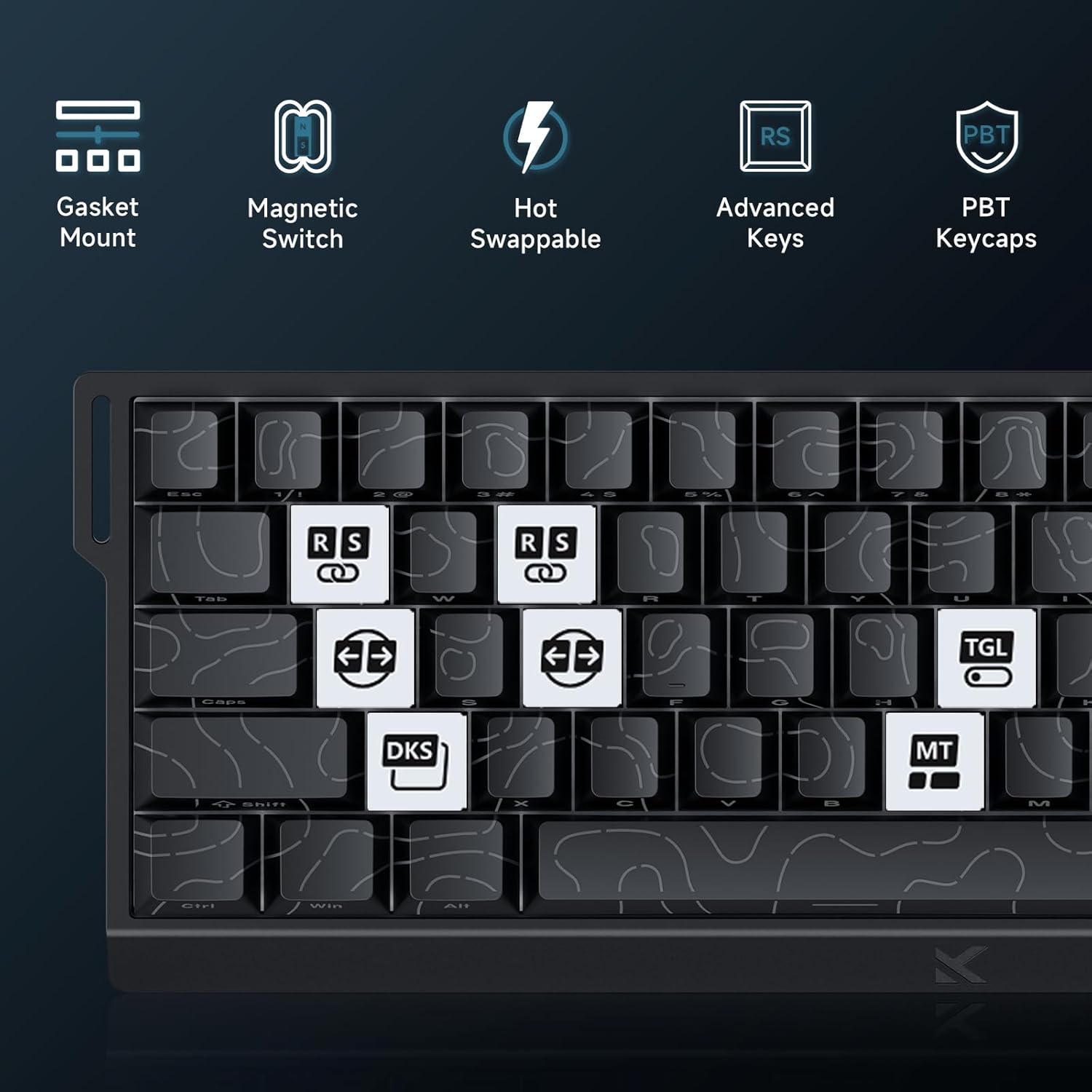
Image: Step 3 - Selecting the Ace 68 device within the M HUB web 인터페이스.
4. 사용 설명서
4.1 폴링 속도 및 지연 시간
The MCHOSE ACE 68 features an 8000Hz polling rate and a 128K scan rate, resulting in an ultra-low 0.1ms latency. This ensures rapid and precise input registration.

Image: Visual representation of 8000Hz Polling Rate and 0.1ms Report Rate, highlighting fast actuation and response time.
4.2 빠른 방아쇠 및 조절 가능한 작동
The keyboard's magnetic switches allow for dynamic actuation and deactivation points, eliminating traditional input latency.
- 빠른 트리거: Keys activate when pressed and deactivate when released, without a fixed reset point. This allows for faster repeated inputs.
- 조절 가능한 작동: Customize the actuation point of each key from 0.1mm to 4.0mm using the M HUB software. This provides precise control over key sensitivity.

Image: Comparison of Rapid Trigger (dynamic reset) versus traditional fixed actuation/reset points.
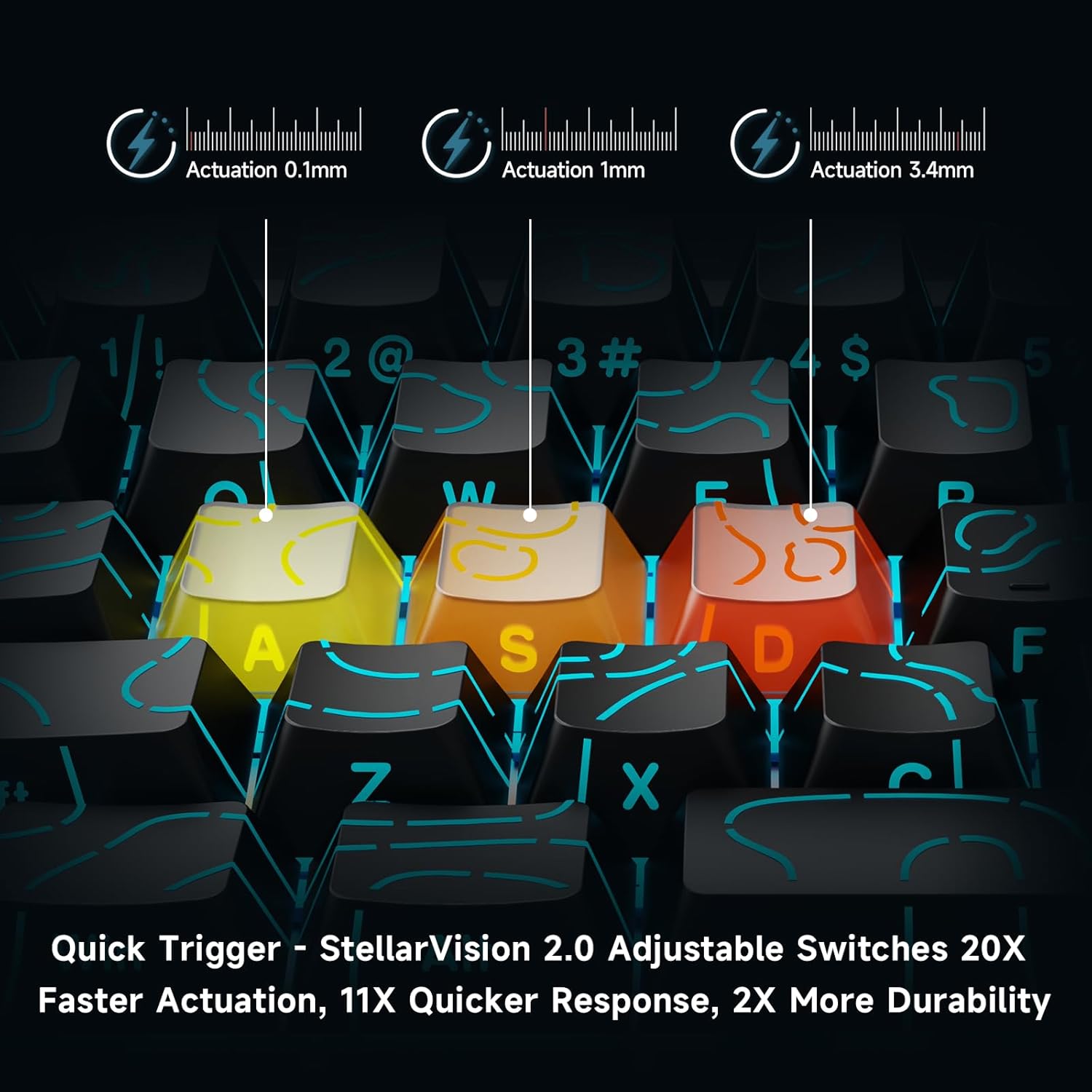
Image: Visual demonstration of adjustable actuation points (0.1mm, 1mm, 3.4mm) for StellarVision 2.0 switches.
4.3 Advanced Key Functionality (M HUB Software)
The M HUB software allows for advanced customization of key behavior:
- RS (래피 스내피): Monitors at least two selected keys and activates the key pressed the furthest. When both are at the same depth, it uses your selected SOCD resolution. This enhances movement in games.
- SOCD (Simultaneous Opposing Cardinal Directions): When opposing direction keys (e.g., Left + Right) are pressed together, you can set it to neutralize, prioritize the last-pressed, or hold the first-pressed direction.
- DKS (Dynamic Key Press): Map up to four separate actions along a single key's travel at actuation, bottom-out, first release, and full release for complex macros or multi-stage 명령.
- MT(모드탭): Assign a key to send one keycode on a quick tap and a different (usually modifier) code when held, blending typing and modifier layers seamlessly.
- TGL(토글): Turn any key into an on/off switch-press once to latch the output; press again to cancel. A hold still provides momentary behavior.

이미지: 이상view of key features including Advanced Keys (RS, DKS, TGL, MT).

Image: Diagram explaining the concept of 4-in-1 Action Keys, allowing multiple actions per key based on press depth.
4.4 RGB 조명 사용자 정의
The MCHOSE ACE 68 features customizable RGB backlighting with 16.8 million colors and 22+ dynamic lighting effects.
- FN 키 조합: Use the Function (FN) key in combination with other keys to adjust lighting effects directly on the keyboard.
- M HUB Software: For full customization, including per-key lighting and advanced effects, use the M HUB web 운전사.

Image: FN key combinations for adjusting RGB lighting effects, brightness, and speed.

Image: The MCHOSE ACE 68 keyboard displaying various preset RGB lighting effects.
5. 유지관리
5.1 청소
- 청소하기 전에 키보드를 컴퓨터에서 분리하세요.
- 부드럽고 마른 천으로 키캡과 키보드 본체를 닦아주세요.
- 더 깊이 세척하려면 압축 공기 캔을 사용하여 키캡 사이의 먼지와 이물질을 제거하세요.
- 강한 화학 물질이나 연마재는 키보드의 마감이나 키캡의 각인을 손상시킬 수 있으므로 사용을 피하십시오.
5.2 키캡 및 스위치 교체
The MCHOSE ACE 68 features hot-swappable magnetic switches, allowing for easy replacement without soldering.
- 제공된 키캡 풀러를 사용하여 원하는 키캡을 조심스럽게 제거하세요.
- Use the provided switch puller to carefully extract the magnetic switch from its socket.
- 새 스위치의 핀을 PCB의 구멍에 맞춰 정렬하고 딸깍 소리가 나면서 제자리에 고정될 때까지 세게 누르십시오.
- 키캡을 새 스위치에 다시 끼웁니다.

Image: Diagram showing the hot-swappable PCB, pre-lubed magnetic switch, plate-mounted stabilizers, hot-swap socket, and north-facing per-key LEDs.
6. 문제 해결
- 키보드가 응답하지 않음:
- USB 케이블이 키보드와 컴퓨터에 모두 단단히 연결되어 있는지 확인하세요.
- 키보드를 컴퓨터의 다른 USB 포트에 연결해보세요.
- 시스템 특정 문제를 배제하기 위해 다른 컴퓨터에서 키보드를 테스트하세요.
- Input Lag or Dropped Inputs:
- Ensure the M HUB web driver is installed and updated to the latest version.
- Check the polling rate setting in the M HUB software; ensure it is set correctly for your needs.
- If 'Berserk Mode' is enabled in the M HUB software, be aware that while it offers maximum accuracy, it may impact stability with mixed switch configurations. Try disabling it if issues persist.
- 다른 소프트웨어나 백그라운드 프로세스가 키보드 입력을 방해하지 않는지 확인하십시오.
- RGB 조명이 작동하지 않음/잘못됨:
- Check FN key combinations for lighting control (refer to section 4.4).
- Verify lighting settings within the M HUB software.
- 키보드 펌웨어가 최신 버전인지 확인하세요.
- 키가 올바르게 작동하지 않음:
- Check the adjustable actuation settings for the specific key in the M HUB software.
- If a switch feels faulty, consider replacing it using the provided spare switches and switch puller (refer to section 5.2).
7. 사양
| 특징 | 세부 사항 |
|---|---|
| 모델 번호 | MCHOSE ACE 68 |
| 키보드 레이아웃 | 60% 컴팩트(61키) |
| 스위치 유형 | TTC Dragon Lord Magnetic Switches (Hall Effect) |
| 작동 범위 | 0.1mm - 4.0mm (조절 가능) |
| 폴링 속도 | 8000Hz |
| 보고율 | 0.1ms |
| 키캡 | PBT Keycaps, Cherry Profile, Shine-through legends |
| 백라이트 | RGB (16.8만 색상, 22가지 이상의 효과) |
| 연결성 | 유선(USB-C) |
| 호환 장치 | PC, Laptop, Gaming Console, PS5, XBOX |
| 제품 치수 | 12.6인치 길이 x 4.56인치 너비 x 1.54인치 높이(32cm x 11.7cm x 3.9cm) |
| 품목 무게 | 2.55파운드(1.16kg) |
| 특별 기능 | Rapid Trigger, Adjustable Actuation, Hot-Swappable Switches, Programmable Keys, Gasket Mount |
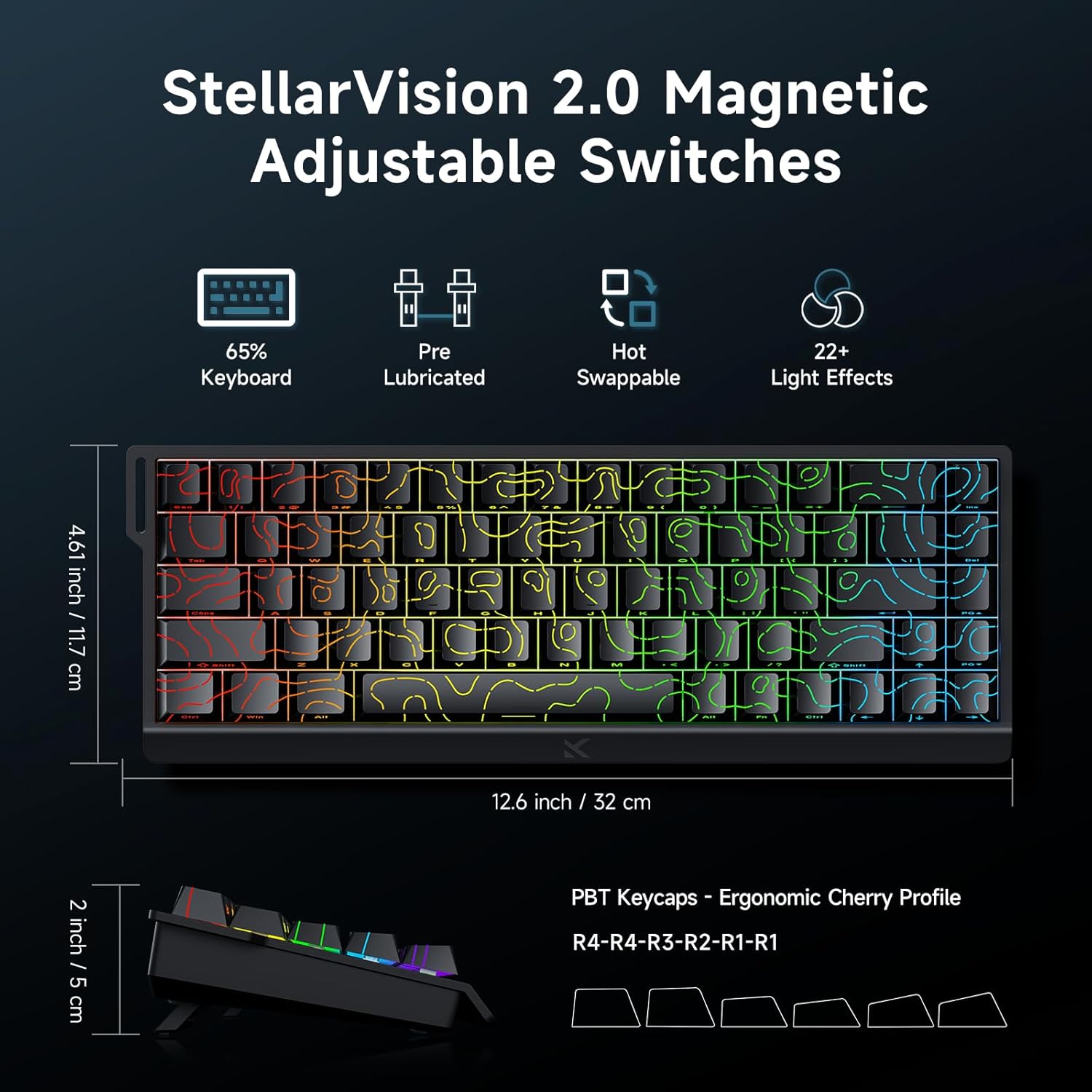
Image: MCHOSE ACE 68 keyboard with dimensions (12.6 inches / 32 cm length, 4.61 inches / 11.7 cm width, 2 inches / 5 cm height) and key features like StellarVision 2.0 Magnetic Adjustable Switches, pre-lubricated, hot-swappable, and 22+ light effects.

Image: Detailed specifications of the Uranus Magnetic Switch eSports, including switch type, actuation range (0.1-3.4mm), lifespan (100 Million Clicks), sensitivity (0.005mm), total travel (3.4mm), and trigger pressure (32 +/- 5 gf).
8. 보증 및 지원
MCHOSE products are designed for durability and performance. For warranty information, technical support, or further assistance, please visit the official MCHOSE web사이트를 방문하거나 고객 서비스에 직접 문의하세요. 보증 청구를 위해 구매 영수증을 보관하세요.
공식적인 Web대지: https://www.mchose.com.cn


