1. 제품 오버view
The DOOGEE Note 56 is a modern smartphone designed for daily use, featuring a powerful Octa-Core processor, a large 6150 mAh battery, and a vibrant 6.56-inch HD+ display with a 90 Hz refresh rate. This manual provides essential information for setting up, operating, and maintaining your device.

그림 1.1: 앞면과 뒷면 view of the DOOGEE Note 56, showcasin세련된 디자인과 카메라 구성이 돋보입니다.
2. 상자 안에 무엇이 들어있나요?
- 두지 노트 56 스마트폰
- 전원 어댑터
- USB 케이블
- SIM 이젝터 도구
- 빠른 시작 가이드
- 보호 케이스(지역에 따라 다를 수 있음)
- 스크린 보호 필름(사전 적용 또는 포함)
3. 설정
3.1 SIM 카드 및 MicroSD 카드 삽입
The DOOGEE Note 56 supports Dual SIM functionality and MicroSD card expansion up to 2TB. Follow these steps to insert your cards:
- 휴대 전화의 전원을 끕니다.
- 기기 측면에서 SIM 카드 트레이를 찾으세요.
- SIM 꺼내기 도구를 트레이 옆에 있는 작은 구멍에 넣고 트레이가 튀어나올 때까지 가볍게 누르세요.
- 나노 SIM 카드 및/또는 MicroSD 카드를 트레이의 지정된 슬롯에 넣으십시오. 카드의 방향이 올바른지 확인하십시오.
- 트레이를 조심스럽게 전화기 안으로 밀어 넣어 딸깍 소리가 나면서 제자리에 고정되도록 합니다.
3.2 전원 켜기/끄기 및 초기 설정
To power on your device, press and hold the Power button until the DOOGEE logo appears. To power off, press and hold the Power button, then select 'Power off' from the options. On first use, follow the on-screen instructions to set up your language, Wi-Fi, Google account, and security features.
4. 장치 작동
4.1 기본 탐색
The DOOGEE Note 56 runs on Android 16, offering an intuitive user interface. Use gestures or the navigation bar at the bottom of the screen to navigate:
- 집: Swipe up from the bottom or tap the Home button to return to the home screen.
- 뒤쪽에: Swipe from the left or right edge, or tap the Back button to go back to the previous screen.
- 최근 앱: Swipe up and hold from the bottom, or tap the Recent Apps button to view 열려 있는 애플리케이션 간에 전환할 수 있습니다.
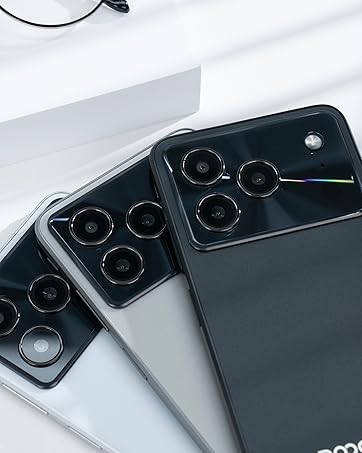
Figure 4.1: Android 16 operating system interface on the DOOGEE Note 56.
4.2 통화 및 메시징
To make a call, open the Phone app, enter the number, and tap the call icon. For messaging, open the Messages app, select a contact or start a new conversation, type your message, and send.
4.3 카메라 기능
The DOOGEE Note 56 features an 8 MP rear camera and a 5 MP front camera. Open the Camera app to access various modes such as Photo, Video, Portrait, and more. Tap the shutter button to capture photos or start/stop video recording.

Figure 4.2: Camera features and AI scene recognition.
4.4 디스플레이 설정
Customize your 6.56-inch HD+ 90 Hz IPS display by going to 설정 > 디스플레이. Here you can adjust brightness, dark mode, screen timeout, and refresh rate for a smoother visual experience.

Figure 4.3: The 90 Hz HD+ display provides smooth visuals.
5. 저장 및 성능
The DOOGEE Note 56 is equipped with 24GB RAM (3GB physical + 21GB virtual) and 64GB of internal storage, expandable up to 2TB via a MicroSD card (sold separately). This configuration ensures smooth multitasking and amp앱, 사진, 비디오를 위한 공간입니다.
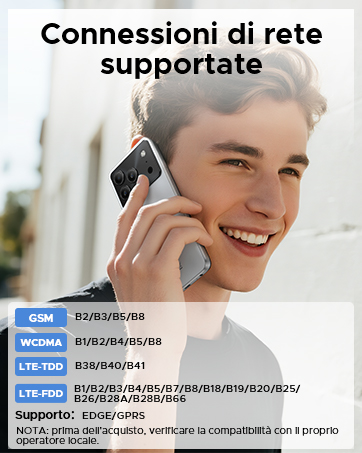
Figure 5.1: Memory configuration of the DOOGEE Note 56.
6. 연결성 및 보안
6.1 네트워크 연결
The device supports 4G LTE for fast mobile data. Ensure your SIM cards are active and correctly inserted. For Wi-Fi, go to 설정 > 네트워크 및 인터넷 > Wi-Fi and connect to your preferred network.

Figure 6.1: Supported network connections for the DOOGEE Note 56.
6.2 얼굴 ID
Unlock your phone quickly and securely using Face ID. To set it up, go to 설정 > 보안 > 얼굴 인식 잠금 해제 화면에 나오는 지시에 따라 얼굴을 등록하세요.
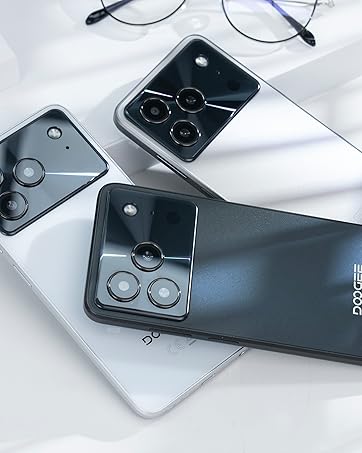
Figure 6.2: Instant facial recognition for unlocking.
6.3 OTG and GPS
The device supports OTG (On-The-Go) for connecting USB accessories like flash drives. GPS functionality provides accurate location services for navigation and location-based apps.
7. 배터리 관리
The DOOGEE Note 56 is equipped with a 6150 mAh silicon-carbon battery, offering extended usage. It supports 10W fast charging. To optimize battery life:
- 화면 밝기를 조정합니다.
- 백그라운드에서 실행 중인 사용하지 않는 앱을 닫습니다.
- 필요할 때 배터리 절약 모드를 활성화하세요.
- 극한의 온도를 피하세요.
Figure 7.1: The 6150 mAh battery provides long-lasting power.

Figure 7.2: Estimated usage times on a single charge.
8. 유지관리
8.1 소프트웨어 업데이트
기기에 최신 기능과 보안 패치가 설치되어 있는지 확인하려면 소프트웨어 업데이트를 정기적으로 확인하세요. 설정 > 시스템 > 시스템 업데이트 업데이트를 확인하고 설치합니다.
8.2 장치 청소
부드럽고 보풀이 없는 천을 사용하여 휴대폰 화면과 본체를 닦으세요. 강한 화학 물질이나 연마재는 사용하지 마세요.
9. 문제 해결
9.1 일반적인 문제 및 해결 방법
- 전화가 켜지지 않습니다: 배터리가 충전되어 있는지 확인하십시오. 최소 10분 동안 충전기에 연결한 후 전원을 켜보십시오.
- 앱 충돌: Clear the cache of the problematic app (Settings > Apps > [App Name] > Storage & cache > Clear cache). If the issue persists, reinstall the app.
- 배터리 수명이 짧음: Review Section 7 for battery optimization tips.
- 네트워크 연결 문제: Check if SIM cards are properly inserted. Restart the phone. Verify network settings in Settings > Network & internet.
10. 사양
| 특징 | 사양 |
|---|---|
| 모델 | 노트56 |
| 운영 체제 | 안드로이드 16 |
| 표시하다 | 6.56-inch HD+ IPS, 90 Hz |
| 프로세서 | 옥타코어 |
| 숫양 | 24GB (3GB + 21GB 가상 메모리) |
| 내부 저장소 | 64GB (XNUMX기가바이트) |
| 확장 가능한 스토리지 | Up to 2 TB MicroSD |
| 후방 카메라 | 8 MP |
| 전면 카메라 | 5 MP |
| 배터리 용량 | 6150mAh |
| 충전 중 | 10W 고속 충전 |
| 치수 | 8.45mm 두께 |
| 무게 | 262g |
| 연결성 | 4G, Dual SIM, Wi-Fi, Bluetooth, GPS, OTG |
| 보안 | 페이스아이디 |
11. 공식 제품 영상
Video 11.1: DOOGEE Note 56 Plus Smartphone Overview. This video highlights the ultra-thin design, camera features, and overall elegance of the Note 56 Plus, which shares many characteristics with the Note 56 model.
Video 11.2: DOOGEE Note 56 Plus Ultra-thin Smartphone. This video focuses on the slim profile and aesthetic appeal of the Note 56 Plus, demonstrating its comfortable handling and modern look.
12. 보증 및 지원
Your DOOGEE Note 56 smartphone comes with a limited warranty. Please refer to the warranty card included in your product packaging for specific terms and conditions. For technical support or service inquiries, please visit the official DOOGEE web사이트를 방문하거나 고객 서비스에 문의하세요.
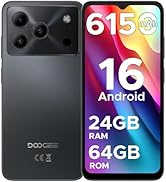
Figure 12.1: DOOGEE customer service details, including warranty and support options.