1. 서론
The Trevi RDA 70 BR is a compact and versatile portable radio designed to provide a comprehensive listening experience. It combines traditional radio functionality with modern digital features, making it suitable for listening to music or news anywhere. This manual provides instructions for the proper setup, operation, and maintenance of your device.
2. 안전 정보
- 장치를 사용하기 전에 모든 지침을 주의 깊게 읽으십시오.
- 라디오를 비, 습기 또는 극한 온도에 노출시키지 마십시오.
- 열원 근처나 직사광선에 장치를 두지 마십시오.
- 직접 분해하거나 수리하지 마십시오. 모든 정비는 자격을 갖춘 기술자에게 맡기십시오.
- 장치를 강한 자기장에서 멀리 두십시오.
- Use only the specified charging cable (USB Type-C) for recharging the battery.
3. 패키지 내용
패키지에 모든 품목이 들어 있는지 확인하세요.
- Trevi RDA 70 BR Portable Radio
- USB Type-C 충전 케이블
- 사용 설명서 (본 문서)
4. 제품 오버view
Familiarize yourself with the various parts and controls of your Trevi RDA 70 BR radio.

그림 1: 각진 앞면 view of the Trevi RDA 70 BR Portable Radio, showing the speaker grille, display, and main controls.
전면 패널 컨트롤
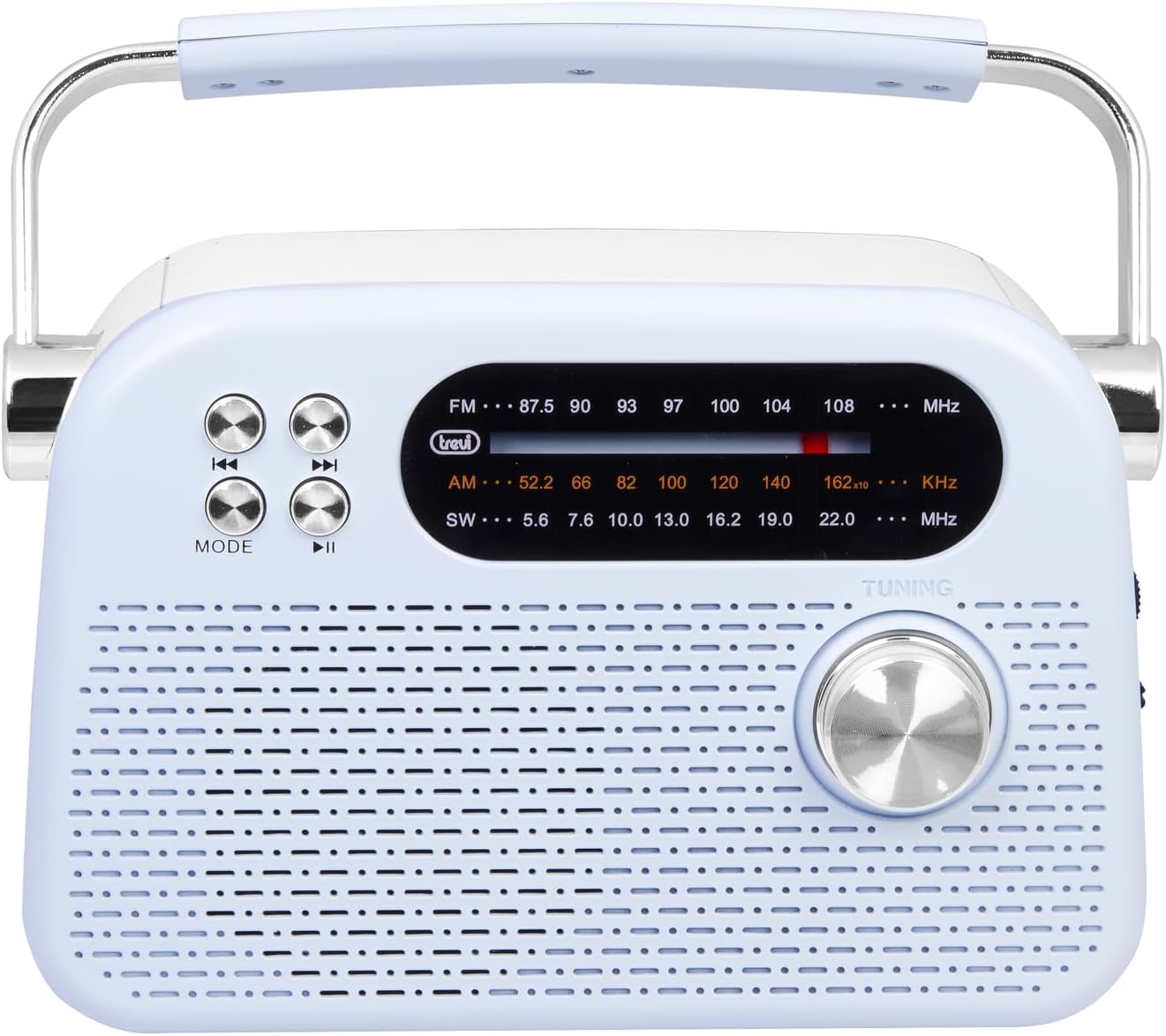
그림 2: 상세 전면 view highlighting the display, mode button, playback controls, and tuning knob.
- 표시하다: 빈도수, 최빈값 및 기타 정보를 표시합니다.
- MODE 버튼: Switches between radio bands (FM/AM/SW) and media playback modes (USB/Micro SD/Wireless).
- Playback Controls (◀◀ / ▶▶ / ▶▶): Used for skipping tracks in media mode or fine-tuning in radio mode.
- 튜닝 노브: For manual station tuning.
Side Panel Controls and Ports

그림 3: 측면 view showing the power switch, volume control, USB port, Micro SD slot, and USB Type-C charging port.
- OFF/ON/Volume Knob: Turns the radio on/off and adjusts the volume level.
- DC 5V IN (USB Type-C): 내장 배터리 충전 포트.
- USB 포트: MP3 재생을 위해 USB 플래시 드라이브를 연결하는 데 사용합니다.
- Micro SD Slot (TF): MP3 재생을 위해 마이크로 SD 카드를 삽입하세요.
- 밴드 선택 스위치: Selects between FM, AM, and SW radio bands, and MEDIA mode for USB/Micro SD/Wireless.
후면 패널

그림 4: 후면 view showing the telescopic antenna and battery compartment.
- 텔레스코픽 안테나: Extend for improved radio reception, especially for FM and SW bands.
- 배터리 칸: 충전식 리튬 배터리가 내장되어 있습니다.
5. 설정
5.1 배터리 충전
- Locate the USB Type-C charging port on the side of the radio.
- Connect the provided USB Type-C cable to the radio's charging port.
- USB 케이블의 다른 쪽 끝을 표준 USB 전원 어댑터(별도 구매) 또는 컴퓨터의 USB 포트에 연결하십시오.
- The charging indicator light will illuminate (if present) to show charging status.
- Once fully charged, disconnect the cable. A full charge ensures maximum portability and uninterrupted use.
5.2 안테나 조정
For optimal radio reception, extend the telescopic antenna fully. Adjust its direction and angle to achieve the clearest signal, especially for FM and Shortwave (SW) broadcasts.
6. 사용 설명서
6.1 전원 켜기/끄기 및 볼륨 제어
- 라디오를 켜려면 ON, rotate the OFF/ON/Volume knob clockwise.
- Continue rotating the knob clockwise to 볼륨을 높이다.
- Rotate the knob counter-clockwise to 볼륨을 줄이세요.
- 라디오를 켜려면 끄다, rotate the knob counter-clockwise until it clicks into the OFF position.
6.2 모드 선택
사용하세요 밴드 선택 스위치 on the side panel to choose your desired mode:
- FM: For Frequency Modulation radio stations.
- 오전: 을 위한 Amplitude Modulation radio stations.
- 소프트웨어: For Shortwave radio stations.
- 미디어: For playing audio from USB, Micro SD, or Wireless (Bluetooth) sources.
6.3 라디오 튜닝
- Select the desired radio band (FM, AM, or SW) using the Band Selector Switch.
- 더 나은 수신을 위해 망원 안테나를 확장하세요.
- 천천히 회전 튜닝 노브 on the front panel to scan for stations.
- The frequency will be displayed on the screen. Stop tuning when you find a clear station.
6.4 USB/Micro SD Playback (MP3)
- Insert a USB flash drive or a Micro SD card (with MP3 files) into the corresponding port/slot on the side panel.
- Switch the Band Selector Switch to 메디아 mode. The radio should automatically detect and begin playing MP3 files.
- 사용하세요 재생 컨트롤 (◀◀ / ▶▶) to skip to the previous or next track.
- 사용하세요 Play/Pause (▶▶) 버튼을 눌러 재생을 일시 중지하거나 다시 시작합니다.
6.5 무선(블루투스) 연결
The radio supports wireless audio streaming from compatible devices.
- Switch the Band Selector Switch to 메디아 mode. The radio will enter Bluetooth pairing mode (indicated by an audible prompt or flashing indicator).
- 스마트폰, 태블릿 또는 기타 Bluetooth 지원 기기에서 Bluetooth를 활성화하고 사용 가능한 기기를 검색하세요.
- 선택하다 "Trevi RDA 70 BR" (or similar name) from the list of devices to pair.
- 페어링이 완료되면 기기에서 라디오로 오디오를 스트리밍할 수 있습니다.
- Use the playback controls on your connected device or the radio's playback controls to manage audio.
7. 유지관리
- 청소: 부드럽고 마른 천을 사용하여 라디오 외부를 청소하십시오. 연마성 세제나 용제를 사용하지 마십시오.
- 저장: 장기간 사용하지 않을 경우, 라디오를 직사광선과 극한의 온도를 피해 시원하고 건조한 곳에 보관하세요.
- 배터리 관리 : To prolong battery life, avoid fully discharging the battery frequently. Recharge it regularly, even if not in constant use.
8. 문제 해결
| 문제 | 가능한 원인 | 해결책 |
|---|---|---|
| 전원이 없습니다 | Battery is discharged; Power knob is OFF. | Charge the battery; Rotate the power knob to ON. |
| 라디오 수신 불량 | 안테나가 확장되지 않음; 신호가 약함; 간섭. | Extend and adjust the telescopic antenna; Move the radio to a different location; Tune carefully. |
| USB/Micro SD not playing | 잘못된 모드입니다. 지원되지 않습니다. file 형식; 손상됨 files. | Ensure Band Selector Switch is on MEDIA; Check if files are MP3 format; Try a different USB/Micro SD card. |
| Cannot connect via Wireless (Bluetooth) | Radio not in pairing mode; Bluetooth off on device; Device already connected to another unit. | Ensure radio is in MEDIA mode; Enable Bluetooth on your device; Disconnect from other devices and try again. |
9. 사양
| 특징 | 세부 사항 |
|---|---|
| 상표 | 트레비 |
| 모델 | RDA 70 BR |
| 치수(길이 x 너비 x 높이) | 18.5 x 7 x 12.5cm |
| 무게 | 600그램 |
| 전원 | 충전식 리튬 배터리 |
| 충전 포트 | USB 타입 C (DC 5V) |
| 지원되는 라디오 대역 | FM, AM, 남서 |
| 미디어 재생 | USB, Micro SD (MP3 format) |
| 무선 연결 | 예 (블루투스 호환) |
| 특별 기능 | 휴대용, 충전식 |
10. 보증 및 지원
For warranty information and customer support, please refer to the documentation provided at the time of purchase or visit the official Trevi website. Standard return policies apply for products purchased through retailers. For specific details regarding returns or defective products, consult your purchase platform's help pages.


