소개
This manual provides essential information for setting up and operating your DOOGEE Fire 5 Ultra Rugged Phone. Please read it carefully to ensure proper use and to maximize the device's capabilities. The DOOGEE Fire 5 Ultra is designed for durability and performance in challenging environments, featuring robust construction, a large battery, and advanced functionalities.
패키지 내용
패키지에 모든 품목이 들어 있는지 확인하세요.
- DOOGEE Fire 5 Ultra Cellphone
- USB 케이블
- 충전기
- Protective Film (Pre-applied)
- 사용자 설명서
- 보증 카드
- Card Slot Opener

Image: Contents of the DOOGEE Fire 5 Ultra box, including the phone, charger, USB cable, protective film, user manual, warranty card, and card slot opener.
Video: An unboxing video of the DOOGEE Fire 5 Ultra, showcasing the phone and its accessories as they are removed from the packaging.
주요 기능 이상view
Explore the main features and design aspects of the DOOGEE Fire 5 Ultra.
Video: A 3D animated overview of the DOOGEE Fire 5 Ultra, highlighting its rugged design, dual camping lights, and camera system.
설치 가이드
1. SIM 카드 및 저장 카드 설치
The DOOGEE Fire 5 Ultra supports dual Nano SIM cards and a TF card for expandable storage up to 2TB. Use the provided card slot opener to access the SIM/TF card tray.
- 휴대폰 측면에서 SIM 카드 트레이를 찾으세요.
- Insert the card slot opener into the small hole next to the tray and press gently until the tray ejects.
- Place your Nano SIM card(s) and/or TF card into the designated slots on the tray. Ensure proper orientation as indicated on the tray.
- 트레이를 조심스럽게 전화기에 다시 삽입하여 제자리에 고정되도록 합니다.
2. 초기 충전
Before first use, fully charge your device. The phone comes with a 13000mAh battery and supports 18W fast charging.
- USB 케이블을 충전 어댑터에 연결합니다.
- 충전기 어댑터를 전원 콘센트에 꽂으세요.
- 케이블의 USB-C 단자를 휴대폰의 충전 포트에 연결하세요.
- 배터리 표시등이 100%를 나타낼 때까지 휴대폰을 충전하세요.
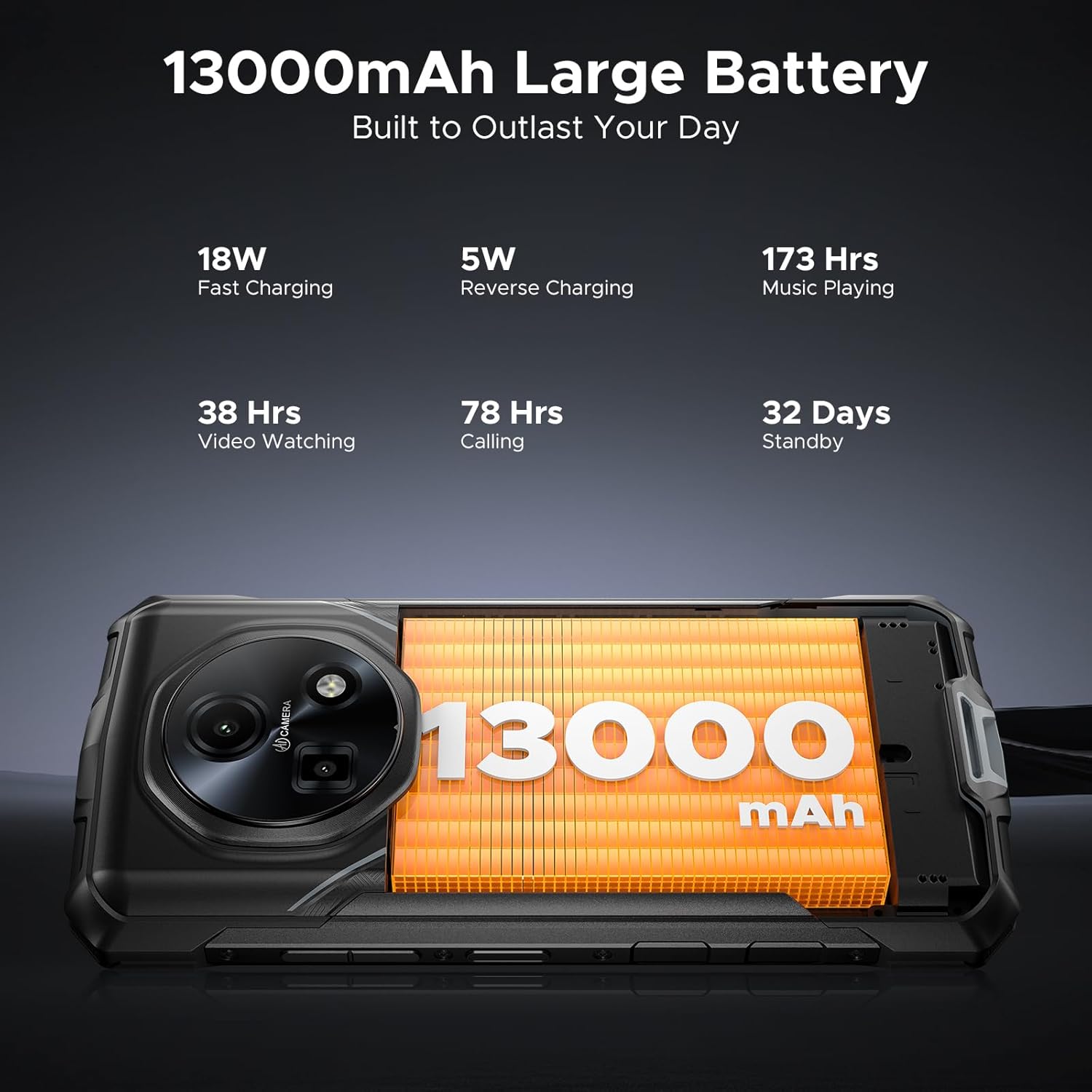
Image: Close-up of the DOOGEE Fire 5 Ultra's charging port with a USB-C cable connected.
장치 작동
전원 켜기/끄기 및 화면 잠금
- To power on, press and hold the Power button until the DOOGEE logo appears.
- 전원을 끄려면 전원 버튼을 길게 누른 다음 옵션에서 "전원 끄기"를 선택하세요.
- To lock the screen, briefly press the Power button. To unlock, press the Power button and swipe up, or use fingerprint/face unlock.
듀얼 Camp조명
The DOOGEE Fire 5 Ultra features dual camping lights on the back, providing illumination for various situations. These lights offer three modes: illumination, strobe, and SOS.
- 활성화: Access the quick settings panel or a dedicated app to control the camp조명을 켜고 있습니다.
- 모드: Switch between steady illumination, strobe (flashing), and SOS (Morse code for distress).
- Brightness & Timer: Adjust the brightness level and set a timer for automatic shut-off through the phone's settings or the dedicated app.

Image: The back of the DOOGEE Fire 5 Ultra showing the dual camping lights illuminated.
Video: A demonstration of the DOOGEE Fire 5 Ultra's powerful dual camping lights, showcasing their brightness and different modes.
카메라 기능
The phone is equipped with a 48MP AI main camera and an 8MP front camera. The camera app offers various modes for photography and video recording.
- 메인 카메라: Supports AI shooting, night mode, panorama, and 2K video recording.
- 전면 카메라: Features beauty mode for enhanced selfies and supports face unlock.
- 입장: 홈 화면이나 잠금 화면에서 카메라 앱을 엽니다.

Image: Close-up of the DOOGEE Fire 5 Ultra's rear camera module.
디스플레이 및 탐색
The 6.6-inch HD IPS display features a 90Hz refresh rate for smooth visuals.
- 항해: Use standard Android gestures or on-screen navigation buttons.
- 다크 모드: Enable Dark Mode in display settings for comfortable view저조도에서.
Video: A demonstration of the DOOGEE Fire 5 Ultra's 6.6-inch HD+ IPS display with a 90Hz refresh rate, showing smooth visuals.
보안 기능
- Side Fingerprint ID: Register your fingerprints in the Security settings for quick and secure unlocking. The sensor is located on the side of the device.
- 페이스 ID: 편리한 잠금 해제를 위해 얼굴 인식 기능을 설정하세요.
Connectivity and Other Functions
- 4G LTE: Ensures stable cellular connectivity.
- NFC : For contactless payments and quick data transfer. Activate in Settings > Connected devices > NFC.
- OTG: On-The-Go functionality allows connecting USB devices like flash drives or external keyboards.
- FM 라디오 : Listen to FM radio stations (may require headphones as an antenna).
내구성 및 보호
The DOOGEE Fire 5 Ultra is built to withstand harsh conditions, certified with industry-leading durability standards.
- IP68/IP69K 등급: This certification indicates the device is highly resistant to dust and water. It can withstand immersion in 1.5 meters of water for up to 30 minutes and is protected against high-pressure, high-temperature water jets.
- MIL-STD-810H 준수: Tested against military standards for durability, the phone is resistant to drops, shocks, vibrations, and extreme temperatures, making it suitable for industrial job sites and outdoor adventures.

Image: The DOOGEE Fire 5 Ultra shown in various rugged scenarios, including being dropped, submerged in water, and covered in mud, illustrating its IP68/IP69K and MIL-STD-810H ratings.
성능 및 스토리지
- 프로세서: Powered by the MediaTek Helio G81 octa-core processor, providing smooth performance for daily tasks and light gaming.
- 운영 체제: 안드로이드 15에서 실행되며 최신 기능과 보안 업데이트를 제공합니다.
- 제미니 AI: Integrated Gemini AI optimizes performance and power efficiency based on usage patterns.
- 숫양: Features 32GB RAM (8GB physical + 24GB extended virtual RAM) for efficient multitasking.
- 내부 저장소: Comes with 256GB of internal storage.
- 확장 가능한 스토리지: Supports storage expansion up to 2TB via a TF (microSD) card (sold separately).

Image: Visual representation of the MediaTek Helio G81 Octa-Core chipset and the 32GB RAM + 256GB ROM configuration.
Video: An animation highlighting the MediaTek Helio G81 Octa-Core processor and its role in the DOOGEE Fire 5 Ultra's performance.
배터리 관리
The DOOGEE Fire 5 Ultra is equipped with a large 13000mAh battery, designed for extended use.
- 용량: 13000mAh for prolonged operation, ideal for outdoor activities or remote work.
- 빠른 충전: Supports 18W fast charging to reduce recharge times.
- OTG 역충전: The phone can act as a power bank to charge other small devices (e.g., headphones, flashlights) using an OTG cable (not included).
Image: The DOOGEE Fire 5 Ultra displaying its 13000mAh battery capacity and charging status.
Video: A visual representation of the DOOGEE Fire 5 Ultra's 13000mAh large battery and its fast charging capabilities.
기술 사양
| 특징 | 사양 |
|---|---|
| 모델명 | Fire5 Ultra |
| 상표 | 두기 |
| 운영 체제 | 안드로이드 15 |
| CPU 모델 | 미디어텍 헬리오 G81 옥타코어 |
| 숫양 | 32GB(물리적 8GB + 가상 24GB) |
| 메모리 저장 용량 | 256GB (TF 카드를 통해 최대 2TB까지 확장 가능) |
| 화면 크기 | 6.6 Inches HD+ IPS Display |
| 해결 | 2560 x 1440 |
| 새로 고침 빈도 | 90Hz |
| 메인 카메라 | 48MP AI 메인 카메라 |
| 전면 카메라 | 8MP 전면 카메라 |
| 배터리 용량 | 13000밀리amp 시간 |
| 충전 중 | 18W 고속 충전, OTG 역충전 |
| 특별 기능 | Dual SIM, Octa Core Processor, Water Resistant (IP68/IP69K), MIL-STD-810H, Dual Camping Lights (1200LM), NFC, GPS, Side Fingerprint ID, Face ID, FM Radio |
| 제품 치수 | 6.95 x 3.25 x 0.74 인치 |
| 품목 무게 | 13.9 온스 |
문제 해결
If you encounter issues with your DOOGEE Fire 5 Ultra, refer to the following common solutions:
- 장치가 켜지지 않음: 배터리가 충전되었는지 확인하세요. 충전기를 연결하고 몇 분 정도 기다린 후 다시 전원을 켜보세요.
- 화면이 반응하지 않음: 기기가 재부팅될 때까지 전원 버튼을 약 10~15초 동안 길게 눌러 재시작해 보세요.
- 네트워크 연결 문제: SIM 카드가 제대로 삽입되었는지 확인하십시오. 설정에서 모바일 데이터가 활성화되어 있는지 확인하십시오. 문제가 지속되면 통신사에 문의하십시오.
- 앱이 충돌하거나 정지됨: Clear the cache of the problematic app in Settings > Apps. If the issue continues, try reinstalling the app.
- 느린 성능: Close unnecessary background applications. Clear cached data regularly. Consider performing a factory reset if performance significantly degrades (back up your data first).
- 충전 문제: Ensure the USB cable and charger are securely connected and undamaged. Try a different power outlet or charger if available.
보증 및 지원
Your DOOGEE Fire 5 Ultra comes with a manufacturer's warranty. Please refer to the included warranty card for specific terms and conditions.
- 보증 기간: Typically includes a 1-year warranty service from the manufacturer.
- 반품 정책: Products purchased may be eligible for return within 30 days of receipt, subject to the retailer's return policy.
- 고객 서비스: For technical assistance or warranty claims, please contact DOOGEE customer support. Refer to the contact information provided on the warranty card or the official DOOGEE web대지.

Image: DOOGEE's service commitment, including 1-year warranty and customer service details.


