1. 서론
The BOIFUN R3 Pro is an advanced outdoor security camera designed to provide comprehensive surveillance with high-resolution imaging and smart features. Equipped with a 4K (8MP) sensor, it delivers clear and detailed video footage day and night. Its integrated 10000mAh battery, complemented by a solar panel, ensures continuous operation without the need for frequent recharging or external power wiring. The camera supports the latest WiFi 6 technology for stable connectivity and features PIR human detection to minimize false alarms, sending instant alerts to your smartphone.
With PTZ (Pan-Tilt-Zoom) functionality, the camera offers a 360-degree horizontal and 120-degree vertical rotation, providing extensive coverage. Two-way audio allows for real-time communication, and support for up to 128GB MicroSD card storage ensures ample recording capacity. The IP65 waterproof rating guarantees durability in various outdoor conditions.

Figure 1: BOIFUN R3 Pro 4K 8MP Outdoor Security Camera with Solar Panel
2. 패키지 내용
모든 품목이 들어 있는지 확인하려면 패키지를 확인하세요.
- 카메라 유닛
- 태양광 패널
- 충전 케이블
- 장착 나사
- 사용 설명서
- 서다

그림 2: 카메라 외부 구성 요소의 명칭이 표시된 도표.
3. 설정
3.1 설치 전 체크리스트
- Before installation, connect the camera and your mobile phone, then verify that the device is functioning correctly.
- Fully charge the camera to 100% using the provided power cable before proceeding with installation.
3.2 물리적 설치
The BOIFUN R3 Pro camera offers flexible installation options, including wall mounting. Ensure you choose a location with optimal sunlight exposure for the solar panel and a clear view 모니터링하려는 영역의
Video 1: Detailed installation guide for the BOIFUN Solar Security Camera, demonstrating wall mounting and solar panel attachment.
설치 단계:
- 드릴 구멍 표시하기: Use the positioning sticker to mark the drill holes on the wall.
- 교련: Drill holes at the marked positions. Insert the expansion screws into the holes.
- Mounting the Camera Stand: Secure the camera stand to the wall using screws.
- 카메라 부착하기: Slide the camera onto the stand from top to bottom until it is securely fixed.
- 태양 전지판 장착: Secure the solar panel stand to the wall. Rotate clockwise to connect the solar panel to its stand.
- Connecting the Charging Cable: Properly connect the charging cable to the camera to prevent water ingress.

Figure 3: Visual guide for the easy connection process.
3.3 앱 설정
Download the dedicated app and register an account before connecting. Allow the "Boifun Cam" app to receive notifications.
- Open the app and tap "Add Device".
- Select "Battery Camera".
- Long-press the power button for 5 seconds until a "ding" sound is heard, indicating the camera is powered on. The red light will flash slowly.
- After 5-10 seconds, long-press the reset button for 5 seconds until a "beep" sound is heard, indicating the camera has been reset. The red light will flash slowly.
- Enter your 2.4GHz Wi-Fi network password. (Note: 5GHz Wi-Fi is not supported).
- Scan the QR code displayed on your phone with the camera.
- Once connected, the blue light will illuminate. Wait for the page to load.

Figure 4: App interface showing the camera pairing process.
4. 카메라 작동
4.1 비디오 품질 및 야간 시야
The camera features an 8MP CMOS sensor, delivering 4K (3840x2144) high-definition video. Equipped with 4 infrared LEDs and 4 white LEDs, it provides up to 15 meters of night vision. This ensures clear surveillance even in dark conditions, allowing for identification of details like clothing and vehicle license plates.

Figure 5: Night vision clarity comparison (5MP vs 8MP).
4.2 전원 관리
The camera includes a 10000mAh high-capacity battery for extended operation. The accompanying 3W solar panel continuously recharges the battery using sunlight, providing 24/7 surveillance without electricity costs. This design eliminates the need for power wiring, enabling permanent, energy-efficient operation.

Figure 6: Power supply options for the camera.
4.3 Connectivity and Motion Detection
The camera supports 2.4GHz Wi-Fi and is compatible with Wi-Fi 6, enhancing transmission stability and signal penetration through walls. Its PIR human sensor accurately detects human movement, significantly reducing false alarms caused by swaying trees or insects. Upon detecting anomalies, it sends instant alert notifications to your smartphone and activates a loud alarm and powerful flashlights to deter intruders.

Figure 7: Real-time alerts and PIR detection in action.
4.4 PTZ and Two-Way Audio
With PTZ functionality, the camera's lens can rotate 360 degrees horizontally and 120 degrees vertically, eliminating blind spots. It supports two-way audio communication, allowing you to interact with family members in real-time. You can also create family accounts to allow multiple users to view 푸tage simultaneously. Remote control via smartphone enables adjustment of camera direction and recording initiation.
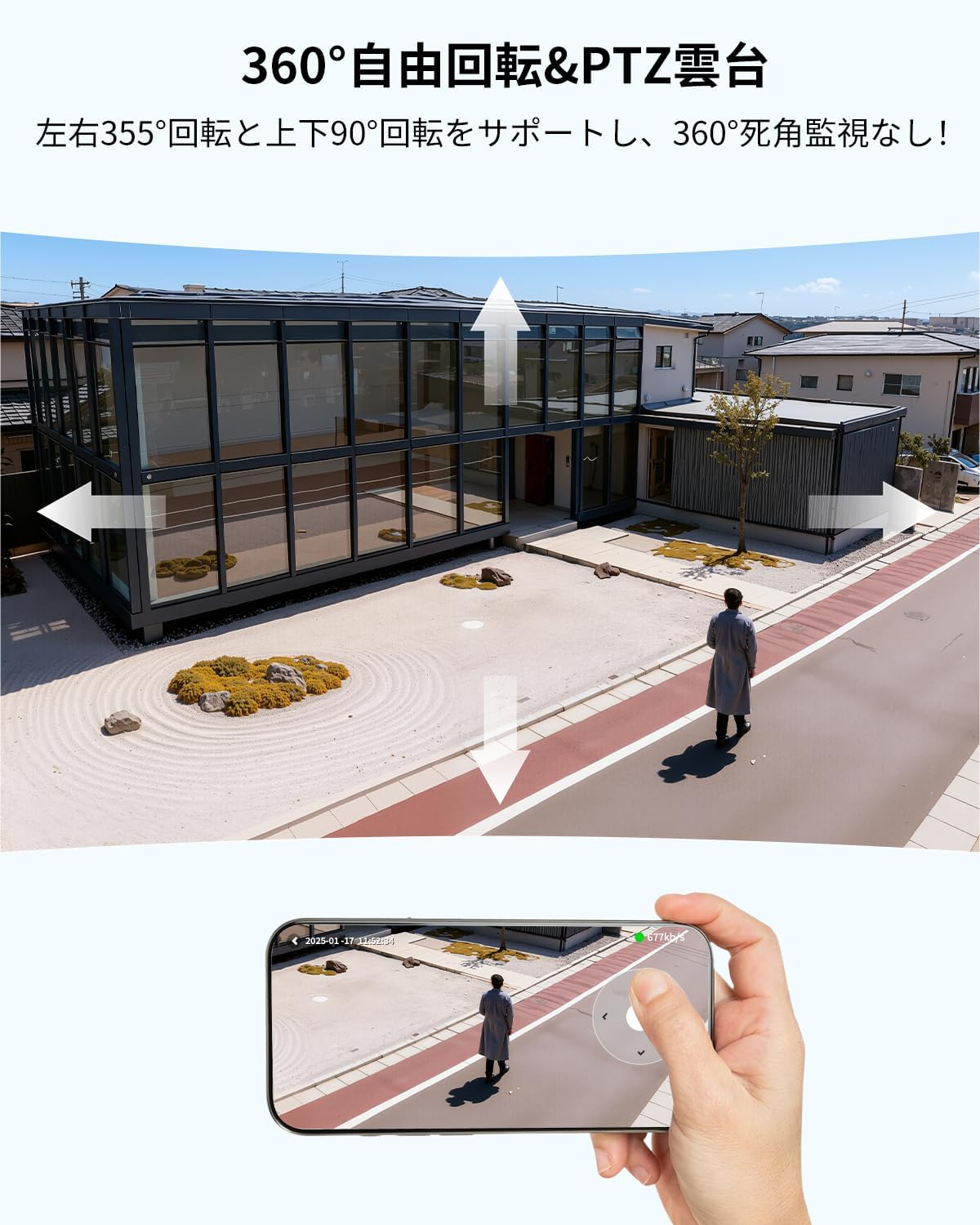
Figure 8: PTZ functionality and remote control via smartphone.
4.5 Storage and Multi-User Access
The camera supports up to a 128GB MicroSD card for ample video storage. It also offers cloud storage options. Family sharing features allow multiple users to access the camera feed simultaneously, ensuring everyone can monitor the property.

Figure 9: Multi-device management and simultaneous view주고받음.
5. 유지관리
5.1 내후성
The BOIFUN R3 Pro camera boasts an IP65 waterproof rating, providing robust protection against rain, dust, and extreme temperatures (-10°C to 50°C). This ensures reliable long-term operation in diverse outdoor environments.

Figure 10: IP65 waterproof feature of the camera.
6. 문제 해결
If you encounter any issues with your BOIFUN R3 Pro camera, please refer to the following common solutions:
- 연결 문제: Ensure your Wi-Fi network is 2.4GHz and the signal strength is adequate. Try resetting the camera and re-pairing it with the app.
- 허위 경보: Adjust the PIR human detection sensitivity settings in the app to reduce triggers from non-human movements.
- 충전 문제: Verify that the solar panel is positioned to receive maximum sunlight. Check the charging cable connection for proper insertion and seal.
- 화질 : Ensure the camera lens is clean and free from obstructions. Check your network speed for smooth streaming.

Figure 11: Visual representation of common issues and how the product addresses them.
7. 사양
| 특징 | 세부 사항 |
|---|---|
| 비디오 캡처 해상도 | 4K |
| 색상 | 검은색 |
| 항목 수 | 1 |
| 무선 통신 기술 | 와이파이 |
| 나이트 비전 범위 | 15 미터 |
| 제품 크기(LxWxH) | 16 x 14 x 10.5cm |
| 방수 레벨 | 방수 (IP65) |
| 제품 모델 번호 | R3 프로 |
| 제품 무게 | 1킬로그램 |
| 배터리 유형 | 리튬 이온 |
| 전원 | Solar/Battery Powered |
| 연결 프로토콜 | 2.4G Wi-Fi Compatible |
| 컨트롤러 유형 | Boifun Cam, Cloud Edge |
| 장착 유형 | 벽걸이형 |
8. 보증 및 지원
BOIFUN security cameras comply with Electrical Appliance and Material Safety Law (PSE) and Radio Law (TELEC) technical standards, ensuring safe use. We offer a 2-year warranty from the date of purchase.
If you have any questions or requests, please feel free to contact us. In case of initial defects, we may offer a replacement product. Our customer service is available Monday to Friday, 9:00 AM to 6:00 PM.

Figure 12: BOIFUN's comprehensive support and 2-year warranty.