1. 초기 설정
This section guides you through the initial setup of your DOOGEE Tab A9 Pro tablet.
1.1 패키지 내용
패키지에 모든 품목이 들어 있는지 확인하세요.
- 1x DOOGEE Tab A9 Pro Tablet
- 1x 타입 C USB 케이블
- 1x 충전기
- 스타일러스 1개 (VIP 에디션)
- 1x Tempered Film (VIP Edition)
- 블루투스 마우스 1개 (VIP 에디션)
- VIP 에디션 가죽 보호 커버 1개
- 블루투스 키보드 1개 (VIP 에디션)
- 1x 포장 상자
- 1x 사용자 설명서

Image: DOOGEE Tab A9 Pro tablet shown with its complete set of accessories, including a stylus, tempered film, Bluetooth mouse, leather protective cover, and Bluetooth keyboard.
1.2 태블릿 충전
Before first use, fully charge the tablet. Connect the Type-C USB cable to the tablet's USB port and the charger to a power outlet. The tablet supports a maximum charging current of 10W.
1.3 전원 켜기/끄기
- 전원을 켜려면: DOOGEE 로고가 나타날 때까지 전원 버튼을 길게 누르세요.
- 전원을 끄려면: Press and hold the power button, then select "Power off" from the options on the screen.
1.4 초기 구성
태블릿을 처음 켤 때 화면 안내에 따라 설정을 완료하세요. 언어 선택, Wi-Fi 네트워크 연결, Google 계정 설정, 보안 옵션 구성 등이 포함됩니다.

이미지: 앞면과 뒷면 view of the DOOGEE Tab A9 Pro tablet, highlighting its sleek design and camera placement.
2. 사용 설명서
This section provides guidance on using the core features of your DOOGEE Tab A9 Pro tablet.
2.1 Android 15 인터페이스 탐색
The tablet runs on Android 15. Familiarize yourself with gestures and navigation:
- 위로 스와이프: 앱 서랍에 접근하세요.
- 아래로 쓸어 내려라: 빠른 설정과 알림에 접근합니다.
- 수도꼭지: 항목을 선택합니다.
- 길게 누르기 : 상황에 맞는 메뉴에 접근하거나 아이콘을 이동합니다.
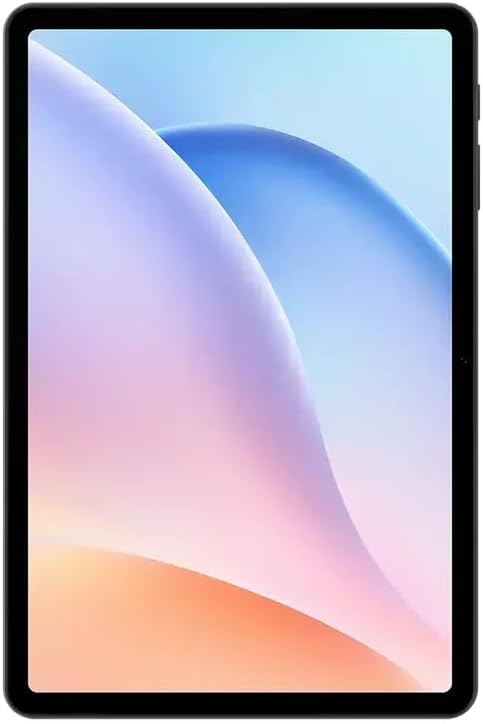
이미지: 앞면 view of the DOOGEE Tab A9 Pro tablet, showcasin10.1인치 IPS HD 디스플레이를 탑재했습니다.
2.2 Wi-Fi 및 블루투스 연결
Wi-Fi 또는 블루투스 장치에 연결하려면:
- 이동하다 설정.
- 선택하다 네트워크 및 인터넷 Wi-Fi 또는 연결된 장치 블루투스용.
- Toggle Wi-Fi or Bluetooth on and select the desired network or device to connect.
The tablet supports Wi-Fi 802.11 a/b/g/n/ac (2.4GHz/5GHz) and Bluetooth 5.0.
2.3 카메라 사용
The tablet features a 5MP front camera and an 8MP rear camera with flash. Open the Camera app to capture photos and videos. Video recording supports FHD 30fps.
2.4 External Storage (TF Card)
The tablet includes a TF card slot, supporting up to 2TB of external storage. Insert a compatible TF card to expand your device's memory for photos, videos, and documents.
2.5 주변기기 연결하기
The VIP Edition includes a Bluetooth keyboard and mouse. Pair these devices via Bluetooth settings for enhanced productivity. The tablet also supports OTG (On-The-Go) functionality via its Type-C USB port for connecting other USB devices, and has a 3.5mm earphone jack.
3. 유지관리
Proper maintenance ensures the longevity and optimal performance of your DOOGEE Tab A9 Pro.
3.1 태블릿 청소
- 부드럽고 보푸라기가 없는 천을 사용하여 화면과 본체를 닦으세요.
- 강한 화학 물질, 연마 세척제 또는 에어로졸 스프레이는 사용하지 마세요.
- 완고한 얼룩의 경우 약간 damp천에 물을 적셔요.
3.2 배터리 관리
이 태블릿에는 6580mAh 배터리가 장착되어 있습니다. 배터리 수명을 최대한 늘리려면 다음과 같이 하세요.
- 극한의 온도를 피하세요.
- 배터리가 자주 완전히 방전되지 않도록 하세요.
- 최적의 충전을 위해 제공된 충전기를 사용하세요.

Image: Visual representation of the DOOGEE Tab A9 Pro's 6580mAh battery, highlighting its capacity and 10W fast charging capability.
3.3 소프트웨어 업데이트
태블릿에 최신 기능, 보안 패치 및 성능 향상이 적용되도록 정기적으로 소프트웨어 업데이트를 확인하고 설치하세요. 자세한 내용은 다음 링크를 참조하세요. 설정 > 시스템 > 시스템 업데이트.
4. 문제 해결
이 섹션에서는 DOOGEE Tab A9 Pro 사용 중 발생할 수 있는 일반적인 문제에 대해 설명합니다.
4.1 태블릿 전원이 켜지지 않음
- 태블릿이 충분히 충전되었는지 확인하세요. 최소 30분 동안 충전기에 연결해 두세요.
- Try a forced restart by holding the power button for 10-15 seconds.
4.2 Wi-Fi 연결 문제
- 설정에서 Wi-Fi가 활성화되어 있는지 확인하세요.
- Wi-Fi 라우터를 다시 시작하세요.
- 태블릿 설정에서 네트워크를 삭제하고 다시 연결하세요.
- Wi-Fi 신호 범위 내에 있는지 확인하세요.
4.3 느린 성능
- 불필요한 백그라운드 애플리케이션을 닫습니다.
- 앱의 캐시 데이터를 지웁니다.
- 충분한 저장 공간을 확보하세요.
- 태블릿을 다시 시작하십시오.
4.4 화면 응답 없음
- Perform a forced restart.
- 문제가 지속되면 공장 초기화를 고려해 보세요.경고: 이렇게 하면 모든 데이터가 지워집니다.)
5. 기술 사양
Detailed specifications for the DOOGEE Tab A9 Pro tablet.

Image: Infographic detailing the 10.1-inch IPS HD display features, including 1280x800 resolution, 80.2% screen-to-body ratio, and 16.7 million screen colors.
| 특징 | 사양 |
|---|---|
| 모델 | 두지 탭 A9 프로 |
| 운영 체제 | 안드로이드 15 |
| 치수 | 242.5 x 160.9 x 9.7mm |
| 무게 | 512g |
| 화면 크기 | 10.1 인치 |
| 디스플레이 유형 | IPS LCD HD Display |
| 해결 | 1280 x 800 픽셀 |
| 피피아이 | 149 |
| 화면 대 본체 비율 | 80.2% |
| 프로세서(CPU) | Unisoc T310 Octa-core (1x Arm Cortex-A75 @2.0GHz, 3x Arm Cortex-A55 @1.8GHz) |
| 그래픽(GPU) | 암 말리-G52 |
| 숫양 | 4GB LPDDR4 (with 16GB virtual RAM expansion, total 20GB) |
| 내부 저장소(ROM) | 128GB 메모리 |
| 확장 가능한 스토리지 | TF Card Slot, up to 2TB |
| 와이파이 | 802.11 a/b/g/n/ac(2.4GHz/5GHz) |
| 블루투스 | 블루투스 5.0 |
| 전면 카메라 | 5MP |
| 후방 카메라 | 플래시 포함 8MP |
| 배터리 용량 | 6580mAh |
| 충전 중 | 10W Max Charging Current, Type-C USB |
| 오디오 잭 | 3.5mm |
| 센서 | G센서 |
| 기타 기능 | OTG support, Bluetooth keyboard connection support |
6. 보증 및 지원
Your DOOGEE Tab A9 Pro comes with a warranty and access to customer support.
6.1 보증 정보
The DOOGEE Tab A9 Pro includes a 12개월 보증 구매일로부터 유효합니다. 본 보증은 정상적인 사용 조건에서 발생하는 제조상의 결함 및 오작동에 적용됩니다. 단, 오용, 사고, 무단 수리 또는 정상적인 마모로 인한 손상은 보증 대상에서 제외됩니다. 보증 청구를 위해 구매 증빙 자료를 보관해 주십시오.
6.2 고객 지원
For technical assistance, warranty claims, or further inquiries, please contact DOOGEE customer support through their official website or the retailer where the product was purchased. Have your product model and purchase details ready when contacting support.


