소개
The OSCAL Marine 2 is a rugged smartphone designed for demanding environments and extended use. Featuring a massive 11000mAh battery, IP68/IP69K and MIL-STD-810H certifications for extreme durability, and powered by Android 15 with Gemini AI 2.0, this device offers robust performance and smart functionality. This manual provides essential information for setting up, operating, maintaining, and troubleshooting your device.
상자 안에 무엇이 들어있나요?
Upon unboxing your OSCAL Marine 2, please ensure all the following items are present:
- 1 x OSCAL Marine 2 Rugged Phone
- 1 x USB C Charger
- 1 x USB C 케이블
- 휴대폰 스트랩 1개
- 1 x 카드 핀
- 1 x 사용자 매뉴얼(이 문서)

Image: All items included in the OSCAL Marine 2 product packaging.
설정
1. SIM/SD 카드 삽입
- Locate the SIM card tray on the side of your OSCAL Marine 2.
- 제공된 카드 핀을 사용하여 트레이를 조심스럽게 꺼내십시오.
- Place your Nano SIM card(s) and/or Micro SD card into the designated slots on the tray. The device supports Dual SIM Nano slots and 1 Micro slot.
- 트레이를 조심스럽게 전화기에 다시 삽입하여 제자리에 고정되도록 합니다.
2. Initial Power On & Basic Setup
- 오른쪽 측면에 있는 전원 버튼을 OSCAL 로고가 나타날 때까지 길게 누르세요.
- 화면의 안내에 따라 언어를 선택하고, Wi-Fi 네트워크에 연결하고, Google 계정으로 로그인하세요.
- Android 15 운영 체제의 안내에 따라 추가 설정 단계를 완료하십시오.
Video: An unboxing video of the 2025 Marine 2 Rugged Phone, demonstrating the initial setup and contents.
장치 작동
Navigation & User Interface
- 홈 화면: Access your main applications and widgets.
- 앱 서랍: 홈 화면에서 위로 스와이프하여 view 설치된 모든 응용 프로그램.
- 알림 및 빠른 설정: 화면 상단에서 아래로 살짝 밀어 알림과 빠른 설정 토글에 접근하세요.
카메라 기능
The OSCAL Marine 2 is equipped with a 16MP AI main camera (ISOCELL JN1 sensor) and an 8MP front camera with AI Beauty 2.0 mode. Utilize AI Smart Google Lens for visual searches, image text translation, and object recognition.

Image: Features of the 16MP AI Rear Camera, including Pro mode, Panorama, and Time Lapse.

Image: Features of the 8MP AI Front Camera, including Beauty Mode and Portrait Mode.

이미지: 전amples of AI-enhanced photography features like Portrait Blur, Portrait Light, Color Focus, and 1080P Video Recording.

Image: Demonstrates the Smart Google Lens feature for scanning, searching, and exploring objects.
Gemini AI 2.0
The Marine 2 integrates Gemini AI 2.0, a useful AI assistant. Interact with Gemini for navigation, content generation, app access, and email management. Simply use voice commands like "Hey Google" to activate.
이미지: 이상view of Gemini AI 2.0 Flash capabilities, including smart control, voice Q&A, voice wake-up, real-time conversation, multi-scenario empowerment, and text-to-image generation.
Video: Demonstrates the OSCAL Marine 2's AI features, including voice interaction and smart global control.
Display & Durability
The 6.56-inch IPS Ultra-HD display with a 90Hz refresh rate and 450 nits brightness provides an immersive visual experience. The Panda screen offers military-grade protection. Activate "Glove Mode" for screen operation while wearing gloves.

Image: The 6.56-inch IPS Ultra-HD Display with 90Hz Refresh Rate, showcasing its visual quality.

Image: Highlights the IP68/IP69K and MIL-STD-810H certifications, showing the phone's suitability for winter commuting, extreme weather, glove mode, and underwater photography.
Video: Demonstrates the rugged features of the phone, including its super-bright torch, water submersion, and drop-proof capabilities.
배터리 및 충전
The 11000mAh battery provides up to 1104 hours of standby time. It supports 18W fast charging and 5W reverse charging to power other devices.

Image: Illustrates the 11000mAh Mega Battery with 18W Fast Charging, detailing usage hours for various activities and standby time.
Video: Highlights the 15000 mAh ultra-long battery life of the Oscal Pilot 1, showcasing는 그것의 내구성을 의미합니다.
Connectivity & Performance
Enjoy fast 4G connectivity (T-Mobile only), Bluetooth 5.2, NFC for payments and data transfer, and quadruple navigation (GPS + GLONASS + Galileo + Beidou). The Unisoc T615 octa-core processor and 24GB RAM (8GB+16GB expansion) ensure smooth multitasking and gaming. Storage is 256GB ROM, expandable up to 2TB via TF card.

Image: Details the Lightning Fast 5G WiFi and Advanced Bluetooth 5.2 for quicker downloads and faster data transfer.

Image: Highlights the Octa-core Unisoc T615 processor and 2TB expandable storage, along with 24GB RAM (8GB+16GB Expansion) for smooth operation.
보안
The Marine 2 supports both facial recognition and fingerprint identification for enhanced privacy and quick access.

Image: Demonstrates the Face Unlock and Fingerprint Unlock security features of the phone.
유지
일반 관리
- 부드럽고 보풀 없는 천으로 화면과 본체를 닦으십시오. 연마성 재질이나 강한 화학 약품은 사용하지 마십시오.
- 방수 및 방진 기능을 유지하려면 모든 포트 덮개가 단단히 닫혀 있는지 확인하십시오.
- Avoid exposing the device to extreme temperatures outside its operational range (-20°C to +60°C) for prolonged periods.
소프트웨어 업데이트
Your OSCAL Marine 2 will receive free software updates. Ensure your device is connected to Wi-Fi and has sufficient battery life before initiating any updates. Navigate to 설정 > 시스템 > 시스템 업데이트 업데이트를 확인하고 설치합니다.
문제 해결
일반적인 문제 및 솔루션
- 장치가 응답하지 않음: 전원 버튼을 약 10~15초간 길게 눌러 강제로 다시 시작하세요.
- 배터리가 빠르게 소모됨: Check for background apps, reduce screen brightness, or enable battery saver mode.
- 네트워크 연결 문제: Toggle airplane mode on/off, restart the device, or check with your service provider.
- 앱 충돌: 앱의 캐시를 지웁니다(설정 > 앱 > [앱 이름] > 저장공간 > 캐시 지우기) 또는 앱을 다시 설치하세요.
지원에 문의하세요
If you encounter issues not resolved by the above steps, please contact OSCAL customer service. Our professional team is available 24/7 to provide personalized support.
명세서
| 특징 | 사양 |
|---|---|
| 모델명 | 오스칼 해병 2 |
| 운영 체제 | 안드로이드 15 (도크OS 4.1) |
| CPU 모델 | MediaTek Helio T615 Octa-core (2.2 GHz) |
| 숫양 | 24GB(8GB + 16GB 확장) |
| 내부 저장소 | 256GB (TF 카드를 통해 최대 2TB까지 확장 가능) |
| 디스플레이 크기 | 6.56 Inches IPS Ultra-HD |
| 해결 | 720 x 1600 |
| 새로 고침 빈도 | 90Hz |
| 후방 카메라 | 16 MP AI (ISOCELL JN1 sensor) |
| 전면 카메라 | 8 MP AI Beauty 2.0 |
| 배터리 용량 | 11000mAh |
| 충전 중 | 18W 고속 충전, 5W 역방향 충전 |
| 내구성 | IP68/IP69K, MIL-STD-810H, Panda Screen |
| 연결성 | 4G (T-Mobile only), Bluetooth 5.2, NFC, Wi-Fi |
| 항해 | GPS + 글로나스 + 갈릴레오 + 베이더우 |
| 치수 | 7.09 x 2.76 x 0.51 인치 |
| 무게 | 13.9온스(395그램) |
보증 및 지원
The OSCAL Marine 2 comes with a 2년 보증 and free software updates. For any issues or inquiries, our professional customer service team is available 24/7 to provide high-quality support. Please refer to the contact information provided in your product packaging or visit the official OSCAL web도움이 필요한 경우 사이트를 방문하세요.
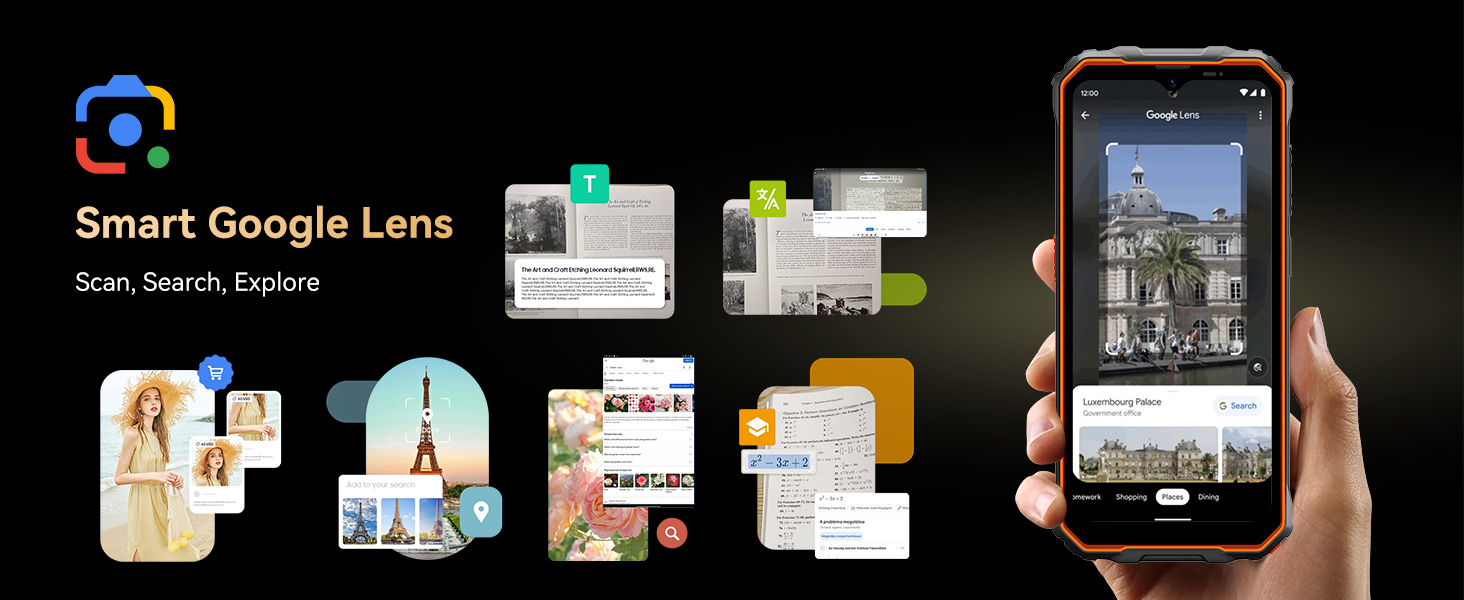
Image: Highlights OSCAL's customer support, including 24/7 online call support and 2-year repair support.


