1. 제품 오버view
The MOUNTUP Ultrawide Monitor Wall Mount (MU-WM49) is designed to securely hold ultrawide and standard monitors ranging from 22 to 49 inches. This heavy-duty mount supports monitors weighing between 4.4 lbs (2 kg) and 44 lbs (20 kg) for flat screens, and 4.4 lbs (2 kg) and 33 lbs (15 kg) for curved screens. It features full motion capabilities, allowing for optimal viewing angle adjustments and space-saving benefits.

Image 1.1: The MOUNTUP Ultrawide Monitor Wall Mount with a curved monitor, showcasin디자인과 기능성이 뛰어납니다.
2. 안전 정보
설치 및 사용 전에 모든 지침을 읽고 이해하십시오. 그렇지 않을 경우 부상이나 재산 피해가 발생할 수 있습니다.
- 중량 용량: Do not exceed the maximum weight capacity of 44 lbs (20 kg) for flat monitors or 33 lbs (15 kg) for curved monitors.
- 벽 유형: This mount is designed for installation on wood studs, brick walls, or concrete walls. 석고보드에만 부착하지 마십시오.
- VESA 호환성: Ensure your monitor has VESA mounting patterns of 75x75mm or 100x100mm. If your monitor does not have VESA holes, a VESA adapter (not included) may be required.
- 집회: 안전한 설치를 위해 2명이 작업하는 것이 좋습니다.
- 도구: 설치에 적합한 도구를 사용하십시오.
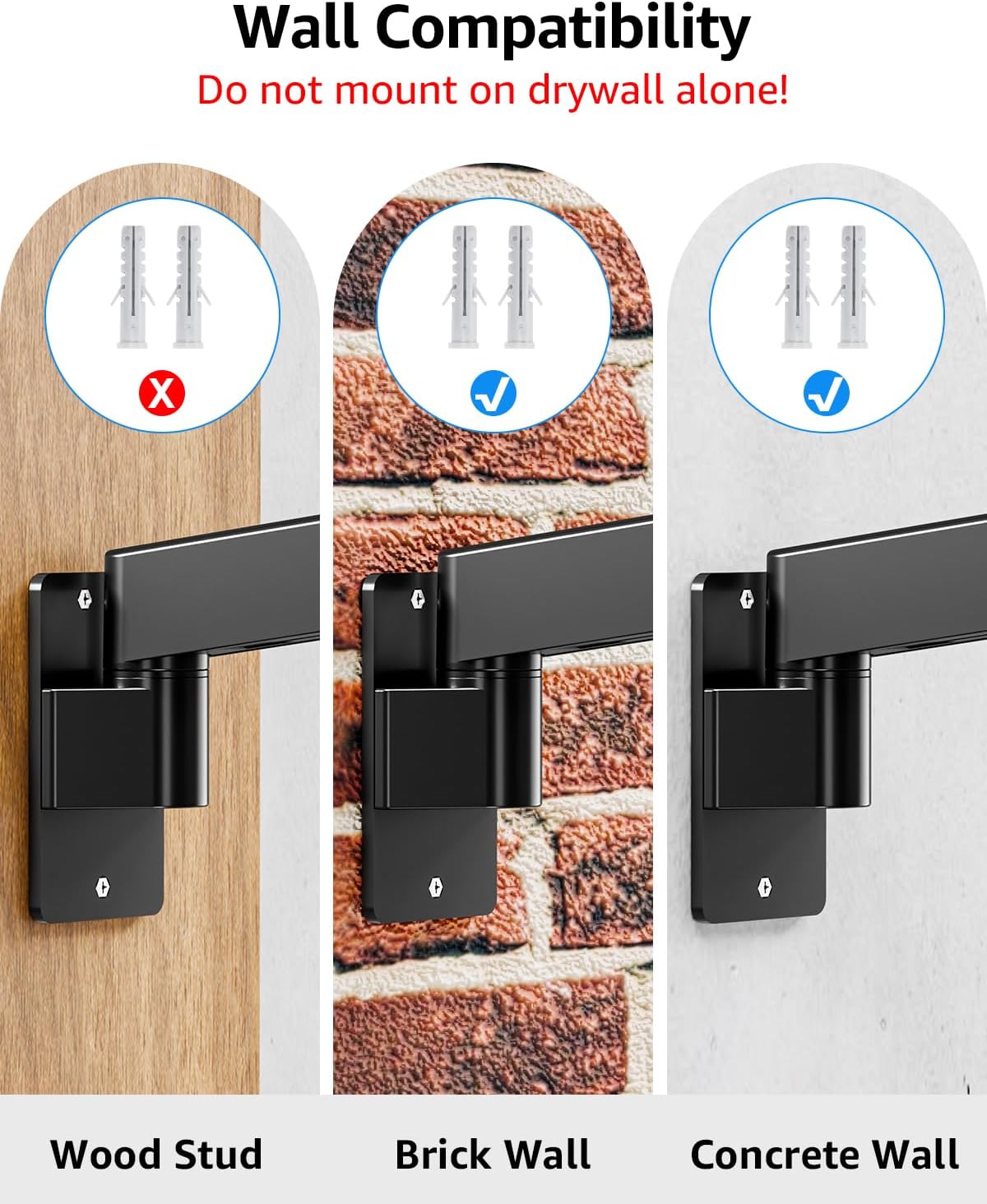
Image 2.1: Diagram illustrating compatible wall types (wood stud, brick, concrete) and explicitly warning against mounting on drywall alone.
3. 사양
| 특징 | 사양 |
|---|---|
| 상표 | 마운트업 |
| 모델 | MU-WM49 |
| 모니터 크기 호환성 | 22~49인치 |
| Weight Capacity (Flat Monitors) | 4.4 - 44파운드(2 - 20kg) |
| Weight Capacity (Curved Monitors) | 4.4 - 33파운드(2 - 15kg) |
| VESA 호환성 | 75x75mm, 100x100mm |
| 장착 유형 | 벽걸이형 |
| 이동 유형 | 기울이기, 회전, 좌우 회전, 높이 조절, 완전 동작 |
| 기울기 각도 | +90° / -45° |
| 회전 각도 | ±90° (at wall plate), ±135° (at arm joint), ±90° (at VESA plate) |
| 회전 | 360° (for monitors under 42"), ±10° (for 42"-49" monitors) |
| 높이 조절 범위 | 13인치 |
| 벽에서 연장된 부분 | 4.2인치(수축 시)에서 23.4인치(확장 시)까지 |
| 재료 | 합금강 |
| 색상 | 검은색 |
| 품목 무게 | 7.94파운드(3.6kg) |

Image 3.1: Visual representation of the mount's compatibility, including screen size range, weight limits for flat and curved monitors, and VESA patterns.
4. 설정 및 설치
Follow these steps carefully to install your MOUNTUP Monitor Wall Mount. All necessary mounting hardware and detailed instructions are included with your product.
4.1. 설치 전 체크리스트
- Verify your monitor's weight and VESA pattern are within the mount's specifications.
- Identify a suitable wall location (wood stud, brick, or concrete).
- Gather necessary tools (e.g., drill, stud finder, level, screwdriver, Allen wrenches).
- 포장 내용물에 명시된 모든 부품이 있는지 확인하십시오.
4.2. 벽면 플레이트 장착
- Locate a wood stud using a stud finder, or identify a solid brick/concrete area.
- Mark the desired height for the wall plate. Use a level to ensure it is straight.
- Drill pilot holes according to the wall plate's screw pattern and your wall type.
- Secure the wall plate to the wall using the provided lag bolts.
4.3. Attaching the VESA Plate to Your Monitor
- 모니터를 부드럽고 깨끗한 표면에 화면이 아래로 향하도록 조심스럽게 놓으십시오.
- Attach the detachable VESA plate to the back of your monitor using the appropriate screws and spacers.
- For monitors between 42" and 49" that will be used in landscape orientation, tighten the rotation screw on the VESA plate to secure the monitor's rotation to ±10° before hanging. For monitors under 42", remove this screw for full 360° rotation.

Image 4.1: Guide on how to adjust the rotation angle for monitors based on their size (under 42" for 360° rotation, 42"-49" for ±10° rotation).
4.4. Hanging the Monitor
- With assistance, carefully lift the monitor and hook the VESA plate onto the arm mechanism.
- Secure the monitor to the arm using the safety screws or clips as indicated in the detailed manual.
5. 사용 설명서
Once installed, your MOUNTUP Monitor Wall Mount offers extensive flexibility for positioning your screen.
5.1. 모니터 위치 조정
- 높이 조정: The gas spring arm allows for smooth vertical movement within a 13-inch range. Gently push or pull the monitor to the desired height.
- 확장 및 수축: Extend the arm up to 23.4 inches from the wall or retract it to a minimum of 4.2 inches.
- 경사: Adjust the monitor's vertical angle from +90° (upward) to -45° (downward) to reduce glare or optimize view주고받음.
- 받침: Pivot the monitor horizontally at various points: ±90° at the wall plate, ±135° at the arm joint, and ±90° at the VESA plate.
- 회전: Rotate the monitor 360° for portrait or landscape viewing (for monitors under 42"). For larger monitors (42"-49"), rotation is limited to ±10°.

Image 5.1: Illustration of the mount's ability to freely position the screen, highlighting the 13-inch height range, 23.4-inch maximum extension, and 4.2-inch retraction from the wall.

Image 5.2: Visual guide to the mount's full motion capabilities, detailing swivel angles at different joints, tilt range, and 360° rotation.
5.2. 장력 조절
The gas spring tension may need adjustment to properly support your monitor's weight. If the monitor rises too easily or drops down, adjust the tension screw located on the arm.
- 모니터가 위로 올라감 (너무 가벼움): Turn clockwise (-) to reduce tension for a lighter monitor.
- 모니터가 너무 무거워서 떨어집니다. Turn counter-clockwise (+) to increase tension for a heavier monitor.
Keep the arm in a horizontal position while adjusting tension. Turn the screw in small increments (e.g., 360° each time) and test the monitor's movement until it holds its position stably.

Image 5.3: Detailed instructions on how to adjust the tension of the monitor arm using an Allen wrench to ensure proper weight support.
5.3. 케이블 관리
The mount features integrated cable management channels to keep your workspace tidy and free of clutter. Route your monitor's power and video cables through these channels along the arm.

Image 5.4: The monitor arm with cables neatly routed through its integrated management system, contributing to a clean desk setup.
6. 유지관리
정기적인 유지 관리는 모니터 벽걸이 거치대의 수명 연장과 안전한 작동을 보장합니다.
- 청소: 부드러운 천으로 마운트를 닦아주세요.amp 천으로 닦으세요. 연마성 세제나 용제는 사용하지 마세요.
- 점검: 정기적으로 모든 나사와 볼트가 단단히 조여져 있는지 확인하십시오. 필요한 경우 다시 조이십시오.
- 매끄럽게 하기: No lubrication is typically required for the moving parts. If movement becomes stiff, contact support.
7. 문제 해결
If you encounter issues with your MOUNTUP Monitor Wall Mount, refer to the following common solutions:
- 모니터가 처지거나 제자리에 고정되지 않음: Adjust the gas spring tension as described in Section 5.2. Ensure the monitor's weight is within the specified range.
- Difficulty Moving the Arm: Check if the tension is too high (if the monitor is too light) or if any bolts are overtightened. Adjust tension or loosen bolts slightly.
- 모니터 수평 불량: Ensure the VESA plate is securely attached to the monitor and the arm. For monitors 42"-49", ensure the rotation screw is tightened to prevent unwanted rotation beyond ±10°.
- 산이 불안정하게 느껴집니다: Re-check all wall mounting screws and bolts for tightness. Confirm the mount is installed on a solid wall structure (wood stud, brick, or concrete) and not drywall alone.
8. 보증 및 지원
MOUNTUP provides reliable support for its products. If you require M6 or M8 screws for TV mounting, or have any questions or concerns regarding installation, operation, or parts, please contact MOUNTUP customer support. Refer to the product packaging or the MOUNTUP official web연락처 정보 사이트.


