소개
Thank you for choosing BESTISAN GM06 Computer Gaming Speakers. These speakers are designed to provide a superior audio experience for various entertainment scenarios, including gaming, movies, and music. Featuring dynamic RGB illumination, multiple sound modes, and broad compatibility, the GM06 speakers are a versatile addition to any desktop setup.
패키지 내용
다음 품목이 패키지에 포함되어 있는지 확인하세요.
- BESTISAN GM06 Computer Speakers (2 units)
- 전원 어댑터
- 3.5mm ~ 3.5mm 오디오 케이블
- 사용자 설명서

Image: BESTISAN GM06 speakers, 3.5mm audio cable, power adapter, and user manual.
주요 특징
- 뛰어난 오디오 성능: Equipped with 2x 2.75-inch mid-bass drivers and 2x 1-inch silk dome tweeters, delivering 50W peak power for a broad and detailed sound stage.
- 광범위한 호환성: Supports 3.5mm AUX, Bluetooth 5.3, and Type-C sound card inputs for connection to PC, Mac, PS4, Xbox, CD players, laptops, TVs, and mobile phones.
- 다중 사운드 모드: Three professional EQ modes (Gaming, Movies, Music) allow seamless switching for an optimized auditory experience in different entertainment scenarios.
- 동적 RGB 조명: Features 8 RGB backlit options to create a unique ambiance and personalize your entertainment experience.
- 섬세한 디자인: Unique diamond-shaped cabinet with a 5-degree elevation, 0.7L isometric cavity, matte panel, metal laser engraving logo, silicone buttons, and anti-slip foot pads.

이미지: 폭발된 view of the speaker showing the 2.75-inch mid-bass driver and 1-inch silk dome tweeter, highlighting the 50W total peak power.
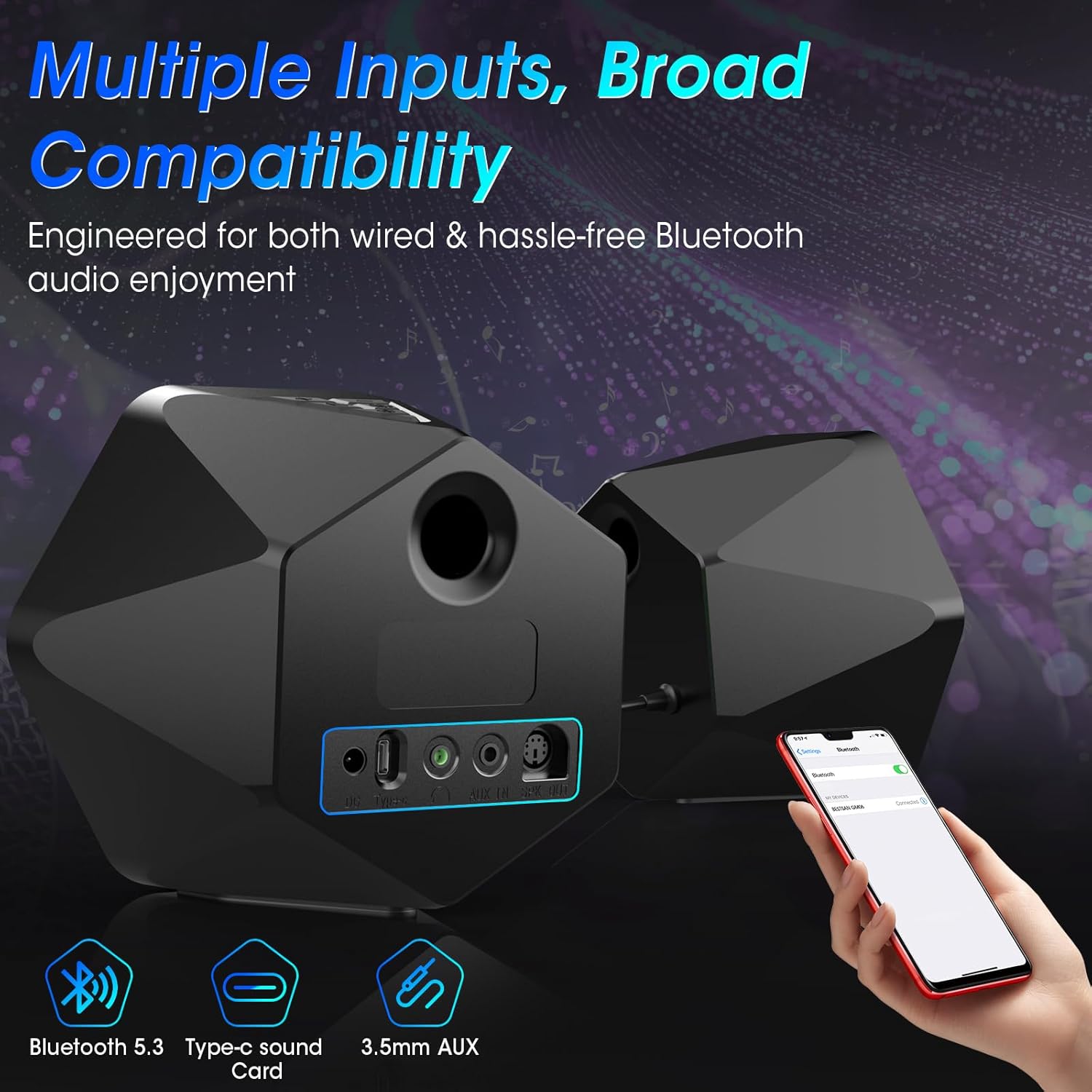
이미지: 후면 view of the speakers illustrating the Bluetooth 5.3, Type-C sound card, and 3.5mm AUX input options, emphasizing broad compatibility.

Image: Visual representation of the three EQ modes (Game, Movie, Music) with corresponding usage scenarios, powered by a Digital Signal Processor (DSP).

Image: Two BESTISAN GM06 speakers flanking a monitor, showcasing the vibrant RGB lighting effects that enhance the desktop aesthetic.

Image: A user wearing headphones connected to one of the BESTISAN GM06 speakers, illustrating the convenient headphone jack for private listening.
설치 지침
- 스피커 연결: Connect the main speaker (with controls) to the secondary speaker using the provided PS2 cable.
- 전원 연결: Connect the power adapter to the main speaker's power port and then to a power outlet.
- 오디오 연결: 원하는 오디오 입력 방식을 선택하세요.
- 3.5mm 보조: Connect the 3.5mm audio cable from your device's audio output to the AUX IN port on the main speaker.
- 블루투스: Power on the speakers. The speakers will automatically enter Bluetooth pairing mode (indicated by a flashing blue light). On your device, search for "BESTISAN GM06" in the Bluetooth settings and pair.
- 타입 C : Connect your device to the Type-C port on the main speaker using a compatible Type-C cable.
- 스피커 위치: Place the speakers on your desktop or desired surface, ensuring optimal sound projection. The 5-degree elevation is designed for improved audio direction.
작동 지침
The main speaker features intuitive controls for easy operation:

이미지: 상단 view of the main speaker showing the silicone buttons for On/Off, RGB lights switch, Volume/Track control, and Sound Source/EQ switch.
- 전원 켜기/끄기: Press and hold the Power/Mode button (labeled with power symbol and 'M') for 3 seconds.
- 입력 모드 전환: Short press the Power/Mode button to cycle through AUX, Bluetooth, and Type-C input modes.
- 볼륨 조절: Use the Volume Lever (labeled with '+' and '-') to increase or decrease the volume.
- 트랙 제어: Long press the '+' button for the next track, and long press the '-' button for the previous track (in Bluetooth mode).
- RGB 조명: Press the RGB lights switch button (labeled with a lightbulb symbol) to cycle through 8 different RGB lighting modes.
- EQ 모드: Press the EQ button (labeled with 'EQ') to switch between Gaming, Movies, and Music sound modes.
- 재생/일시 중지: Press the Play/Pause button (labeled with play/pause symbol) to play or pause audio (in Bluetooth mode).
Video Tutorial: GM06 Gaming Speaker's Button/Backlight/Interface Details
Video: An official BESTISAN US video demonstrating the functionality of the buttons, backlight, and interface details of the GM06 Gaming Speaker.
명세서
| 모델명 | GM06 |
| 스피커 유형 | 책꽂이 |
| 연결 기술 | Auxiliary, Bluetooth 5.3, Type-C |
| 스피커 최대 출력 전력 | 50와트(최대) |
| 주파수 응답 | 20 kHz (XNUMX kHz) |
| 신호 대 잡음 비율 | 80데시벨 |
| 우퍼 직경 | 2.75 인치 |
| 트위터 직경 | 1 인치 |
| 제품 치수 | 6.3인치 깊이 x 4.3인치 너비 x 5.7인치 높이 |
| 품목 무게 | 3.3 파운드 |
| 특징 | LED Light (8 RGB Modes) |
| 제어 방법 | 만지다 |
유지
To ensure the longevity and optimal performance of your BESTISAN GM06 speakers, please follow these maintenance guidelines:
- 청소: 부드럽고 마른 천으로 스피커 표면을 닦으십시오. 연마성 세척제, 왁스 또는 용제는 마감재를 손상시킬 수 있으므로 사용하지 마십시오.
- 놓기: Place speakers on a stable, flat surface to prevent accidental falls. Ensure adequate ventilation around the speakers.
- 습기를 피하세요: Keep the speakers away from water, excessive humidity, and direct exposure to rain or splashes. These speakers are not waterproof.
- 온도: Avoid exposing the speakers to extreme temperatures (hot or cold) or direct sunlight for extended periods.
- 케이블 관리: Handle cables gently. Avoid bending, twisting, or pinching them, which can damage internal wiring.
문제 해결
If you encounter any issues with your BESTISAN GM06 speakers, please refer to the following common solutions:
- 소리 없음:
- 스피커 전원이 켜져 있고 볼륨이 충분히 커져 있는지 확인하십시오.
- Verify that the correct input mode (AUX, Bluetooth, Type-C) is selected.
- 모든 케이블 연결(전원, 스피커 연결, 오디오 입력)이 제대로 되어 있는지 확인하십시오.
- Confirm your device's volume is not muted or too low.
- 왜곡된 소리:
- Lower the volume on both the speakers and your connected device.
- Check for interference if using Bluetooth. Try moving the speakers closer to the device or away from other electronic devices.
- Ensure audio cables are fully inserted and not damaged.
- 블루투스 페어링 문제:
- Ensure the speakers are in Bluetooth pairing mode (flashing blue light).
- 기기의 Bluetooth를 껐다가 다시 켠 후, 다시 페어링을 시도해 보세요.
- Forget/remove "BESTISAN GM06" from your device's Bluetooth list and re-pair.
- RGB 조명이 작동하지 않음:
- 스피커의 전원이 켜져 있는지 확인하세요.
- Press the RGB lights switch button to cycle through modes or turn them on.
보증 및 지원
The BESTISAN GM06 Computer Gaming Speakers come with a Limited Warranty. For specific details regarding warranty coverage, duration, and terms, please refer to the warranty card included in your package or contact BESTISAN customer support.
For technical support, troubleshooting assistance, or any inquiries regarding your product, please visit the official BESTISAN website or contact their customer service team through the contact information provided in your user manual.


