1. 서론
This manual provides detailed instructions for the setup, operation, and maintenance of your POLONO PM220S Label Maker Machine. Please read this manual thoroughly before using the device to ensure proper function and longevity.
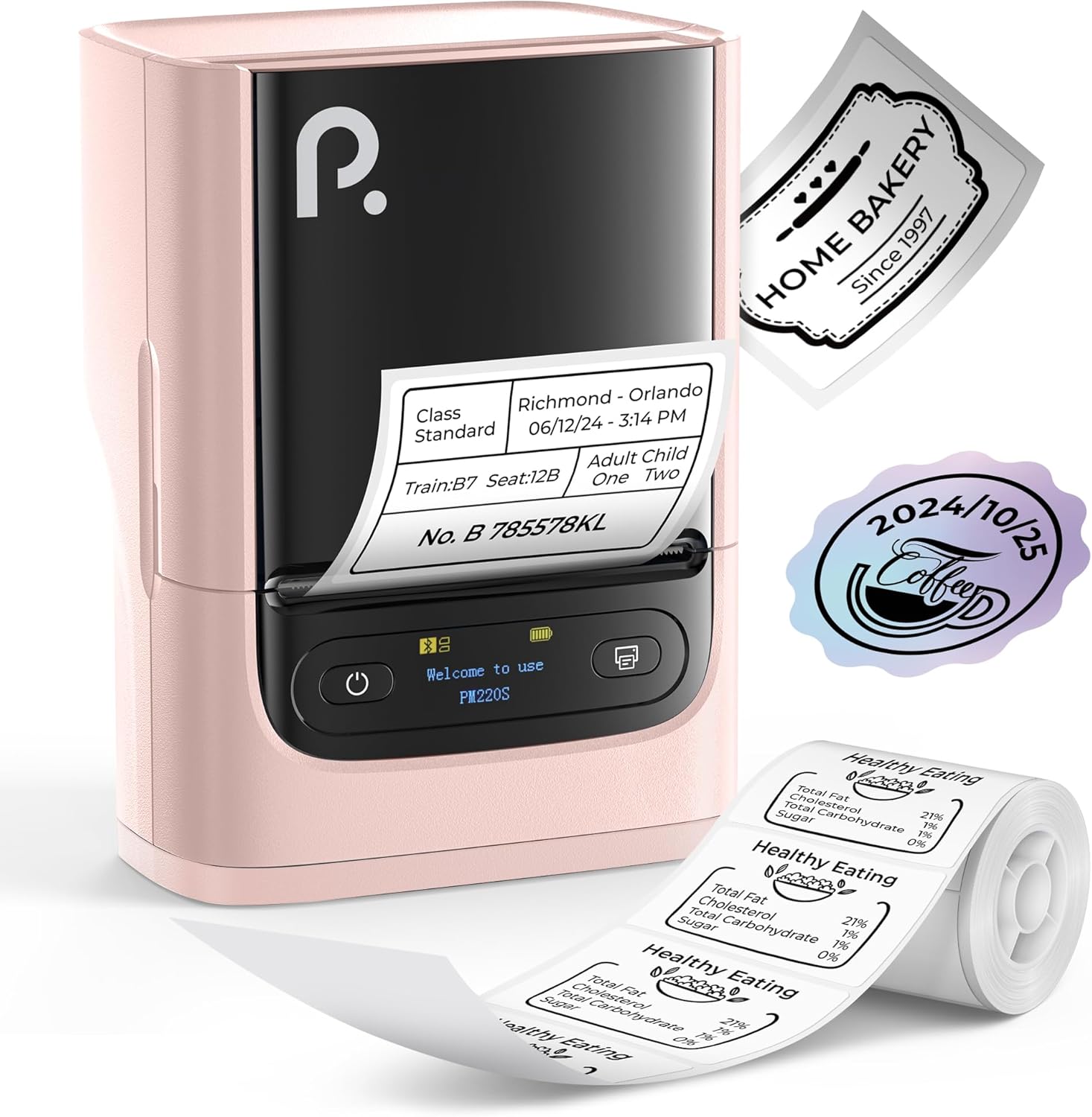
Figure 1: POLONO PM220S Label Maker Machine with samp라벨.
2. 제품 오버view
2.1 포함된 구성 요소
- POLONO PM220S Label Maker Machine
- Label Tape (50x30mm, pre-installed or included)
- USB 충전 케이블
- 사용 설명서 (본 문서)
2.2 주요 특징
- 블루투스 연결: Seamless connection with iOS, Android, and PC devices.
- Intuitive LED Screen: Displays battery level, Bluetooth connection status, and alerts for paper shortages or timed shutdowns.
- Feature-Rich "Labelnize" App: Offers label templates, supports QR codes, barcodes, tables, text, icons, 90+ fonts, 14+ languages, and 450+ material presets.
- Premium Thermal Printing: BPA-Free Direct Thermal Technology with 203 DPI for high-definition, inkless printing.
- 광범위한 라벨 호환성: Supports label widths from 23-54mm (0.91"-2.12").
- 휴대성 있는 디자인: Compact and lightweight for easy transport and use in various environments.
3. 설정 지침
3.1 장치 충전
Before first use, fully charge the label maker using the provided USB cable. The LED screen will indicate charging status.
3.2 App Installation and Driver Download
For mobile devices (iOS/Android), download the "Labelnize" app from your respective app store. For PC users, visit 폴로노닷컴 필요한 드라이버와 애플리케이션을 다운로드하세요.

Figure 2: Universal compatibility with smartphones and laptops for app and driver installation.
3.3 블루투스를 통한 연결
- Ensure the PM220S is powered on.
- On your mobile device, open the "Labelnize" app.
- Within the app, search for and connect to the PM220S via Bluetooth. Do not connect directly via your device's Bluetooth settings for mobile devices.
- For PC, ensure the driver is installed, then connect through the downloaded application.
3.4 라벨 테이프 적재
- 라벨 칸 덮개를 여세요.
- 라벨 롤을 인쇄면이 위를 향하도록 삽입하십시오.
- Adjust the paper slot guides to secure the tape according to its width (23-54mm) for precise alignment.
- 덮개를 닫으세요.

Figure 3: Proper loading of label tape into the PM220S.
4. 사용 설명서
4.1 Using the "Labelnize" App
- Open the "Labelnize" app on your connected device.
- Select from various pre-designed templates or create your own custom labels.
- The app allows you to add text, barcodes, QR codes, tables, icons, and more.
- Customize labels using a selection of over 90 fonts and 14 languages.
- Utilize the 450+ material presets for different label applications.
- 중요한: For optimal results, use specialized POLONO labels. Avoid tearing the green back sticker to prevent printing issues.
4.2 Understanding the LED Screen Display
The integrated LED screen provides real-time feedback on the printer's status:
- 배터리 수준: Indicates the current charge of the device.
- 블루투스 연결 : Shows if the device is successfully connected via Bluetooth.
- 종이 쇼어tag전자 경고: Notifies when the label roll is low or empty.
- 시간 종료: Displays countdown for automatic power-off to conserve battery.

Figure 4: LED screen display functions for real-time status monitoring.
4.3 라벨 인쇄
- Design your label within the "Labelnize" app.
- Review 라벨 프리view 정확성을 보장하기 위해.
- 앱에서 "인쇄" 버튼을 누르세요.
- The label maker will print the label using thermal technology.
- 인쇄된 라벨을 조심스럽게 떼어내세요.
5. 유지관리
5.1 일반 관리
- 장치를 깨끗하고 먼지나 이물질이 없는 상태로 유지하십시오.
- 장치를 극한의 온도나 직사광선에 노출시키지 마십시오.
- 사용하지 않을 때는 기기를 건조한 곳에 보관하세요.
5.2 프린트 헤드 청소
If print quality degrades, the thermal print head may need cleaning:
- Turn off the label maker and disconnect it from any power source.
- 라벨함을 엽니다.
- 면봉으로 열전사 프린트 헤드를 부드럽게 닦아주세요.amp이소프로필 알코올로 소독함.
- 프린트 헤드가 완전히 마를 때까지 기다린 후 덮개를 닫고 다시 사용하십시오.
6. 문제 해결
| 문제 | 가능한 원인 | 해결책 |
|---|---|---|
| 장치 전원이 켜지지 않음 | 배터리가 부족하거나 전원 문제가 있습니다. | 기기를 완전히 충전하세요. 전원 버튼이 제대로 눌렸는지 확인하세요. |
| 블루투스로 연결할 수 없습니다 | Incorrect connection method or app issue. | Ensure you are connecting through the "Labelnize" app, not directly via phone settings. Restart both the device and the app. For PC, verify driver installation. |
| Poor print quality / Faint printing | Dirty print head, incorrect label type, or low battery. | Clean the print head (see Section 5.2). Ensure you are using thermal labels. Charge the device. |
| 라벨이 제대로 정렬되지 않았거나 걸렸습니다. | Improper label loading or paper slot adjustment. | Open the cover, remove any jammed labels, and reload the tape ensuring the paper slot guides are adjusted correctly for the label width. Avoid tearing the green back sticker. |
| "Paper Shortage" alert | Label roll is empty or incorrectly loaded. | Replace the label roll or re-seat it correctly. |
7. 사양
| 상표 | 폴로노 |
| 모델명 | PM220S |
| 연결 기술 | 블루투스 |
| 인쇄 기술 | 열의 |
| 최대 인쇄 해상도 | 203DPI |
| 최대 인쇄 속도(흑백) | 45.0mm/초 |
| 지원되는 미디어 크기 | 23-54mm (0.91"-2.12") width, 50x30mm included |
| 제품 치수 | 3.3인치 깊이 x 4.4인치 너비 x 2.5인치 높이(8.4 x 11.2 x 6.4cm) |
| 품목 무게 | 13.4 온스(380g) |
| 특징 | Portable, Inkless Printing, LED Display |
8. 보증 및 지원
For warranty information, technical support, or to purchase accessories and replacement labels, please visit the official POLONO web사이트에서 폴로노닷컴 or contact POLONO customer service directly.
보증 청구를 위해 구매 증명서를 보관하십시오.


