1. 서론
This manual provides comprehensive instructions for the safe and effective use of your Cangaroo Babypone Callisto Baby Monitor. This modern baby monitor offers clear image and sound transmission, convenient two-way communication, soothing lullabies, night vision capabilities, and a room temperature sensor. The camera can be remotely controlled from the parent unit, allowing for upward, downward, left, and right adjustments. The system provides reliable monitoring, flexible camera control, and clear picture and sound quality, day and night.
2. 패키지 내용
포장 내용물을 꼼꼼히 확인해 주세요. 누락되었거나 손상된 품목이 있는 경우 판매점에 문의하세요.
- Parent Unit with 2.8-inch LCD display
- 베이비 유닛(카메라)
- 부모 장치용 전원 어댑터
- 베이비 유닛용 전원 어댑터
- USB Power Cables (2x)
- 벽걸이 키트(나사 및 앵커 포함)
- 사용 설명서 (본 문서)

이미지 2.1: Included accessories: two USB power cables, two power adapters, and a wall mounting kit.
3. 제품 오버view
Familiarize yourself with the components and controls of your Cangaroo Babypone Callisto Baby Monitor.
3.1 상위 단위

이미지 3.1: 클로즈업 view of the Parent Unit's 2.8-inch LCD screen and control buttons.
- 2.8인치 LCD 디스플레이: Shows live video feed from the baby unit.
- 전원 버튼: Turns the parent unit on/off.
- 확인 버튼: 선택 사항을 확인합니다.
- 탐색 버튼(위, 아래, 왼쪽, 오른쪽): Navigate menus, control camera pan/tilt.
- 메뉴 버튼: 설정 및 기능에 접근할 수 있습니다.
- 자장가 버튼: Activates/deactivates lullabies.
- 마이크로폰: 양방향 오디오 통신을 위해.
- 스피커: For audio output from the baby unit and lullabies.
- 충전 포트: 전원 어댑터를 연결합니다.
3.2 베이비유닛(카메라)

이미지 3.2: 앞쪽 view of the Baby Unit (camera) with its lens and sensors.
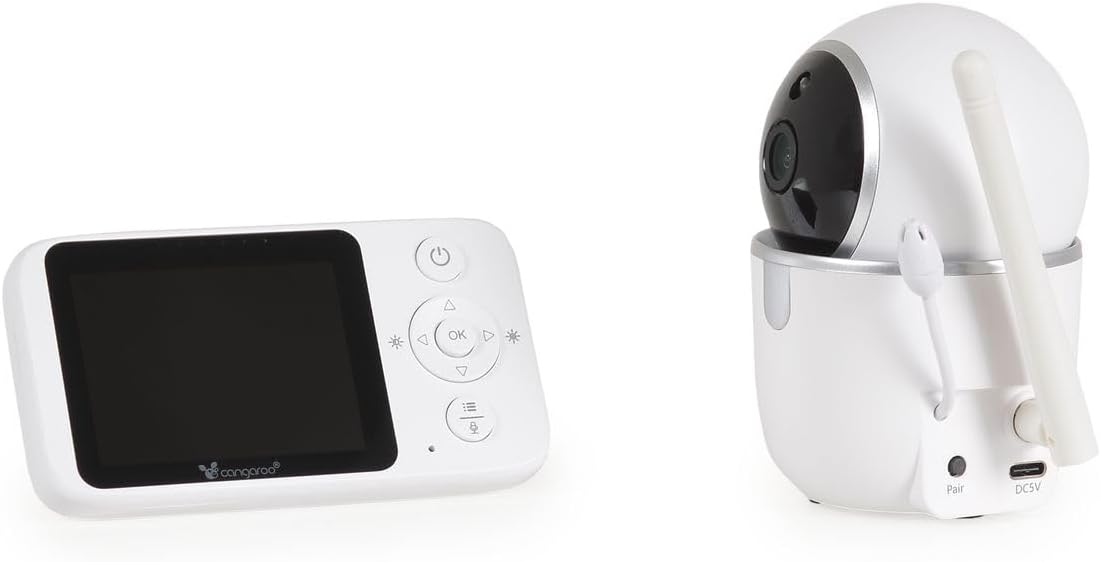
이미지 3.3: 뒤쪽 view of the Baby Unit, showing the 'Pair' button and DC5V power input.
- 카메라 렌즈: 영상 피드를 캡처합니다.
- 적외선 LED: 야간 투시 기능을 위해서입니다.
- 마이크로폰: 아기 방의 소리를 수집합니다.
- 스피커: 양방향 오디오 및 자장가 재생 기능.
- 온도 센서: 실내 온도를 모니터링합니다.
- 페어링 버튼: Used to pair the baby unit with the parent unit.
- DC5V 전원 입력: 전원 어댑터를 연결합니다.
- 안테나: 무선 신호 전송용.
4. 설정
4.1 장치 전원 켜기
- Connect the power adapter to the Baby Unit's DC5V input and plug it into a power outlet. The baby unit will power on automatically.
- Connect the power adapter to the Parent Unit's charging port and plug it into a power outlet. Press and hold the Power Button on the Parent Unit to turn it on.
- Allow both units a few moments to establish a connection. The parent unit display will show the live video feed once connected.
4.2 베이비 유닛(카메라) 위치 지정
아기용 유닛을 깨끗한 곳에 놓으세요. view of your baby's crib or sleeping area. Ensure it is at least 1 meter (3 feet) away from the baby to prevent any potential cord hazards. The camera can be placed on a flat surface or mounted to a wall using the included wall mounting kit.
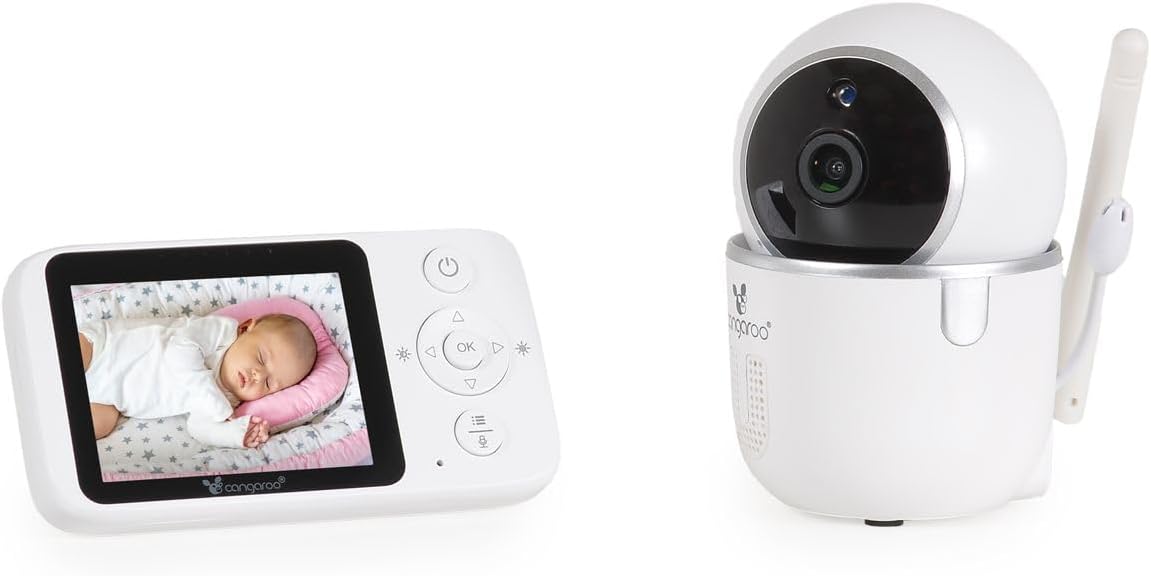
이미지 4.1: The Parent Unit displaying a baby, alongside the Baby Unit (camera).
- 최적의 배치: Position the camera to capture the entire crib area.
- 코드 안전: Keep all cords out of reach of children.
- 신호 범위: The monitor has a radio range of up to 250m outdoors and up to 50m indoors. Obstacles like walls and furniture can reduce this range.
4.3 Pairing (If Necessary)
The units are typically pre-paired. If they do not connect automatically, follow these steps:
- Ensure both the Parent Unit and Baby Unit are powered on.
- On the Parent Unit, press the Menu button to access the menu.
- Navigate to the "Pairing" option using the navigation buttons and press OK.
- Within 10 seconds, press the "Pair" button located on the back of the Baby Unit.
- The Parent Unit will display a confirmation message once pairing is successful.
5. 사용 설명서
5.1 기본 모니터링
- Once powered on and paired, the Parent Unit will automatically display the live video feed and audio from the Baby Unit.
- The screen will show the current room temperature detected by the Baby Unit's sensor.
- 야간 투시경: The Baby Unit automatically activates infrared night vision in low-light conditions, providing clear images up to 5 meters.
5.2 양방향 오디오 통신
To speak to your baby through the Baby Unit's speaker:
- Press and hold the Talk button (often represented by a microphone icon) on the Parent Unit.
- 학부모 상담실의 마이크에 대고 또박또박 말하세요.
- Release the Talk button to hear your baby again.
5.3 Remote Camera Control (Pan/Tilt)
You can remotely adjust the camera's viewing angle from the Parent Unit:
- Use the Up/Down/Left/Right navigation buttons on the Parent Unit to pan (left/right) and tilt (up/down) the Baby Unit's camera. The camera supports 360° rotation.
5.4 자장가
아기에게 자장가를 들려주려면:
- Press the Lullaby button on the Parent Unit.
- Use the navigation buttons to select one of the 5 built-in lullabies.
- Press OK to start playback. Press the Lullaby button again to stop.
5.5 Alarm Function and Settings
The monitor includes an alarm function and adjustable settings:
- 볼륨 조절: Use the Parent Unit's menu to adjust the alarm volume.
- 밝기 조정: Adjust the display brightness via the Parent Unit's menu.
- 에너지 절약 모드 : Activate this mode in the menu to conserve battery life. The screen may turn off after a period of inactivity, but audio monitoring continues. The screen will reactivate upon detecting sound or pressing a button.
6. 유지관리
- 청소: Wipe the units with a dry, soft cloth. Do not use abrasive cleaners or solvents.
- 배터리 관리(부모 장치): The Parent Unit has a built-in rechargeable ion battery. For optimal battery life, avoid fully discharging the battery frequently. Recharge when the low battery indicator appears.
- 저장: If storing the unit for an extended period, ensure the battery is partially charged and store in a cool, dry place.
- 환경 조건: Avoid exposing the units to extreme temperatures, direct sunlight, dust, or moisture.
7. 문제 해결
| 문제 | 가능한 원인 | 해결책 |
|---|---|---|
| 부모 유닛에서 영상/소리가 나오지 않습니다. | Units are not powered on or not paired. Out of range. | Ensure both units are plugged in and powered on. Re-pair the units if necessary (see Section 4.3). Move Parent Unit closer to Baby Unit. |
| 화질/음질이 좋지 않습니다. | Interference from other devices. Units are too far apart or obstacles are blocking the signal. | Move the units away from other electronic devices (e.g., Wi-Fi routers, microwaves). Reduce the distance between units. |
| 부모 유닛 배터리가 빨리 소모됩니다. | Energy Saving Mode is off. Frequent use of features. | Activate Energy Saving Mode in the menu. Reduce screen brightness. Ensure the battery is fully charged before use. |
| Camera not responding to remote control. | Units are out of range or connection issue. | Move Parent Unit closer to Baby Unit. Check connection status. |
| 온도 측정값이 정확하지 않은 것 같습니다. | 아기 침대를 열원이나 통풍이 잘 되는 곳에 두지 마십시오. | Relocate the Baby Unit to a more central location in the room, away from windows, vents, or direct sunlight. |
8. 사양
- 모델: Cangaroo Babypone Callisto (Model Number: 112301)
- 부모 장치 표시: 2.8인치 LCD
- 무선 기술: 디지털 2.4GHz FHSS
- 실내 범위: 최대 50미터(약 164피트)
- 야외 범위: 최대 250미터(약 820피트)
- 야간 투시경: Infrared, up to 5 meters
- 카메라 기능: Pan/Tilt (360° rotation), Two-Way Audio, Temperature Sensor, Lullabies (5 built-in)
- 전원 공급 장치: DC 5V (via included adapters)
- 부모 유닛 배터리: 충전식 리튬이온 배터리 내장
- 재료: 플라스틱
- 부모 유닛 크기: 길이 11 x 너비 3 x 높이 6 cm
- 아기용 유닛 치수: 길이 6 x 너비 8 x 높이 10.5 cm
- 품목 무게: 400 g (total product)
9. 보증 및 지원
보증 정보 및 고객 지원은 구매 시 제공된 설명서를 참조하거나 판매점에 문의하십시오. 보증 청구를 위해서는 구매 증빙 자료를 보관하십시오.


