1. 서론
This manual provides essential information for setting up, operating, and maintaining your NIMO 17.3" IPS FHD Gaming Laptop. Designed for both productivity and entertainment, this laptop features an AMD Ryzen 7 8745HS processor, 64GB DDR5 RAM, and a 2TB PCIe 4.0 SSD, ensuring a responsive and powerful user experience.
Image 1.1: NIMO 17.3" FHD Gaming Laptop overview주요 기능을 강조합니다.
2. 상자 안에 무엇이 들어있나요?
상자를 풀 때 모든 품목이 들어 있는지 확인하세요.
- NIMO N177 노트북 1대
- Type-C 100W PD 고속 충전기 1개
- 1 x 사용자 설명서
- 윈도우 11 홈 (사전 설치됨)
3. 초기 설정
3.1 전원 켜기 및 충전
- Connect the provided 100W Type-C PD Fast Charger to the laptop's USB-C port and a power outlet.
- 노트북 덮개를 여세요. 노트북이 자동으로 켜질 수도 있고, 전원 버튼을 눌러야 할 수도 있습니다.
- Allow the battery to charge fully before initial use. A 15-minute charge can provide approximately 2 hours of use.

Image 3.1: Illustration of the laptop charging process and battery life.
3.2 Windows 11 Configuration
Follow the on-screen prompts to complete the Windows 11 setup process. This includes selecting your region, connecting to a Wi-Fi network, and creating a user account.
3.3 지문 판독기 설정
보안 강화 및 빠른 로그인을 위해 내장 지문 인식기를 설정하세요.
- Windows 설정 > 계정 > 로그인 옵션으로 이동하세요.
- Select 'Fingerprint recognition (Windows Hello)' and follow the instructions to register your fingerprint.

Image 3.2: The backlit keyboard and fingerprint sensor for secure login.
4. 노트북 작동
4.1 성능 및 멀티태스킹
Your NIMO laptop is equipped with an AMD Ryzen 7 8745HS processor (8-core/16-thread, up to 4.9GHz) and 64GB DDR5 RAM, providing robust performance for demanding applications, gaming, and seamless multitasking. The 2TB PCIe 4.0 SSD ensures fast boot times and rapid data access.

Image 4.1: Details of the AMD Ryzen 7 8745HS processor.

Image 4.2: Laptop demonstrating seamless multitasking with ample storage and RAM.
4.2 디스플레이
The 17.3" FHD (1920x1080) IPS anti-glare display offers immersive visuals with vibrant colors and wide viewing angles. The ultra-thin bezel design provides an 85% screen-to-body ratio for an expansive view경험.

Image 4.3: The 17.3" FHD IPS display for visual clarity.
4.3 키보드 및 터치패드
The full-size keyboard includes a numeric keypad and features backlighting for comfortable typing in various lighting conditions. The precision gesture touchpad allows for intuitive navigation and supports multi-touch gestures.
4.4 Web캠
내장형 2MP webcam is suitable for video calls and online meetings. For privacy, the laptop includes a physical privacy switch to disable the web캠을 사용하지 않을 때.

Image 4.4: Privacy-focused camera convenience with a built-in switch.
5. 연결성
5.1 포트 및 인터페이스
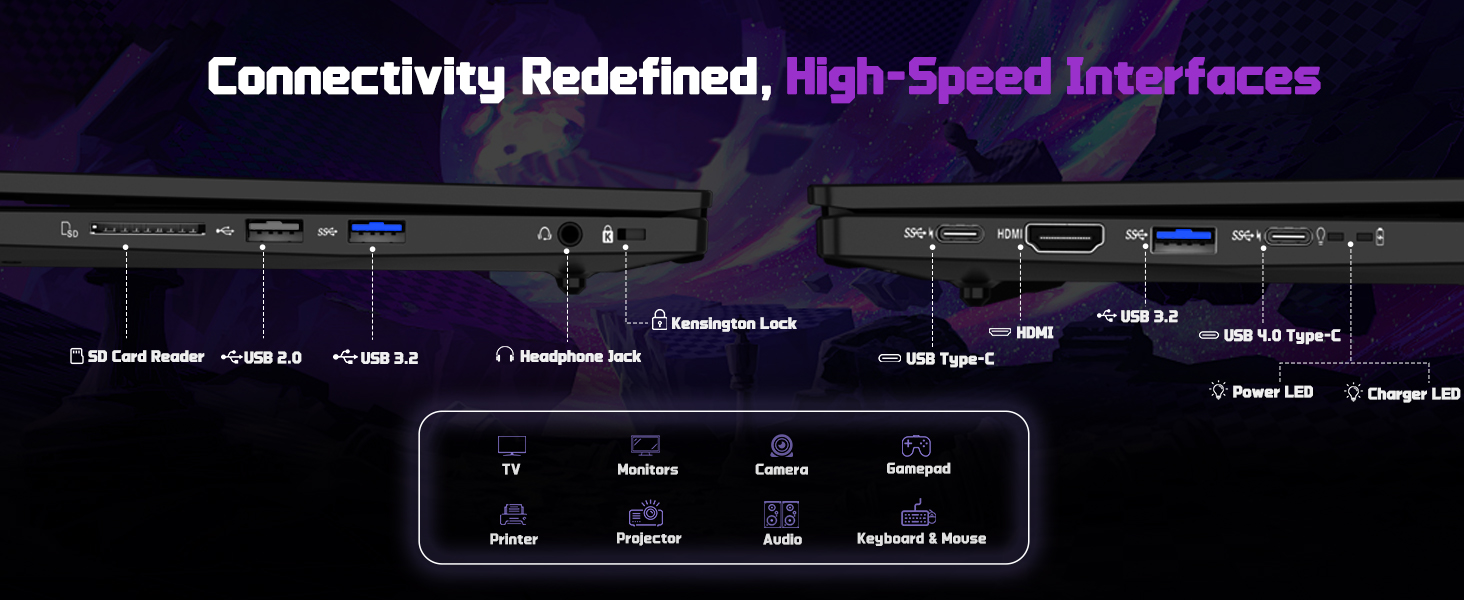
The NIMO N177 laptop offers a variety of ports for connecting peripherals and external displays:
- 1 x USB 2.0 포트
- 3개의 USB 3.0 포트
- 1 x USB 4.0 Type-C Port (supports 100W PD charging, data transfer, and display output)
- 1 x HDMI 포트
- 1 x 헤드폰 잭
- 1 x SD 카드 리더
- 1 x 켄싱턴 잠금 슬롯

Image 5.1: Detailed diagram of the laptop's high-speed interfaces.
5.2 무선 연결
The laptop supports 802.11a/b/g/n/ac Wi-Fi for reliable wireless internet access and Bluetooth for connecting wireless accessories.
6. 유지관리
6.1 청소
- 부드럽고 보푸라기가 없는 천을 사용하여 화면과 외부 표면을 청소하세요.
- 가혹한 화학물질이나 연마재의 사용은 피하세요.
- For the screen, use a specialized screen cleaner and a microfiber cloth.
6.2 소프트웨어 업데이트
Regularly check for and install Windows updates and driver updates to ensure optimal performance and security. You can find driver updates on the NIMO official web대지.
6.3 보관 및 취급
Store the laptop in a cool, dry place. Avoid exposing it to extreme temperatures, direct sunlight, or excessive moisture. Handle the laptop with care to prevent physical damage.
7. 문제 해결
If you encounter issues with your NIMO laptop, try the following common troubleshooting steps:
- 전원 없음: Ensure the charger is securely connected to both the laptop and a working power outlet. Check if the power adapter's LED indicator is on.
- 디스플레이 문제: 화면이 검게 나오면 외부 모니터를 연결하여 노트북이 제대로 작동하는지 확인해 보세요. Windows에서 디스플레이 설정을 조정해 볼 수도 있습니다.
- 느린 성능: 불필요한 애플리케이션을 닫고, 백그라운드 프로세스를 확인하고, 충분한 저장 공간을 확보하세요.
- 연결 문제: For Wi-Fi issues, restart your router and the laptop. For peripheral issues, ensure drivers are updated and connections are secure.
- 시스템 응답 없음: 전원 버튼을 10~15초 동안 길게 눌러 강제로 종료한 다음 노트북을 다시 시작하십시오.
For persistent issues, refer to the support section or contact NIMO customer service.
8. 사양
| 특징 | 사양 |
|---|---|
| 상표 | 니모 |
| 모델명 | NIMO N177L |
| 화면 크기 | 17.3 인치 |
| 화면 해상도 | 1920 x 1080 픽셀 (FHD IPS) |
| 프로세서 | AMD Ryzen 7 8745HS (8 Cores, up to 4.9 GHz) |
| 숫양 | 64GB DDR5(4800MHz) |
| 하드 드라이브 | 2TB SSD (PCIe 4.0) |
| 그래픽 코프로세서 | AMD 라데온 780M (내장형) |
| 운영 체제 | 윈도우 11 홈 |
| 무선형 | 802.11a/b/g/n/ac |
| USB 포트 | USB 2.0 1개, USB 3.0 3개, USB 4.0 Type-C 1개 |
| 특별 기능 | 백라이트 키보드, 지문 인식기, HD 오디오, 숫자 키패드 |
| 평균 배터리 수명 | 15.5시간 (75Wh) |
| 품목 무게 | 3.84파운드 |
| 제품 치수 | 15.66 x 9.99 x 0.74 인치 |
| 색상 | 검은색 |
9. 보증 및 지원
9.1 보증 정보
NIMO 노트북은 다음 기술로 지원됩니다. 2년 보증. This warranty covers manufacturing defects and ensures your satisfaction. The product also includes partial U.S. assembly.
9.2 반품 정책
NIMO offers hassle-free 90일 반품 from the date of purchase. Please refer to your purchase documentation for detailed return instructions.
9.3 고객 지원
Our dedicated support team is available to assist you with any questions or issues. You can contact us via:
- 이메일: service@nimopc.com
- 우리 공식 website or product page (for contact details).
We aim to provide quick solutions and a worry-free experience.
이미지 9.1: 이상view of NIMO's customer commitment and support.


