1. 서론
This manual provides detailed instructions for the Bikevee Wireless Cycling GPS Computer, a device designed to track and display various cycling data. It features a 2.4-inch LCD display with auto backlight, IPX7 waterproofing, and multi-satellite GPS tracking for accurate data collection.
1.1 주요 특징
- 배터리 수명 연장: Equipped with a 650mAh rechargeable battery, providing up to 28 hours of continuous use.
- Precision GPS Tracking: Utilizes 5-satellite systems (GPS, BDS, GLONASS, Galileo, QZSS) for stable and accurate signal reception.
- 내구성과 방수성: IPX7 waterproof rating ensures resistance to rain and splashes.
- 명확한 전시: 2.4-inch LCD screen with automatic backlight for visibility in various lighting conditions.
- 포괄적인 데이터: Tracks speed (MPH/KM/H), distance, time, temperature, altitude, gradient, and more.
1.2 상자 내용물
패키지에 모든 구성 요소가 들어 있는지 확인하세요.
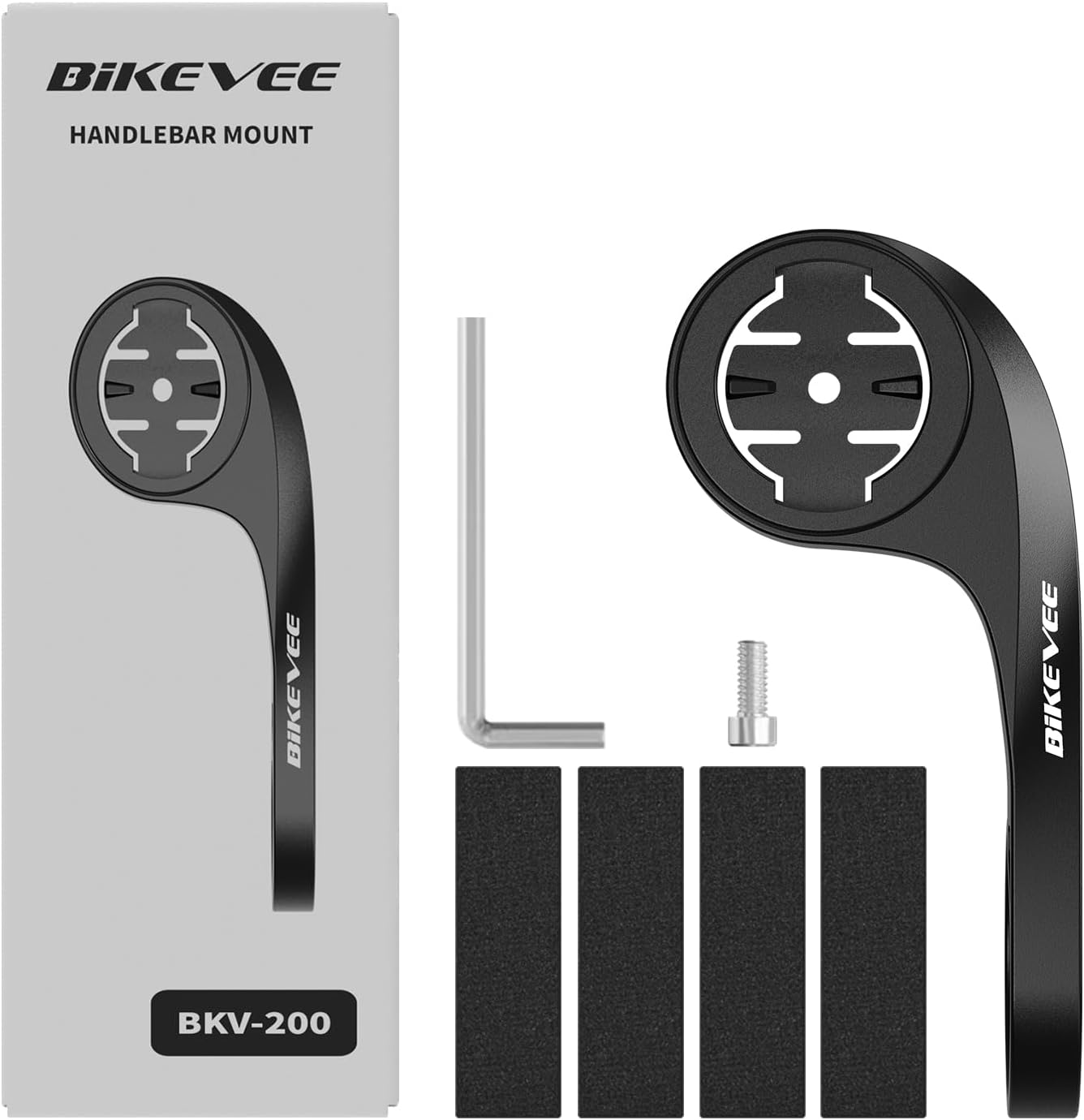
Figure 1.1: Package Contents. Includes Bike Computer, Charging Cable, Rubber Rings, Mount, Rubber Pad, and User Manual.
- Bikevee GPS Cycling Computer
- 표준 자전거 마운트
- Out Front Mount
- 고무 패드
- 충전 케이블(C형)
- 마운트 설치용 고무 링
- 사용자 설명서
2. 설정 및 설치
2.1 장치 충전
Before first use, fully charge the Bikevee GPS Computer. Connect the provided Type-C charging cable to the device's charging port and a USB power source. The battery indicator on the screen will show charging status.
2.2 장치 장착
The Bikevee GPS Computer comes with both a standard bike mount and an out front mount. Choose the mount that best suits your preference and bicycle setup.
2.2.1 Standard Bike Mount Installation
- Place the rubber pad on your bicycle's handlebar or stem.
- 표준 자전거 거치대를 고무 패드 위에 놓으십시오.
- Secure the mount using the provided rubber rings, wrapping them around the handlebar/stem and hooking them onto the mount.
- Align the Bikevee GPS Computer with the mount's grooves and twist clockwise until it locks into place.
2.2.2 Out Front Mount Installation

Figure 2.1: Bikevee Out Front Mount.
- Place the rubber pad around your bicycle's handlebar where you intend to install the mount.
- Position the out front mount over the rubber pad.
- Use the provided Allen key to tighten the screw on the mount's clamp around the handlebar until it is secure.
- Align the Bikevee GPS Computer with the mount's grooves and twist clockwise until it locks into place.
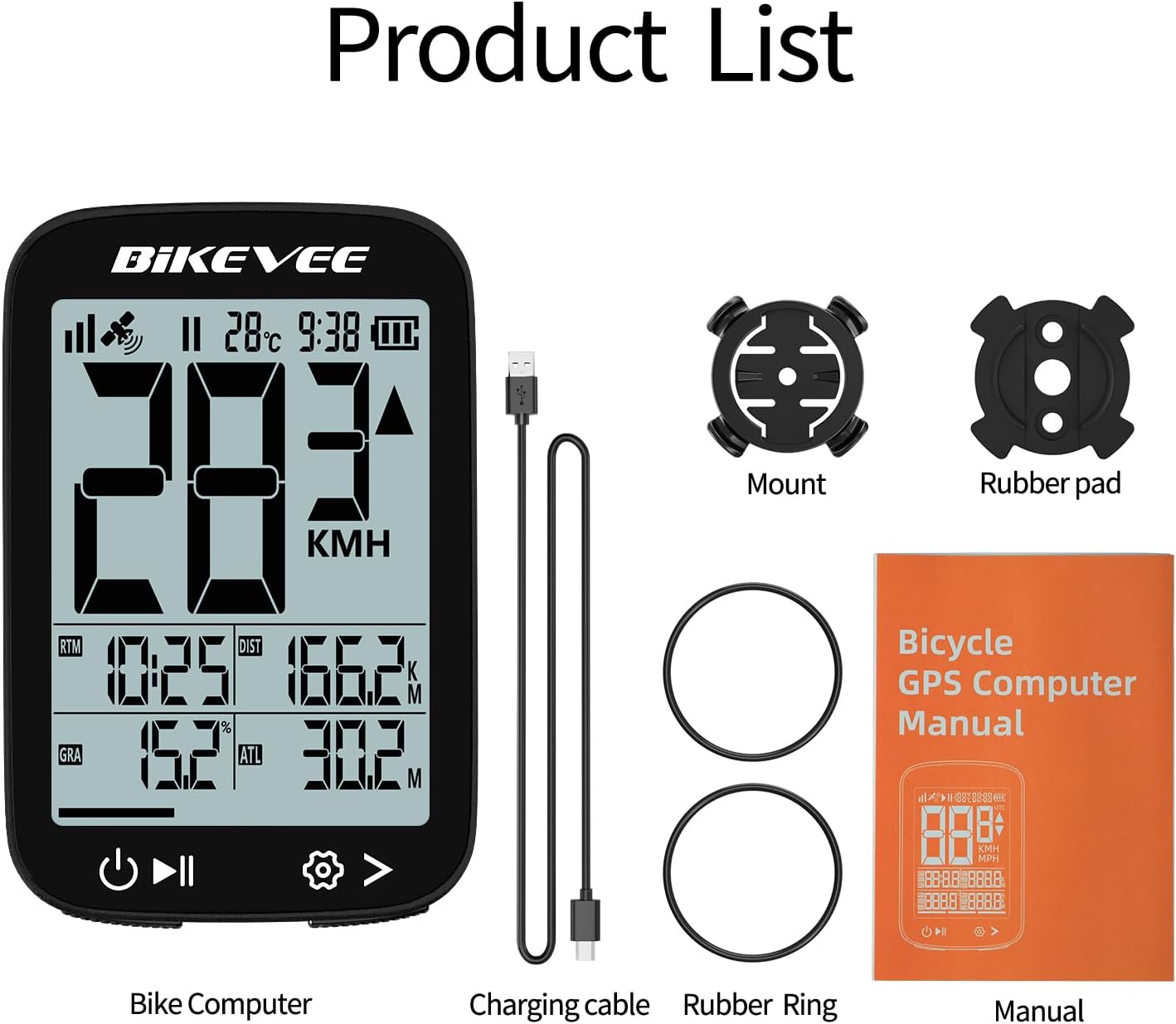
Figure 2.2: Handlebar Mount Components.
2.3 초기 전원 켜기 및 설정
- 전원 켜기: Press and hold the power button (usually located at the bottom left) until the screen illuminates.
- 단위 선택: Upon first power-on or after a reset, you may be prompted to select your preferred unit of measurement (MPH or KM/H). Use the navigation buttons to select and confirm.
- GPS 수집: Take the device outdoors to an open area to allow it to acquire GPS satellite signals. This may take a few moments. A stable GPS signal icon will appear once connected.
3. 사용 설명서
3.1 기본 작업
- 전원 켜기/끄기: 왼쪽 버튼을 길게 눌러 전원을 켜거나 끌 수 있습니다.
- 주행 시작/일시 정지/정지: Press the middle button to start recording a ride. Press again to pause. Press and hold to stop and save the ride data.
- 페이지 전환: Use the right button to cycle through different data display pages.
- 백라이트: The device features an automatic backlight that adjusts based on ambient light conditions.
3.2 Data Display and Interpretation
The Bikevee GPS Computer displays up to 14 types of cycling data, providing comprehensive insights into your ride.
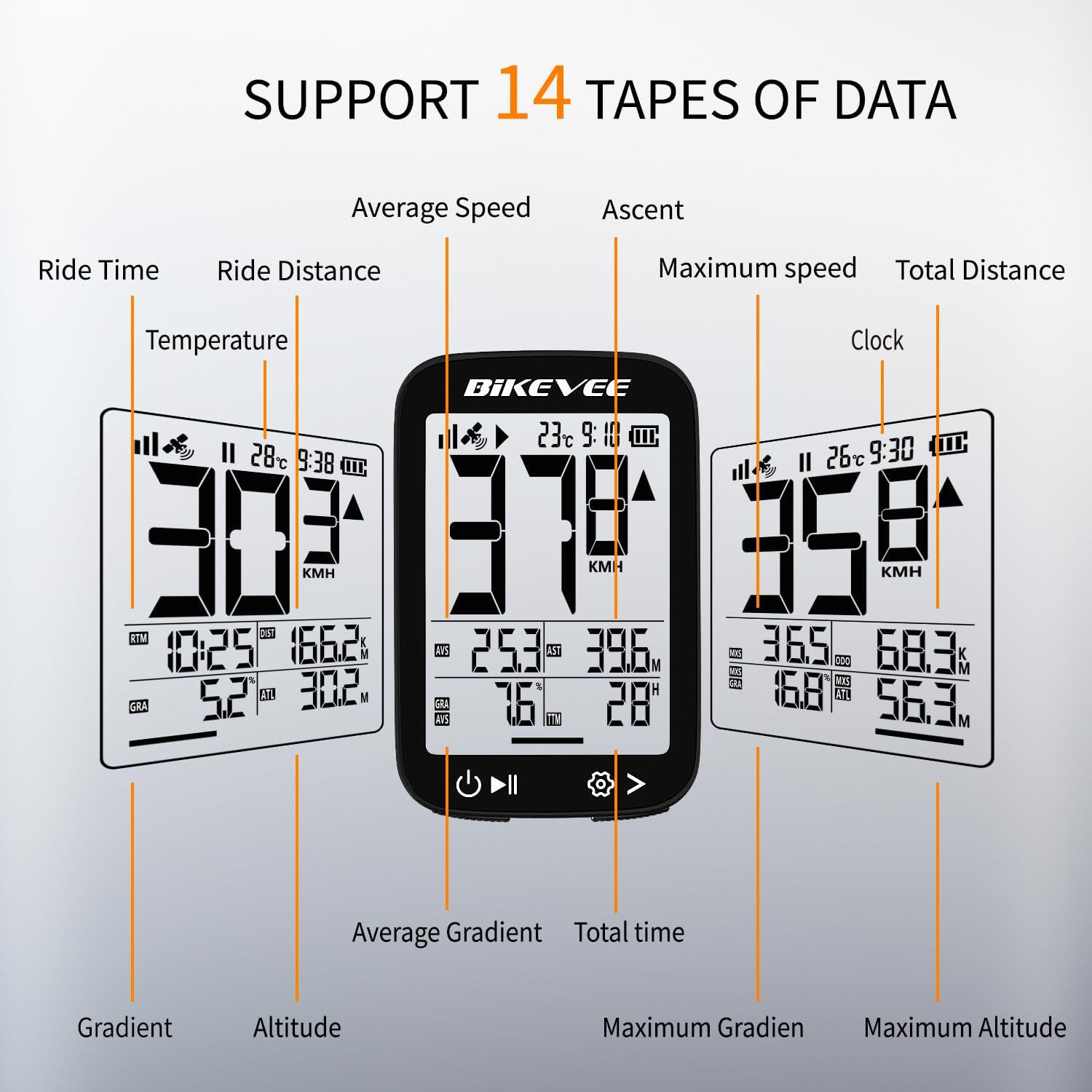
Figure 3.1: Supported Data Types Display.
- 현재 속도: Displays your real-time speed (MPH or KM/H).
- 평균 속도: The average speed for the current ride.
- 최대 속도: The highest speed recorded during the current ride.
- 주행 시간: Duration of the current active ride.
- Ride Distance: 이번 라이딩 중 이동 거리.
- 총 주행 거리(주행 거리계 기준): 기기가 기록한 누적 거리.
- 온도: 주변 온도.
- 시계: 현재 시간.
- 오르막: 라이딩 중 상승한 총 고도.
- 구배: 현재 상승 또는 하락률(%)tage.
- 고도: 현재 해발 고도.

Figure 3.2: Display Icons and Their Meanings.
- Satellite Signal: GPS 신호 강도를 나타냅니다.
- IPX7: Confirms waterproof rating.
- 배터리 수준: 배터리 잔량을 표시합니다.
- 자동 백라이트: Indicates auto backlight feature is active.
- 타입 C : Denotes the charging port type.
- 속도 비교: Arrow indicates if current speed is higher or lower than average speed.
4. 유지관리 및 관리
4.1 장치 청소
최적의 성능과 외관을 유지하려면 기기를 정기적으로 청소하십시오.
- 화면과 본체는 부드러운 천으로 닦아주세요.amp 옷감.
- Avoid using abrasive cleaners, solvents, or chemical sprays, as these can damage the device's surface or internal components.
- 먼지와 물이 들어가지 않도록 충전 포트 덮개가 단단히 닫혀 있는지 확인하십시오.
4.2 방수 등급(IPX7)

그림 4.1: IPX7 방수 기능.
The Bikevee GPS Computer has an IPX7 waterproof rating, meaning it is protected against temporary immersion in water (up to 1 meter for 30 minutes). However, it is important to note:
- 장치를 오랫동안 물에 담그지 마십시오.
- 고압 물 분사를 피하세요.
- Ensure the charging port cover is sealed before exposure to water.
4.3 배터리 관리 및 보관
- 사용하지 않을 때는 장치를 서늘하고 건조한 곳에 보관하십시오.
- 장시간 기기를 극한의 온도(뜨겁거나 차가움)에 노출시키지 마세요.
- 장기간 보관할 경우 배터리 수명 유지를 위해 약 50%까지 충전하십시오.
5. 문제 해결
If you encounter issues with your Bikevee GPS Computer, refer to the following common problems and solutions:
| 문제 | 가능한 원인 | 해결책 |
|---|---|---|
| 장치의 전원이 켜지지 않습니다. | 배터리가 부족합니다. | 제공된 Type-C 케이블을 사용하여 기기를 완전히 충전하세요. |
| No GPS signal or inaccurate readings. | 방해됨 view of sky; initial signal acquisition. | Move to an open outdoor area. Wait a few minutes for signal acquisition. Avoid dense forests or tunnels. |
| 디스플레이가 어둡거나 읽을 수 없습니다. | Auto backlight setting; low battery. | Ensure sufficient battery charge. The backlight adjusts automatically; try moving to a different lighting condition. |
| 장치가 정지되거나 응답하지 않습니다. | 소프트웨어 오류. | 기기가 다시 시작될 때까지 전원 버튼을 10~15초 동안 길게 눌러 소프트 리셋을 수행하십시오. |
6. 사양
Detailed technical specifications for the Bikevee Wireless Cycling GPS Computer:

Figure 6.1: Device Dimensions and Weight.
- 모델: Bikevee Cycling GPS Computer
- 표시하다: 2.4-inch LCD, Automatic Backlight
- 배터리: 650mAh 충전식 리튬이온
- 배터리 수명: 최대 28시간(연속 사용)
- GPS 시스템: GPS, BDS, GLONASS, Galileo, QZSS (5-satellite tracking)
- 방수 등급: IPX7
- 치수: Approximately 70mm (Height) x 45mm (Width) / 2.76in x 1.77in
- 무게: Approximately 50g / 0.11lb
- 충전 포트: Type-C USB
- Data Types Supported: 14 types (e.g., Speed, Distance, Time, Temperature, Altitude, Gradient)
7. 보증 정보
The Bikevee Wireless Cycling GPS Computer is covered by a limited manufacturer's warranty. This warranty typically covers defects in materials and workmanship under normal use. Please retain your proof of purchase for warranty claims.
For specific warranty terms and conditions, including duration and coverage details, please refer to the warranty card included with your product or contact Bikevee customer support directly.
8. 고객 지원
If you have any questions, require technical assistance, or need to report an issue with your Bikevee Wireless Cycling GPS Computer, please contact our customer support team.
- 온라인 지원: Visit the official Bikevee webFAQ, 문제 해결 가이드, 문의 양식을 제공하는 사이트입니다.
- 이메일 지원: 제품 포장이나 공식 문서를 참조하세요. web고객 지원 이메일 주소 사이트.
When contacting support, please be prepared to provide your product model number (Bikevee Cycling GPS Computer) and a detailed description of the issue.


