1. 서론
This manual provides essential information for the safe and effective operation of your Andeman Ep155 or Ep177 Car Jump Starter with Air Compressor. Please read this manual thoroughly before using the device and retain it for future reference. This device is designed to jump start 12V vehicles and, for the Ep177 model, also functions as a portable tire inflator and power bank.
2. 안전 정보
WARNING: Improper use can result in injury or damage to the device and vehicle. Always follow these safety guidelines.
- 어린이의 손이 닿지 않는 곳에 보관하세요.
- 장치를 물에 담그지 마십시오.
- 가연성 액체, 가스, 먼지 등이 있는 곳 등 폭발 위험이 있는 환경에서는 작동하지 마세요.
- 사용 중 적절한 환기를 하십시오.
- Do not disassemble the device. Contact qualified service personnel for repairs.
- 직사광선이나 고온에 노출시키지 마십시오.
- 제공된 스마트 클립만 사용하십시오.amps 및 액세서리.
- 최적의 성능을 위해 사용 전에 기기가 완전히 충전되었는지 확인하십시오.
- The device features 10 advanced safety protections, including Overload Protection, Sparks Protection, Reverse Charges Protection, Reverse Polarities Protection, Over Currents Protection, Low Temperature Protection, Over Charges Protection, and Short Circuits Protection.

3. 제품 오버view 및 구성 요소
Your Andeman Car Jump Starter is a multi-functional device designed for emergency vehicle starting, and for the Ep177 model, also includes a portable air compressor and power bank capabilities.
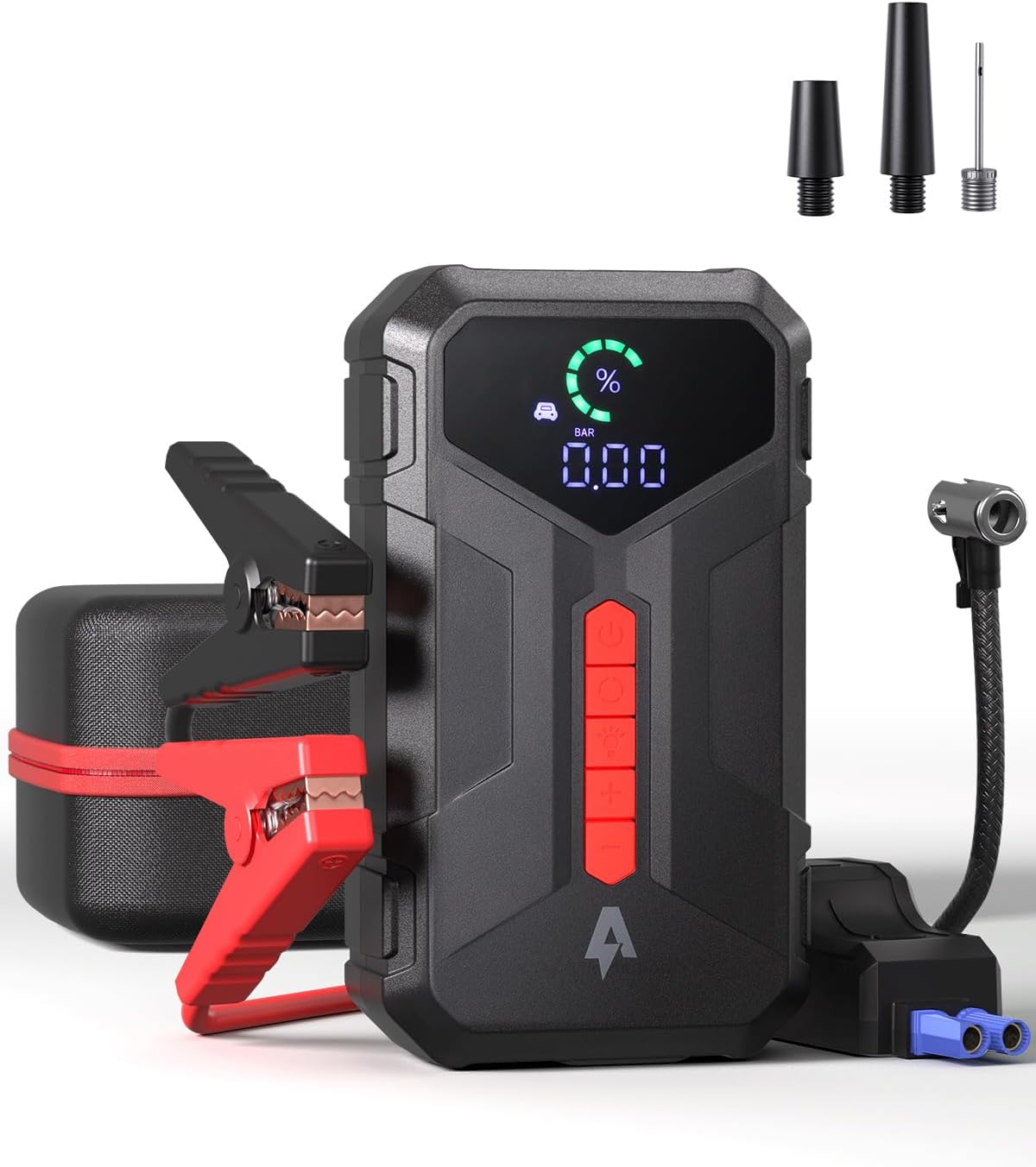

패키지 내용:
- Andeman Car Jump Starter (Ep155 or Ep177)
- 스마트 배터리 Clamps
- USB-C 충전 케이블
- Inflation Nozzles (for Ep177 model)
- 사용자 설명서
4. 사양
| 특징 | Ep155 Model | Ep177 Model |
|---|---|---|
| 피크 전류 | 3000A | 4000A |
| 배터리 용량 | 20000mAh | 24000mAh |
| 엔진 호환성(가솔린) | 최대 9.0L | 최대 8.5L |
| 엔진 호환성(디젤) | 최대 7.0L | 최대 7.0L |
| Starts per Charge | 최대 80회까지 | 최대 70회까지 |
| 대기 시간 | 24개월 | 48개월 |
| Air Compressor (PSI) | 없음 | 최대 150PSI |
| 충전 입력(C 타입) | 5V/3A, 9V/2A, 12V/1.5A | |
| USB-A 출력 | QC3.0 | |
| USB-B 출력 | 5V/3A | |
| DC 출력 | 15V | |
| 완전 충전 시간 | 약 1.8시간 | |
| LED 손전등 | 240 Lumens, 36 hours battery life | |

5. 설정 및 충전
5.1 초기 충전
Before first use, fully charge the jump starter. Connect the provided USB-C charging cable to the device's Type-C input port and a suitable USB power adapter (not included). The device supports bi-directional fast charging, achieving a full charge from 0% to 100% in approximately 1.8 hours.

5.2 배터리 잔량 확인
The device features a digital display or indicator lights to show the current battery level. Ensure the device has sufficient charge before attempting to jump start a vehicle or inflate tires.
6. 사용 설명서
6.1 차량 점프 스타트
- 점프 스타터가 최소 50% 이상 충전되어 있는지 확인하십시오.
- 차량의 점화 장치와 모든 부속품을 끄세요.
- 연결하다 빨간색 (+) 클amp 차량의 양극(+) 배터리 단자에 연결하십시오.
- 연결하다 검은색 (-) 클amp to the vehicle's negative (-) battery terminal or a solid, unpainted metal part of the engine block.
- 스마트 CL 플러그amp connector into the jump starter's port. The indicator light on the smart clamp should turn green, indicating a correct connection. If it's red or flashing, check connections and battery voltage.
- Start the vehicle. If it doesn't start immediately, wait 30 seconds before trying again. Do not crank for more than 3 seconds per attempt.
- Once the vehicle starts, immediately disconnect the smart clamp 점프 스타터의 커넥터.
- Remove the black (-) clamp 먼저, 그 다음 빨간색 (+) clamp 차량 배터리에서.
6.2 Using the Air Compressor (Ep177 Model Only)
The Ep177 model features a built-in air compressor capable of delivering up to 150PSI.
- 공기 호스를 타이어 밸브 스템에 연결하십시오. 공기 누출을 방지하기 위해 단단히 연결되었는지 확인하십시오.
- Power on the jump starter. The current tire pressure will be displayed.
- Use the '+' and '-' buttons to set the desired pressure.
- Press the inflation button to start the compressor. The compressor will automatically stop once the preset pressure is reached.
- 타이어 밸브에서 공기 호스를 분리하십시오.
Note: For continuous use, it is recommended to rest the compressor for 10 minutes after every 10 minutes of operation to prevent overheating. A full charge can inflate 195/60 R15 tires from 0 to full approximately 4-5 times.

6.3 파워뱅크로 사용하기
The jump starter can also function as a portable power bank to charge electronic devices.
- Connect your device's charging cable to the appropriate output port on the jump starter (USB-A QC3.0, USB-B 5V/3A, or Type-C 5V/3A, 9V/2A, 12V/1.5A).
- 기기가 자동으로 충전을 시작합니다.
- The DC15V output port can power compatible devices like tire inflators (if not using the built-in one) or car refrigerators.

6.4 LED 손전등 사용법
The built-in 240 lumens LED flashlight offers multiple modes for various situations.
- 손전등 버튼을 한 번 누르면 지속광이 켜집니다.
- Press again for SOS mode (flashing slowly).
- Press a third time for Strobe mode (flashing rapidly).
- 네 번째로 누르면 손전등이 꺼집니다.
The flashlight provides up to 36 hours of battery life.

7. 유지관리
7.1 충전 중
To maintain optimal battery health, recharge the jump starter every 3-6 months, even if not in use. This prevents deep discharge and extends battery life.
7.2 보관
- 기기를 서늘하고 건조한 곳에 보관하고, 직사광선과 극한의 온도를 피하세요.
- Keep the device and accessories in the provided carrying case to protect them from damage.
7.3 청소
부드럽고 마른 천으로 기기를 닦으세요. 강한 화학 물질이나 연마성 세제는 사용하지 마세요.
8. 문제 해결
8.1 Vehicle Does Not Start
- 배터리 잔량 확인 : 점프 스타터에 충분한 전력이 충전되어 있는지 확인하십시오.
- 연결 확인: Verify that the smart clamp배터리 단자(빨간색은 양극, 검은색은 음극)에 단단히 연결되어 있습니다.
- 스마트 CLamp 지시자: If the indicator is red or flashing, refer to the smart clamp's instructions for error codes.
- Vehicle battery condition: If the vehicle battery is severely damaged or completely dead, the jump starter may not be able to start it.
8.2 Air Compressor Not Working (Ep177 Only)
- 배터리 잔량 확인 : 점프 스타터에 충분한 전력이 충전되어 있는지 확인하십시오.
- 호스 연결: Verify the air hose is securely connected to both the device and the tire valve.
- 과열: If the compressor has been running for an extended period, it may have overheated. Allow it to cool down for 10-15 minutes before attempting to use it again.
8.3 기기가 충전되지 않음
- 케이블: USB-C 충전 케이블이 손상되지 않았는지, 제대로 연결되어 있는지 확인하십시오.
- 전원 어댑터: Verify the USB power adapter is functional and provides adequate power output.
9. 보증 및 지원
Your Andeman jump starter is UL Certified, ensuring it meets stringent safety standards. For warranty information, technical support, or service inquiries, please refer to the contact information provided with your purchase or visit the official Andeman web대지.
For further assistance, please contact Andeman customer support.