소개
This manual provides comprehensive instructions for the KERUI 3K/5MP Lite 8-Channel 6-in-1 Digital Video Recorder (DVR). This DVR is designed for security camera systems, offering compatibility with various camera types including Analog, XVI, AHD, TVI, CVBS, CVI, and IP cameras. Please read this manual carefully before installation and operation to ensure proper use and optimal performance of your surveillance system.
상자 안에 무엇이 들어있나요?
패키지에 모든 구성 요소가 들어 있는지 확인하세요.
- 8채널 DVR 본체 1개
- 1 x 2TB Surveillance Hard Drive (Pre-installed)
- 1 x DVR 전원 공급 장치
- 1 x USB 마우스
- 경고 스티커 1개
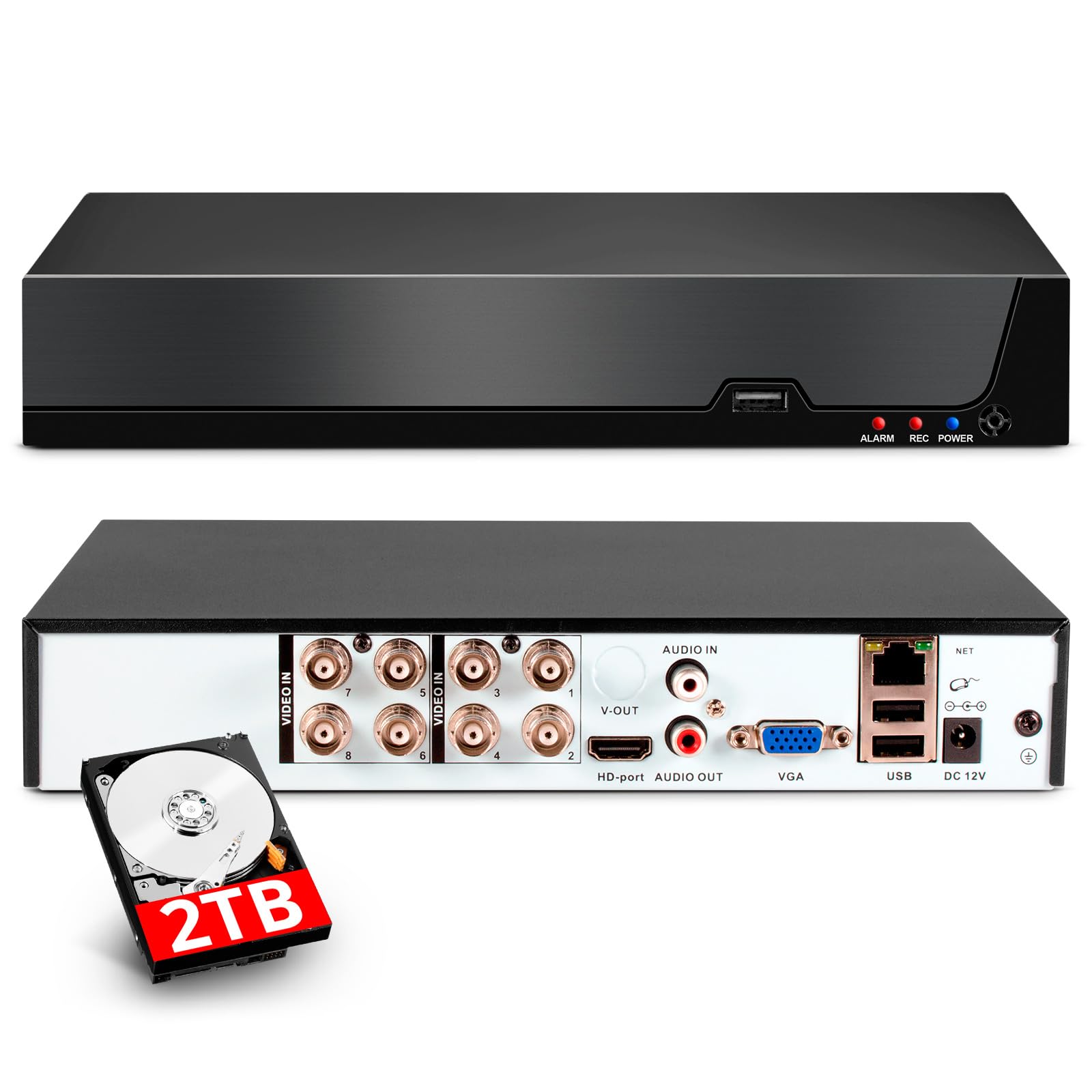
Image: Contents of the KERUI 8-Channel DVR box, showing the DVR unit with dimensions, a 1TB surveillance HDD, DVR power supply, USB mouse, and warning stickers.
설정
1. 초기 연결
Before powering on the DVR, ensure all necessary connections are made.
- 카메라 연결: Connect your security cameras to the appropriate video input ports (BNC connectors for Analog/AHD/TVI/CVI/XVI cameras, Ethernet for IP cameras). The DVR supports up to 8 channels for local cameras and additional IP channels depending on the configuration.
- 모니터 연결: Use an HDMI or VGA cable to connect a monitor to the DVR's corresponding output port.
- 마우스 연결: 동봉된 USB 마우스를 DVR의 USB 포트 중 하나에 연결하세요.
- 네트워크 연결(선택 사항): For remote access and network features, connect an Ethernet cable from the DVR's LAN port to your router or network switch.
- 전원 연결: Connect the DVR power supply to the DC 12V input port on the DVR, then plug the power supply into an electrical outlet.

Image: Rear panel connections of the DVR, illustrating video inputs (AHD, CVI, XVI, CVBS, TVI, IP camera compatibility), HDMI output, audio input/output, VGA input, USB input, network input, and power input.
2. 초기 전원 켜기 및 구성
Once all connections are secure, power on the DVR. The system will boot up and display the live view on the connected monitor. Follow the on-screen prompts for initial setup, which may include setting a password, date/time, and network settings.
작동 지침
1. 비디오 압축(H.265 이상)
The DVR utilizes advanced H.265+ video compression technology. This standard significantly improves compression ratios compared to H.264, resulting in longer recording times and up to 80% storage savings. It also enhances image quality and provides a smoother view경험.

Image: Visual comparison demonstrating the efficiency of H.265+ compression, showing reduced storage space and improved bandwidth compared to H.264.
2. 스마트 동작 감지 및 알림
The DVR features intelligent motion detection and human/face detection capabilities. When abnormal activity is detected, the system can automatically trigger an alarm and send real-time notifications via email or mobile app. This allows you to monitor your property's security immediately, regardless of your location.

이미지: 이상view of AI Human & Face Detection, showing real-time alerts via app push and email, with remote viewing options on mobile phones and computers.
3. 원격 접속 및 재생
The DVR supports remote access, allowing you to view live surveillance footage and play back recorded videos from anywhere with an internet connection. This can be done through mobile phones, computers, and other devices using the dedicated application (XMEye and Icsee) or PC software (VMS).

Image: Remote access and playback feature, showing live and recorded footage accessible via the internet, even without a constant internet connection for local recording.
4. Switching DVR Mode
The DVR supports various channel configurations to accommodate different camera types and quantities. You can switch the DVR mode through the system settings to match your camera setup.
Video: This video demonstrates how to switch the DVR mode to support different camera configurations (e.g., 8 XVI, AHD, TVI, CVI, CVBS, 4 1080P, or 16 5MP IP cameras).
5. Disabling Hard Disk Storage Reminder
If you wish to disable the hard disk storage reminder, follow the steps shown in the video below. This can be useful in specific scenarios where continuous reminders are not desired.
Video: This video illustrates the process of canceling the hard disk storage reminder on the DVR interface.
유지
To ensure the longevity and optimal performance of your KERUI DVR, consider the following maintenance tips:
- 정기 청소: DVR 본체에 먼지와 이물질이 쌓이지 않도록 하십시오. 부드럽고 마른 천으로 닦아주세요. 통풍구가 막히지 않도록 주의하십시오.
- 펌웨어 업데이트: 정기적으로 제조업체를 확인하십시오 website for firmware updates. Updates can improve performance, add features, and enhance security.
- 데이터 백업: 중요한 기록물을 정기적으로 백업하세요tage to an external storage device to prevent data loss.
- 환경 조건: Operate the DVR within recommended temperature and humidity ranges to prevent damage.
문제 해결
If you encounter issues with your DVR, refer to the following common troubleshooting steps:
- 비디오 출력 없음: Check HDMI/VGA cable connections to the monitor and DVR. Ensure the monitor is set to the correct input source.
- 카메라가 표시되지 않음: Verify that cameras are properly connected and powered. Check camera compatibility with the DVR's current mode (refer to 'Switching DVR Mode' section).
- 녹음 안함: Ensure the hard drive is correctly installed and initialized. Check recording schedules and settings.
- 원격 액세스 문제: Verify network cable connection and router settings. Ensure the mobile app or PC software is correctly configured and the DVR has internet access.
- 시스템 멈춤/응답 없음: Try restarting the DVR. If the issue persists, consider performing a factory reset (note: this will erase settings).
For more complex issues, contact customer support.
명세서
| 특징 | 사양 |
|---|---|
| 상표 | 케루이 |
| 모델 번호 | A6208 |
| 제품 치수 | 19 x 4 x 19cm; 1.1kg |
| 비디오 캡처 해상도 | 1080p (supports up to 5MP Lite) |
| 채널 수 | 8 |
| 메모리 저장 용량 | 2 TB (Integrated Hard Drive) |
| 연결 기술 | HDMI, USB, VGA |
| 특별 기능 | Two-way audio, High-efficiency video encoding (H.265+), App control, Video recording, Smart playback, Motion detection, Human detection |
| 호환 장치 | Supports 4* 5M-N@20fps, 4* 4MN@30fps, 4* 1080P@25fps cameras. Compatible with XVI, AHD, TVI, CVI, CVBS, IP cameras. |
| 추천 용도 | 야외, 실내 |
보증 및 지원
For warranty information, please refer to the product packaging or contact your retailer. For technical support, product inquiries, or further assistance, please visit the official KERUI web해당 사이트를 방문하거나 고객 서비스 부서에 문의하세요. 보증 청구를 위해 구매 영수증을 보관하세요.


