
1. 서론
This manual provides detailed instructions for the setup, operation, maintenance, and troubleshooting of the RGBlink NDI PTZ Camera Controller (RGBBKT). This device is designed for professional video production environments, offering comprehensive control over various PTZ cameras using multiple protocols.
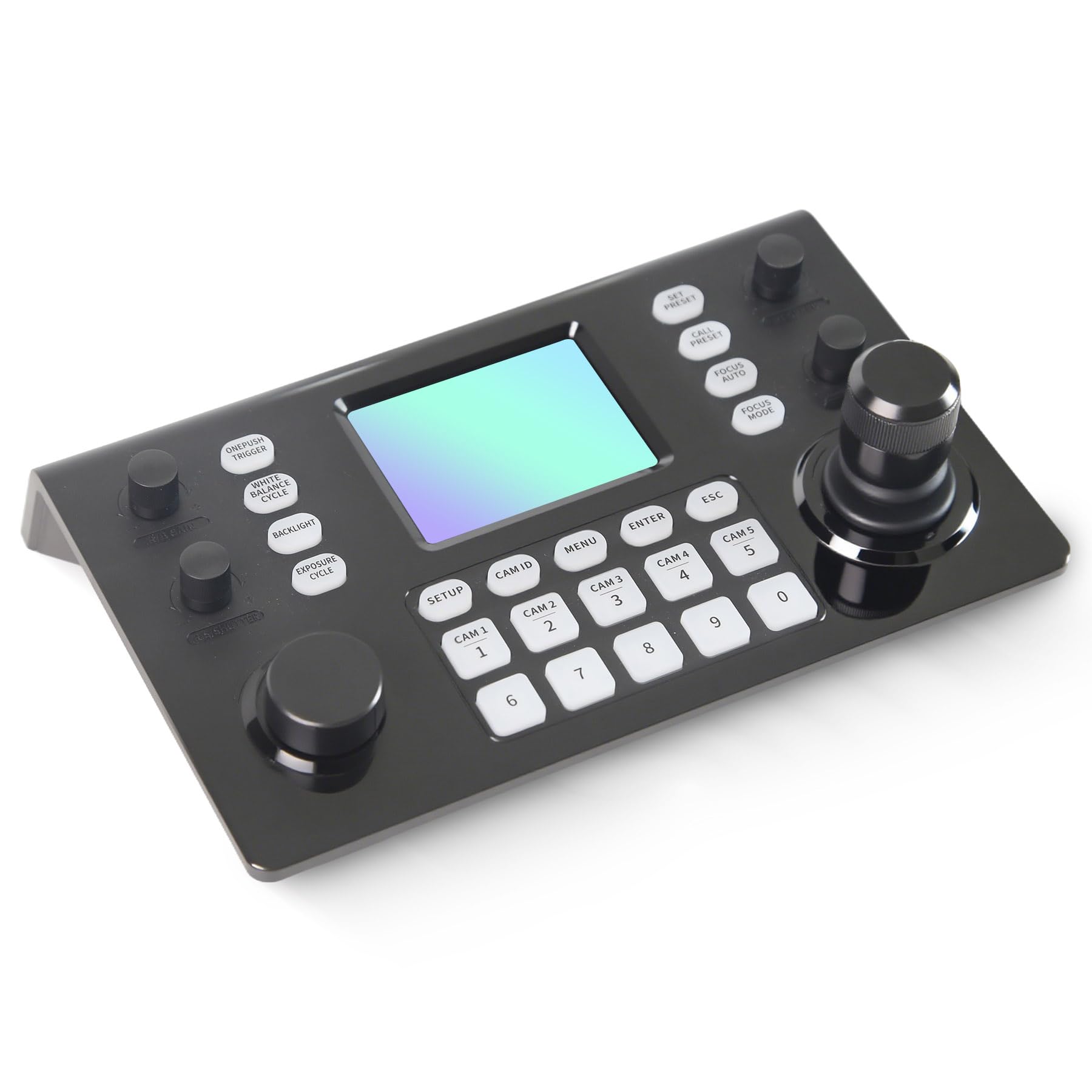
Image 1.1: RGBlink NDI PTZ Camera Controller (RGBBKT).
2. 설정
Follow these steps to set up your RGBlink NDI PTZ Camera Controller.
2.1 포장 풀기 및 초기 검사
- 포장에서 모든 구성 요소를 조심스럽게 제거합니다.
- 포장 목록에 기재된 모든 품목이 있는지 확인하십시오.
- Inspect the controller for any signs of physical damage. If damage is found, contact your dealer immediately.
2.2 컨트롤러 연결
The RGBlink NDI PTZ Camera Controller supports various connection methods for power and camera control.
- PoE(Power over Ethernet): Connect a single RJ45 Ethernet cable from a PoE-enabled network switch to the controller's LAN port. This provides both power and network connectivity.
- 외부 전원 어댑터: If PoE is not available, connect the provided power adapter to the DC 12V input port and to a power outlet.
- 카메라 연결:
- Ethernet (IP Control): Connect PTZ cameras to the same network as the controller via RJ45 Ethernet cables. The controller supports VISCA over IP, ONVIF v2.42, and NDI v5.5 protocols.
- 직렬 제어: For cameras supporting serial communication, use RS232, RS422, or RS485 interfaces. Connect the appropriate cables from the controller's serial ports to the cameras.

Image 2.1: Rear panel connections including RS-232, RS-422, LAN (PoE), and Power Input.

이미지 2.2: Example connection diagram showing PTZ Controller, PoE Switch, PTZ Cameras, Audio Mixer, and Computer.

Image 2.3: Diagram illustrating IP camera connections via a network switch.
2.3 네트워크 구성
For IP-based camera control, ensure the controller and cameras are on the same network segment. The controller supports automatic detection of NDI-enabled PTZ cameras.
- Access the controller's web 인터페이스에 IP 주소를 입력하여 web browser. (Refer to the device's display or network tools to find the IP address).
- The default login credentials are typically 'admin' with a blank password. It is recommended to set a strong password immediately.
- 내에서 web interface, configure camera protocols (e.g., ONVIF, VISCA over IP) and enter camera-specific user credentials if required.

Image 2.4: NDI|HX camera search and control interface on the controller.
3. 운영
This section details the operational functions of the RGBlink NDI PTZ Camera Controller.
3.1 이상view 컨트롤의
The controller features a 3.49" LCD display, a 3D joystick, various knobs, and a numeric keypad for intuitive control.

Image 3.1: The controller's 3.49-inch LCD display.

이미지 3.2: 상세 view of the 3D joystick and multi-function knobs.

Image 3.3: Layout of the controller's buttons and numeric keypad area.
3.2 카메라 선택
- 빠른 선택 버튼: Use the dedicated CAM 1-5 buttons for quick selection of up to 5 cameras.
- 숫자 키패드: For cameras beyond the quick select buttons (up to 255), press the 캠 ID button, then enter the camera number using the numeric keypad, and press 입력하다.

Image 3.4: The controller's ability to manage multiple cameras.
3.3 PTZ 제어
- 조종간: The 3D joystick controls pan (left/right), tilt (up/down), and zoom (rotate the joystick).
- PT 속도 조절 노브: Adjusts the gimbal movement speed for pan and tilt.
- Zoom Knob: Provides precise zoom control, especially useful in preview 방법.
3.4 Image Parameter Adjustment
- IRIS/SHUTTER Knob: Rotate to adjust aperture and shutter speed. Press to switch control modes.
- R/B GAIN Knob: Rotate to adjust red and blue gain. Press to switch control modes.
- FOCUS Button: 를 누르세요 자동 초점 button to switch the camera to auto focus mode.
- EXPOSURE Button: Cycles through exposure modes (Aperture Priority, Shutter Priority, Gain Priority, Manual Exposure, Auto Exposure).
- 백라이트 버튼: Toggles the camera's backlight mode.
- WHITE BALANCE CYCLE Button: Cycles through white balance modes (Indoor, Outdoor, Manual, Auto).
- ONE PUSH TRIGGER Button: When white balance is set to "One-Push White Balance", press this button to initiate a one-push white balance calibration.

Image 3.5: Functions of buttons and knobs on the left side of the controller.

Image 3.6: Functions of buttons and knobs on the right side of the controller, including preset controls.
3.5 프리셋
- SET PRESET Button: Press to enter preset position mode. Use the numeric keys to enter the preset number (0-9) and press 입력하다 저장합니다. 누르다 키보드 종료합니다.
- CALL PRESET Button: Press to enter preset recall mode. Use the numeric keys to enter the preset number (0-9) and press 입력하다 to recall. Press 키보드 종료합니다.
- The controller supports saving and recalling up to 255 presets per camera.
3.6 메뉴 탐색
- 메뉴 버튼: Press to open or close the camera settings menu. In menu control mode, the joystick controls navigation (up, down, left, right), 입력하다 confirms selections, and 키보드 acts as a back button.
4. 유지관리
Proper maintenance ensures the longevity and optimal performance of your RGBlink NDI PTZ Camera Controller.
4.1 청소
- Use a soft, dry cloth to clean the exterior of the controller.
- 완고한 먼지에는 약간 damp천에 물이나 순하고 마모성이 없는 세척액을 적셔주세요.
- Avoid using harsh chemicals, solvents, or abrasive materials, as these can damage the surface and display.
- Ensure no liquids enter the device through openings or ports.
4.2 보관
- 장기간 사용하지 않을 경우 컨트롤러를 직사광선과 극한 온도 변화를 피해 서늘하고 건조한 곳에 보관하십시오.
- 장치를 먼지와 습기로부터 보호하세요.
5. 문제 해결
이 섹션에서는 일반적으로 발생할 수 있는 문제에 대한 해결책을 제공합니다.
5.1 전원 없음
- 전원 확인: 전원 어댑터가 컨트롤러와 작동하는 전원 콘센트에 제대로 연결되어 있는지 확인하십시오.
- PoE 확인: If using PoE, verify that the Ethernet cable is connected to a PoE-enabled port on your network switch and that the switch is powered on.
- 케이블 무결성: Inspect the power cable and Ethernet cable for any damage.
5.2 Cannot Control Camera
- 네트워크 연결성: For IP cameras, ensure the controller and cameras are on the same network and can communicate. Check network cables and IP addresses.
- 프로토콜 불일치: Verify that the correct control protocol (e.g., VISCA over IP, ONVIF, NDI, Pelco-D/P) is selected on both the controller and the camera.
- 카메라 ID: Ensure the correct camera ID is selected on the controller.
- 로그인 자격 증명: If the camera requires authentication, confirm that the correct username and password are configured in the controller's web 인터페이스.
- 직렬 연결: For serial control, check RS232/RS422/RS485 cable connections and ensure baud rates and addresses match between the controller and camera.
- 펌웨어: Ensure both the controller and cameras have the latest firmware installed. Visit the RGBlink support web업데이트 사이트.
5.3 LCD Display Issues
- 디스플레이 없음: 컨트롤러의 전원이 켜져 있는지 확인하세요.
- 희미한 디스플레이: Check if there are any brightness settings on the controller that can be adjusted.
6. 사양
| 특징 | 세부 사항 |
|---|---|
| 모델 | RGBBKT |
| 치수(길이 x 너비 x 높이) | 11.4 x 7.8 x 5.9인치(약 290 x 200 x 150mm) |
| 무게 | 2.2파운드(약 1kg) |
| 표시하다 | 3.49인치 LCD |
| 제어 프로토콜 | VISCA over IP, ONVIF v2.42, NDI v5.5, Pelco-D/P |
| 인터페이스 | RS232, RS422, RS485, RJ45 Ethernet (PoE) |
| Camera Capacity | Up to 255 PTZ cameras |
| 전원 입력 | PoE or DC 12V (external adapter) |
| 조종간 | High-precision Hall sensor 3D joystick |

Image 6.1: Controller dimensions and typical usage environments.

Image 6.2: Visual representation of supported protocols including RJ45, RS485, RS422, RS232, ONVIF, NDI, Pelco-D, Pelco-P, and Visca.
7. 제품 영상 시연
Watch the official product video for a visual demonstration of the RGBlink NDI PTZ Camera Controller's features and operation.
Video 7.1: Official demonstration of the RGBlink PTZ Camera Controller Joystick, showcasing multi-camera control and key features.
8. 보증 및 지원
For warranty information, technical support, or service inquiries, please contact RGBlink customer service or visit their official web대지.
- 제조업체: 샤먼 RGBlink 과학기술 유한회사
- 공식적인 Web대지: www.rgblink.com (참고: 이것은 플레이스홀더입니다. URL, please refer to your product packaging or official documentation for the correct support web대지.)
- 연락처 정보: Refer to the RGBlink official website for the most current contact details for technical support and warranty claims.