1. 서론
The CUBOT Kingkong 11 is a rugged 5G smartphone designed for durability and high performance. It features a powerful processor, extensive memory, a large battery, and an advanced camera system, all housed in a robust, water-resistant, and dustproof body.
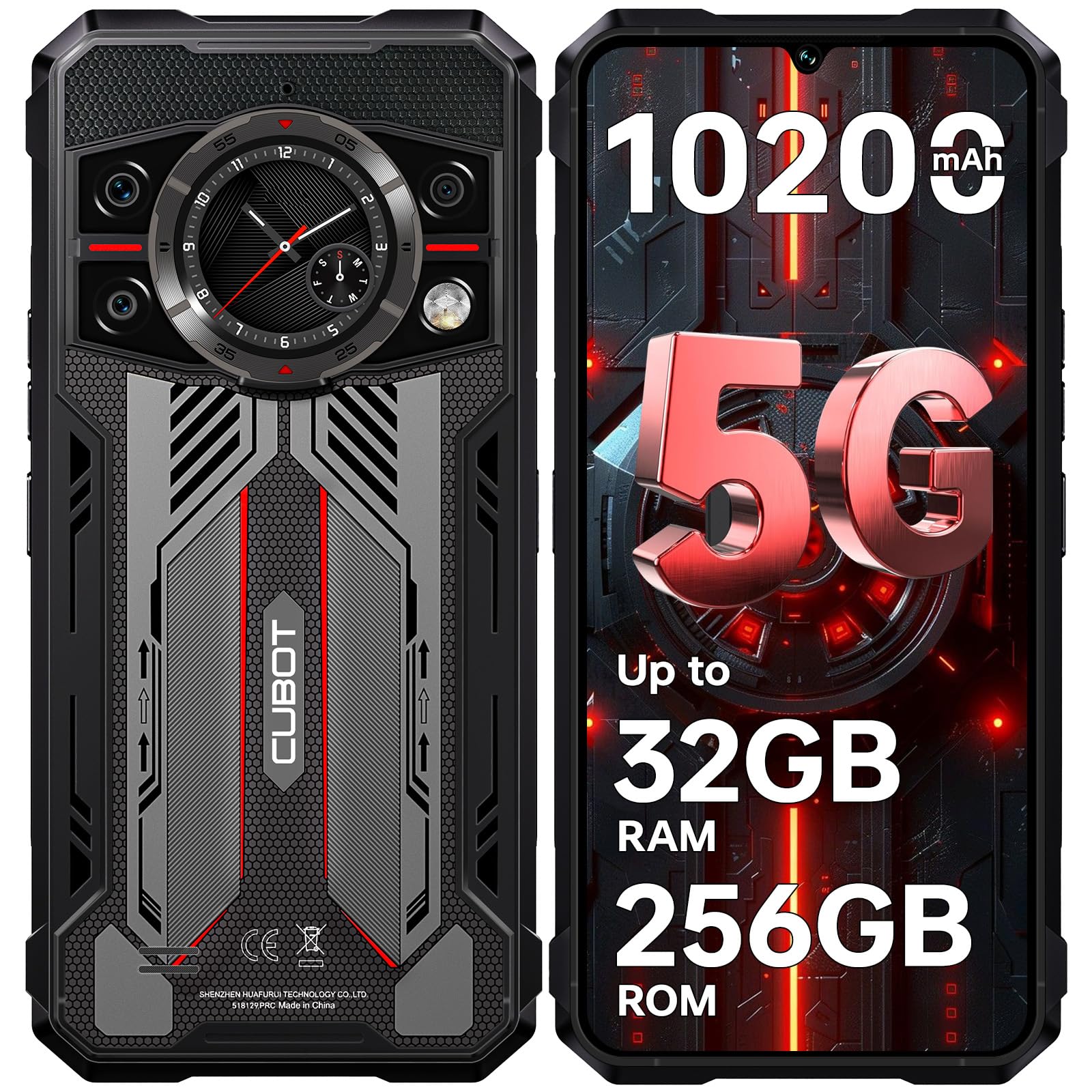
이미지: 앞면과 뒷면 view of the CUBOT Kingkong 11 5G smartphone, highlighting its rugged design.
2. 초기 설정
2.1. SIM 카드 및 MicroSD 카드 삽입
The CUBOT Kingkong 11 supports dual SIM cards and a MicroSD card for expanded storage.
- 기기 측면에서 SIM 카드 트레이를 찾으세요.
- 제공된 SIM 꺼내기 도구를 사용하여 트레이를 엽니다.
- 나노 SIM 카드 및/또는 MicroSD 카드를 지정된 슬롯에 조심스럽게 삽입하십시오. 방향이 올바른지 확인하십시오.
- 트레이를 장치 측면과 맞물릴 때까지 조심스럽게 다시 밀어 넣습니다.

Image: Close-up of the CUBOT Kingkong 11 showing the SIM card tray with waterproof seals.
2.2. 전원 켜기 및 초기 충전
- Press and hold the power button located on the side of the device until the CUBOT logo appears.
- For first-time use, it is recommended to fully charge the device. Connect the USB-C cable to the phone and the 33W fast charger to a power outlet.
- 화면의 배터리 표시등은 충전 상태를 보여줍니다.

Image: Illustration of the 10200mAh battery capacity and 33W fast charging capability of the CUBOT Kingkong 11.
2.3. 소프트웨어 구성
Follow the on-screen prompts to complete the initial setup, including language selection, Wi-Fi connection, Google account login, and security settings (Face ID/Fingerprint).
3. 운영
3.1. 안드로이드 15 운영체제
The CUBOT Kingkong 11 runs on Android 15, offering an intuitive user interface and enhanced features. Navigate through apps, customize settings, and utilize smart functions for an optimized experience.

Image: Screenshot of the Android 15 operating system interface on the CUBOT Kingkong 11.
3.2. 메인 디스플레이 (6.72인치 FHD+ 120Hz)
The 6.72-inch FHD+ display provides vibrant visuals with a 120Hz refresh rate for smooth scrolling and gaming. The 1080x2400 resolution ensures clear and detailed content view주고받음.

Image: Visual representation of the 6.72-inch FHD+ display with 120Hz refresh rate on the CUBOT Kingkong 11.
3.3. Rear Smart Display (1.46")
The 1.46-inch rear smart display provides quick access to essential information such as time, notifications, battery status, and compass without activating the main screen. This feature is useful for quick glances during activities.

Image: The 1.46-inch rear smart display of the CUBOT Kingkong 11, showing widgets for clock, camera, music, battery, calls, compass, and alarm.
3.4. 카메라 시스템
이 기기는 다재다능한 쿼드 카메라 시스템을 갖추고 있습니다.
- 108MP 메인 카메라: Captures high-resolution photos with impressive detail.
- 32MP 전면 카메라: For high-definition selfies and video calls.
- 24MP 야간 투시 카메라: Equipped with infrared LEDs for clear imaging in complete darkness.
- 8MP 매크로 렌즈: Allows for close-up photography, capturing intricate details of small subjects.

이미지: 이상view of the CUBOT Kingkong 11's quad-camera system, including the 108MP main, 32MP front, 24MP night vision, and 8MP macro lenses, with examp사진들.
3.5. 연결성 및 내비게이션
The Kingkong 11 supports 5G full-band connectivity for fast data speeds. It includes NFC for contactless payments and data transfer, and a quadruple positioning system (GPS+GLONASS+BeiDou+Galileo) for accurate navigation.

Image: Graphic illustrating the CUBOT Kingkong 11's 5G ultra-fast global coverage and connectivity features.
4. 유지관리
4.1. 내구성 및 보호성
The CUBOT Kingkong 11 is certified with IP68/IP69K for dust and water resistance, and MIL-STD-810H for shock resistance. It can withstand submersion in water up to 5 meters for 30 minutes.
- 방수 기능: Ensure all ports (USB-C, SIM tray) are properly sealed before exposing the device to water. After exposure to water, dry the device thoroughly before charging.
- 먼지 저항: The device is designed to prevent dust ingress. Clean any accumulated dust from ports and crevices using a soft, dry brush.
- 충격 저항: While rugged, avoid intentional drops or impacts from extreme heights to preserve the device's integrity.

Image: Visual representation of the CUBOT Kingkong 11's IP68, IP69K, and MIL-STD-810H certifications for water, dust, and shock resistance.
4.2. 청소
Use a soft, lint-free cloth to clean the screen and body of the phone. For stubborn smudges, a slightly damp 천을 사용한 후 바로 말릴 수 있습니다.
5. 문제 해결
5.1. 장치 전원이 켜지지 않음
- 배터리가 충전되었는지 확인하세요. 충전기를 연결하고 몇 분 정도 기다린 후 다시 전원을 켜보세요.
- 최소 10~15초 동안 전원 버튼을 길게 눌러 강제 재시작을 실행하세요.
5.2. Poor Performance/Lag
- 불필요한 백그라운드 애플리케이션을 닫습니다.
- 자주 사용하는 앱의 캐시 데이터를 지웁니다.
- 충분한 보관 공간이 확보되어 있는지 확인하십시오. 부피가 큰 물건은 옮기는 것을 고려해 보세요. fileMicroSD 카드 또는 클라우드 저장소에 저장합니다.
- 주기적으로 장치를 다시 시작하세요.
5.3. 충전 문제
- 충전 케이블과 어댑터가 안전하게 연결되고 손상되지 않았는지 확인하세요.
- 다른 호환 충전기와 케이블을 사용해 보세요.
- Check the USB-C port for any debris or obstruction.
5.4. 네트워크 연결 문제
- Ensure SIM cards are correctly inserted and activated.
- Check network settings (e.g., APN settings) with your service provider.
- 비행기 모드를 켜고 끕니다.
- 장치를 다시 시작합니다.
6. 사양
| 특징 | 세부 사항 |
|---|---|
| 상표 | 쿠봇 |
| 모델 | CUBOT KINGKONG 11 |
| 운영 체제 | 안드로이드 15 |
| 프로세서 | 5G Dimensity 7025 Octa-Core |
| 숫양 | Up to 32 GB (16 GB physical + 16 GB extended) |
| 내부 저장소 | 256GB (XNUMX기가바이트) |
| 확장 가능한 스토리지 | MicroSD 카드를 통해 최대 1TB까지 지원 |
| 메인 디스플레이 | 6.72 inches FHD+ (1080x2400), 120Hz refresh rate, 450 nits brightness |
| 후면 디스플레이 | 1.46 inches Smart Display |
| 메인 카메라 | 108 MP |
| 전면 카메라 | 32 MP |
| 야간 투시 카메라 | 24 MP with IR LED |
| 매크로 렌즈 | 8 MP |
| 배터리 용량 | 10200mAh |
| 충전 중 | 33W 고속 충전, OTG 역충전 |
| 연결성 | 5G, NFC, Dual SIM |
| 항해 | GPS+GLONASS+BeiDou+갈릴레오 |
| 내구성 | IP68/IP69K, MIL-STD-810H (Water resistant up to 5m for 30 min) |
| 보안 | 얼굴 인식, 지문 센서 |
| 치수 | 22.4 x 17.3 x 4.2cm (패키지) |
| 무게 | 700g (패키지) |

Image: Energy label for the CUBOT Kingkong 11, showing battery life and durability ratings. View EPREL 제품 정보 시트
7. 보증 및 지원
CUBOT offers a comprehensive support package for the Kingkong 11:
- 보고: 구매 후 30일 이내 간편하게 반품이 가능합니다.
- 보증: A two-year warranty covers manufacturing defects.
- 기술 지원: Long-term technical assistance is available.
- 고객 서비스: 24/7 online customer service is provided for any inquiries during your ownership.
For assistance, please contact CUBOT customer service through their official channels.