소개
This manual provides essential information for the safe and efficient operation of your Hermitlux Countertop Dishwasher. Please read all instructions carefully before first use and retain this manual for future reference.

이미지: 앞면 view of the Hermitlux Countertop Dishwasher.
설정
1. 언박싱 및 구성품
Carefully remove the dishwasher and all accessories from its packaging. Ensure all components listed below are present:
- Hermitlux Countertop Dishwasher
- 접시걸이
- Cutlery Holder
- 인 레트 관
- 배수관
- 물 투
- 사용자 설명서

Image: Hermitlux Countertop Dishwasher with all included accessories laid out.
2. 배치
Place the dishwasher on a stable, level countertop near a water source and drain. The slim design (14.6 inches wide) is suitable for various kitchen layouts including U-shaped, L-shaped, or linear designs.
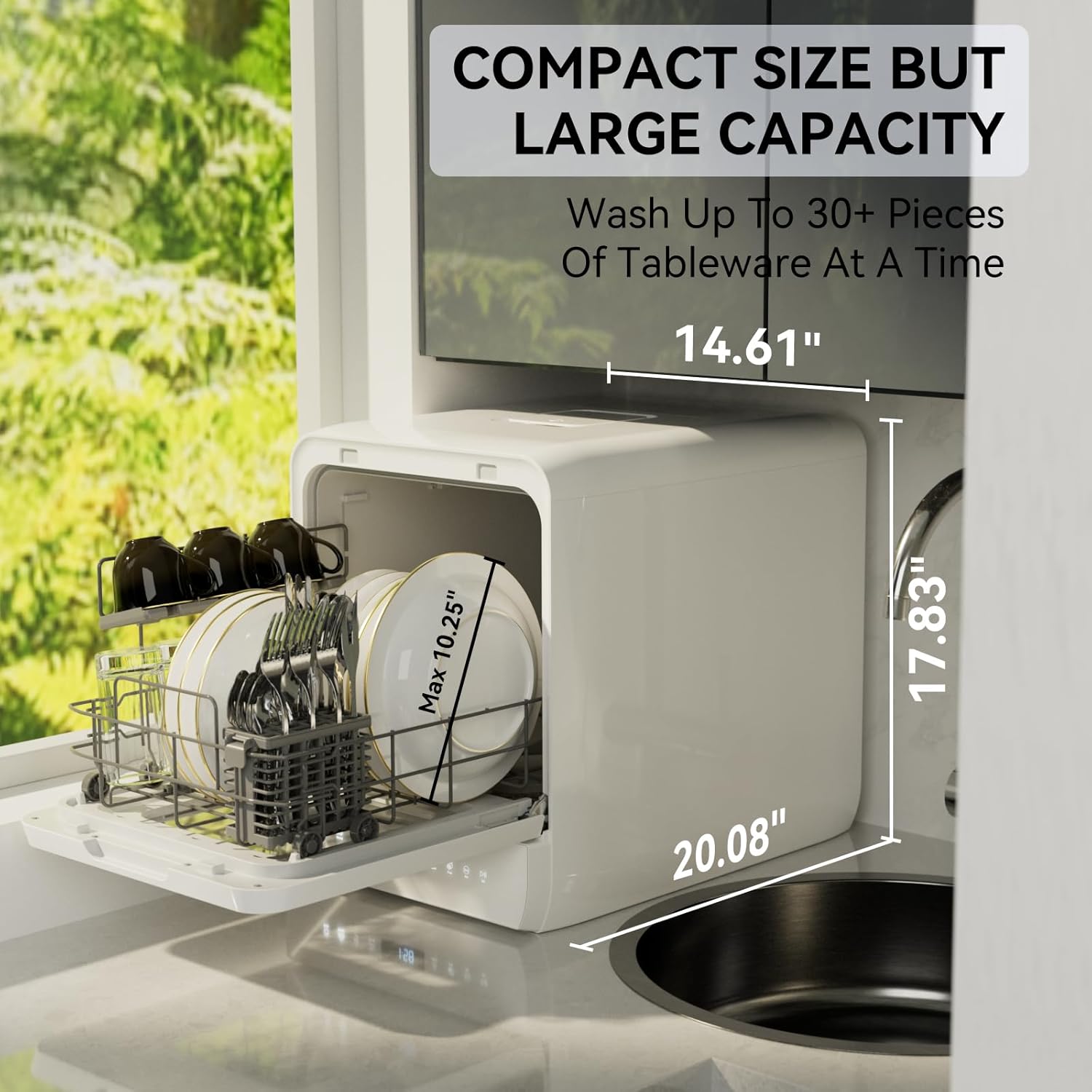
Image: Dimensions of the dishwasher (14.61" W x 20.08" D x 17.83" H) and suggested placement on a countertop next to a sink.
3. 물 공급 연결
식기세척기는 물 공급을 위한 두 가지 방법을 제공합니다.
- Manual Tank Fill: Open the water inlet cover on top of the unit and pour water using the provided pitcher until the dishwasher beeps, indicating the tank is full.
- 수도꼭지 직접 연결: Connect the inlet pipe to a kitchen faucet (G3/4" compatibility). Ensure the connection is secure to prevent leaks.

Image: Illustration showing both manual tank fill and direct faucet connection methods for water supply.
4. 배수
Connect the drain pipe to the designated outlet on the back of the dishwasher. Route the drain pipe to a sink or a suitable drainage area. Ensure the drain hose is properly secured to prevent spills.
작동 지침
1. 식기 세척기 바구니에 식기를 넣는 방법
Arrange dishes in the basket, ensuring they do not block the spray arms. The dishwasher can hold up to 5 full place settings and 10.25" dishes at an angle. The adjustable shelf creates extra space for taller items.

Image: Diagram illustrating optimal loading of dishes, cups, and cutlery in the dishwasher basket.
2. 세제 추가
Add the recommended amount of dishwasher detergent (powder or liquid) to the dispenser located inside the door. Do not use hand dish soap.
3. Control Panel and Wash Programs
The LED control panel allows selection of various wash programs:
- 정상: 일상적인 식기 세척에 적합합니다.
- 에코: 에너지 절약 모드.
- 강한: 심하게 더러운 품목에 사용하세요.
- 빠른: 약간 더러운 접시를 빨리 씻으세요.
- 과일: 과일과 채소를 세척하기 위한 전용 프로그램입니다.
- Super Strong: Enhanced cleaning for stubborn stains.
- 마른: An extra function for drying dishes and preventing odors.

이미지: 이상view of the dishwasher's control panel displaying the 6 wash programs and 1 extra function (Dry).
4. 사이클 시작
Press the Power button to turn on the dishwasher. Select your desired wash program. Press the Start/Pause button to begin the cycle. The dishwasher will beep when the water tank is full (if using manual fill).
5. 특별 기능
- Dual Y-Head Spray Arms: Provide 360-degree coverage and enhanced cleaning with double spray nozzles.
- 건조 모드: Reaches up to 167°F to ensure dishes are dry and free from odors. A 72-hour keep-fresh mode can be activated after washing.
- 물 절약: Uses approximately 5L of water per cycle, saving up to 83% compared to handwashing.

Image: Diagram illustrating the dual Y-head spray arms providing cross-washing and multi-angle coverage.
유지
1. 필터 청소
Regularly clean the food debris filter located at the bottom of the dishwasher. Twist and pull up the filter to remove it, rinse under running water, and reinsert securely.

Image: Close-up of the dishwasher's interior, highlighting the efficient food debris filter and G3/4" water inlet connection.
2. 일반 관리
Wipe down the interior and exterior of the dishwasher regularly with a damp cloth. Do not use abrasive cleaners. Ensure the air vent on the right side of the dishwasher is not blocked to prevent steam burns.
문제 해결
- 식기 세척기가 작동하지 않음: Ensure the power cord is securely plugged in and the door is fully closed. Check if the water tank is filled or the inlet hose is properly connected.
- 접시가 깨끗하지 않음: Verify that dishes are loaded correctly and not blocking spray arms. Ensure sufficient detergent is used. Select a stronger wash program if needed.
- 누수: Check all hose connections for tightness. Ensure the drain hose is properly positioned in the sink or drainage area.
- 오류 코드 : Refer to the user manual for specific error code meanings and solutions.
명세서
| 특징 | 사양 |
|---|---|
| 모델 번호 | US-HDW5CW02 |
| 치수(D x W x H) | 20.08인치 x 14.61인치 x 17.83인치 |
| 품목 무게 | 33파운드(15킬로그램) |
| 용량 | 5리터(물탱크) |
| 권tage | 120 볼트 |
| 에너지 소비 | 0.38킬로와트시 |
| 물 소비량 | 분당 1.32갤런 |
| 소음 수준 | 50데시벨 |
| 세탁 프로그램 | 6 + 1 Dry Function |
| 특별 기능 | Compact, Portable, Slim-Size, Super Strong Washing Mode, Y-Head Spray Arms |
| 인증 | 전자상거래 |
공식 제품 영상
The following video provides additional guidance on using your Hermitlux Countertop Dishwasher:
Hermitlux Countertop Dishwasher, 6 Wash
비디오: 간략하게 살펴보기view of the Hermitlux Countertop Dishwasher, highlighting its 6 wash programs. This video is a 7-second preview.
보증 및 지원
For warranty information or technical support, please refer to the contact details provided in your product's user manual or visit the official Hermitlux web대지.